1. Танилцуулга
This manual provides comprehensive instructions for the setup, operation, and maintenance of your InFocus IN124 DLP Projector. Please read this manual thoroughly before using the projector to ensure proper functionality and to maximize its lifespan.
The InFocus IN124 is designed to deliver clear and bright projections, suitable for various environments including home cinema and business presentations. Its compact design and robust features make it a versatile display solution.
2. Бүтээгдэхүүний бүрэлдэхүүн хэсгүүд
Upon unboxing your InFocus IN124 DLP Projector, please verify that all the following components are included:
- InFocus IN124 DLP Projector Unit
- Алсын удирдлага
- Цахилгаан кабель
- VGA Cable (may vary by region/package)
- User Manual (this document, typically on CD or downloadable)
If any items are missing or damaged, please contact InFocus customer support immediately.
3. Тохиргоо
3.1 Физик байрлал
Position the projector on a stable, flat surface or mount it securely to a ceiling. Ensure adequate ventilation around the unit to prevent overheating. Maintain a clear path between the projector lens and the projection surface (screen or wall).
3.2 Төхөөрөмжүүдийг холбох
The InFocus IN124 supports various input sources. Connect your source device (e.g., laptop, DVD player, gaming console) to the projector using the appropriate cable.
- HDMI: For high-definition digital video and audio. Connect an HDMI cable from your source device to the HDMI port on the projector.
- VGA: For analog video input, commonly used with computers. Connect a VGA cable from your computer's VGA output to the VGA input on the projector.
- Нийлмэл видео: For standard definition video. Connect a composite video cable (yellow RCA) to the corresponding port.
- Аудио оролт/гаралт: Шаардлагатай бол гадаад аудио төхөөрөмжүүдийг холбоно уу.
3.3 Асаах
Шаардлагатай бүх кабелийг холбосны дараа:
- Цахилгааны кабелийг проекторт, дараа нь цахилгаан залгуурт холбоно уу.
- Press the power button on the projector's control panel or the remote control. The power indicator light will change, and the projector lamp гэрэлтүүлэх болно.
- Allow a few moments for the projector to warm up and display the image.
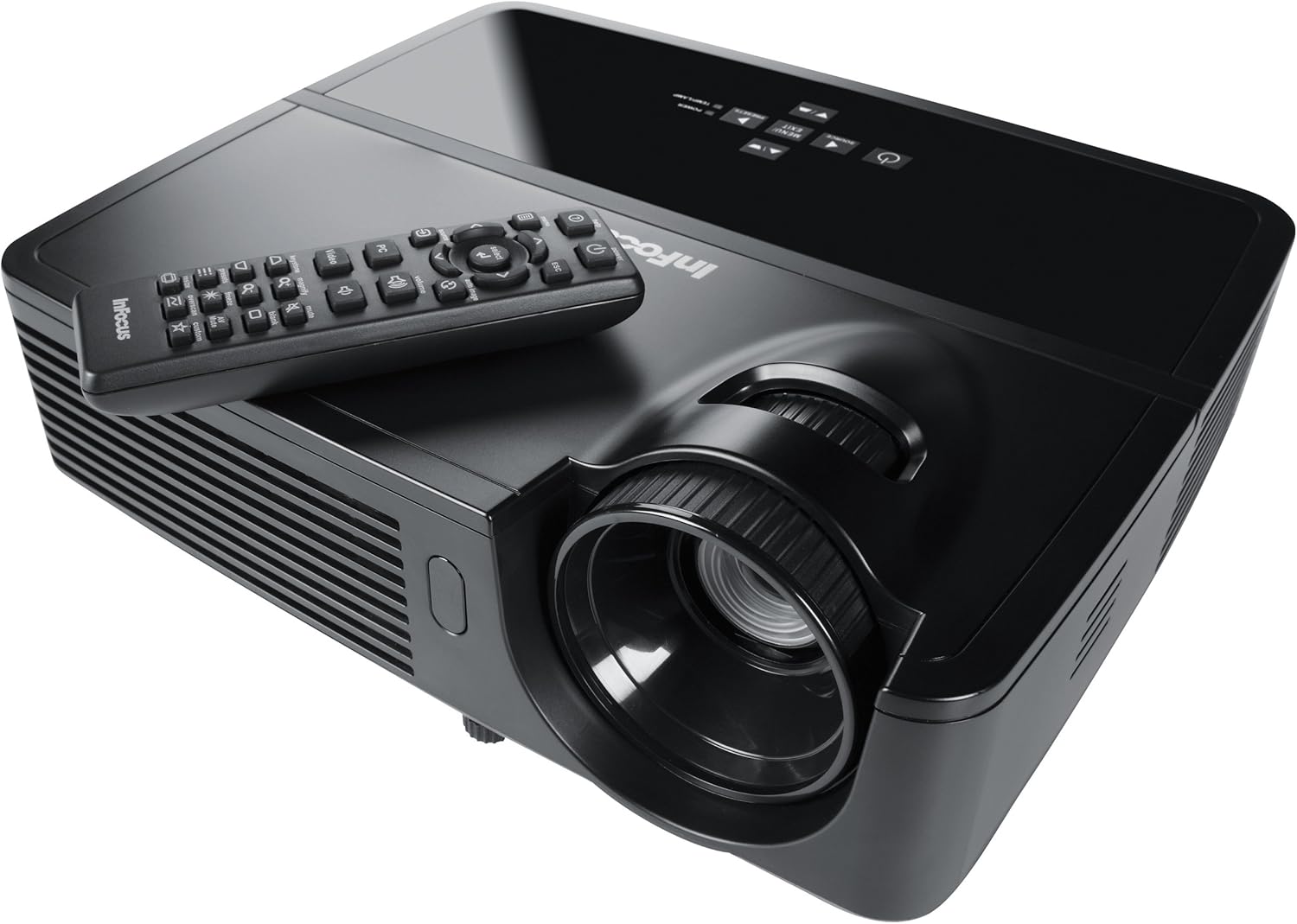
Figure 1: InFocus IN124 DLP Projector with its remote control. The image shows the top-down view of the black projector unit, highlighting the lens, ventilation grilles, and the control panel. The remote control is placed on top of the projector.
4. Проекторыг ажиллуулах
4.1 Үндсэн удирдлага
The projector can be operated using the control panel on the unit or the included remote control.
- Цахилгаан товч: Проекторыг асаах эсвэл унтраана.
- Эх товчлуур: Cycles through available input sources (HDMI, VGA, Video).
- Цэсийн товчлуур: Accesses the on-screen display (OSD) menu for settings adjustments.
- Сумтай товчлуурууд: Цэсийн сонголтоор шилжиж, утгыг тохируулна уу.
- Оруулах/Сонгох товчлуур: Цэс дэх сонголтыг баталгаажуулна.
- Дууны товчлуурууд: Аудио гаралтын түвшинг тохируулна.
- Түлхүүр чулууны залруулга: Adjusts the image shape to correct trapezoidal distortion.
- Фокус бөгж: Manually adjust the lens to sharpen the image.
4.2 Цэсний навигаци ба тохиргоо
Press the "Menu" button to open the On-Screen Display (OSD). Use the arrow keys to navigate through categories such as "Picture," "Display," "Setup," and "Advanced." Press "Enter" to select a category or option. Adjust settings like brightness, contrast, color temperature, aspect ratio, and resolution to optimize your viewтуршлага.
4.3 3D функциональ байдал
The InFocus IN124 is 3D-ready. To experience 3D content, you will need compatible 3D source material, a 3D-capable player, and active DLP Link 3D glasses (sold separately). Refer to your 3D source device's manual for specific setup instructions.
5. Засвар үйлчилгээ
Тогтмол засвар үйлчилгээ нь таны проекторын ашиглалтын хугацааг уртасгаж, оновчтой гүйцэтгэлийг баталгаажуулдаг.
5.1 Линзийг цэвэрлэх
Use a soft, lint-free cloth specifically designed for optical lenses. Gently wipe the lens surface to remove dust or smudges. Avoid using abrasive cleaners or excessive force, which can scratch the lens.
5.2 Cleaning Air Filters
The projector has air filters to prevent dust from entering the internal components. Locate the filter cover (refer to the diagram in the full manual if available) and remove it. Clean the filter using a small brush or a vacuum cleaner with a brush attachment. Replace the filter securely.
5.3 лamp Солих
Проектор лamp хязгаарлагдмал хугацаатай. Хэзээ лamp indicator light illuminates or the image becomes dim, it's time to replace the lamp. Always allow the projector to cool down completely before attempting lamp replacement. Consult the full service manual or a qualified technician for detailed lamp replacement procedures specific to the IN124 model.
6. Алдаа засах
Энэ хэсэгт проектортой холбоотой нийтлэг асуудлуудыг авч үзэх болно.
| Асуудал | Боломжит шалтгаан | Шийдэл |
|---|---|---|
| Зураг харагдахгүй байна | Оролтын эх үүсвэрийг буруу сонгосон; Сул кабель холболт; Проектор асаагүй байна. | Press the "Source" button to cycle inputs; Check all cable connections; Ensure projector is powered on and lamp асдаг. |
| Зураг бүдэг байна | Out of focus; Incorrect resolution setting. | Adjust the focus ring on the lens; Adjust the resolution setting in the OSD menu or on your source device. |
| Зураг нь трапец хэлбэртэй байна | Проектор дэлгэцтэй перпендикуляр биш. | Use the keystone correction feature (digital or manual) to square the image. Reposition the projector if possible. |
| Аудио байхгүй | Volume too low; Incorrect audio input selected; Muted. | Increase volume; Check audio cable connections; Ensure projector or source device is not muted. |
| Проектор хэт халж, унтардаг | Blocked ventilation; Dirty air filter. | Ensure clear space around vents; Clean air filter as per maintenance section. |
For issues not listed here, please refer to the comprehensive online support resources or contact InFocus customer service.
7. Техникийн үзүүлэлтүүд
Below are the key technical specifications for the InFocus IN124 DLP Projector:
| Онцлог | Дэлгэрэнгүй |
|---|---|
| Загварын дугаар | IN124 |
| Дэлгэцийн технологи | DLP |
| Төрөлхийн тогтоол | 1280x720 (HD) |
| Гэрэлтүүлэг | 3200 люмен хүртэл |
| Ялгаатай харьцаа | 3000:1 |
| Холболт | HDMI, VGA, нийлмэл видео |
| Онцлог шинж чанарууд | 3D-д бэлэн |
| Бүтээгдэхүүний хэмжээ (L x W x H) | 12.99 x 12.99 x 5.9 инч |
| Зүйлийн жин | 4.78 фунт (2.17 кг) |
| Эрчим хүчний хангамж | 100-240 Volts at 50-60 Hz |
| Зөвлөмж болгож буй хэрэглээ | Гэрийн кино театр |
8. Баталгаат хугацаа ба дэмжлэг
InFocus provides a limited warranty for the IN124 DLP Projector. For detailed warranty terms and conditions, please refer to the warranty card included with your product or visit the official InFocus webсайт. Худалдан авалтын баримтаа баталгаат нэхэмжлэлд зориулж худалдан авалтын баталгаа болгон хадгална уу.
For technical support, troubleshooting assistance beyond this manual, or service requests, please contact InFocus customer support through their official website or the contact information provided in your product documentation. Online resources, including FAQs and driver downloads, may also be available.


