Танилцуулга
This manual provides detailed instructions for the setup, operation, maintenance, and troubleshooting of your POLY Plantronics Savi Office W730 Convertible Headset. This wireless headset system is designed to unify communication across your PC, desk phone, and mobile phone, offering hands-free mobility and high-quality audio.
Бүтээгдэхүүн дууссанview
The Savi Office W730 system includes a convertible headset and a multi-device charging base. It features a noise-canceling microphone, digital sound processing, and wideband PC audio for clear communication. The system allows for seamless switching between different call sources and offers a wireless range of up to 350 feet.

Зураг 1: The Plantronics Savi Office W730 headset docked in its base station. The base station serves as a charging dock and connectivity hub for PC, desk phone, and mobile devices.
Тохиргоо
1. Сав баглаа боодол ба эд ангиуд
Бүх бүрэлдэхүүн хэсгүүд байгаа эсэхийг шалгана уу:
- Savi W730 Convertible Headset
- Multi-device Base Station
- АС тэжээлийн хувиргагч
- USB кабель
- Утасны интерфэйсийн кабель
2. Суурь станцыг холбох
- Эрчим хүчийг холбох: Plug the AC power adapter into the base station and then into a power outlet.
- Компьютерт холбогдох: Connect one end of the USB cable to the USB port on the base station and the other end to an available USB port on your computer.
- Ширээний утастай холбогдох:
- Disconnect the handset coil cord from the base of your desk phone.
- Connect the telephone interface cable to the handset port on your desk phone.
- Connect the other end of the telephone interface cable to the designated port on the base station.
- Connect the desk phone handset to the telephone interface cable.
- Pair with Mobile Phone (Bluetooth):
- On the base station, press and hold the Bluetooth pairing button until the Bluetooth indicator light flashes blue and red.
- On your mobile phone, enable Bluetooth and search for new devices. Select "Savi W730" from the list.
- If prompted, enter "0000" as the passcode. The Bluetooth indicator on the base will turn solid blue when paired.
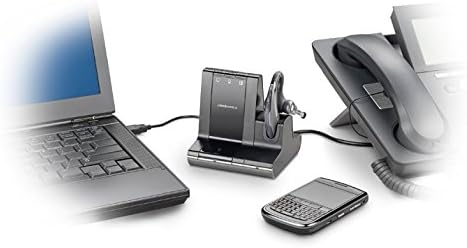
Зураг 2: The Savi Office W730 base station demonstrating its multi-connectivity, linking to a laptop via USB, a desk phone via telephone interface cable, and a mobile phone wirelessly via Bluetooth.
3. Чихэвчийг цэнэглэж байна
Place the headset into the charging cradle on the base station. The charge indicator light on the base will illuminate to confirm charging. Allow approximately 3 hours for a full charge before initial use.
Ашиглалтын заавар
1. Дуудлага хийх, хариулах
- Дуудлагад хариулах/дуусах: Press the Call Control button on the headset or the corresponding phone button on the base station.
- Дуудлага хийх: Select the desired phone source (PC, desk phone, or mobile) on the base station, then dial from your device.
- Дуудлагуудыг солих: During an active call, press the button for another connected device on the base station to switch to that line.
2. Чихэвчний удирдлага
- Дууны тохируулга: Чихэвчний дууг чангалах (+) болон дууг багасгах (-) товчлууруудыг ашиглана уу.
- Микрофоны дууг хаах: Press the Mute button on the headset. Press again to unmute.
- Flash (for desk phone): Press the Call Control button on the headset briefly to put a call on hold or switch between calls on the desk phone.
3. Утасгүй хүрээ
The Savi W730 offers a wireless range of up to 350 feet from the base station. Environmental factors and obstacles may affect actual range.
4. Software Integration (Plantronics Hub)
For advanced features, customization, and firmware updates, install the Plantronics Hub software on your PC. This software enables features like call control for softphones and status updates.
Засвар үйлчилгээ
1. Зайны арчилгаа
The headset features a hot-swappable battery, allowing for extended talk time with an optional spare battery (sold separately). To maximize battery life, fully charge the headset before first use and regularly dock it in the base station when not in use. Note that over time, all rechargeable batteries experience reduced capacity.
2. Цэвэрлэгээ
Wipe the headset and base station with a soft, dry, lint-free cloth. Avoid using liquid cleaners or abrasive materials.
Алдааг олж засварлах
| Асуудал | Боломжит шийдэл |
|---|---|
| No dial tone or audio |
|
| Аудио чанар муу эсвэл статик |
|
| Headset not pairing with mobile phone |
|
| Батерейны ашиглалтын хугацаа хязгаарлагдмал |
|
Үзүүлэлтүүд
- Загварын дугаар: 83543-01
- Холболт: DECT 6.0 (Wireless), USB (PC), RJ-11 (Desk Phone), Bluetooth (Mobile Phone)
- Утасгүй хүрээ: 350 фут (100 метр) хүртэл
- Чихэвчний жин: 0.8 унц (ойролцоогоор)
- Зай: 1 Lithium Polymer battery (hot-swappable)
- Бүтээгдэхүүний хэмжээ: 5.92 x 1.17 x 2.73 inches (Base Station)
- Онцлог шинж чанарууд: Noise-canceling microphone, digital sound processing, wideband PC audio, one-touch call controls.
Баталгаат болон дэмжлэг
For warranty information, technical support, or to purchase accessories, please visit the official POLY webсайт эсвэл харилцагчийн үйлчилгээтэй холбогдоно уу. Баталгаат нэхэмжлэл гаргахын тулд худалдан авалтаа нотлох баримтаа хадгалаарай.