1. Танилцуулга
Худалдан авалт хийсэнд баярлалааasing the RCA DHT235A 3.5-Inch LED-lit 720p 60Hz TV. This portable television is designed to provide digital television viewing on a compact screen. This manual provides instructions for the proper setup, operation, and maintenance of your device.
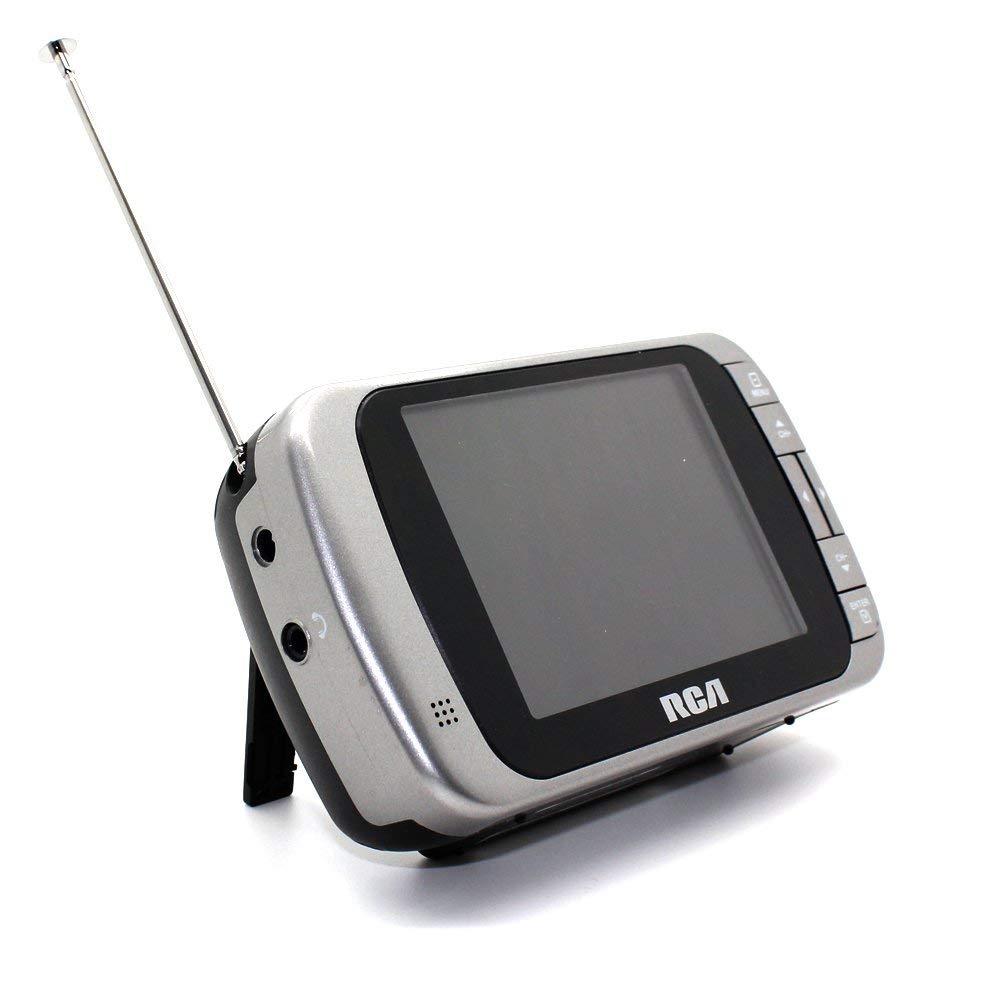
Image 1.1: The RCA DHT235A portable television, featuring its 3.5-inch screen and compact design.
2. Аюулгүй байдлын мэдээлэл
- Төхөөрөмжийг ажиллуулахын өмнө бүх зааврыг уншина уу.
- Гал болон цахилгаан цочролоос сэргийлэхийн тулд төхөөрөмжийг бороо, чийгэнд бүү тавь.
- Агааржуулалтын нүхийг хааж болохгүй. Агаарын урсгалыг хэвийн болгохын тулд төхөөрөмжийн эргэн тойронд хангалттай зайг хангах.
- Use only specified power sources (4 AA batteries or compatible AC adapter).
- Нэгжийг унагах эсвэл хүчтэй цохилтонд оруулахаас зайлсхий.
- Энэ бүтээгдэхүүнд өөрөө үйлчлэх гэж бүү оролдоорой. Бүх засвар үйлчилгээг мэргэшсэн үйлчилгээний ажилтнуудад хандаарай.
- Батерейг орон нутгийн дүрэм журмын дагуу зөв устгана уу.
3. Багцын агуулга
Бүх зүйл багцад байгаа эсэхийг шалгана уу:
- RCA DHT235A Portable TV Unit
- Зогс
- Quick Guide (refer to this manual for detailed instructions)
- Эзэмшигчийн гарын авлага (энэ баримт бичиг)
4. Бүтээгдэхүүн дууссанview
The RCA DHT235A features a 3.5-inch LED-lit display, designed for portable digital television reception. Key components include:
- 3.5-Inch LED Backlit LCD Display: Provides clear visual output.
- Суулгасан чанга яригч: Аудио гаралтын хувьд.
- Чихэвчний Жак: Хувийн сонсох зориулалттай.
- Embedded Monopole Antenna: For receiving terrestrial ATSC and NTSC signals.
- Зайны тасалгаа: 4 АА батерейнд зориулагдсан.
- AC Adapter Input (9-24VDC): For external power.
- Хяналтын товчлуурууд: For power, channel, volume, and menu navigation.
5. Тохиргоо
5.1 Powering the TV
The TV can be powered by 4 AA batteries or an optional AC adapter.
Батерей ашиглах:
- Locate the battery compartment on the back of the TV.
- Зайны тасалгааны тагийг нээ.
- Зөв туйлшралыг (+/-) баталгаажуулж, 4 АА батерейг оруулаарай.
- Зайны тасалгааны тагийг сайтар хаа.
Using AC Adapter (Optional):
- Connect a compatible 9-24VDC AC adapter (not included) to the DC input jack on the TV.
- Хувьсах гүйдлийн адаптерийг стандарт залгуурт холбоно уу.
5.2 Антенны тохиргоо
Extend the embedded monopole antenna fully for optimal signal reception. For improved reception, especially in areas with weak signals, an external antenna may be connected to the dedicated RCA connector input.
6. Ашиглалтын заавар
6.1 Асаах/унтраах
дээр дарна уу ХҮЧ ТВ-г асаах эсвэл унтраах товчлуур.
6.2 Анхны сувгийн скан
Upon first use or after moving to a new location, perform an auto channel scan to find available digital and analog channels.
- дээр дарна уу Цэс товч.
- Navigate to the "Channel" or "Setup" menu using the arrow buttons.
- Select "Auto Scan" or "Auto Program" and confirm.
- The TV will scan for available channels. This process may take several minutes.
6.3 Сувгийн сонголт
- -г ашиглана уу CH+ болон CH- buttons to cycle through available channels.
- For direct channel input, use the numeric keypad (if available on your model) or the "Direct Channel Changing" option in the menu.
6.4 Дууны тохируулга
-г ашиглана уу VOL+ болон VOL- аудио дууны түвшинг тохируулах товчлуурууд.
6.5 Цэсийн навигаци
дээр дарна уу Цэс button to access settings. Use the arrow buttons to navigate and the OK or ENTER Сонголтыг баталгаажуулахын тулд товчийг дарна уу. Цэс again or an ГАРАХ button to leave the menu.
Available menu options include:
- Зургийн тохиргоо: Adjust brightness, contrast, color.
- Дууны тохиргоо: Adjust audio mode, balance.
- Сувгийн тохиргоо: Auto scan, manual scan, channel editing.
- Цагийн тохиргоо: Auto time setting, time zone.
- Хэл: Select menu language (English, Spanish).
- Хаалттай тайлбар: Enable/disable digital closed captioning (E1A-708B compliant).
7. Засвар үйлчилгээ
7.1 Цэвэрлэгээ
- Before cleaning, ensure the TV is powered off and disconnected from any external power source.
- Дэлгэц болон гаднах гадаргууг зөөлөн, хуурай даавуугаар арчина.
- Зөрүүд тэмдгийн хувьд хөнгөнөөр dampдаавуугаар усаар. Зүлгүүрийн цэвэрлэгч, лав, уусгагчийг бүү ашигла.
- Дэлгэц рүү эсвэл нүх рүү шууд шингэн цацахаас зайлсхий.
7.2 Хадгалалт
When storing the TV for an extended period, remove the batteries to prevent leakage. Store the unit in a cool, dry place away from direct sunlight and extreme temperatures.
8. Алдаа засах
| Асуудал | Боломжит шийдэл |
|---|---|
| Хүч чадалгүй | Ensure batteries are correctly inserted and not depleted. If using AC adapter, verify it is properly connected and the outlet is functional. |
| No Picture/Weak Signal | Extend the antenna fully. Perform an auto channel scan. Try repositioning the TV or antenna. Consider using an external antenna for better reception. Check signal strength display in the menu. |
| Дуу байхгүй | Increase the volume. Check if headphones are plugged in. Ensure the Mute function is not active. |
| Товчнууд хариу өгөхгүй байна | Turn the TV off and then on again. If the issue persists, remove and reinsert batteries or disconnect/reconnect the AC adapter. |
| Screen Scratches Easily | Handle the screen with care. Use a screen protector if desired (not included). |
| Батерейны богино хугацаа | Use fresh, high-quality alkaline or rechargeable batteries. Consider using the AC adapter for extended viewing. |
| Low Audio Volume | Ensure volume is set to maximum. For better audio, consider connecting external speakers to the headphone jack. |
9. Техникийн үзүүлэлтүүд
- Загвар: DHT235A
- Дэлгэцийн хэмжээ: 3.5 инч (диагональ)
- Дэлгэцийн төрөл: LED арын гэрэлтүүлэгтэй LCD
- Шийдвэр: 320 x 240 digital RGB (720p compatible)
- Сэргээх хурд: 60 Гц
- Видео тайлах: MPEG-2 (MP at ML, MP at HL)
- Аудио тайлах: Dolby Digital Audio, Digital multi-lingual
- Таалагч: Terrestrial ATSC 8VSB, Terrestrial NTSC CH2 - CH69
- Эрчим хүчний эх үүсвэр: 4 AA Batteries or 9-24VDC AC Adapter (optional)
- Зайны хугацаа: Approximately 2+ hours of DTV playback on 4 AA batteries
- Аудио гаралт: Headphone jack, Built-in speaker
- Нэмэлт онцлогууд: Real-time signal strength display, On-screen program information, Direct channel changing, Channel editing, Time zone setting, Auto channel scan, Digital Closed Captioning (E1A-708B compliant), Menu languages (English, Spanish).
- Хэмжээ: Ойролцоогоор 4.84 x 1.34 x 2.83 инч
- Жин: Ойролцоогоор 5.6 унц
10. Баталгаат хугацааны мэдээлэл
This product is covered by a limited warranty. For detailed warranty terms and conditions, please refer to the warranty card included with your purchase or visit the official RCA webсайт. Баталгаат нэхэмжлэл гаргахын тулд худалдан авалтаа нотлох баримтаа хадгалаарай.
11. Хэрэглэгчийн дэмжлэг
If you encounter any issues or have questions not covered in this manual, please contact RCA customer support. You can find contact information on the official RCA webсайт эсвэл таны бүтээгдэхүүнтэй хамт өгсөн баримт бичгээр дамжуулан.
Онлайн дэмжлэг: Албан ёсны RCA-д зочлоорой webТүгээмэл асуултууд болон туслах эх сурвалжуудын сайт.
Утасны дэмжлэг: Refer to your product packaging or the RCA webодоогийн холбоо барих утасны сайт.