1. Танилцуулга
This manual provides essential information for the safe and efficient operation of your Datalogic PowerScan M8300-AR910RB Handheld Laser Bar Code Reader. Please read this manual thoroughly before using the device to ensure proper setup, operation, and maintenance. Keep this manual for future reference.
2. Аюулгүй байдлын мэдээлэл
Төхөөрөмжийг гэмтээх, гэмтээхээс сэргийлэхийн тулд дараах аюулгүй байдлын урьдчилан сэргийлэх арга хэмжээг үргэлж дагаж мөрдөөрэй.
- Лазерын аюулгүй байдал: This device emits a laser beam. Do not stare directly into the laser beam or point it at others. Avoid direct eye exposure.
- Батерейны аюулгүй байдал: Use only Datalogic-approved batteries and charging accessories. Do not expose batteries to extreme temperatures, puncture, or disassemble them. Dispose of batteries according to local regulations.
- Байгаль орчны нөхцөл: Do not operate the device in explosive atmospheres or near flammable materials. Keep the device dry and away from extreme temperatures.
- Засвар үйлчилгээ: Refer all servicing to qualified service personnel. Do not attempt to open or modify the device.
3. Багцын агуулга
Бүх зүйл багцад байгаа эсэхийг шалгана уу:
- Datalogic PowerScan M8300-AR910RB Handheld Laser Bar Code Reader
- Зөөврийн зай
- Charging/Communication Cradle (may be sold separately depending on configuration)
- USB or Serial Cable (for cradle connection, may be sold separately)
- Power Supply (for cradle, may be sold separately)
- Түргэн эхлүүлэх гарын авлага
4. Бүтээгдэхүүн дууссанview
The Datalogic PowerScan M8300 is a robust, cordless handheld laser bar code reader designed for industrial applications. It features a durable casing and a 910MHz radio for reliable wireless communication.
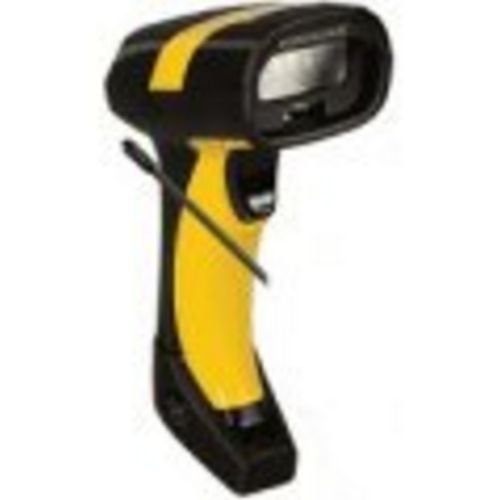
Зураг 1: Datalogic PowerScan M8300 Handheld Laser Bar Code Reader. This image displays the front view of the scanner, highlighting its ergonomic design, scan window, and trigger button.
Гол бүрэлдэхүүн хэсгүүд:
- Скан хийх цонх: Located at the front, where the laser beam exits to read barcodes.
- Өдөөгч: Activates the laser for scanning.
- Заагч гэрэл: Provide feedback on scan status, battery level, and communication.
- Зайны тасалгаа: Located at the base of the handle, housing the removable battery.
- Харилцаа холбооны интерфейс: For wireless data transmission via the 910MHz radio.
5. Тохиргоо
5.1. Зай суурилуулах
- Сканнер унтарсан эсэхийг шалгана уу.
- Locate the battery compartment cover at the bottom of the handle.
- Тагийг нээгээд, зөв туйлшралыг хангахын тулд салгаж авч болох батерейг хийнэ үү.
- Зайны тасалгааны тагийг сайтар хаа.
5.2. Батерейг цэнэглэж байна
- Place the scanner into its charging cradle. Ensure the contacts on the scanner align with those on the cradle.
- Connect the power supply to the charging cradle and plug it into an electrical outlet.
- The scanner's indicator light will show charging status (typically amber for charging, green for fully charged).
- Allow the battery to fully charge before first use (approximately 4 hours).
5.3. Connecting to a Host System
The PowerScan M8300 uses a 910MHz radio for wireless communication. It typically connects to a host system (e.g., PC, laptop) via a base station or cradle connected by a USB or serial cable.
- Connect the communication cable (USB or serial) from the charging/communication cradle to your host system.
- Connect the power supply to the cradle and plug it in.
- Place the scanner in the cradle. The scanner and cradle will automatically establish a wireless link.
- Install any necessary drivers or software on your host system as prompted or as instructed by Datalogic documentation for your specific cradle model.
6. Ашиглалтын заавар
6.1. Асаах/унтраах
- Асаахын тулд: The scanner typically powers on automatically when removed from the cradle or when the trigger is pressed.
- Унтраахын тулд: The scanner will enter a low-power sleep mode after a period of inactivity. To fully power off, remove the battery.
6.2. Бар кодыг сканнердах
- Aim the scan window at the barcode you wish to read.
- Гох товчийг дараад барина уу. Лазер шугам гарч ирнэ.
- Position the laser line across the entire barcode.
- Once the barcode is successfully read, the scanner will emit an audible beep and/or an indicator light will illuminate.
- Release the trigger. The scanned data will be transmitted to the connected host system.
6.3. Мэдээлэл дамжуулах
The PowerScan M8300 transmits scanned data wirelessly to its paired base station/cradle. Ensure the scanner is within range of its base station for successful data transfer. Out-of-range scanning capabilities may vary by configuration; refer to advanced programming guides for details.
7. Засвар үйлчилгээ
7.1. Төхөөрөмжийг цэвэрлэх
- Use a soft, clean cloth dampусаар эсвэл зөөлөн цэвэрлэгээний уусмалаар дүүргэнэ.
- Зүлгүүрийн цэвэрлэгч, уусгагч, химийн хатуу бодис хэрэглэж болохгүй.
- Gently wipe the scan window and the exterior of the scanner.
- Төхөөрөмжийн нүхэнд шингэн орохгүй байхыг баталгаажуул.
7.2. Зайны арчилгаа
- Зайг тогтмол цэнэглэ.
- Байнга зайгаа бүрэн цэнэглэхээс зайлсхий.
- Store the scanner and spare batteries in a cool, dry place when not in use.
7.3. Хадгалах
When storing the scanner for extended periods, ensure the battery is partially charged (around 50%) and remove it from the device if possible. Store in a temperature-controlled environment.
8. Алдаа засах
If you encounter issues with your PowerScan M8300, refer to the following common problems and solutions:
| Асуудал | Боломжит шалтгаан | Шийдэл |
|---|---|---|
| Сканнер асахгүй байна. | Дууссан эсвэл буруу суурилуулсан зай. | Check battery installation. Charge the battery. Replace battery if necessary. |
| Сканнер зураасан код уншдаггүй. | Barcode damaged or poorly printed; scan window dirty; incorrect symbology enabled. | Try scanning a different barcode. Clean the scan window. Refer to the programming guide to enable/disable symbologies. |
| No data transmitted to host. | Scanner out of range; base station not connected; communication issue. | Move scanner closer to the base station. Verify base station connection to host. Check base station power. |
| Батерейны ашиглалтын хугацаа богино. | Battery nearing end of life; frequent use; improper charging. | Replace battery. Ensure full charges. Reduce backlight/power settings if configurable. |
If the problem persists, contact Datalogic technical support.
9. Техникийн үзүүлэлтүүд
The following specifications apply to the Datalogic PowerScan M8300-AR910RB model:
- Загварын дугаар: PM8300-AR910RB
- Бүтээгдэхүүний хэмжээ: 2.72 x 4.49 x 8.15 инч
- Барааны жин: 13.9 унц
- Үйлдвэрлэгч: Өгөгдлийн ADC
- Эрчим хүчний эх үүсвэр: Батерейгаар ажилладаг
- Холболтын технологи: Wireless (910MHz)
- Тохиромжтой төхөөрөмжүүд: Ширээний компьютер, зөөврийн компьютер
- UPC: 053926383351
10. Баталгаат хугацааны мэдээлэл
Datalogic products are covered by a limited warranty against defects in materials and workmanship. The specific terms and duration of the warranty may vary by region and product. Please refer to the warranty card included with your product or visit the official Datalogic webбаталгаат байдлын дэлгэрэнгүй мэдээлэл, бүртгэлийн журмын талаархи сайт.
11. Дэмжлэг
For technical assistance, product inquiries, or to report issues, please contact Datalogic customer support:
- Webсайт: Visit the official Datalogic website for support resources, FAQs, and driver downloads.
- Холбоо барих: Refer to the 'Contact Us' section on the Datalogic webтанай бүс нутагт хамаарах утасны дугаар болон имэйл хаягуудын сайт.
When contacting support, please have your product model number (PM8300-AR910RB) and serial number ready.


