1. Танилцуулга
The AmScope MU900-CK is a 9.1-megapixel USB 2.0 digital camera designed for microscopes. It enables users to capture still images, stream live video, and record video. The camera is compatible with Windows XP/Vista/7/8/10 and Mac OS X 10.6 & Up operating systems. The included software provides advanced features such as image stitching, Extended Depth of Focus (EDF), video recording, and measurement functions for Windows users. Mac users can capture still images, record video, and control color and exposure. The package includes two mounting adapters, a reduction lens, and a calibration kit for precise measurements.
2. Багцын агуулга
Доор жагсаасан бүх зүйл таны багцад байгаа эсэхийг шалгаарай.
- AmScope MU900-CK 9.1MP USB Digital Camera
- USB 2.0 кабель
- Програм хангамж суулгах CD
- 23mm Mounting Adapter
- 30mm Mounting Adapter
- 30.5mm Mounting Adapter (often integrated or provided as an additional ring)
- Reduction Lens
- Calibration Kit (calibration slide)

Зураг 2.1: Contents of the AmScope MU900-CK package, including the camera, USB cable, software disk, mounting adapters, and calibration slide.
3. Тохиргоо
3.1. Програм хангамж суурилуулах
Before connecting the camera, install the provided software from the CD or download the latest version from the AmScope website. Follow the on-screen instructions for your operating system (Windows or Mac).
- Windows хэрэглэгчид: The software for Windows XP/Vista/7/8/10 offers comprehensive features including image editing, processing, stitching, EDF, and measurement functions.
- Mac хэрэглэгчид: The software for Mac OS X 10.6 & Up allows for still image capture, video recording, and basic control over color and exposure.
3.2. Камер суурилуулах
- Select the appropriate mounting adapter (23mm, 30mm, 30.5mm, or C-mount) that matches your microscope's eyepiece tube or trinocular port.
- Insert the reduction lens into the camera body if required for your microscope type to achieve a wider field of view.
- Attach the selected adapter to the camera.
- Carefully insert the assembled camera into the microscope's eyepiece tube or trinocular port. Ensure a secure fit.

Зураг 3.1: The AmScope MU900-CK camera installed on a stereo microscope, displaying live feed on a laptop.

Зураг 3.2: The AmScope MU900-CK camera installed on a compound microscope, displaying live feed on a laptop.
3.3. Компьютерт холбогдох
Connect the USB cable from the camera to an available USB 2.0 port on your computer. The operating system should detect the camera after software installation.
4. Ашиглалтын заавар
4.1. Launching the Software
After successful installation, launch the AmScope camera software from your desktop shortcut or applications folder.
4.2. Амьд View and Image Capture
Upon launching, the software will display a live feed from the microscope camera. Adjust the microscope's focus and illumination for a clear image.
- Хөдөлгөөнгүй зураг авах: Locate the "Capture" or "Snapshot" button within the software interface to take a still image. Images are typically saved in a designated folder.
- Видео бичлэг: Use the "Record" function to capture live video. Video files are also saved to a specified location.
- Нарийвчлалын тохиргоо: Урьдчилсанview and capture resolutions can be set independently. This allows for viewing a high-speed, low-resolution live video while capturing higher-resolution images or video.
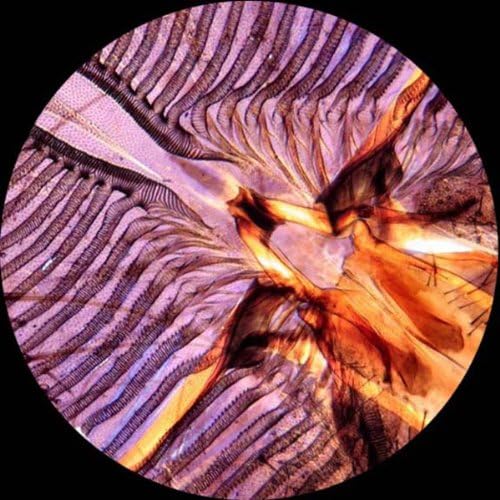
Зураг 4.1: Example of a detailed microscopic image captured using the camera.
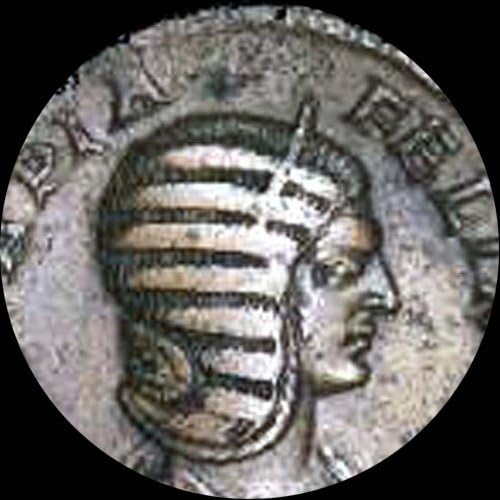
Зураг 4.2: Example of a microscopic image of an ancient coin captured using the camera.
4.3. Advanced Features (Windows Software)
The Windows software includes advanced functionalities:
- Оёдол: Combine multiple images to create a wider field of view.
- EDF (Extended Depth of Focus): Merge images taken at different focal planes to create a single image with greater depth of field.
- Хэмжилтийн функцууд: Perform precise measurements on captured images.
- Тэмдэглэл: Add notes, shapes, and watermarks to images.
5. Шалгалт тохируулга
The included calibration kit is essential for accurate measurements. Refer to the software's help documentation for detailed instructions on how to perform calibration. This process typically involves capturing an image of the calibration slide and using the software to define known distances, ensuring precise measurements for future observations.

Зураг 5.1: The calibration slide, showing a scale for precise measurement setup.
6. Алдаа засах
- Камер илрээгүй:
- USB кабелийг камер болон компьютерт найдвартай холбосон эсэхийг шалгаарай.
- Verify that the camera drivers and software are correctly installed.
- Өөр USB порт руу холбогдож үзнэ үү.
- Компьютерээ дахин эхлүүлнэ үү.
- No Live Image:
- Check if the camera is properly mounted on the microscope.
- Ensure the microscope's light source is active and adjusted.
- Confirm that the correct camera device is selected within the software.
- Зургийн чанар муу:
- Adjust the microscope's focus and illumination.
- Clean the camera lens and microscope optics.
- Check software settings for exposure, white balance, and resolution.
7. Техникийн үзүүлэлтүүд
| Онцлог | Дэлгэрэнгүй |
|---|---|
| Загвар | MU900-CK |
| Sensor Resolution | 9.1 мегапиксел |
| Интерфэйс | USB 2.0 |
| Тохиромжтой байдал | Windows XP/Vista/7/8/10, Mac OS X 10.6 & Up, Linux |
| Mounting Sizes | 23mm, 30mm, 30.5mm, C-mount |
| Software Features (Windows) | Stitching, EDF, Video Recording, Measurement, Annotations |
| Software Features (Mac) | Still Image Capture, Video Recording, Color/Exposure Control |
| Хэмжээ | 6.69 x 5.91 x 2.36 инч |
| Жин | 1.13 фунт |
| Эрчим хүчний эх үүсвэр | Утастай цахилгаан (USB-ээр) |
8. Баталгаат хугацаа ба дэмжлэг
For warranty information or technical support, please refer to the documentation included with your product or visit the official AmScope website. Contact their customer service for assistance with product operation, troubleshooting, or parts replacement.
AmScope Official Webсайт: www.amscope.com


