1. Танилцуулга
This manual provides comprehensive instructions for the setup, operation, and maintenance of your Geemarc CL100 Amplified Big Button Corded Phone. Please read this manual carefully to ensure proper use and to maximize the benefits of your new telephone.
The Geemarc CL100 is designed for ease of use, featuring large buttons, adjustable amplification, and visual indicators, making it suitable for individuals with hearing or visual impairments. This telephone is line-powered and does not require an external power source.
Чухал тэмдэглэл: This telephone does not include a built-in answering machine, speakerphone, caller display, talking caller ID, talking keypad, or voice assist functionality.
2. Бүтээгдэхүүн дууссанview
2.1 Багцын агуулга
- Geemarc CL100 Corded Telephone Base
- Гар утас
- Ороомог гар утасны утас
- Утасны шугамын утас
- Хэрэглэгчийн гарын авлага (энэ баримт бичиг)
2.2 Telephone Layout
Familiarize yourself with the key components and controls of your Geemarc CL100 phone.

Зураг 1: Дээрээс доош view of the Geemarc CL100 phone, illustrating the large numeric keypad, function buttons, and memory slots.
- Гар утас: For speaking and listening during calls.
- Тоон товчлуур: Large, easy-to-read buttons for dialing numbers.
- P1, P2, P3 Buttons: Priority memory buttons for frequently called numbers.
- M1-M9 Buttons: One-touch memory buttons for storing additional numbers.
- Дахин залгах товч: Хамгийн сүүлд залгасан дугаар руу залгана.
- Flash товчлуур: Сүлжээний үйлчилгээнд ашигладаг (жишээлбэл, дуудлага хүлээх).
- Хадгалах товч: Used for programming memory numbers.
- Дууг хаах товч: Temporarily mutes your microphone during a call.
- Аяны хяналтын унтраалга: Adjusts the audio tone for clearer conversations.
- Дууны хяналтын унтраалга: Adjusts the receiving volume during a call.
- Харааны хонхны индикатор: Flashes when an incoming call is received.
- Memory Index Card: Pull-out card for noting stored memory numbers.

Зураг 2: Хажуу тал view of the phone, illustrating the ringer ON/OFF switch and the telephone line connection port.
3. Тохиргоо
3.1 Connecting the Telephone
- Гар утсыг холбоно уу: Plug one end of the coiled handset cord into the handset and the other end into the handset jack on the side of the telephone base.
- Утасны шугамыг холбоно уу: Plug one end of the telephone line cord into the jack labeled with a telephone icon on the back or side of the phone base. Plug the other end into your wall telephone jack.
- Эрчим хүчний эх үүсвэр: The Geemarc CL100 is powered by the telephone line and does not require an external power adapter.
- Ringer Switch: Ensure the ringer switch (located on the side) is set to "Low" or "High" for audible ringing.
3.2 Анхны шалгалт
- Lift the handset and listen for a dial tone. If no dial tone is present, check all connections.
- Make a test call to ensure proper functionality.
4. Ашиглалтын заавар
4.1 Дуудлага хийх
- Гар утсаа өргө.
- Залгах аяыг хүлээнэ үү.
- Dial the required number using the numeric keypad.
- Upon completion of the call, carefully replace the handset in the cradle to disconnect.
4.2 Дуудлагад хариулах
When an incoming call is received, the phone will ring and the visual indicator will flash.
- Дуудлагад хариулахын тулд утсаа өргө.
- Upon completion of the call, carefully replace the handset in the cradle.
4.3 Last Number Redial
- Гар утсаа өргө.
- Залгах аяыг хүлээнэ үү.
- дээр дарна уу Дахин залгах button. The previously dialed number will be automatically redialed.
- Note: This function does not apply to numbers dialed from memory buttons.
4.4 Дууг хаах функц
The Mute button allows you to speak privately without your caller overhearing.
- Дуудлагын үеэр Дууг хаах button. You will still hear the caller, but they will not hear you.
- дээр дарна уу Дууг хаах button again to resume normal conversation.
4.5 Storing Telephone Numbers (Memory Dialing)
Your telephone can store 12 direct memory numbers: 3 priority numbers (P1, P2, P3) and 9 standard memory numbers (M1-M9). Priority memories can store up to 24 digits, and M1-M9 can store up to 32 digits.
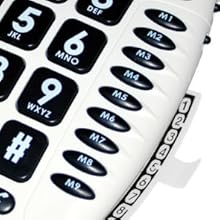
Зураг 3: Detail of the memory buttons (M1-M9) and the integrated memory index card.
- Гар утсаа өргө.
- дээр дарна уу Дэлгүүр товч.
- Dial the telephone number you wish to store.
- дээр дарна уу Дэлгүүр дахин товчлуур.
- Press the desired memory button (P1, P2, P3, or M1-M9) where you want to save the number.
- Гар утсаа солино уу.
- Note: Use the index card located under the base to record your stored numbers for easy reference. Stored memories are protected even if the phone line is unplugged.
4.6 Dialing Stored Numbers
- Гар утсаа өргө.
- Залгах аяыг хүлээнэ үү.
- Press the appropriate memory button (P1, P2, P3, or M1-M9). The stored number will be dialed automatically.
4.7 Recall (R), * & # Buttons
These buttons are used in conjunction with new services provided on digital exchanges. For specific details on their use, please contact your network operator.
4.8 Сонсголын аппаратын нийцтэй байдал
If you are using this telephone with a hearing aid, set your hearing aid to the "T" (Telecoil) setting for optimal audio quality.
5. Засвар үйлчилгээ
- Цэвэрлэгээ: Clean the telephone with a soft, damp даавуу. Зүлгүүрийн цэвэрлэгч, уусгагчийг бүү ашигла.
- Хадгалах: Утсаа нарны шууд тусгал, хэт температураас хол, сэрүүн, хуурай газар хадгална уу.
- Шингэнээс зайлсхийх: Do not expose the telephone to water or other liquids.
- Утас арчилгаа: Ensure the handset and line cords are not tangled or pinched to prevent damage.
6. Алдаа засах
| Асуудал | Боломжит шалтгаан | Шийдэл |
|---|---|---|
| Залгах ая байхгүй | Утасны утас зөв холбогдоогүй байна. | Check that both ends of the telephone line cord are securely plugged in. |
| Дуудагчийг сонсохгүй байна / Дуудагч намайг сонсохгүй байна | Volume settings are too low or Mute is active. | Adjust the Volume control. Ensure the Mute button is not pressed. |
| Утас дуугарахгүй байна | Ringer switch is set to "Off". | Set the ringer switch (on the side) to "Low" or "High". |
| Stored memory numbers are lost | This phone protects stored memories even if the phone line is unplugged. If numbers are lost, they may not have been stored correctly. | Re-store the numbers following the instructions in Section 4.5. |
| Difficulty dialing quickly | Some older phone systems may require a slower dialing pace. | Try dialing at a slightly slower pace. Consider using the memory dial function for frequently called numbers. |
7. Техникийн үзүүлэлтүүд
- Загвар: Geemarc CL100
- Төрөл: Утастай утас
- Ampамь нас: Up to 30 dB receiving volume
- Хонхны дууны түвшин: Adjustable up to 85 dB
- Санах ой: 3 Priority (P1-P3), 9 One-touch (M1-M9)
- Эрчим хүчний эх үүсвэр: Line-powered (no external adapter required)
- Сонсголын аппарат тохирох: Yes (T-coil setting)
- Хэмжээ: Ойролцоогоор 7.5 x 8 x 3 инч (19 x 20.3 x 7.6 см)
- Жин: Ойролцоогоор 2.25 фунт (1.02 кг)
- Өнгө: Цагаан
8. Баталгаат хугацаа ба дэмжлэг
8.1 Баталгаат хугацааны мэдээлэл
For information regarding the warranty period and terms for your Geemarc CL100 telephone, please refer to the warranty card included with your purchase or visit the official Geemarc webсайт. Баталгаат нэхэмжлэл гаргахын тулд худалдан авалтаа нотлох баримтаа хадгалаарай.
8.2 Хэрэглэгчийн дэмжлэг
If you encounter any issues not covered in the troubleshooting section or require further assistance, please contact Geemarc customer support. Contact details can typically be found on the Geemarc webсайт эсвэл бүтээгдэхүүний сав баглаа боодол дээр.
Онлайн эх сурвалжийг үзэхийг хүсвэл зочилно уу: www.geemarc.com


