1. Танилцуулга
This manual provides comprehensive instructions for the setup, operation, maintenance, and troubleshooting of your DNP DS-RX1HS Dye Sublimation Photo Printer. The DS-RX1HS is designed for high-volume photo printing, offering enhanced efficiency and print speed for various applications, including photo booths and event photography. It supports multiple print sizes and features USB iSerial connectivity for seamless integration with Mac and PC systems.

Figure 1: DNP DS-RX1HS Photo Printer, angled front view. This image shows the compact design of the printer with its front media tray and the DNP logo.
2. Тохиргоо
Follow these steps to set up your DNP DS-RX1HS printer.
2.1 Савлах
- Принтерийг сав баглаа боодолоос нь болгоомжтой авч хая.
- Verify that all included components are present: Printer CD, Drivers for Windows OS7 and 8.1, Printhead Cushion, Power Cord. (Print media is not included and must be purchased separately).
- Remove any protective tapes or packing materials from the printer.
2.2 Принтерийг холбох
The DS-RX1HS connects to your computer via a USB 2.0 Type B port.
- Locate the USB 2.0 Type B port on the rear of the printer.
- Connect one end of a USB 2.0 cable (not included) to the printer and the other end to an available USB port on your computer.
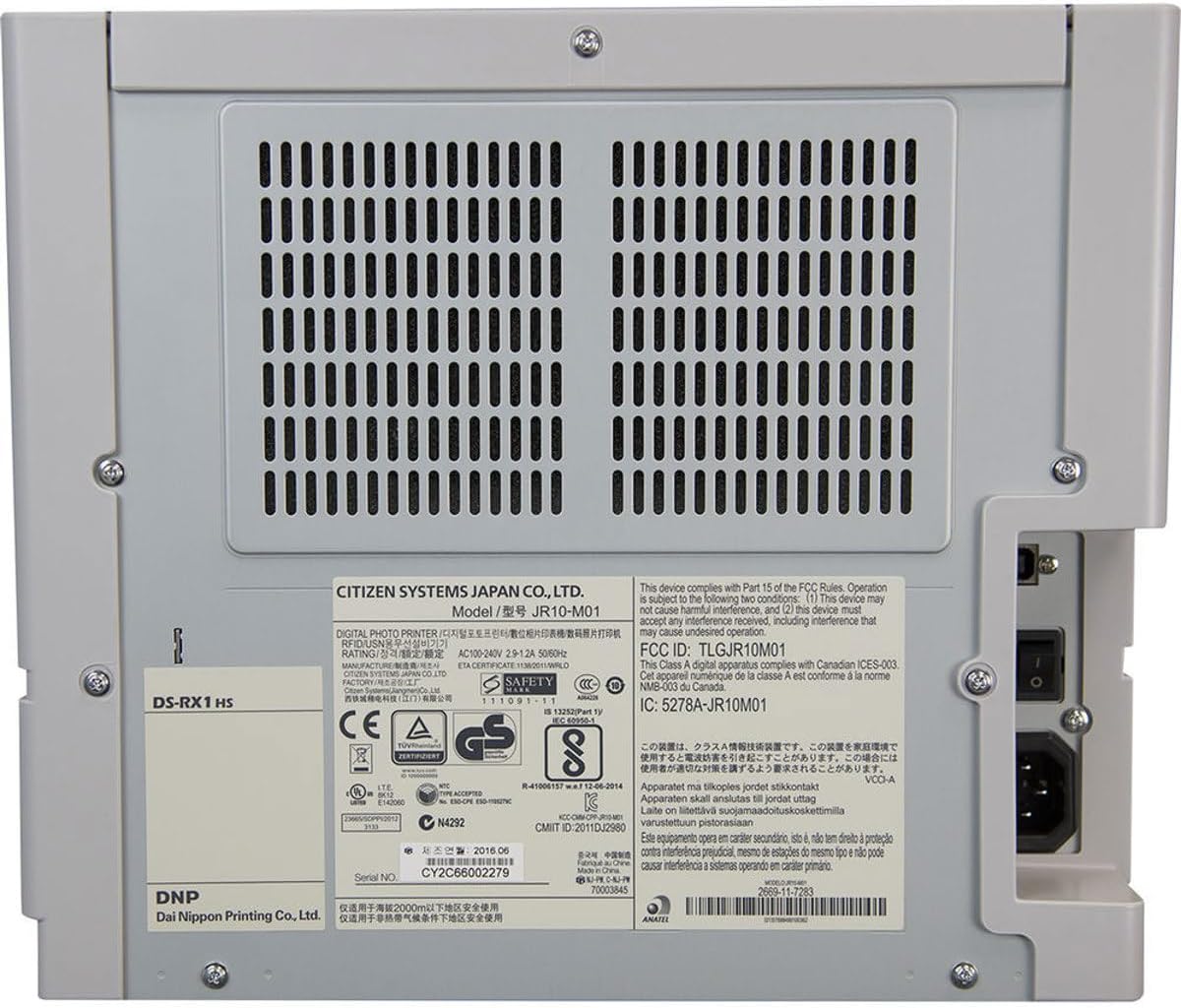
Зураг 2: Ар талд view of the DNP DS-RX1HS Photo Printer. This image highlights the power input and USB connectivity port on the back panel.
2.3 Драйвер суурилуулах
Install the necessary drivers before operating the printer.
- Windows-д зориулсан: Insert the included Printer CD and follow the on-screen instructions to install drivers for Windows OS7 and 8.1. Drivers for newer Windows versions and a printer Status App for RX1HS are available for download from the DNP webсайт.
- Mac-д зориулсан: A Mac OS-X Print Center Driver is available for download from the DNP webсайт.
2.4 Хэвлэх хэрэгслийг ачаалж байна
The DS-RX1HS uses dye-sublimation media, consisting of a ribbon and glossy photo paper.
- Принтерийн урд тагийг нээнэ үү.
- Carefully insert the paper roll into the designated slot.
- Load the ribbon cartridge according to the instructions provided with your media kit. Ensure it is securely seated.
- Урд талын тагийг хаа.

Зураг 3: Дотоод засал view of the DNP DS-RX1HS Photo Printer with media loaded. This image shows the paper roll and ribbon cartridge installed inside the printer.
2.5 Эрчим хүчний холболт
- Connect the power cord to the power input on the rear of the printer.
- Цахилгааны утасны нөгөө үзүүрийг тохирох цахилгаан залгуурт холбоно.
- Press the power button, usually located on the front or side, to turn on the printer. The POWER indicator light should illuminate.
3. Принтерийг ажиллуулах
Once the printer is set up and drivers are installed, you can begin printing.
3.1 Хэвлэх үндсэн үйл явц
- Принтер асаалттай, таны компьютерт холбогдсон эсэхийг шалгаарай.
- Open the image you wish to print using your preferred photo editing or printing software.
- Select the DNP DS-RX1HS as your printer.
- In the print settings, choose your desired print size (e.g., 4x6", 6x8") and quality (300x300dpi or 300x600dpi).
- Initiate the print command. The printer will process and output the photo.
3.2 Print Speed and Sizes
- Хэвлэх хурд: Approximately 12.4 seconds for a 4x6" print and 22 seconds for a 6x8" print.
- Дэмжигдсэн хэмжээ: The printer supports 2x6", 4x6", and 6x8" print formats.
3.3 USB iSerial Functionality
The USB iSerial feature allows for simplified management when connecting multiple DS-RX1HS units to a single computer, enhancing productivity for large-scale events. Refer to the DNP website for specific software and setup instructions for this feature.
4. Засвар үйлчилгээ
Тогтмол засвар үйлчилгээ нь принтерийн оновчтой ажиллагааг хангаж, ашиглалтын хугацааг уртасгадаг.
4.1 Хэвлэл мэдээллийн хэрэгслийг солих
The printer can produce up to 700 4x6" sheets per roll. Replace the ribbon and paper roll when the media runs out or when prompted by the printer status.
- Урд тагийг нээ.
- Remove the used paper roll and ribbon cartridge.
- Install new media as described in Section 2.4.
- Урд талын тагийг хаа.
4.2 Хэвлэх толгойг цэвэрлэх
A printhead cushion is included with the printer. Refer to the DNP official documentation for detailed instructions on printhead cleaning procedures to maintain print quality.
4.3 Ерөнхий цэвэрлэгээ
- Принтерийн гадна талыг зөөлөн, хуурай даавуугаар арчина.
- Хүчтэй химийн бодис, зүлгүүрийн цэвэрлэгч хэрэглэхээс зайлсхий.
- Ensure no dust or debris accumulates in the media loading area.
5. Алдаа засах
This section addresses common issues you might encounter with your DS-RX1HS printer.
5.1 Заагч гэрэл
The front panel of the printer features several indicator lights to communicate its status.

Зураг 4: Урд view of the DNP DS-RX1HS Photo Printer. This image shows the indicator lights for Power, Ribbon, Paper, and Error on the left side of the front panel.
- ХҮЧ: Принтер асаалттай байгааг илтгэнэ.
- RIBBON: Illuminates when the ribbon needs replacement or is incorrectly installed.
- Цаас: Illuminates when the paper roll needs replacement or is incorrectly installed.
- АЛДАА: Indicates a general error. Refer to the printer's Status App or driver software for specific error codes.
5.2 Нийтлэг асуудал ба шийдвэрлэх арга замууд
| Асуудал | Боломжит шалтгаан | Шийдэл |
|---|---|---|
| Принтер асахгүй байна. | Цахилгааны утас холбогдоогүй, цахилгаан гаралтын асуудал. | Ensure power cord is securely connected to both printer and outlet. Test outlet with another device. |
| "RIBBON" light is on. | Ribbon is empty or incorrectly installed. | Replace the ribbon cartridge or re-install it correctly. |
| "PAPER" light is on. | Paper roll is empty or incorrectly installed. | Replace the paper roll or re-install it correctly. |
| Хэвлэх чанар муу (судал, буруу өнгө). | Dirty printhead, old media, incorrect driver settings. | Clean the printhead (refer to Section 4.2). Replace media. Verify print settings in your software. |
| Принтерийг компьютер танихгүй байна. | Incorrect or missing drivers, loose USB connection. | Reinstall drivers (Section 2.3). Check USB cable connection. Try a different USB port or cable. |
For more detailed troubleshooting, consult the DNP Status App for Windows or the official DNP support webсайт.
6. Техникийн үзүүлэлтүүд
Key technical specifications for the DNP DS-RX1HS Photo Printer:
| Онцлог | Дэлгэрэнгүй |
|---|---|
| Загварын нэр | DS-RX1HS |
| Хэвлэлийн технологи | Будаг сублимация |
| Принтерийн гаралт | Өнгө |
| Холболтын технологи | USB 2.0 |
| Дэмжигдсэн медиа хэмжээ | 2x6", 4x6", 6x8" |
| Хэвлэл мэдээллийн төрөл | Гялгар гэрэл зургийн цаас |
| Хамгийн их оролтын хуудасны багтаамж | 350 sheets (for 4x6" media) |
| Maximum Print Speed (4x6") | Ойролцоогоор 12.4 секунд |
| Maximum Print Speed (6x8") | Ойролцоогоор 22 секунд |
| Шийдвэр | 300x300dpi (high speed), 300x600dpi |
| Бүтээгдэхүүний хэмжээс | 6"D x 290"W x 4"H (Note: The width '290"W' appears to be a data entry anomaly; actual printer width is significantly less.) |
| Зүйлийн жин | 30.8 фунт (14 килограмм) |
| Санах ойн хадгалах багтаамж | 64 MB |
| Оруулсан бүрэлдэхүүн хэсгүүд | Printer CD, Drivers for Windows OS7 and 8.1, Printhead Cushion, Power Cord (Print Media Not Included) |
7. Баталгаат хугацаа ба дэмжлэг
For information regarding product warranty, technical support, and additional resources, please contact DNP directly or visit their official webсайт.
- Үйлдвэрлэгч: DNP
- Албан ёсны Webсайт: Refer to your product packaging or the DNP website for the most current support information and driver downloads.


