Бүтээгдэхүүн дууссанview
The iSound Twist Portable Bluetooth Wireless Speaker offers a unique design combined with superior sound quality. Its compact form factor allows for portability, while its advanced features enable wireless music streaming and hands-free calling. The speaker features full stereo sound with 6 watts total output from two 40mm drivers and a passive radiator for enhanced bass.
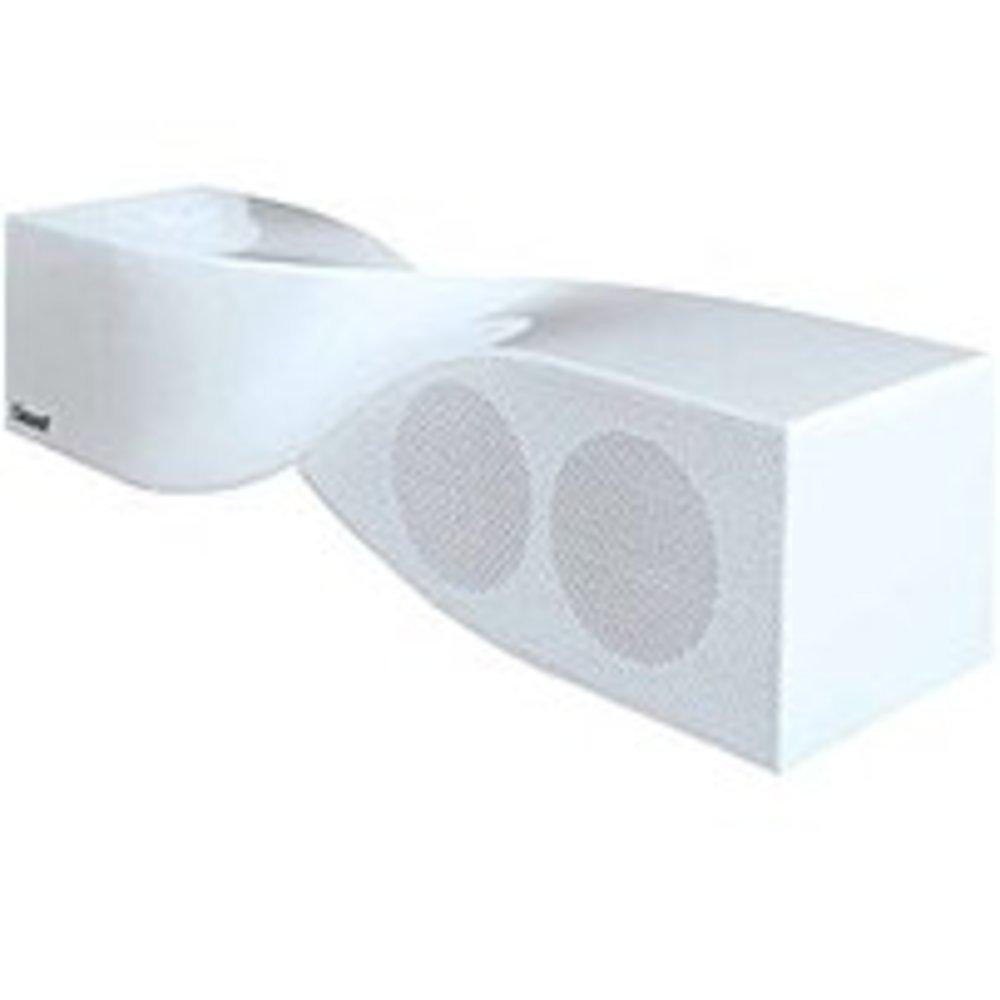
Image: The iSound Twist Portable Bluetooth Wireless Speaker in white, showcasing its unique twisted design.
Багцын агуулга
- iSound Twist Portable Bluetooth Wireless Speaker
- USB цэнэглэгч кабель
- 3.5mm AUX Input Cable
- Хэрэглэгчийн гарын авлага (энэ баримт бичиг)
Тохиргоо
1. Илтгэгчийг цэнэглэх
Before initial use, fully charge the iSound Twist speaker. Connect the provided USB charging cable to the speaker's USB charging port and the other end to a powered USB source (e.g., computer, USB wall adapter). The charging indicator light will illuminate during charging and turn off when fully charged. A full charge provides up to 5 hours of continuous play.

Image: Rear panel of the speaker, highlighting the USB charging port, ON/OFF switch, and AUX IN port.
2. Асаах/унтраах
Locate the ON/OFF switch on the rear panel of the speaker. Slide the switch to the "ON" position to power on the device. Slide it to the "OFF" position to power off.
3. Bluetooth хослол
- Ensure the speaker is powered on and within close proximity to your Bluetooth-enabled device (e.g., smartphone, tablet, laptop).
- The speaker will automatically enter Bluetooth pairing mode. A blue indicator light will flash, indicating it is discoverable.
- Төхөөрөмж дээрээ Bluetooth тохиргоо руу очоод Bluetooth-г идэвхжүүлнэ үү.
- хайх available devices. The iSound Twist speaker should appear in the list, typically named "iSound Twist" or similar.
- Select the speaker from the list to initiate pairing. If prompted for a password, enter "0000".
- Once successfully paired, the blue indicator light on the speaker will stop flashing and remain solid. You will hear an audible confirmation.
- Your device is now connected, and you can stream audio wirelessly.
4. AUX оролтын холболт
For devices without Bluetooth capability, or if you prefer a wired connection, use the provided 3.5mm AUX cable.
- Connect one end of the 3.5mm AUX cable to the AUX IN port on the rear of the speaker.
- Connect the other end of the cable to the headphone jack or audio output port of your audio device.
- The speaker will automatically switch to AUX input mode.
Ашиглалтын заавар
Хяналтын самбарын функцууд
The speaker features onboard controls located on its top surface for convenient operation.
- Эрчим хүч / горим товч: Press and hold to power on/off. Short press to switch between Bluetooth and AUX modes.
- Тоглуулах/түр зогсоох/Дуудлага хийх товч: Short press to play or pause music. During an incoming call, short press to answer or end the call. Press and hold to reject an incoming call.
- Дууг нэмэгдүүлэх/Дараах дууны товчлуур: Short press to increase volume. Press and hold to skip to the next track.
- Дууг багасгах/Өмнөх дууны товчлуур: Short press to decrease volume. Press and hold to go to the previous track.
Гар чөлөөтэй дуудлага хийх
When connected via Bluetooth, the iSound Twist speaker's built-in microphone allows for hands-free phone calls.
- Дуудлагад хариулах: When a call comes in, the music will pause. Press the Play/Pause/Call button once to answer.
- Дуудлага дуусгах: During a call, press the Play/Pause/Call button once to end the call.
- Дуудлагаас татгалзаж байна: Press and hold the Play/Pause/Call button to reject an incoming call.
Засвар үйлчилгээ
- Чанга яригчийг ус, чийг, хэт өндөр температураас хол байлга.
- Чанга яригчийг зөөлөн, хуурай даавуугаар цэвэрлэ. Зүлгүүрийн цэвэрлэгч, уусгагчийг бүү ашигла.
- Чанга яригчийг унагах эсвэл хүчтэй нөлөөнд оруулахаас зайлсхий.
- Батерейны ашиглалтын хугацааг уртасгаагүй үед чанга яригчийг сэрүүн, хуурай газар хадгалж, үе үе цэнэглэж байгаарай.
Алдааг олж засварлах
| Асуудал | Шийдэл |
|---|---|
| Чанга яригч асахгүй байна. | Ensure the battery is charged. Connect the speaker to a power source using the USB cable and try again. |
| Bluetooth-ээр холбох боломжгүй. |
|
| Дуу байхгүй эсвэл дуу багатай. |
|
| Дуудлагын чанар муу байна. |
|
Үзүүлэлтүүд
| Онцлог | Дэлгэрэнгүй |
|---|---|
| Загварын нэр | ISOUND-1691 |
| Брэнд | iSound |
| Чанга яригчийн төрөл | Цамхаг |
| Онцлог шинж чанар | Баригдсан микрофон |
| Зөвлөмж болгож буй хэрэглээ | For Smartphones or Tablets, Music Players |
| Тохиромжтой төхөөрөмжүүд | Ширээний компьютер, зөөврийн компьютер, MP3 тоглуулагч, проектор, ухаалаг утас, таблет, телевиз |
| Хүрээлэн буй орчны дууны сувгийн тохиргоо | 2.0 |
| Өнгө | Цагаан |
| Зүйлийн жин | 13.6 унц |
| Усны хамгаалалттай | ХУДАЛ |
| Утасгүй холбооны технологи | Bluetooth |
| Чанга яригчийн хэмжээ | 0.75 инч |
| Эрчим хүчний эх үүсвэр | Батерейгаар ажилладаг |
| Батерейны тоо | 1 лити ион батерей шаардлагатай. (оруулсан) |
| Аудио драйверын төрөл | Динамик драйвер |
| Аудио драйверын хэмжээ | 40 миллиметр |
| Бүтээгдэхүүний хэмжээс | 5 x 4 x 11.75 инч |
| Чанга яригчийн хамгийн их гаралтын чадал | 6 ватт |
| Холболтын технологи | Утасгүй |
| Аудио гаралтын горим | Стерео |
| Суурилуулах төрөл | Ширээний тавиур |
Бүтээгдэхүүний албан ёсны видео
Video: Official product video for the iSound Twist Bluetooth Speaker, demonstrating its features and design. This video showcases the speaker's ability to stream audio from various devices and handle calls.
Баталгаат болон дэмжлэг
The iSound Twist Portable Bluetooth Wireless Speaker comes with a Хязгаарлагдмал баталгаат хугацаа. For specific warranty terms, conditions, and support inquiries, please refer to the warranty card included in your product packaging or visit the official iSound webсайт.
For further assistance, please contact iSound customer support.


