1. Танилцуулга
This manual provides detailed instructions for the installation, operation, and maintenance of the Intermatic ET91215CR 30A 120-277V SPDT 365-Day Astronomic Energy Control. This robust device is designed for heavy-duty industrial and commercial applications, offering precise control over electrical circuits with its astronomic time-keeping capabilities and durable Type 3R steel enclosure.
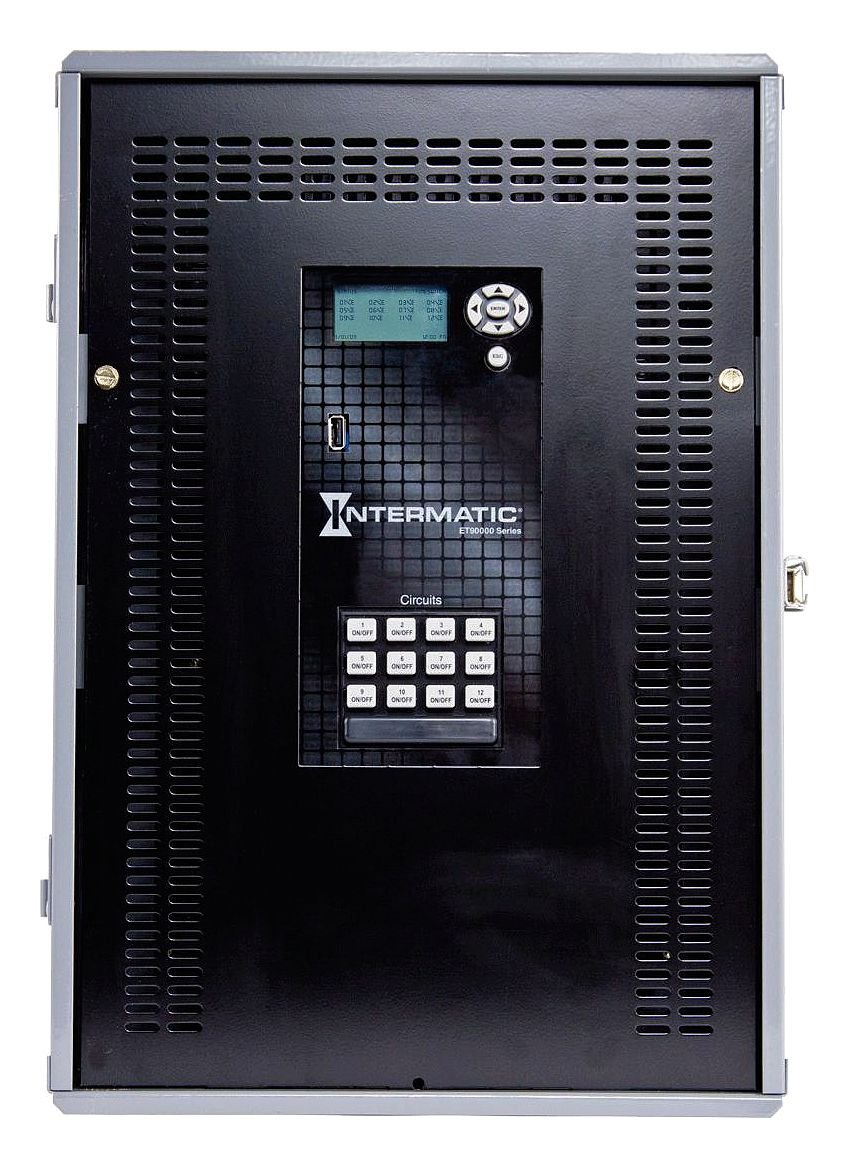
Зураг 1: Front panel of the Intermatic ET91215CR Energy Control. The unit features a digital display for programming, navigation buttons, a USB port for data transfer, and twelve individual ON/OFF buttons for circuit control, labeled 1 through 12. The Intermatic logo and 'ET90000 Series' designation are visible below the display.
2. Аюулгүй байдлын мэдээлэл
АНХААРУУЛГА: Risk of electric shock. Installation and servicing must be performed by qualified personnel only. Disconnect power at the circuit breaker or fuse before installing or servicing. Follow all local and national electrical codes.
- Always ensure the power supply is disconnected before working on the unit.
- Do not operate the unit with damaged wiring or if the enclosure is compromised.
- Энэ төхөөрөмж нь байнгын суурилуулалтанд зориулагдсан.
- Цахилгааны аюулаас урьдчилан сэргийлэхийн тулд зөв газардуулга хийх.
3. Тохиргоо ба суурилуулалт
3.1 Хаалтыг суурилуулах
The ET91215CR features a Type 3R steel enclosure, suitable for outdoor applications, providing protection against rain, sleet, and external ice formation. Mount the enclosure securely to a flat, vertical surface using appropriate hardware (not included). Ensure adequate clearance for wiring and ventilation.
3.2 Утас тавих заавар
This device is rated for 30A and operates on 120-277V. It features a Single Pole Double Throw (SPDT) switch configuration. All wiring must comply with the National Electrical Code (NEC) and local codes. Refer to the wiring diagram provided inside the enclosure door for specific connections.
- Disconnect all power to the installation site at the main circuit breaker.
- Хаалганы хаалгыг нээ.
- Connect the incoming power supply wires to the designated terminals.
- Connect the load wires for each controlled circuit to the appropriate output terminals.
- Бүх холболтууд нягт, найдвартай байгаа эсэхийг шалгаарай.
- Close the enclosure door and restore power.
Жич: For optimal performance and safety, it is highly recommended that a licensed electrician perform the installation and wiring of this energy control unit.
4. Ашиглалтын заавар
4.1 Initial Power-Up and Display
Upon initial power-up, the digital display will illuminate. The display shows current time, date, and status information. Use the navigation buttons (up, down, left, right, ENTER, ESC) located next to the display to navigate through menus and adjust settings.
4.2 Цаг, огноог тохируулах
Access the main menu using the navigation buttons. Select the 'Time/Date' option to set the current time, date, and year. Ensure these settings are accurate for the astronomic feature to function correctly.
4.3 Programming Schedules (Astronomic Feature)
The 365-day astronomic feature automatically adjusts ON/OFF times based on sunrise and sunset for your geographical location. This requires setting your precise latitude and longitude. Consult the detailed programming guide within the unit's internal menu or refer to the full product manual for advanced scheduling options.
- Navigate to the 'Astronomic Settings' menu.
- Enter your geographical coordinates (latitude and longitude).
- Define desired offsets from sunrise/sunset if needed.
- Assign astronomic schedules to specific circuits.
4.4 Manual Circuit Control
The unit features twelve individual ON/OFF buttons for direct control of each circuit. Pressing an 'ON/OFF' button will toggle the corresponding circuit's power state. This manual override can be used independently of programmed schedules.
4.5 USB портын функц
The integrated USB port allows for easy transfer of programming schedules, event logs, and firmware updates. Refer to the Intermatic software documentation for detailed instructions on using this feature.
5. Засвар үйлчилгээ
The Intermatic ET91215CR is designed for minimal maintenance. Regular inspection is recommended to ensure optimal performance.
- Цэвэрлэгээ: Periodically clean the exterior of the enclosure with a soft, damp даавуу. Зүлгүүрийн цэвэрлэгч, уусгагчийг бүү ашигла.
- Шалгалт: Annually inspect all wiring connections for tightness and signs of wear or corrosion. Check the enclosure for any damage that might compromise its Type 3R rating.
- Програм хангамжийн шинэчлэлтүүд: Check the Intermatic website periodically for available firmware updates via the USB port to ensure your unit has the latest features and bug fixes.
6. Алдаа засах
If you encounter issues with your ET91215CR, refer to the following common troubleshooting steps:
| Асуудал | Боломжит шалтгаан | Шийдэл |
|---|---|---|
| Төхөөрөмж асахгүй байна. | Цахилгаан хангамж байхгүй; хэлхээний таслуур тасарсан. | Check power supply at the source. Reset circuit breaker. Verify wiring connections. |
| Schedules not activating. | Incorrect time/date; schedule not enabled; astronomic settings incorrect. | Verify current time and date. Ensure schedules are programmed and enabled for the correct circuits. Check astronomic coordinates. |
| Circuit not responding to manual ON/OFF. | Wiring issue; internal fault. | Check wiring for the specific circuit. If problem persists, contact technical support. |
| Дэлгэц хоосон эсвэл унших боломжгүй байна. | Power issue; display fault. | Verify power supply. If power is present and display remains blank, contact technical support. |
If troubleshooting steps do not resolve the issue, contact Intermatic Technical Support for further assistance.
7. Техникийн үзүүлэлтүүд
| Онцлог | Тодорхойлолт |
|---|---|
| Загварын дугаар | ET91215CR |
| Ботьtage | 120-277 вольт |
| Ampэрч хүч | 30 Amps |
| Шилжүүлэгчийн төрөл | SPDT (Нэг туйлтай давхар шидэлт) |
| Хаалтны төрөл | Type 3R Steel Enclosure |
| Програмчлал | 365-Day Astronomic |
| Бүтээгдэхүүний хэмжээс | 3.6 x 5.7 x 9.6 инч |
| Зүйлийн жин | 21 фунт |
| Material (Internal) | Хөнгөн цагаан, зэс |
| Гэрчилгээ | NOM, UL |
| Оруулсан бүрэлдэхүүн хэсгүүд | Intermatic ET91215CR Timer, 30A 120-277V SPDT 365-Day Astronomic Energy Control w/Type 3R Steel Enclosure |
8. Баталгаат хугацаа ба дэмжлэг
8.1 Хязгаарлагдмал баталгаат хугацаа
The Intermatic ET91215CR is covered by a limited warranty. For specific terms and conditions, please refer to the warranty documentation included with your product or visit the official Intermatic website. This warranty typically covers defects in materials and workmanship under normal use.
8.2 Техникийн дэмжлэг
For technical assistance, product inquiries, or warranty claims, please contact Intermatic Customer Service. Have your product model number (ET91215CR) and purchase date available when contacting support.
Интерматик холбоо барих мэдээлэл:
Please refer to the official Intermatic webхамгийн сүүлийн үеийн холбоо барих мэдээллийг сайт эсвэл бүтээгдэхүүний сав баглаа боодол.


