1. Танилцуулга
This manual provides detailed instructions for the installation, operation, and maintenance of your Gewiss GW10701 Programmable Thermostat. This device is designed to control heating and air conditioning systems, allowing you to manage room temperature efficiently and comfortably. Please read this manual thoroughly before installation and use to ensure proper functionality and safety.
2. Аюулгүй байдлын мэдээлэл
Хувийн гэмтэл бэртэл эсвэл төхөөрөмжид гэмтэл учруулахаас урьдчилан сэргийлэхийн тулд дараах аюулгүй байдлын урьдчилан сэргийлэх арга хэмжээг үргэлж дагаж мөрдөөрэй.
- Суурилуулалтыг зөвхөн орон нутгийн цахилгааны дүрэм, журмын дагуу мэргэшсэн ажилтан гүйцэтгэнэ.
- Disconnect power to the heating/cooling system at the main circuit breaker before installing or servicing the thermostat.
- Термостатыг ус эсвэл хэт их чийгшилд бүү оруул.
- Зөвхөн заасан төрлийн батерейг ашиглаж, суурилуулах явцад зөв туйлшралыг шалгаарай.
- Keep batteries out of reach of children. Do not dispose of batteries in fire.
- Do not attempt to open or repair the thermostat yourself. Contact qualified service personnel.
3. Бүтээгдэхүүн дууссанview
The Gewiss GW10701 is a wall-mounted programmable thermostat featuring an LCD display and intuitive controls for temperature management.
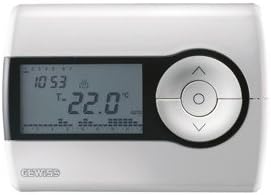
Зураг 1: Урд view of the Gewiss GW10701 Thermostat. It features a clear LCD screen displaying time and temperature, alongside a circular control panel with directional buttons and a central confirmation button for easy navigation and setting adjustments.
3.1 дугаартай. Бүрэлдэхүүн хэсгүүд
- LCD дэлгэц: Shows current time, temperature, operating mode, and programming settings.
- Хяналтын товчлуурууд: Typically include UP/DOWN arrows for temperature adjustment, MODE button for selecting operating modes (e.g., Heat, Cool, Auto, Off), and a SET/PROG button for accessing programming menus. (Note: Specific button functions may vary slightly; refer to on-screen prompts.)
- Зайны тасалгаа: Located on the rear or side, houses the power supply batteries.
- Суурилуулах хавтан: Хананд найдвартай суурилуулах зориулалттай.
4. Суурилуулалт
4.1. Байршил сонгох
Select a central location on an interior wall, approximately 1.5 meters (5 feet) above the floor. Avoid locations near heat sources (lamps, direct sunlight, fireplaces), drafts (windows, doors), or areas with poor air circulation.
4.2. Термостат суурилуулах
- Цахилгааныг салгах: Үндсэн хэлхээний таслуур дээрх халаалт/хөргөлтийн системийн цахилгааныг унтраа.
- Separate Base Plate: Carefully detach the front cover of the thermostat from its base plate.
- Тэмдэглэгээ ба өрөмдлөг: Hold the base plate against the wall at your chosen location. Mark the drilling points. Drill holes and insert wall anchors if necessary.
- Аюулгүй суурь хавтан: Fasten the base plate to the wall using the provided screws.
- Утас (хэрэв байгаа бол): Connect the system wires to the appropriate terminals on the base plate. Refer to the wiring diagram provided with your heating/cooling system or consult a qualified electrician. Note: While the thermostat is battery-powered, it controls a 230V system. Ensure correct wiring.
- Батерейг суулгах: Insert the required batteries into the battery compartment, observing correct polarity (+/-).
- Термостатыг холбох: Carefully reattach the thermostat front cover to the base plate, ensuring it clicks securely into place.
- Эрчим хүчийг сэргээх: Turn on the power to your heating/cooling system at the main circuit breaker.
5. Үйл ажиллагаа
5.1. Анхны тохиргоо
Upon first power-up or after battery replacement, you may need to set the current time and date. Follow the on-screen prompts or refer to the programming section.
5.2. Температурыг тохируулах
-г ашиглана уу UP болон ДООШ arrow buttons to adjust the desired temperature. The display will show the set temperature temporarily, then revert to the current room temperature.
5.3. Үйлдлийн горимууд
дээр дарна уу MODE button (or similar) to cycle through available operating modes:
- ДУЛААН: Өрөөний температур тогтоосон температураас доош унасан үед термостат нь халаалтын системийг идэвхжүүлнэ.
- Хөргөх: The thermostat will activate the air conditioning system when the room temperature rises above the set temperature.
- АВТО: Термостат нь тогтоосон температурын хязгаарыг хадгалахын тулд халаалт болон хөргөлтийн хооронд автоматаар шилждэг.
- Унтрааж байна: Халаалт болон хөргөлтийн системүүд унтарсан байна.
6. Програмчлал
The Gewiss GW10701 allows you to create custom heating/cooling schedules for different times of the day and days of the week. This feature helps optimize energy consumption and comfort.
6.1. Цаг, огноог тохируулах
- дээр дарна уу SET or PROG товчийг дарж тохиргооны цэс рүү орно.
- Navigate using the arrow buttons to find "Time" or "Date" settings.
- Use the arrow buttons to adjust the values (hour, minute, day, month, year).
- Тохиргоо бүрийг баталгаажуулна уу SET or central button.
6.2. Creating a Program Schedule
The thermostat typically offers daily or weekly programming options. You can set different temperatures for various periods (e.g., Wake, Day, Evening, Sleep).
- дээр дарна уу PROG товчийг дарж програмчлалын горимд орно.
- Select the day or group of days you wish to program (e.g., Mon-Fri, Sat-Sun, or individual days).
- For each period (e.g., "Wake"), set the desired start time and temperature using the arrow buttons.
- Advance to the next period and repeat the process.
- Save your program and exit programming mode.
Consult the on-screen menu and specific button labels on your device for precise programming steps, as interfaces can vary.
7. Засвар үйлчилгээ
7.1. Зай солих
The thermostat is powered by batteries. When the battery indicator appears on the display, replace the batteries promptly to ensure continuous operation. Typically, 2x AA or AAA alkaline batteries are required.
- Термостатын урд тагийг болгоомжтой авч хая.
- Хуучин батерейг авч, хариуцлагатайгаар устгана уу.
- Зөв туйлшралыг баталгаажуулж, шинэ батерейг оруулна уу.
- Урд талын тагийг дахин холбоно уу.
7.2. Цэвэрлэгээ
Clean the thermostat's exterior with a soft, dry cloth. Do not use abrasive cleaners, solvents, or spray cleaners directly onto the device, as this can damage the display or internal components.
8. Алдаа засах
| Асуудал | Боломжит шалтгаан | Шийдэл |
|---|---|---|
| Дэлгэц хоосон эсвэл бүдэг байна. | Батерей бага эсвэл дуусаагүй. | Батерейг шинээр солих. |
| Халаалт/Хөргөлтийн систем ажиллахгүй байна. |
|
|
| Температурын уншилтууд буруу харагдаж байна. | Thermostat location affected by drafts or heat sources. | Ensure thermostat is not exposed to direct sunlight, drafts, or heat-emitting appliances. |
9. Техникийн үзүүлэлтүүд
- Үйлдвэрлэгч: Гьюис
- Загварын дугаар: GW10701 (Chorus)
- Хэмжээ (L x W x H): 13 x 2.3 x 9.2 см
- Жин: 9.07 гр
- Өнгө: Цагаан
- Материал: Хуванцар
- Эрчим хүчний хангамж: Батерейгаар ажилладаг
- Солих ботьtage: 230 Volt (for controlled system)
- Дэлгэцийн төрөл: LCD эсвэл LED
- Суурилуулах төрөл: Хананд суурилуулсан
- Хяналтын онцлогууд: Programmable, Button control
- Хэрэглээ: Heating systems, Air conditioning systems
10. Баталгаат хугацаа ба дэмжлэг
For warranty information, technical support, or service inquiries regarding your Gewiss GW10701 Thermostat, please refer to the warranty card included with your product or visit the official Gewiss website. You may also contact your local Gewiss distributor or retailer for assistance.
Gewiss Official Webсайт: www.gewiss.com


