1. Танилцуулга
This manual provides comprehensive instructions for the safe and effective operation of the KORAD KA3005P Programmable DC Power Supply. The KA3005P is a high-precision, variable, and adjustable linear power supply designed for laboratory, educational, and industrial applications. It offers stable and reliable DC power output with advanced features such as programmable control, memory storage, and multiple safety protections.

Зураг 1.1: KORAD KA3005P Programmable DC Power Supply. This image shows the front and side view of the power supply unit, highlighting its compact design and the clear digital display.
2. Аюулгүй ажиллагааны заавар
To ensure safe operation and prolong the life of your KORAD KA3005P power supply, please observe the following safety precautions:
- Always connect the power supply to a properly grounded AC outlet.
- Do not operate the unit in a wet or damp орчин.
- Ensure adequate ventilation around the unit to prevent overheating. Do not block the ventilation openings.
- c-г нээж болохгүйasinцахилгаан хангамжийн g. Дотор нь хэрэглэгчийн засвар үйлчилгээ хийх хэсэг байхгүй. Бүх үйлчилгээг мэргэшсэн боловсон хүчинд шилжүүлээрэй.
- Оруулсан эзлэхүүнийг шалгана ууtage selector switch (110V/220V) on the rear panel is set correctly for your local power supply before connecting to AC mains.
- Disconnect the power cord before performing any maintenance or when the unit is not in use for extended periods.
- Avoid short-circuiting the output terminals. Although the unit has short-circuit protection, prolonged short circuits can cause damage.
- Use appropriate test leads and ensure they are rated for the voltage and current levels you intend to use.
3. Хайрцагт юу байна
Upon unpacking your KORAD KA3005P, please verify that all the following items are included:
- 1 x KORAD KA3005P Power Supply Unit
- 1 х AC цахилгаан утас
- 1 x USB кабель
- 1 x Set of 5 Amp Test Leads (Banana plug to Crocodile clip)
- 1 х хэрэглэгчийн гарын авлага
- 1 x CD containing Remote Control Software
4. Бүтээгдэхүүний онцлог
The KORAD KA3005P is equipped with a range of features designed for precision and ease of use:
- High Precision Output: Provides stable and accurate 0-30V and 0-5A DC output.
- 4-Digit LED Display: Bright and clear display for precise voltage (0.001V resolution) and current (0.001A resolution) readings.
- Програмчлагдах удирдлага: USB and RS232 ports for remote control via PC software.
- Санах ойн сан: Four dedicated memory locations (M1-M4) to save and recall frequently used voltage болон одоогийн тохиргоо.
- Тогтмол ботьtage (CV) & Тогтмол гүйдэл (CC) горимууд: Automatically switches between modes to maintain stable output.
- Аюулгүй байдлын иж бүрэн хамгаалалт: Includes Over-Current Protection (OCP), Over-Voltage Protection (OVP), and Short-Circuit Protection.
- Гаралтын АСААХ/УНТРААХ товчлуур: Allows safe connection and disconnection of loads without powering down the unit.
- Түгжих функц: Ашиглалтын явцад тохиргоог санамсаргүй өөрчлөхөөс сэргийлнэ.
- Switchable Input Voltage: Supports 110V/220V AC input, making it suitable for international use.
- Чимээгүй хөргөлтийн сэнс: Built-in variable speed fan for efficient heat dissipation and reduced operational noise.

Зураг 4.1: Key features of the KORAD KA3005P. This image illustrates the power and protection mechanisms, memory settings, the bright 4-digit LED display, and the switchable power input on the rear panel.
5. Panel Overview
5.1 Урд самбар

Зураг 5.1: Front Panel Layout of the KORAD KA3005P. This image provides a detailed view of the front panel with numbered labels indicating the function of each control and indicator.
- Ботьtage Readout (V): Гаралтын ботыг харуулнаtage вольтоор.
- Current Readout (A or mA): Displays the output current in Amperes эсвэл миллиampэрес.
- Power Readout (Watts): Displays the calculated output power in Watts.
- Тогтмол ботьtage Mode Indicator (CV): Төхөөрөмж Тогтмол Боть дээр ажиллаж байх үед гэрэлтдэгtage горим.
- Constant Current Mode Indicator (CC): Illuminates when the unit is operating in Constant Current mode.
- Memory Setting Indicator (M1-M4): Indicates which memory preset is currently active.
- Over-Current Protection Indicator (OCP): Illuminates when Over-Current Protection is active.
- Хэт ботьtage Protection Indicator (OVP): Illuminates when Over-Voltage Хамгаалалт идэвхтэй байна.
- Front Panel Lock Indicator (LOCK): Illuminates when the front panel controls are locked.
- Output On/Off Indicator (ON): Illuminates when the output is active.
- A/mA Button: хооронд сэлгэдэг Amperage and milliAmperage display, and also serves as the Panel Lock button when held.
- OCP товч: Activates/deactivates Over-Current Protection.
- OCP SET Button: Used to set the Over-Current Protection limit.
- OVP Button: Activates/deactivates Over-Voltage Хамгаалалт.
- OVP SET Button: Used to set the Over-Voltage Protection limit.
- ON/OFF товч: Toggles the output power ON or OFF.
- Memory Save/Recall Buttons (M1-M4): Used to save and recall voltage болон одоогийн тохиргоо.
- BEEP Button: Toggles the audible feedback (beeper) ON or OFF.
- SENSE Button: (Functionality may vary, typically for remote sensing).
- Setting Adjustment Dial: Дууны хэмжээг тохируулах эргэлдэгч кодлогчtage ба одоогийн утга.
- Digit Selection Buttons (Left/Right Arrows): Used to select the digit to be adjusted by the Setting Adjustment Dial.
- Ботьtage/Current Adjustment Selector: Toggles between adjusting voltage ба одоогийн.
- Гаралтын терминалууд: Red (+) and Black (-) terminals for connecting the load.
- Газрын терминал (GND): Явах эд ангийн газардуулгад зориулсан ногоон терминал.
- Цахилгаан товч: Төхөөрөмжийн үндсэн цахилгаан унтраалга.
5.2 Арын самбар
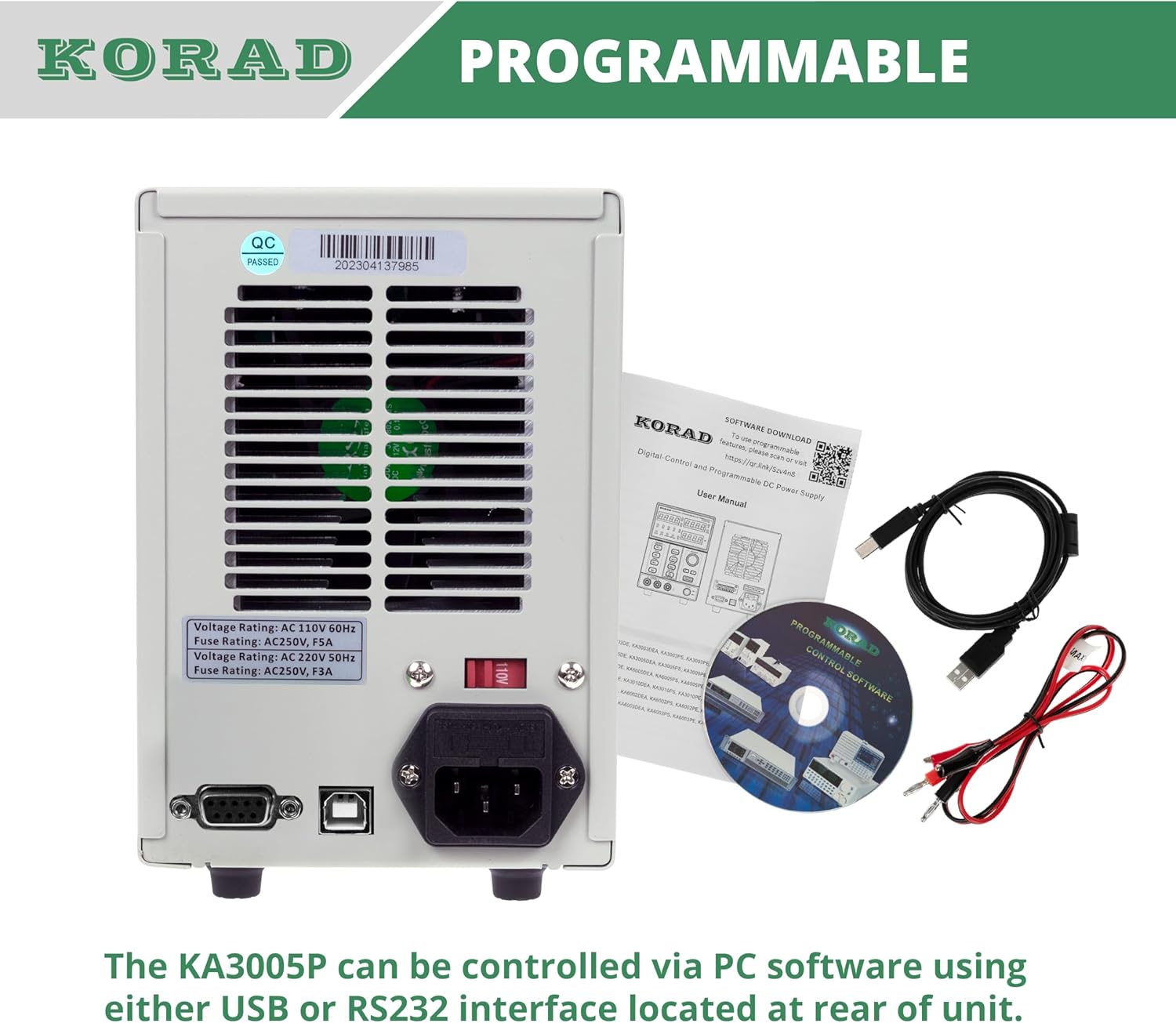
Зураг 5.2: Rear Panel Layout of the KORAD KA3005P. This image displays the rear panel, showing the AC input, voltage selector, cooling fan, and communication ports.
- Хувьсах гүйдлийн оролтын залгуур: Нийлүүлсэн хувьсах гүйдлийн тэжээлийн утсыг холбоход зориулагдсан.
- Ботьtage Сонгогч унтраалга (110V/220V): Allows selection of the appropriate input voltagтанай бүс нутагт e. Ensure this is set correctly before connecting to power.
- Хөргөх сэнс: Automatically adjusts speed based on internal temperature to maintain optimal operating conditions.
- USB порт: For connecting to a computer for programmable control.
- RS232 порт: For connecting to a computer or other devices for programmable control.
- Гал хамгаалагч: Contains the main AC input fuse.
6. Тохиргоо
6.1 Анхны үзлэг
Before connecting the power supply, inspect the unit for any signs of physical damage that may have occurred during shipping. If any damage is found, contact your supplier immediately.
6.2 Setting Input Voltage
Эзлэхүүнийг олохtage selector switch on the rear panel of the unit. Ensure it is set to match your local AC mains voltage (110V эсвэл 220V). Буруу тохиргоо нь төхөөрөмжийг гэмтээж болно.

Зураг 6.1: Rear panel showing the 110V/220V voltage selector switch. This switch must be correctly set to match the local AC power supply before operation.
6.3 Эрчим хүчний холболт
Connect the supplied AC power cord to the AC input socket on the rear panel and then plug it into a grounded wall outlet.
6.4 Гаралтын холболтууд
Connect your load to the output terminals on the front panel using the provided test leads or other suitable leads. Ensure correct polarity: Red for positive (+), Black for negative (-). The green terminal is for chassis ground.
7. Ашиглалтын заавар
7.1 Асаах/унтраах
- дээр дарна уу ХҮЧ button on the front panel to turn the unit ON. The display will illuminate.
- дээр дарна уу ХҮЧ нэгжийг унтраахын тулд дахин товчлуурыг дарна уу.
7.2 Тохиргоо ботьtage ба одоогийн
- дээр дарна уу БОТЬTAGE/CORRENT button to select whether you are adjusting voltage or current. The corresponding display will flash.
- -г ашиглана уу Зүүн/Баруун сум buttons to select the digit you wish to adjust. The selected digit will flash.
- -г эргүүл Setting Adjustment Dial to change the value of the selected digit.
- Нэг удаа хүссэн ботьtage and current limit are set, press the ON/OFF button to enable the output. The ON заагч асах болно.

Зураг 7.1: Close-up of the bright 4-digit LED display. This display provides precise and clear readouts of voltage and current, essential for accurate power delivery.
7.3 Санах ойн функцууд (M1-M4)
The unit allows you to save and recall up to four sets of voltage болон одоогийн тохиргоо.
- Хадгалах: Хүссэн хэмжээгээ тохируулна ууtage and current. Press and hold the desired memory button (M1, M2, M3, or M4) until you hear a beep or the display indicates saving.
- Дахин сануулах: Briefly press the desired memory button (M1, M2, M3, or M4). The saved settings will be loaded.

Зураг 7.2: Close-up of the memory save/recall buttons (M1-M4). These buttons allow users to quickly store and retrieve frequently used voltage болон одоогийн тохиргоо.
7.4 Output ON/OFF Control
The ON/OFF button controls the output power to the terminals independently of the main power switch.
- дарна уу ON/OFF to enable output. The ON заагч асах болно.
- дарна уу ON/OFF again to disable output. The ON заагч унтарна.
- It is recommended to disable the output before connecting or disconnecting loads.
7.5 Түгжих функц
Ашиглалтын явцад тохиргоонд санамсаргүй өөрчлөлт орохоос урьдчилан сэргийлэхийн тулд та урд самбарын удирдлагыг түгжиж болно.
- -г удаан дар А/мА товчлуурыг хэдэн секундын турш дар TOCK indicator illuminates. All front panel controls will be disabled.
- Түгжээг тайлахын тулд товчийг удаан дарна уу А/мА хүртэл дахин товчийг дарна уу TOCK заагч унтарна.
7.6 Over-Current Protection (OCP) and Over-Voltage Хамгаалалт (OVP)
These features protect your connected load and the power supply from damage due to excessive current or voltage.
- Setting OCP/OVP: дээр дарна уу OCP SET or OVP SET товч. -г ашиглана уу Setting Adjustment Dial болон Зүүн/Баруун сум buttons to set the desired protection limit.
- Activating OCP/OVP: дээр дарна уу OCP or OVP button to enable the protection. The corresponding indicator will light up.
- When an OCP or OVP event occurs, the output will automatically shut off, and the respective indicator will flash. To reset, disable the protection or resolve the fault, then press the ON/OFF button to re-enable output.

Зураг 7.3: Close-up of the protection and control buttons. This image highlights the OCP, OVP, and Lock buttons, which are crucial for safe operation and preventing accidental changes.
8. Programmable Control
The KORAD KA3005P can be controlled remotely via a computer using the USB or RS232 ports located on the rear panel.
- Програм хангамж суурилуулах: Insert the provided CD into your computer and follow the on-screen instructions to install the remote control software. Drivers for the USB/RS232 interface may also be included.
- Холболт: Connect the power supply to your computer using the supplied USB cable or an RS232 cable (not included for RS232).
- Програм хангамжийн ажиллагаа: Launch the installed software. Select the correct COM port corresponding to your connected power supply. The software allows you to set voltage, current, enable/disable output, and configure protection limits from your computer. Some software versions may support programmable sequences or data logging.
- Цуврал протокол: For advanced users, the user manual and CD typically contain documentation on the serial communication protocol, allowing for custom software development or integration with other programming environments (e.g., LabVIEW, Python).
Зураг 8.1: Rear panel showing USB and RS232 ports for programmable control. The image also displays the included user manual, USB cable, test leads, and software CD, which facilitate remote operation.
For software downloads or updates, please refer to the official KORAD website or the link provided in the manual (e.g., www.koradtechnology.com).
9. Засвар үйлчилгээ
The KORAD KA3005P is designed for reliable operation with minimal maintenance. Follow these guidelines:
- Цэвэрлэгээ: Цэвэрлэхийн өмнө цахилгаан тэжээлийг цахилгаан тэжээлээс салга. Гадна талыг зөөлөн, хуурай даавуугаар арчина. Зүлгүүрийн цэвэрлэгч эсвэл уусгагч хэрэглэж болохгүй.
- Агааржуулалт: Ensure the ventilation openings on the sides and rear of the unit are free from dust and obstructions. Periodically clean the fan vents with compressed air if necessary.
- Гал хамгаалагч солих: If the unit does not power on, check the fuse located in the fuse holder on the rear panel. Replace only with a fuse of the same type and rating (e.g., 5A/250V for 110V input, 3A/250V for 220V input). Always disconnect the power cord before replacing the fuse.
- Хадгалах: Удаан хугацаагаар ашиглаагүй тохиолдолд төхөөрөмжийг сэрүүн, хуурай газар, нарны шууд тусгал болон хэт өндөр температураас хол хадгална уу.
10. Алдаа засах
If you encounter issues with your KORAD KA3005P, refer to the following common problems and solutions:
| Асуудал | Боломжит шалтгаан | Шийдэл |
|---|---|---|
| Төхөөрөмж асахгүй байна. | Хувьсах гүйдлийн хүчдэл байхгүй; Гал хамгаалагч шатсан; Буруу дуугаралтtage сонгогчийн тохиргоо. | Check power cord connection and wall outlet. Replace fuse if blown. Verify voltage selector (110V/220V) on rear panel is correct. |
| Гаралтын эзлэхүүн байхгүйtagд/гүйдэл. | Output is OFF; OCP/OVP triggered; Short circuit at output. | дээр дарна уу ON/OFF button to enable output. Check if OCP/OVP indicators are flashing; resolve fault and reset. Check for short circuits in the load or test leads. |
| Гаралтын ботьtage/current is unstable. | Poor load connection; Overheating; Faulty test leads. | Ensure secure connections to the load. Check ventilation and allow unit to cool. Inspect and replace test leads if damaged. |
| Дэлгэц нь буруу уншилтыг харуулж байна. | Calibration issue; External interference. | If readings are consistently inaccurate, contact support for calibration. Minimize external electromagnetic interference. |
| Software communication issues. | Incorrect COM port; Driver issues; Software incompatibility. | Verify COM port selection in software. Reinstall USB/RS232 drivers. Ensure software version is compatible with your operating system. Refer to software documentation. |
If the problem persists after attempting these solutions, please contact KORAD customer support.
11. Техникийн үзүүлэлтүүд
Technical specifications for the KORAD KA3005P Programmable DC Power Supply:

Зураг 11.1: KORAD KA3005P Unit Specifications. This image provides a visual summary of the key technical parameters of the power supply.
| Параметр | Үнэ цэнэ |
|---|---|
| Ботьtage Хамрах хүрээ | 0-30 В |
| Одоогийн хүрээ | 0-5A |
| Ачааллын зохицуулалт (Боть)tage) | ≤0.01% + 2мВ |
| Ачааллын зохицуулалт (Одоогийн) | ≤0.1% + 10мА |
| Line Regulation (Voltage) | ≤0.01% + 3мВ |
| Line Regulation (Current) | ≤0.1% + 3мА |
| Setup Resolution (Voltage) | 10мкв |
| Setup Resolution (Current) | 1мА |
| Setup Accuracy (25°C ± 5°C) (Voltage) | ≤0.5% + 20мВ |
| Setup Accuracy (25°C ± 5°C) (Current) | ≤0.5% + 10мА |
| Ripple (20-20M) (Voltage) | ≤2mVrms |
| Ripple (20-20M) (Current) | M2мАрм |
| Температурын коэффициент (Ботьtage) | ≤150ppm |
| Temperature Coefficient (Current) | ≤150ppm |
| Read Back Resolution (Voltage) | 10мкв |
| Read Back Resolution (Current) | 1мА |
| Reaction Time (Voltage Rise) | ≤100mS (Voltage Дусал) |
| Интерфэйс | Programmable (USB, RS232) |
| Жин | 9.52 фунт / 4.32 кг |
| Хэмжээ (Ө x Ө x D) | 100мм (W) x 156mm (H) x 260mm (D) |
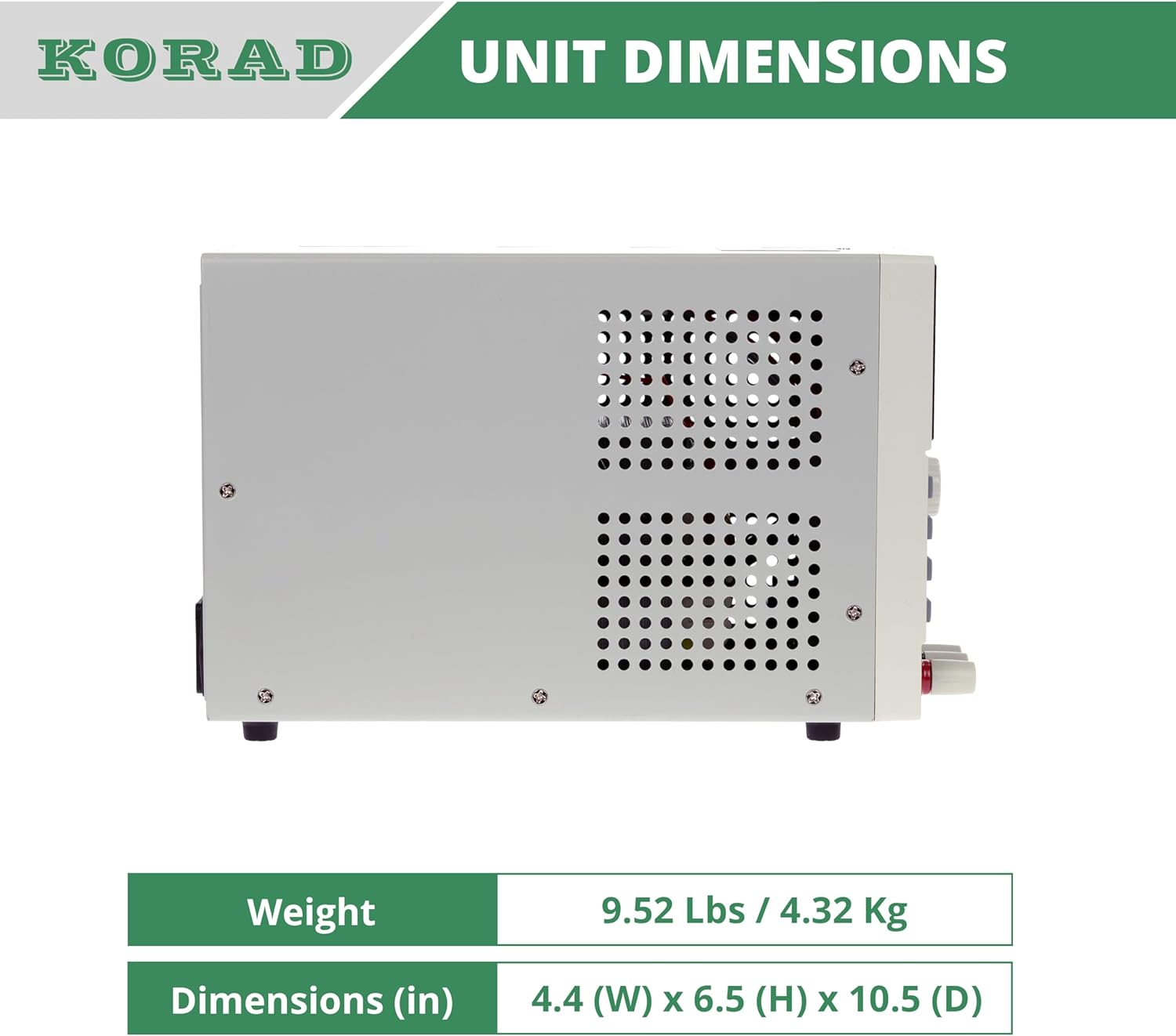
Зураг 11.2: Хажуу тал view of the KORAD KA3005P, illustrating its physical dimensions. The unit measures 4.4 inches (W) x 6.5 inches (H) x 10.5 inches (D).
12. Баталгаат хугацаа ба дэмжлэг
KORAD products are manufactured to high quality standards. For warranty information and technical support, please refer to the documentation included with your purchase or visit the official KORAD webсайт.
- Баталгаат хугацаа: Баталгаат хугацааны нэхэмжлэл гаргахын тулд худалдан авалтын баримтаа хадгална уу. Баталгаат хугацааны нөхцөл, болзол нь бүс нутгаас хамаарч өөр өөр байж болно.
- Техникийн дэмжлэг: For technical assistance, troubleshooting beyond this manual, or service inquiries, please contact KORAD customer support through their official channels.
- Онлайн нөөцүүд: Check the KORAD website for updated manuals, software, and FAQs.


