1. Танилцуулга
Thank you for choosing the TFA 30.5027.02 Digital Thermometer/Hygrometer. This device is designed to accurately measure and display indoor temperature and humidity, providing a clear indication of the comfort level in your environment. Its ultra-flat design and high-gloss surface make it a discreet and functional addition to any room. Please read this manual carefully to ensure proper setup and operation.
2. Аюулгүй байдлын мэдээлэл
- Энэ заавар гарын авлагыг цаашид лавлах зорилгоор хадгална уу.
- Энэ төхөөрөмж нь зөвхөн дотор ашиглах зориулалттай.
- Do not expose the device to extreme temperatures, direct sunlight, moisture, or strong vibrations.
- Төхөөрөмжийг ус болон бусад шингэнд дүрж болохгүй.
- Do not attempt to open or modify the device. This will void the warranty.
- Батерейг хүүхдэд хүрэхгүй газар хадгална уу. Хэрэв залгисан бол яаралтай эмнэлгийн тусламж авах хэрэгтэй.
- Ашигласан батерейг орон нутгийн дүрэм журмын дагуу устгана уу.
- Төхөөрөмжийг зөөлөн, damp даавуу. Зүлгүүрийн цэвэрлэгч, уусгагчийг бүү ашигла.
3. Багцын агуулга
Бүх бүрэлдэхүүн хэсгүүд байгаа бөгөөд гэмтэлгүй эсэхийг шалгана уу:
- 1x TFA 30.5027.02 Digital Thermometer/Hygrometer
- 1x CR2 Lithium Battery (pre-installed or separate)
- 1х зааварчилгааны гарын авлага (энэ баримт бичиг)
4. Бүтээгдэхүүн дууссанview
The TFA 30.5027.02 features a clear digital display showing current temperature and humidity. It also includes a comfort level indicator and a maximum/minimum value memory function.

Зураг 1: Урд view of the TFA 30.5027.02 Digital Thermometer/Hygrometer. The display shows temperature in Celsius and relative humidity percentage, along with a comfort level icon.
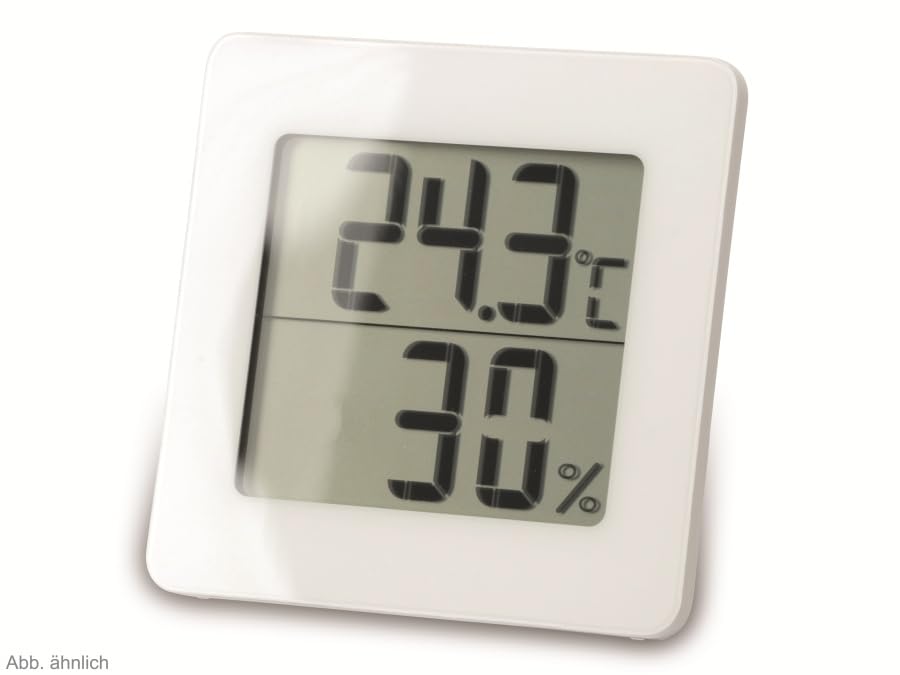
Зураг 2: Өөр view of the TFA 30.5027.02 showing different temperature and humidity readings, demonstrating the device's clear digital display.
Гол онцлогууд:
- Digital display for temperature (°C) and humidity (% RH)
- Ultra-flat design with high-gloss finish
- Comfort level indicator (smiley icon)
- Maximum and minimum value memory function
- Хананд суурилуулах боломжтой
5. Тохиргоо
5.1 Батерей суурилуулах
- Төхөөрөмжийн арын хэсэгт зайны тасалгааны тагийг олоорой.
- Тагийг нь гулсуулж эсвэл зөөлөн онгойлгож ав.
- Insert one CR2 Lithium battery, ensuring the correct polarity (+/-) as indicated inside the compartment.
- Зайны тасалгааны тагийг найдвартай солино.
- The device display should activate, showing current temperature and humidity readings.
5.2 Анхны байршуулалт
For accurate readings, place the thermometer/hygrometer in a location free from direct sunlight, drafts, or heat sources. The device can be placed on a flat surface or mounted on a wall using the integrated mounting hole on the back.
- Хананд суурилуулах: Use a small screw (not included) suitable for your wall type. Hang the device securely.
- Ширээний тавцангийн байршил: Ensure the device is stable on a flat, level surface.
6. Ашиглалтын заавар
6.1 Дээд дэлгэцview
The large digital display shows two main values:
- Дээд дэлгэц: Current temperature in degrees Celsius (°C).
- Доод дэлгэц: Одоогийн харьцангуй чийгшил (хувиар)tage (% НҮЭМ).
- Тав тухтай байдлын үзүүлэлт: A small icon (e.g., a smiley face) indicates the current indoor climate comfort level based on temperature and humidity.
6.2 Макс/мин функц
The device records the maximum and minimum temperature and humidity values measured since the last reset. To access these values:
- дээр дарна уу MAX/MIN button (if present, typically on the back or side). The display will show the maximum recorded temperature and humidity.
- дээр дарна уу MAX/MIN дахин товчийг дарна уу view бүртгэгдсэн хамгийн бага температур ба чийгшил.
- дээр дарна уу MAX/MIN button a third time to return to current readings.
To reset the MAX/MIN values, press and hold the MAX/MIN button for a few seconds while viewing the MAX or MIN values. The memory will clear, and new maximum and minimum values will begin recording from that point.
6.3 Тав тухтай байдлын түвшний үзүүлэлт
The comfort level indicator provides a quick visual reference for indoor climate conditions:
- Баяр хөөртэй царай: Хамгийн тохиромжтой тав тухыг илтгэнэ (жишээ нь, 20-25°C ба 40-70% чийгшил).
- Төвийг сахисан царай: Хүлээн зөвшөөрөгдөх боловч оновчтой биш нөхцөл байдлыг заана.
- Гунигтай царай: Indicates uncomfortable conditions (e.g., too dry, too humid, too hot, or too cold).
Note: Specific ranges for comfort levels may vary slightly by model. Refer to the device's display for the exact icon representation.
7. Засвар үйлчилгээ
7.1 Цэвэрлэгээ
Төхөөрөмжийг зөөлөн, бага зэрэг цэвэрлэнэ damp cloth. Do not use abrasive cleaning agents, solvents, or alcohol, as these can damage the surface and display.
7.2 Батерейг солих
When the battery power is low, a low battery indicator (if available) will appear on the display. Replace the battery as follows:
- Төхөөрөмжийн арын хэсэгт байрлах зайны тасалгааны тагийг нээнэ үү.
- Хуучин CR2 литийн батерейг салга.
- Insert a new CR2 Lithium battery, observing the correct polarity (+/-).
- Зайны тасалгааны тагийг хаа.
Note: After battery replacement, the device may reset, and MAX/MIN values will be cleared.
8. Алдаа засах
| Асуудал | Боломжит шалтгаан | Шийдэл |
|---|---|---|
| Дэлгэц байхгүй эсвэл бүдэг дэлгэц | Батерей дууссан эсвэл буруу оруулсан байна. | Replace the battery with a new CR2 Lithium battery, ensuring correct polarity. |
| Буруу уншилтууд | Device is placed in an unsuitable location (e.g., near a window, heat source, or vent). | Relocate the device to a stable indoor environment away from direct influences. Allow 15-30 minutes for readings to stabilize. |
| Comfort indicator always shows the same face | Environmental conditions are consistently outside or within a specific comfort range. | This indicates the device is functioning correctly. Adjust your indoor environment if desired. |
9. Техникийн үзүүлэлтүүд
- Загварын дугаар: 30.5027.02
- Брэнд: TFA
- Өнгө: Цагаан
- Бүтээгдэхүүний хэмжээс (L x W x H): 10 x 1.2 x 8.2 см (3.94 x 0.47 x 3.23 инч)
- Барааны жин: 70 грамм (2.47 унц)
- Зай: 1 x CR2 Lithium (included)
- Суурилуулах төрөл: Ханын бэхэлгээ
- Operational Humidity Range: 20% - 95% RH
- Upper Rated Temperature: 50°C (122°F)
- Температурын нарийвчлал: ±1°C
- Температурыг унших нарийвчлал: ±1°C
10. Баталгаат хугацаа ба дэмжлэг
For warranty information and customer support, please refer to the terms and conditions provided by your retailer or contact the manufacturer directly. Keep your proof of purchase for any warranty claims.
Үйлдвэрлэгч: TFA Dostmann GmbH & Co. KG
For further assistance, please visit the official TFA webсайт эсвэл харилцагчийн үйлчилгээний хэлтэстэй холбогдоно уу.


