Танилцуулга
The Intermatic TN111RM40 is a mechanical 24-hour timer designed for controlling lamps and small appliances. This timer allows for up to two ON and two OFF events per day, making it suitable for automating various electrical devices, including landscape lighting systems. It features a 2-prong polarized outlet and a manual override function. The timer is housed in a 3R enclosure, indicating its suitability for outdoor use.
This manual provides instructions for the safe and effective operation of your Intermatic TN111RM40 timer.
Аюулгүй байдлын мэдээлэл
- Хэрэглэхийн өмнө бүх зааврыг уншина уу.
- Усанд дүрж болохгүй.
- Ensure the timer is unplugged before making any adjustments or cleaning.
- Таймерын цахилгаан үзүүлэлтээс хэтрүүлж болохгүй.
- This timer is designed for use with 2-prong polarized plugs only.
Бүтээгдэхүүн дууссанview
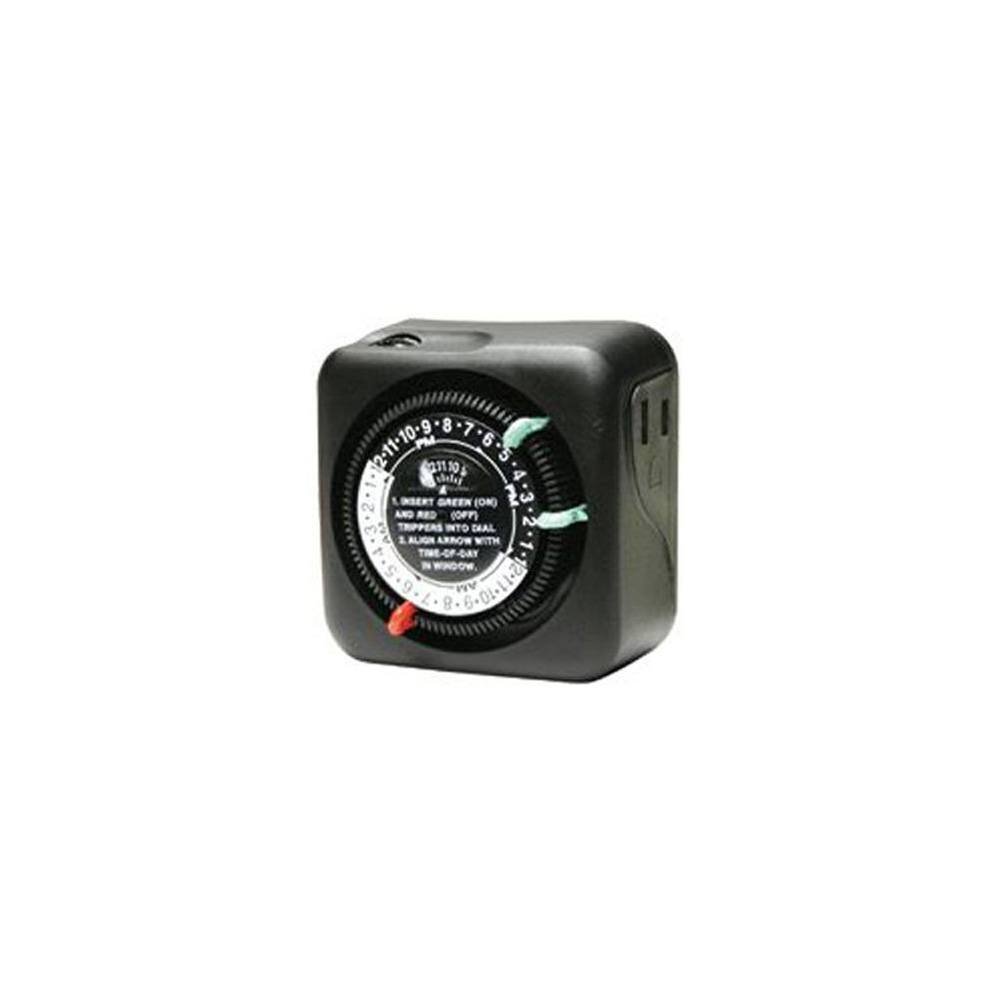
Зураг 1: Урд view of the Intermatic TN111RM40 timer, highlighting the 24-hour dial, green (ON) and red (OFF) trippers, and the time-of-day window. The image also shows the product dimensions: 3 inches deep, 4 inches wide, and 3 inches high.
The Intermatic TN111RM40 timer features a rotating 24-hour dial with markings for AM and PM. It includes removable trippers (pins) for setting ON and OFF times, a manual override switch, and a single 2-prong polarized outlet.
Тохиргоо
- Таймерыг задлах: Carefully remove the timer from its packaging. Inspect for any damage.
- Бүрэлдэхүүн хэсгүүдийг тодорхойлох: Locate the green (ON) trippers and red (OFF) trippers. These are small pins that insert into the dial.
- Одоогийн цагийг тохируулах:
- Rotate the entire dial clockwise until the current time aligns with the "TIME-OF-DAY" arrow in the window. Ensure to distinguish between AM and PM hours.
- Insert ON/OFF Trippers:
- Insert the green (ON) trippers into the dial at the desired times you want the connected appliance to turn ON.
- Insert the red (OFF) trippers into the dial at the desired times you want the connected appliance to turn OFF.
- The timer supports up to two ON and two OFF settings per 24-hour period.
- Таймерыг залгана уу: Plug the timer into a standard 2-prong wall outlet.
- Төхөөрөмжийг холбох: l-г залгаарайamp or small appliance into the 2-prong polarized outlet on the side of the timer. Ensure the appliance is switched to the ON position if it has its own power switch.
Ашиглалтын заавар
Once set up, the timer will automatically turn your connected appliance ON and OFF according to the programmed times. The dial will continuously rotate clockwise, indicating the passage of time.
Гараар хүчингүй болгох
The Intermatic TN111RM40 includes a manual override feature. This allows you to temporarily turn the connected appliance ON or OFF without disturbing the programmed schedule.
- To manually turn the appliance ON or OFF, locate the manual override switch (often a small lever or button) on the timer.
- Toggle the switch to the desired position. The timer will resume its programmed schedule at the next ON or OFF event.
Засвар үйлчилгээ
- Цэвэрлэгээ: Disconnect the timer from the power outlet before cleaning. Wipe the exterior with a soft, damp даавуу. Зүлгүүрийн цэвэрлэгч, уусгагчийг бүү ашигла.
- Хадгалах: Хэрэв таймерыг удаан хугацаагаар хадгалах бол цэвэр, хуурай эсэхийг шалгаарай. Нарны шууд тусгалаас хол, сэрүүн, хуурай газар хадгална.
- Шалгалт: Periodically inspect the timer and its cord for any signs of wear or damage. If damage is found, discontinue use and replace the unit.
Алдааг олж засварлах
| Асуудал | Боломжит шалтгаан | Шийдэл |
|---|---|---|
| Төхөөрөмж програмчлагдсан цагт асахгүй/унтрахгүй. |
|
|
| Цаг хэмжигч эргэхгүй байна. |
|
|
Үзүүлэлтүүд
- Загвар: TN111RM40
- Брэнд: Интерматик
- Төрөл: 24 цагийн механик таймер
- Тохиргоо: Up to 2 ON/OFF events per day
- Гаралтын төрөл: 2-Prong Polarized
- Хаалт: 3R (Suitable for outdoor use)
- Өнгө: Хар
- Материал: Хуванцар
- Бүтээгдэхүүний хэмжээ: 3" (Depth) x 4" (Width) x 3" (Height)
- Барааны жин: 5.3 унц
- UPC: 702811361973
Баталгаат болон дэмжлэг
For warranty information or technical support, please refer to the official Intermatic webсайт эсвэл харилцагчийн үйлчилгээний хэлтэстэй холбогдоно уу. Баталгаат зарга авахын тулд худалдан авалтын баримтаа хадгална уу.
Intermatic Customer Support: www.intermatic.com/support


