Танилцуулга
This manual provides essential information for the safe and efficient operation of your APC SMT1500J Smart-UPS 1500VA LCD 100V. The Smart-UPS is an Uninterruptible Power Supply (UPS) designed to protect electronic equipment from power outages, sags, surges, and other power disturbances. Please read this manual thoroughly before installation and use.
Аюулгүй байдлын мэдээлэл
Observe all safety warnings and instructions in this manual. The UPS contains internal batteries and can present a shock hazard even when disconnected from the AC power source. Do not disassemble or modify the unit. This product is heavy; use proper lifting techniques or assistance when moving.

Зураг 1: Арын самбар дээшview. This image displays the rear panel of the APC SMT1500J Smart-UPS. It features USB and Serial communication ports, multiple output receptacles (Group 1), a main power input, a battery connector (with a note about disconnecting during transport), and an overload protection reset button. Safety warnings indicate a risk of electric shock if disassembled or modified, and a weight warning for items over 18kg (40lbs).
Тохиргоо
- Савлах: Carefully unpack the UPS and inspect it for any shipping damage. Retain the packaging for future use.
- Зайны холболт: Connect the internal battery. Refer to the battery connection instructions provided with the unit. Ensure the battery connector is securely fastened.
- Байршил: Place the UPS in a location with adequate airflow, away from direct sunlight, excessive heat, or moisture.
- Connecting to Utility Power: Plug the UPS power cord into a grounded 100V AC outlet.
- Холбох төхөөрөмж: Connect your devices to the output receptacles on the rear panel. For critical equipment, use the designated 'Group A' outlets if applicable.

Figure 2: Output Group Function. This diagram demonstrates the 'Output Group Function' which allows independent control of power to connected devices. Group A is for important products, while Group B is for less critical products. During a power outage, power to Group B can be cut to efficiently allocate capacity to Group A, extending runtime for essential equipment.
Ашиглалтын заавар
- Асаах/унтраах: Press the power button on the front panel to turn the UPS on or off.
- LCD дэлгэц: The LCD provides real-time status information, including input/output voltagд, зайны цэнэгийн түвшин, ачааллын хувьtage, and estimated runtime. Navigate through the display options using the control buttons.
- Цэвэр синус долгионы гаралт: The SMT1500J provides a pure sine wave output, ensuring compatibility with sensitive electronic equipment.

Figure 3: Pure Sine Wave Output. This image illustrates the pure sine wave output capability of the APC Smart-UPS. The graphic shows a smooth sine wave, signifying that the UPS provides high-quality power suitable for sensitive electronic equipment.
- Автомат ботьtage Зохицуулалт (AVR): UPS нь бага хэмжээний дууг автоматаар засдагtagБатерейны цэнэгийг ашиглахгүйгээр хэлбэлзэл нь батерейны ашиглалтын хугацааг уртасгадаг.
- Ногоон горим: This feature optimizes energy efficiency by bypassing the internal AVR when utility power is stable, reducing power consumption and operating costs.

Figure 4: Green Mode Efficiency. This image highlights the 'Green Mode' feature, designed to reduce electricity costs. It shows a comparison where Smart-UPS with Green Mode reduces power consumption by 24-43% compared to older models without this feature. The actual reduction rate varies depending on the Smart-UPS capacity.
- Ухаалаг батерейны удирдлага: The UPS features intelligent battery monitoring to ensure precise charging management, maximizing battery capacity, lifespan, and reliability.

Figure 5: Intelligent Battery Management. This image highlights the automatic voltage control and intelligent battery monitoring features. The text explains that precise charging management maximizes battery capacity, lifespan, and reliability, preventing battery degradation.
- Network Management (Optional): For advanced monitoring and control, an optional Network Management Card (NMC) can be installed. This allows for remote monitoring and safe shutdown of connected equipment via PowerChute software.

Figure 6: Network Management Overview. This diagram illustrates how an optional Network Management Card (NMC) can be used with PowerChute software to enable secure remote monitoring and control of the UPS over a network. It also allows for safe shutdown during power outages.
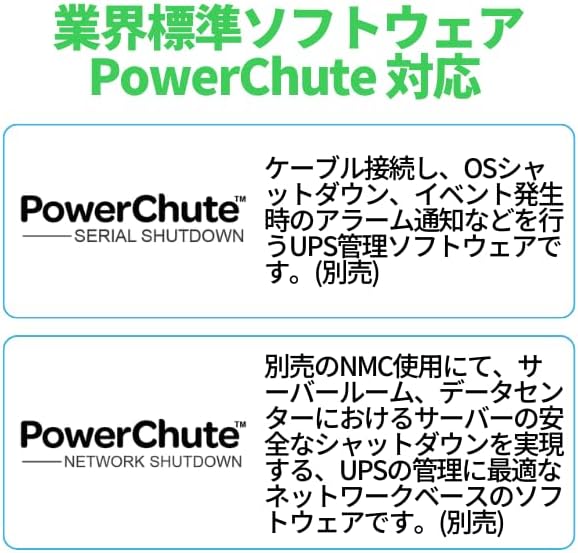
Figure 7: PowerChute Software. This image describes the industry-standard PowerChute software. It explains that PowerChute (Serial Shutdown) is UPS management software that handles cable connection, OS shutdown, and alarm notifications during events. PowerChute (Network Shutdown), when used with an optional NMC, is network-based software ideal for UPS management, enabling safe shutdown of servers in server rooms and data centers.
Засвар үйлчилгээ
- Батерейны арчилгаа: The UPS performs automatic battery self-tests. Replace the battery when indicated by the UPS or after its expected service life (typically 3-5 years). Refer to APC's official documentation for battery replacement procedures.
- Цэвэрлэгээ: Keep the UPS clean and free of dust. Use a dry cloth to wipe the exterior. Do not use liquid cleaners or solvents.
- Агааржуулалт: Ensure that the ventilation openings on the UPS are not blocked to prevent overheating.
Алдааг олж засварлах
If the UPS is not operating correctly, consult the following basic troubleshooting steps:
- Эрчим хүчгүй: Ensure the UPS is plugged into a live AC outlet and the power button is pressed. Check the circuit breaker.
- Батерейг цэнэглэхгүй байна: Verify the battery is properly connected. Allow the UPS to charge for at least 24 hours after initial installation or a deep discharge.
- Хэт ачааллын дохиолол: If an overload alarm sounds, disconnect non-essential equipment from the UPS outlets. Press the overload protection reset button on the rear panel if necessary.
- Consult LCD: The LCD display often provides error codes or messages that can help diagnose issues. Refer to the full user manual for a complete list of error codes.
Үзүүлэлтүүд
| Онцлог | Тодорхойлолт |
|---|---|
| Загварын дугаар | SMT1500J |
| Брэнд | APC |
| Ботьtage | 100 вольт |
| Ampарилгах | 15 А |
| Зүйлийн жин | 62.000 фунт (28.12 кг) |
| Бүтээгдэхүүний хэмжээ (LxWxH) | 6.77 x 17.28 x 8.86 инч |
| UPC | 731304290889 |
Баталгаат хугацаа
APC products typically come with a standard warranty. For specific warranty terms and conditions applicable to your SMT1500J Smart-UPS, please refer to the warranty card included with your product or visit the official APC webсайт. Баталгаат нэхэмжлэл гаргахын тулд худалдан авалтаа нотлох баримтаа хадгалаарай.
Дэмжлэг
For technical assistance, troubleshooting beyond this manual, or to inquire about replacement parts, please contact APC Customer Support. You can find contact information and additional resources on the official APC webсайт эсвэл зочилно уу Амазон дээрх APC дэлгүүр.


