Танилцуулга
The Korg TMR-50 is a versatile device designed to assist musicians in improving their pitch and rhythm. It integrates a tuner, metronome, and recorder into a single compact unit. These three functions can be used independently or simultaneously, offering comprehensive support for practice and performance. The TMR-50 also features high-quality linear PCM recording, allowing up to 100 tracks to be stored, and a USB port for easy data transfer to a computer. With its built-in microphone, speaker, and various rhythm variations, the TMR-50 is an essential tool for any musician.
Аюулгүй байдлын урьдчилан сэргийлэх арга хэмжээ
- Do not expose the unit to extreme temperatures, direct sunlight, high humidity, or dusty environments.
- Нэгжийг унагах эсвэл хүчтэй цохилтонд оруулахаас зайлсхий.
- Төхөөрөмжийг задлах, өөрчлөхийг бүү оролдоорой. Бүх үйлчилгээг мэргэшсэн боловсон хүчинд шилжүүлээрэй.
- Зөвхөн заасан төрлийн батерей (AAA) ашиглаж, суурилуулах явцад зөв туйлшралыг шалгаарай.
- Хэрэв төхөөрөмжийг удаан хугацаагаар ашиглахгүй бол ус гоожихоос сэргийлж зайгаа салга.
- Keep the unit away from sources of strong electromagnetic interference.
Багцын агуулга
Таны багцад дараах зүйлс байгаа эсэхийг шалгана уу.
- Korg TMR-50 Tuner Metronome Recorder unit
- 2 x AAA batteries (for initial use)
- Хэрэглэгчийн гарын авлага (энэ баримт бичиг)
Хэсгийн нэр ба функцууд
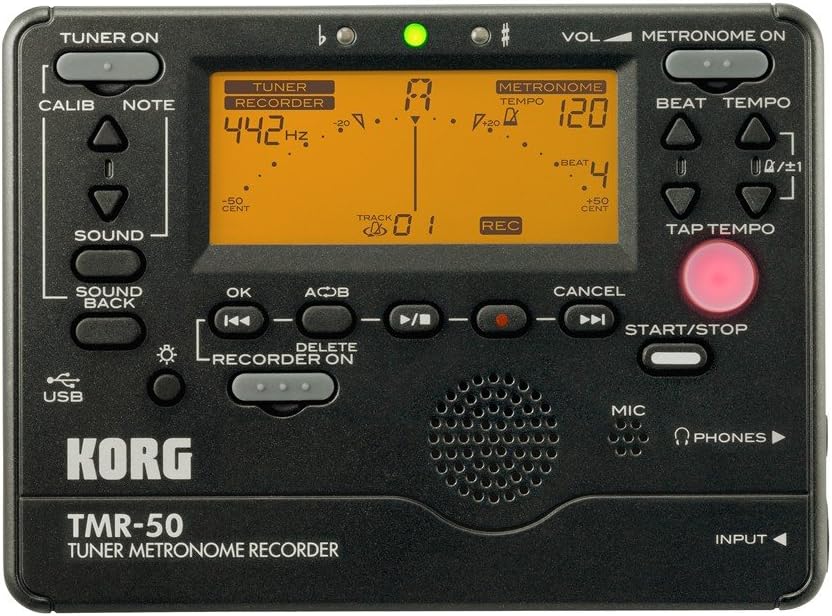
Зураг 1: Урд самбар дээрview of the Korg TMR-50, showing all controls and the display.
Тохируулагчийн удирдлага
- TUNER ON Button: Activates or deactivates the tuner function.
- CALIB Button: Adjusts the calibration frequency (standard is 440Hz, often adjustable to 442Hz as shown).
- NOTE Buttons (Up/Down Arrows): Selects the target note for tuning.
- SOUND Button: Activates the Sound Out function, which outputs a reference tone from the internal speaker.
- SOUND BACK Button: Engages the Sound Back function, allowing the unit to detect the input pitch and output the closest correct pitch for comparison.
Метрономын удирдлага
- METRONOME ON Button: Activates or deactivates the metronome function.
- VOL (Volume) Slider: Adjusts the output volume of the metronome and other audio.
- BEAT Buttons (Up/Down Arrows): Adjusts the number of beats per measure.
- TEMPO Buttons (Up/Down Arrows): Adjusts the metronome tempo in beats per minute (BPM).
- TAP TEMPO товч: Allows you to set the tempo by tapping the button in time with the desired beat.
Recorder Controls
- RECORDER ON Button: Activates the recorder function.
- REC Button (Red Dot): Initiates recording when the recorder is active.
- OK товчлуур: Сонголт эсвэл үйлдлийг баталгаажуулна.
- Rewind/Fast Forward Buttons (Double Arrows): Navigates through recorded tracks or within a track.
- Play/Pause Button (Triangle/Two Vertical Bars): Starts or pauses playback of a recorded track.
- Stop Button (Square): Тоглуулах эсвэл бичлэг хийхийг зогсооно.
- A<->B Button: Sets a loop playback region within a recorded track.
- УСТГАХ товч: Deletes selected recorded tracks.
- START/STOP товч: A general control for starting and stopping various functions, including recording and metronome.
Дэлгэц ба үзүүлэлтүүд
- LCD дэлгэц: Shows tuning information (note, cent deviation, calibration), metronome tempo and beat, and recorder track number and status.
- Flat (b) / Sharp (#) Indicators: Lights up to indicate if the detected pitch is flat or sharp.
- Ногоон заагч гэрэл: Illuminates when the detected pitch is in tune.
Input/Output and Other Features
- MIC (Микрофон): Built-in microphone for recording and tuning.
- PHONES (Headphone Jack): Output for connecting headphones.
- INPUT Jack: Input for connecting an external microphone or instrument pickup.
- USB порт: For connecting to a computer to transfer recorded data.
- Илтгэгч: Built-in speaker for metronome clicks, reference tones, and playback.
Тохиргоо
Батерей суурилуулах
- Төхөөрөмжийн арын хэсэгт байрлах зайны тасалгааны тагийг нээнэ үү.
- Тасалгааны дотор талд заасанчлан зөв туйлшралыг (+/-) хангаж, хоёр (2) AAA батерейг оруулна уу.
- Зайны тасалгааны тагийг сайтар хаа.
Асаах/унтраах
- Асаахын тулд товчлуурыг удаан дарна уу TUNER ON or METRONOME ON товчийг нэг секунд орчим дарна уу.
- Унтраахын тулд the товчийг удаан дарна уу TUNER ON or METRONOME ON button again for approximately one second. The unit will also automatically power off after a period of inactivity to conserve battery life.
Operating the Tuner
- дээр дарна уу TUNER ON button to activate the tuner. The display will show tuning information.
- Adjust the calibration frequency using the CALIB button if needed. The default is typically 440Hz, but can be set to 442Hz or other values.
- Play a single note on your instrument. The TMR-50 will detect the pitch via its built-in microphone or an external input.
- Дэлгэцийг ажиглаарай:
- The note name will be displayed.
- The meter indicates pitch deviation. Adjust your instrument until the meter is centered and the green indicator light illuminates.
- The 'b' (flat) or '#' (sharp) indicators will light up if the pitch is significantly off.
- -г ашиглана уу ДУУ button to output a reference pitch for ear training.
- -ийг оролцуулах SOUND BACK function to hear the closest correct pitch while you play, aiding in intonation practice.
Operating the Metronome
- дээр дарна уу METRONOME ON товчлуурыг дарж метрономыг идэвхжүүлнэ.
- ашиглан хурдыг тохируулна уу ТЕМПО Up/Down arrow buttons. The tempo range is typically from 30 to 252 BPM.
- Set the desired beat pattern using the ЗОХИОХ Up/Down arrow buttons. This controls the number of beats per measure and rhythm variations.
- Эсвэл, ашиглана уу Цорго TEMPO button to set the tempo by tapping it at your desired speed.
- дээр дарна уу START/STOP button to begin or end the metronome click.
- Adjust the metronome volume using the БОТЬ гулсагч.
Дуу хураагуурыг ажиллуулах
- дээр дарна уу RECORDER ON button to enable the recording function.
- Бичлэг хийж эхлэхийн тулд товчийг дарна уу REC button (red dot). The display will show "REC" and the track number.
- Play your instrument or sing into the built-in microphone.
- Бичлэгийг зогсоохын тулд дарна уу ЗОГС товч.
- To play back a recorded track:
- Use the Rewind/Fast Forward buttons to select the desired track.
- дээр дарна уу Тоглуулах/түр зогсоох тоглуулж эхлэх товчлуур.
- дээр дарна уу ЗОГС тоглуулахыг дуусгах товчийг дарна уу.
- To use the Loop Play function:
- Тоглуулах явцад товчийг дарна уу А<->Б button at the desired start point (A).
- дээр дарна уу А<->Б button again at the desired end point (B). The section between A and B will loop continuously.
- дарна уу А<->Б a third time to cancel the loop.
- To delete a track:
- Select the track you wish to delete using the Rewind/Fast Forward buttons.
- дээр дарна уу УСТГАХ товч.
- Confirm the deletion if prompted (usually by pressing OK).
Компьютерт холбогдох
The TMR-50 features a USB port for transferring recorded audio files to your computer. Connect the unit to your computer using a standard USB cable (not included). The device should appear as a removable storage device, allowing you to copy files. Refer to your computer's operating system instructions for managing external storage devices.
Засвар үйлчилгээ
- Төхөөрөмжийг зөөлөн, хуурай даавуугаар цэвэрлэ. Зүлгүүрийн цэвэрлэгч, уусгагчийг бүү ашигла.
- Хэрэв төхөөрөмжийг удаан хугацаагаар ашиглахгүй бол гоожиж, зэврэхээс сэргийлж батерейг нь салгаж авна уу.
- Төхөөрөмжийг нарны шууд тусгалаас хол, сэрүүн, хуурай газар хадгална.
Алдааг олж засварлах
| Асуудал | Боломжит шалтгаан / шийдэл |
|---|---|
| Төхөөрөмж асахгүй байна. |
|
| Тохируулагч буруу эсвэл хариу өгөхгүй байна. |
|
| Метрономын дуу хэт нам эсвэл байхгүй байна. |
|
| Recorded audio is too quiet or distorted. |
|
| Шилжүүлэх боломжгүй fileUSB-ээр дамжуулан. |
|
Үзүүлэлтүүд
| Онцлог | Дэлгэрэнгүй |
|---|---|
| Загварын дугаар | TMR-50 |
| Хэмжээ (W x D x H) | 5.2 x 5.2 x 1.3 инч (ойролцоогоор) |
| Жин | 6.7 унц (батерейг эс тооцвол) |
| Эрчим хүчний хангамж | 2 x AAA батерей |
| Тохируулагчийн хүрээ | A0 (27.50 Гц) - C8 (4186.01 Гц) |
| Шалгалт тохируулгын хүрээ | A4 = 410 – 480 Hz |
| Метрономын хэмнэлийн хүрээ | 30 - 252 BPM |
| Metronome Beat Settings | 0 – 9 beats, duplets, triplets, quadruplets, etc. (15 variations) |
| Бичлэгийн формат | Linear PCM (WAV) |
| Бичлэг хийх чадвар | Up to 100 tracks (approx. 20 minutes total) |
| Оролт/гаралт | INPUT jack (mono), PHONES jack (stereo), USB port (Type B) |
Баталгаат болон дэмжлэг
For warranty information and technical support, please refer to the warranty card included with your product or visit the official Korg website. Keep your proof of purchase for warranty claims. Do not attempt to repair the unit yourself, as this may void your warranty.
Official Korg Webсайт: www.korg.com


