Танилцуулга
This manual provides detailed instructions for the operation and maintenance of your PENTAX Q10 digital interchangeable lens camera. The PENTAX Q10 is a super-compact and lightweight camera designed to deliver high-quality photography with a 12.4MP CMOS image sensor and improved autofocus performance.
Хайрцагт юу байна
- PENTAX Q10 Camera Body
- 02 Standard Zoom Lens (5-15mm)
- Цэнэглэдэг лити-ион батерей
- Зай цэнэглэгч
- USB кабель
- Оосор
- Биеийн бэхэлгээний таг
- Линзний таг (урд ба хойд)
- Програм хангамжийн CD-ROM
- Хэрэглэх заавар (энэ баримт бичиг)
Камер дууссанview

Зураг 1: Урд View (Lens Removed) - This image displays the front of the Pentax Q10 camera body with the lens detached, revealing the image sensor and the Q-mount for interchangeable lenses. The 'PENTAX' logo is visible at the top, and 'SR' (Shake Reduction) is indicated on the grip.
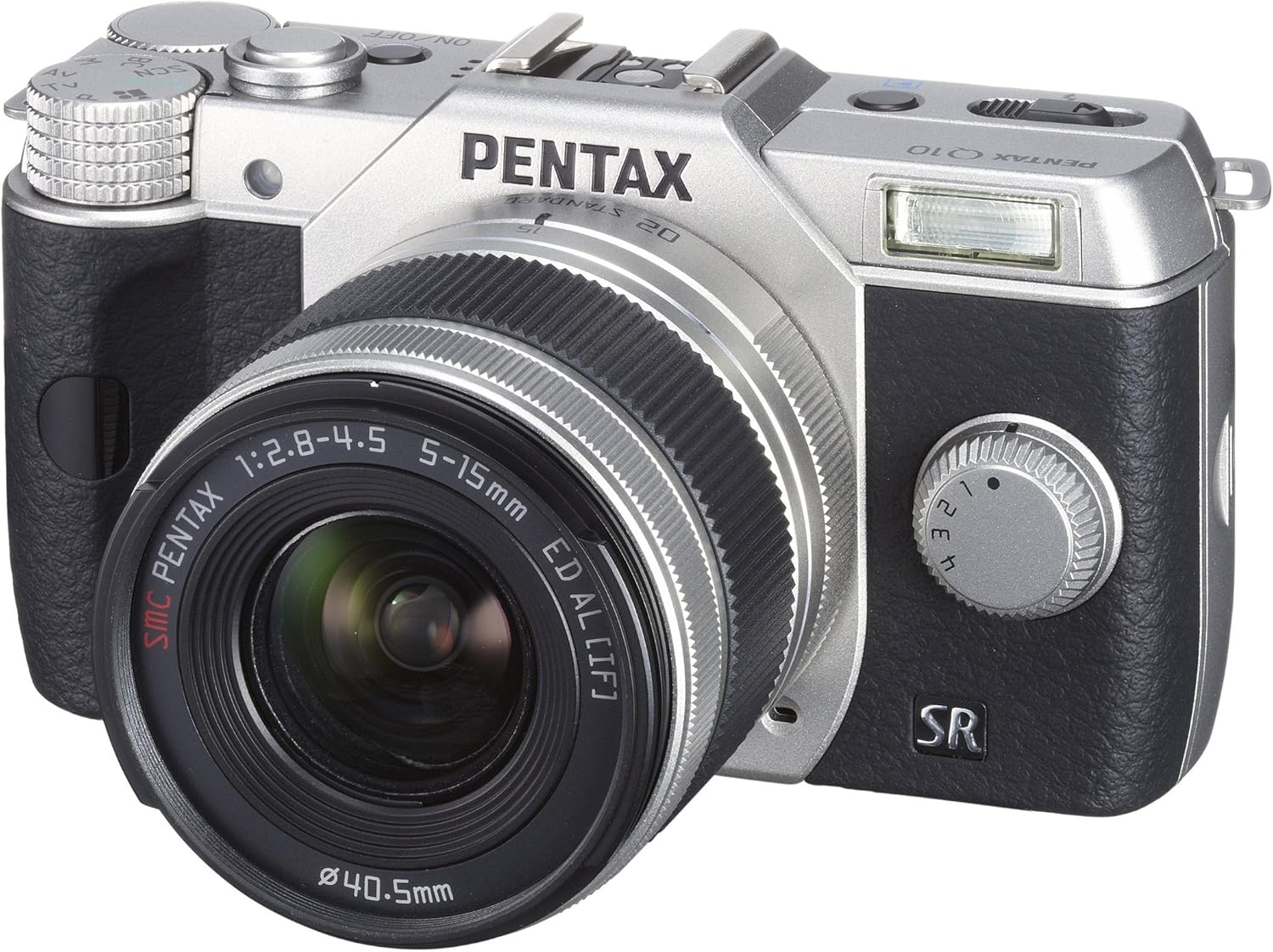
Зураг 2: Урд View with Lens Attached - The Pentax Q10 camera is shown with the 02 Standard Zoom Lens (5-15mm) mounted. This view highlights the compact size of the camera with its standard kit lens.

Зураг 3: Дээд тал View - This overhead view of the Pentax Q10 shows the main controls on the top panel, including the mode dial (with Auto, P, Av, Tv, M, SCN settings), the power ON/OFF button, the shutter release button, and the hot shoe for external flash units.

Зураг 4: Урд View with Flash Activated - The Pentax Q10 is depicted with its built-in pop-up flash extended, ready for use. This view also shows the 02 Standard Zoom Lens attached.

Зураг 5: Ар талд View - The back of the Pentax Q10 camera features the 3-inch LCD screen, along with various control buttons such as the playback button, delete button, ISO, OK, WB, and menu navigation buttons.
Үндсэн тохиргоо
1. Батерейг цэнэглэж байна
Insert the provided rechargeable battery into the battery charger. Connect the charger to a power outlet. The charging indicator light will show the charging status. Once fully charged, remove the battery.
2. Зай болон санах ойн картыг оруулах
Open the battery/memory card compartment cover located at the bottom of the camera. Insert the charged battery with the correct orientation until it clicks into place. Insert an SD/SDHC/SDXC memory card into the card slot until it locks. Close the compartment cover securely.
3. Линзийг бэхлэх
Align the red dot on the lens with the red dot on the camera's lens mount. Rotate the lens clockwise until it clicks into place. To remove the lens, press the lens release button on the camera body and rotate the lens counter-clockwise.
4. Анхны тохиргоо
Upon first power-on, the camera may prompt you to set the date, time, and language. Follow the on-screen instructions using the control buttons and LCD screen.
Камер ажиллуулах
Асаах/унтраах
дээр дарна уу ON/OFF button located on the top panel to power the camera on or off.
Буудлагын горимууд
Хүссэн зураг авалтын горимоо сонгохын тулд камерын дээд хэсэгт байрлах горимын товчлуурыг эргүүлнэ үү.
- Автомат: Ашиглахад хялбар болгохын тулд бүрэн автомат буудлага.
- P (AE програм): Камер нь диафрагм болон хаалтын хурдыг тохируулдаг боловч програмын шилжилтийг зөвшөөрдөг.
- Ав (Апертурын тэргүүлэх чиглэлийн AE): Та диафрагмыг тохируулна, камер Хөшигний хурдыг тохируулна.
- ТВ (Хөшигний тэргүүлэх чиглэлийн AE): Та Хөшигний хурдыг тохируулна, камер диафрагмыг тохируулна.
- M (гарын авлага): Та диафрагм болон Хөшигний хурдыг хоёуланг нь тохируулна.
- SCN (Үзэгдлийн горимууд): Pre-set modes for specific situations (e.g., Portrait, Landscape, Night Scene, Macro, Blue Sky, Forest, Blur control).
Зураг авах
- Select a shooting mode using the mode dial.
- LCD дэлгэц ашиглан зургаа жаазлаарай.
- Press the shutter release button halfway down to focus. The camera will confirm focus.
- Press the shutter release button fully to take the picture.
Видео бичлэг
The PENTAX Q10 supports Full 1080p HD video recording at 30 frames per second with H.264 compression. To record video:
- Switch the camera to movie mode (if available on the mode dial or via menu setting).
- Press the dedicated movie recording button (if present) or the shutter release button to start recording.
- Бичлэгийг зогсоохын тулд товчлуурыг дахин дарна уу.
Флаш ажиллагаа
The camera features a built-in pop-up flash. To activate the flash, slide the flash release lever. The flash has various modes (e.g., Auto, Flash On, Red-eye Reduction) which can be selected via the camera's menu or dedicated flash button.
Автомат фокусын систем
The PENTAX Q10 utilizes a contrast detection autofocus system with 25 autofocus points. Available AF modes include Continuous, Face Detection, Multi-area, Selective single-point, Single, and Tracking. Select the appropriate AF mode from the camera's menu to suit your shooting conditions.
Зураг тогтворжуулах
The camera incorporates a sensor-shift shake reduction system to minimize blur caused by camera shake, especially in low light conditions or when using longer focal lengths.
Засвар үйлчилгээ
Камерын их биеийг цэвэрлэх
Камерын их биеийг зөөлөн, хуурай даавуугаар арчина. Зөрүүд шороонд бага зэрэг dampen the cloth with water or a mild cleaning solution specifically designed for electronics. Avoid using strong solvents.
Линзийг цэвэрлэх
Use a lens blower to remove dust from the lens surface. For smudges, use a specialized lens cleaning cloth and lens cleaning fluid. Never touch the lens surface with your fingers.
Мэдрэгчийг цэвэрлэх
The PENTAX Q10 features an integrated DRII (Dust Removal II) dust reduction system. If dust spots appear on your images, consult a professional service center for sensor cleaning. Attempting to clean the sensor yourself can cause damage.
Батерейны арчилгаа
Store batteries in a cool, dry place. Do not expose them to extreme temperatures. If the camera will not be used for an extended period, remove the battery.
Алдааг олж засварлах
Камер асахгүй байна
- Батерейг бүрэн цэнэглэж, зөв оруулсан эсэхийг шалгаарай.
- Зайны контактууд цэвэр эсэхийг шалгана уу.
Зураг авч чадахгүй байна
- Санах ойн карт хийгдсэн бөгөөд хангалттай зай байгаа эсэхийг шалгана уу.
- Check if the lens is properly attached and unlocked.
- Ensure the camera is not in playback mode.
- If the flash is set to a slow sync mode, the shutter may not release immediately.
Зургууд бүдэг байна
- Линз цэвэрхэн байгаа эсэхийг шалгаарай.
- Check if the camera is properly focused.
- Use a faster shutter speed or increase ISO in low light conditions.
- Confirm that the image stabilization (SR) is active if needed.
Санах ойн картын алдаа
- Санах ойн картыг дахин оруулна уу.
- Өөр, нийцтэй санах ойн картыг туршаад үзээрэй.
- Санах ойн картыг форматлах (тэмдэглэл: энэ нь бүх өгөгдлийг устгах болно).
Үзүүлэлтүүд
| Загварын нэр | Пентакс Q10 |
| Зургийн мэдрэгч | 12.4 MP Backlit CMOS (1/2.3-inch) |
| Үр дүнтэй шийдэл | 12.4 МП |
| Линзний бэхэлгээ | Pentax Q-mount |
| Зураг тогтворжуулах | Мэдрэгчийн шилжилт |
| Видеоны нягтрал | Full HD 1080p (1920x1080) at 30fps (H.264) |
| Дэлгэц | 3 инчийн LCD (460,000 цэг) |
| ISO мэдрэмж | Expanded ISO Minimum 100 |
| Хөшигний хурд | 1/8000 - 30 секунд |
| Автомат фокусын систем | Ялгааг илрүүлэх (25 оноо) |
| Тасралтгүй буудлага | 5 fps хүртэл |
| Хадгалах хэрэгсэл | SD/SDHC/SDXC санах ойн карт |
| Холболт | HDMI (Type C Mini), USB |
| Жин (ойролцоогоор) | 0.44 фунт (Зөвхөн биед) |
Тэмдэглэл: Техникийн үзүүлэлтүүдийг мэдэгдэлгүйгээр өөрчлөх боломжтой.
Баталгаат болон дэмжлэг
Баталгаат хугацааны мэдээлэл
The PENTAX Q10 camera comes with a 1 жилийн эд анги, хөдөлмөрийн баталгаа from the date of purchase. Please retain your proof of purchase for warranty claims. This warranty covers manufacturing defects and workmanship under normal use.
Хэрэглэгчийн дэмжлэг
Техникийн туслалцаа, үйлчилгээ эсвэл нэмэлт лавлагаа авахыг хүсвэл Pentax-ийн албан ёсны дэмжлэг үзүүлэх үйлчилгээнд зочилно уу webсайт эсвэл харилцагчийн үйлчилгээний хэлтэстэй холбогдоно уу. Холбоо барих мэдээллийг ихэвчлэн үйлдвэрлэгчээс олж болно webсайт эсвэл таны бүтээгдэхүүнд хавсаргасан баталгаат картанд.


