1. Танилцуулга
This manual provides essential information for the safe and effective use of your ProForm Power 995c Treadmill. Please read all instructions carefully before assembly and operation. Retain this manual for future reference.

Image 1.1: The ProForm Power 995c Treadmill, ready for use.
2. Аюулгүй байдлын мэдээлэл
To reduce the risk of serious injury, read all important precautions and instructions in this manual before using the treadmill. ProForm assumes no responsibility for personal injury or property damage sustained by or through the use of this product.
- Аливаа дасгалын хөтөлбөрийг эхлүүлэхийн өмнө эмчтэйгээ үргэлж зөвлөлд.
- Хүүхэд болон тэжээвэр амьтдыг гүйлтийн замаас хол байлга.
- Place the treadmill on a level surface with at least 6 feet of clear space behind it and 2 feet on each side.
- Тохиромжтой дасгалын хувцас, спортын гутал өмс.
- Гүйлтийн зам эвдэрсэн эсвэл буруу ажиллаж байвал түүнийг ажиллуулж болохгүй.
- Always use the safety key. Attach the clip to your clothing before starting the treadmill.
- Хэрэглэгчийн жингийн дээд хэмжээ 350 фунт (159 кг)-аас хэтэрч болохгүй.

Image 2.1: User preparing to use the treadmill.
3. Угсрах заавар
The ProForm Power 995c Treadmill requires assembly. Due to its weight and size, it is recommended that two or more people assist with the assembly process. Ensure all parts are present before beginning. Refer to the included assembly guide for detailed, step-by-step instructions and diagrams.
3.1 Space Saver Design
This treadmill features a Space Saver design, allowing the walking platform to be folded vertically for storage. To fold, lift the walking platform until the latch pin locks it in the upright position. To unfold, push the latch pin and slowly lower the platform to the floor.

Image 3.1: Folding the treadmill for compact storage.
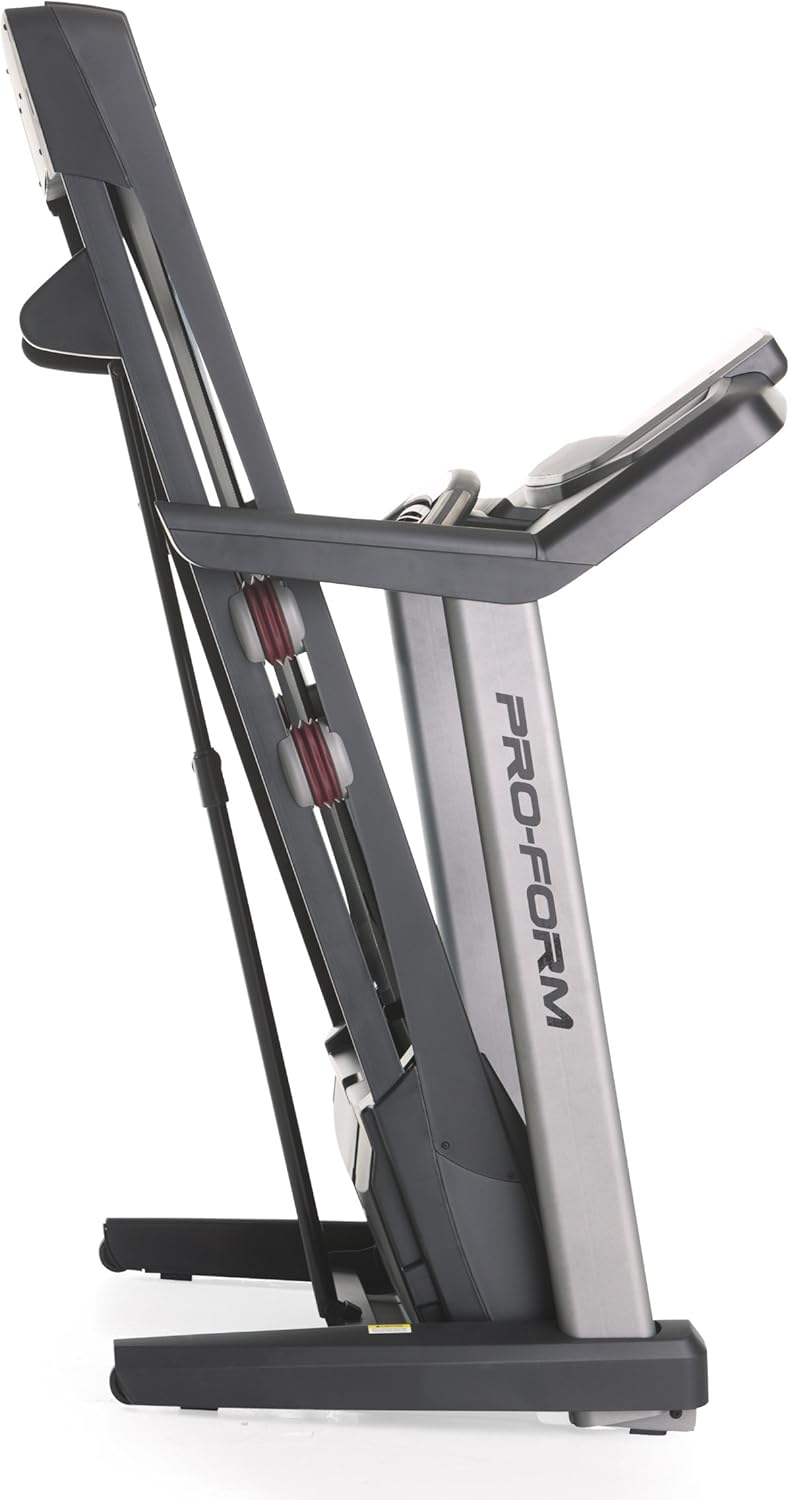
Image 3.2: The treadmill in its folded position.
4. Ашиглалтын заавар
Familiarize yourself with the console and its functions before starting your workout.
4.1 Консолын дээд хэсэгview
The treadmill features a 7-inch oversized backlit display that shows your workout metrics. The console includes QuickSpeed and Quick Incline controls for easy adjustments during your exercise.

Image 4.1: Treadmill console with display and control buttons.
4.2 Starting a Manual Workout
- Гүйлтийн замын бүс дээр гишгэнэ үү.
- Аюулгүй байдлын түлхүүрийн хавчаарыг хувцаснаасаа холбоно уу.
- дээр дарна уу START button. The belt will begin to move at a low speed.
- ашиглан хурдыг тохируулна уу QuickSpeed товчлуурууд эсвэл + болон - товчлуурууд.
- Налууг ашиглан тохируулна уу Quick Incline товчлуурууд эсвэл ^ болон v товчлуурууд.
- Зогсоохын тулд товчийг дарна уу ЗОГС товчийг дарах эсвэл аюулгүйн түлхүүрийг татах.

Image 4.2: Interacting with the console controls.
4.3 Built-in Workout Apps
The treadmill includes 30 pre-programmed workout apps. Select a workout by pressing the corresponding number button on the console. The treadmill will automatically adjust speed and incline according to the program.
4.4 iFit Compatibility
The ProForm Power 995c Treadmill is iFit Compatible. With an iFit wireless module (sold separately), you can access a library of interactive workouts, track your progress, and simulate real-world routes using Google Maps. The console also features a media tray for your personal devices.

Image 4.3: iFit Compatible feature on the console.

Image 4.4: Media tray for personal devices.
4.5 Зүрхний цохилтын хяналт
The treadmill is equipped with a heart rate monitor. Grip the metal sensors on the handlebars to display your heart rate on the console. This feature helps you stay within your target heart rate zone.
5. Засвар үйлчилгээ
Тогтмол засвар үйлчилгээ нь таны гүйлтийн зам урт, оновчтой гүйцэтгэлийг баталгаажуулдаг.
- Цэвэрлэгээ: Гүйлтийн замын гадаргууг зар сурталчилгаагаар арчинаamp Хэрэглэх бүрийн дараа даавуугаар арчина. Зүлгүүрийн цэвэрлэгчээс зайлсхий.
- Туузан тосолгоо: Periodically check and lubricate the walking belt as instructed in the detailed assembly guide. Proper lubrication prevents friction and wear.
- Бүсээ тэгшлэх ба татах: Ensure the walking belt remains centered and properly tensioned. Adjustments may be necessary over time. Refer to the assembly guide for specific instructions.
- Моторын бүрээс: Keep the motor cover clean and free of dust to ensure proper ventilation.
6. Алдаа засах
If you encounter issues with your treadmill, refer to the following common solutions. For problems not listed here, contact customer support.
| Асуудал | Боломжит шалтгаан | Шийдэл |
|---|---|---|
| Гүйлтийн зам асахгүй байна. | Цахилгааны утас залгагдаагүй; хэлхээний таслуур тасарсан; аюулгүйн түлхүүр оруулаагүй байна. | Цахилгааны утсыг газардуулгатай залгуурт найдвартай залгасан эсэхийг шалгана уу. Өрхийн автомат таслуурыг шалгана уу. Аюулгүйн түлхүүрийг консол руу бүрэн оруулна уу. |
| Walking belt slows down or stops during use. | Belt too loose; motor overheating; user weight exceeds capacity. | Adjust belt tension as per manual. Allow treadmill to cool down. Ensure user weight is within specifications. |
| Console display is erratic or not working. | Loose cable connection; console malfunction. | Check all cable connections to the console. If problem persists, contact customer support. |
| Unusual noise from the treadmill. | Loose parts; belt friction; motor issue. | Inspect for loose bolts or screws and tighten. Lubricate walking belt if needed. If noise persists, contact customer support. |
7. Техникийн үзүүлэлтүүд
Detailed technical specifications for the ProForm Power 995c Treadmill.
- Загварын дугаар: PFTL99912
- Мотор: 3.0 CHP Mach Z Commercial Plus Motor
- Хамгийн их хурд: Цагт 12 миль (19.3 км/цаг)
- Хамгийн их налуу: 15% Quick Incline Control
- Дэвслэх бүс: 20 inches x 60 inches (50.8 cm x 152.4 cm) Non-Stretch, Commercial Tread belt
- Зөөлөн зөөлөвч: ProShox Cushioning
- Хэрэглэгчийн хамгийн их жин: 350 фунт (159 кг)
- Бүтээгдэхүүний хэмжээс (LxWxH): 81" x 37" x 60" (205.7 см x 94 см x 152.4 см)
- Нугалсан хэмжээсүүд (ойролцоогоор): 33"W x 14"H (Depth varies)
- Дэлгэцийн төрөл: 7-inch Oversized Backlit LCD
- Дасгал хийх програмууд: 30 Built-in Workout Apps
- Холболт: iFit нийцтэй
- Хэмжсэн хэмжүүр: Distance, Heart Rate, Incline, Time, Calories Burned, Speed
- Хүрээний материал: Металл, хуванцар

Image 7.1: ProShox Cushioning system.

Image 7.2: ProForm branding on the treadmill deck.
8. Баталгаат хугацаа ба дэмжлэг
Your ProForm Power 995c Treadmill is covered by the following warranty:
- Frame and Motor: Насан туршийн баталгаа
- Хэсэг: 3 жилийн баталгаат хугацаа
- Хөдөлмөр: 1 жилийн баталгаат хугацаа
For warranty claims, technical assistance, or to order replacement parts, please contact ProForm Customer Service. Have your model number (PFTL99912) and serial number ready when contacting support.


