1. Оршил ба түүнээс дээшview
The Alpine VIE-X007-WS-E is a dedicated in-dash car navigation system designed for specific vehicle models, featuring a high-definition 7-inch wide VGA LED LCD display. This unit provides clear and detailed maps, high-quality video playback, and integrates advanced features for an enhanced driving experience. It includes a 32GB SDHC memory for map and music data, a built-in terrestrial digital TV tuner, and Bluetooth connectivity for hands-free calling and audio streaming. The system is 'Tuned by Alpine' to ensure optimal acoustic settings and vehicle-specific functionalities.
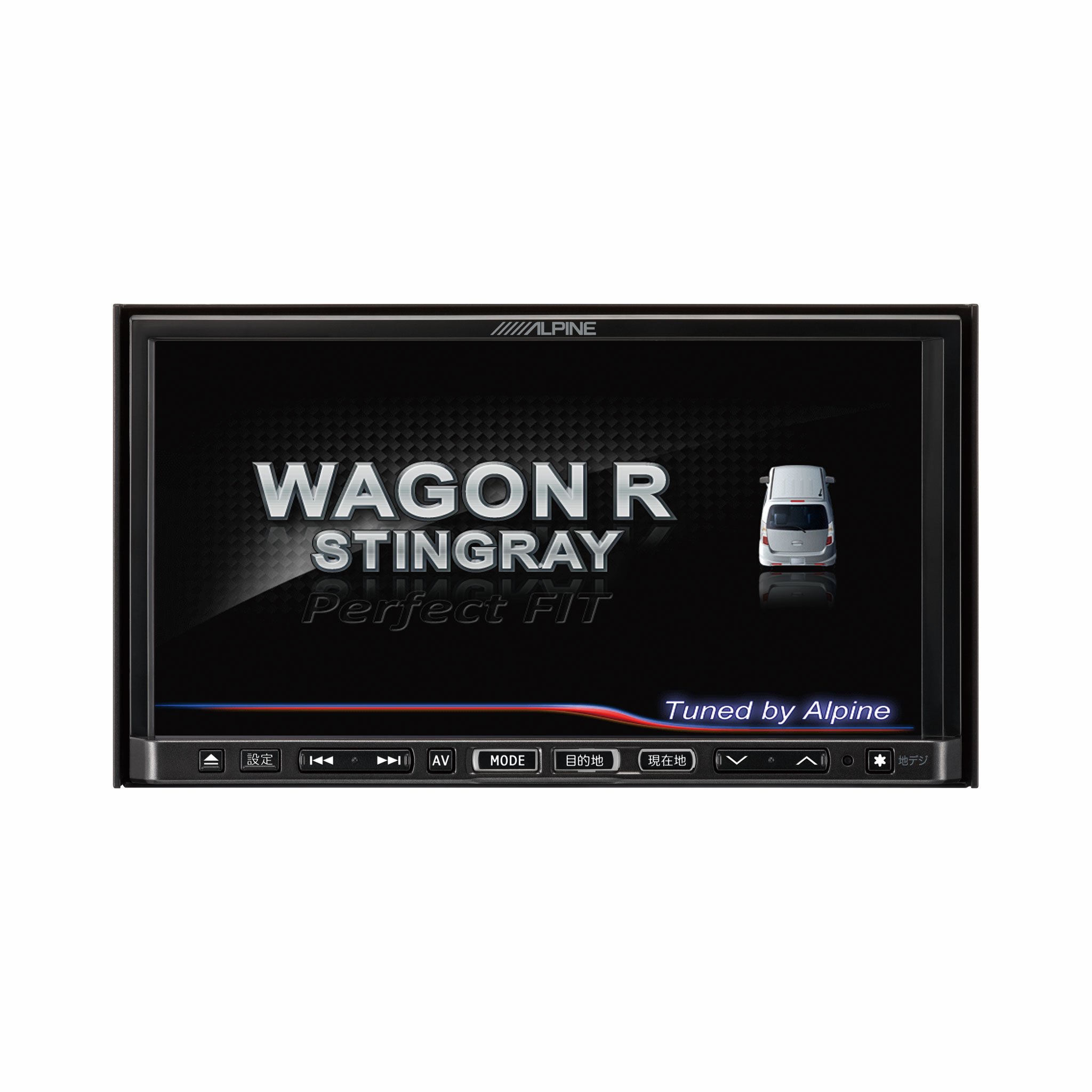
Зураг 1.1: Урд view of the Alpine VIE-X007-WS-E In-Dash Car Navigation System, showcasing its 7-inch display and control interface.
2. Үндсэн шинж чанарууд
- Дэлгэц: 7-inch LED / WVGA Touch Panel Monitor for clear visuals and intuitive control.
- Хадгалах: 32GB SD memory (16GB for Map Data + 16GB for Music Data).
- Таалагч: Built-in Terrestrial Digital TV Tuner (12 Segments/One Segment) for broadcast reception.
- Холболт: Built-in Bluetooth for hands-free calling and Bluetooth audio support.
- Медиа тоглуулах: Supports DVD/CD, FM/AM radio, SD Memory Card, iPod/iPhone, USB, and Walkman (connection cable not included).
- Тээврийн хэрэгслийн нэгдэл: Alpine system link functions for rear vision camera and vehicle-specific settings.
3. Тохируулах заавар
Proper installation is crucial for optimal performance and safety. It is highly recommended that this unit be installed by a qualified professional car audio technician.
3.1. Суулгахын өмнөх шалгалт
- Суурилуулалтыг эхлүүлэхийн өмнө тээврийн хэрэгслийн батерейг салгасан эсэхийг шалгаарай.
- Verify all necessary mounting hardware and wiring harnesses are present.
- Confirm compatibility with your specific vehicle model (Wagon R MH23 Stingray).
3.2. Утасны холболт
- Эрчим хүчний холболт: Connect the main power harness to the vehicle's power supply, ensuring proper grounding.
- Чанга яригчийн холболтууд: Connect the speaker wires to the corresponding vehicle speakers, observing polarity.
- Антенны холболтууд: Connect the GPS antenna and the terrestrial digital TV antenna to their respective inputs on the unit. Position antennas in locations with clear line of sight.
- Гадаад төхөөрөмжийн холболтууд: Connect any optional devices such as a rear-view camera, USB devices, or iPod/iPhone using the appropriate cables (sold separately).
3.3. Төхөөрөмжийг суурилуулах
- Carefully insert the unit into the vehicle's dashboard opening.
- Өгөгдсөн бэхэлгээний хаалт болон боолтыг ашиглан төхөөрөмжийг бэхлэнэ.
- Re-connect the vehicle's battery.
3.4. Анхдагч асаалт
- Turn on the vehicle's ignition. The unit should power on and display the Alpine logo.
- Хэлний сонголт болон цагийн бүс гэх мэт анхны тохиргооны дэлгэц дээрх зааврыг дагана уу.
4. Ашиглалтын заавар
This section provides general guidance on operating your Alpine navigation system.
4.1. Асаах/унтраах
- The unit typically powers on automatically with the vehicle's ignition.
- To manually turn off or put the unit into standby, press and hold the power button (location may vary, refer to specific vehicle integration manual).
4.2. Мэдрэгчтэй дэлгэцийн ажиллагаа
- Navigate menus and select functions by lightly touching the screen icons.
- Use swipe gestures for scrolling through lists or maps.
4.3. Навигацийн функцууд
- Accessing Navigation: Tap the 'Navigation' or 'Map' icon on the main menu.
- Хүрэх газраа оруулж байна: Use the on-screen keyboard to input an address, point of interest (POI), or select from recent destinations.
- Маршрутын заавар: Once a destination is set, the system will calculate a route and provide turn-by-turn voice guidance and visual cues.
- Газрын зураг View: Switch between 2D, 3D, and various zoom levels using the on-screen controls.
4.4. Медиа тоглуулах
- Радио: Select 'FM' or 'AM' from the main menu. Use the tuner controls to scan for stations or select presets.
- CD/DVD: Insert a disc into the slot. Playback should begin automatically or can be selected from the 'Disc' source.
- SD Card/USB: Insert an SD card or USB device. Select 'SD' or 'USB' as the source and browse for media files.
- Bluetooth Аудио: Pair your Bluetooth device (see section 4.5) and select 'Bluetooth Audio' as the source to stream music.
- Газрын дижитал телевиз: Select 'TV' from the main menu. The system will scan for available channels.
4.5. Bluetooth хослол
- On the unit, go to the 'Bluetooth' menu.
- Мобайл төхөөрөмж дээрээ Bluetooth-г идэвхжүүлж, боломжтой төхөөрөмжүүдийг хайж олоорой.
- Select 'Alpine VIE-X007-WS-E' (or similar name) from your device's list.
- Хэрэв асуувал хоёр төхөөрөмж дээрх хослох кодыг баталгаажуулна уу.
- Хосолсоны дараа та дуудлага хийх/хүлээн авах, аудио дамжуулах боломжтой.
5. Засвар үйлчилгээ
Regular maintenance ensures the longevity and optimal performance of your navigation system.
5.1. Нэгжийг цэвэрлэх
- Use a soft, dry cloth to wipe the display and control panel.
- For stubborn smudges on the screen, lightly dampen the cloth with a screen cleaner specifically designed for electronics. Do not spray cleaner directly onto the unit.
- Зүлгүүрийн цэвэрлэгч, уусгагч эсвэл хүчтэй химийн бодис хэрэглэхээс зайлсхий.
5.2. Програм хангамж болон газрын зургийн шинэчлэлтүүд
- Periodically check the Alpine official website for available software and map updates.
- Follow the instructions provided with the update package carefully to ensure proper installation. Updates typically involve downloading files to an SD card or USB drive and inserting it into the unit.
5.3. SD Card Handling
- Always eject the SD card safely through the unit's menu before physically removing it.
- Store the SD card in a protective case when not in use to prevent damage.
6. Алдаа засах
Энэ хэсэгт танд тулгарч болох нийтлэг асуудлууд болон тэдгээрийн боломжит шийдлүүдийг авч үзэх болно.
| Асуудал | Боломжит шалтгаан | Шийдэл |
|---|---|---|
| Төхөөрөмж асахгүй байна. | Цахилгааны холболт тасарсан, гал хамгаалагч шатсан, машины аккумляторын асуудал. | Цахилгааны утас болон гал хамгаалагчийг шалгана уу. Тээврийн хэрэгслийн аккумулятор цэнэглэгдсэн эсэхийг шалгаарай. Асуудал арилахгүй бол мэргэжлийн хүнтэй зөвлөлдөөрэй. |
| No GPS signal or inaccurate positioning. | GPS antenna obstructed or improperly connected, unit in an area with poor satellite reception. | GPS-ийн антен нь тунгалаг байгаа эсэхийг шалгаарай view of the sky. Check antenna connection. Move to an open area. |
| Bluetooth device fails to pair. | Bluetooth not enabled on device, incorrect pairing mode, interference. | Ensure Bluetooth is active on your device. Put the unit in pairing mode. Try re-pairing. Move closer to the unit. |
| Мэдрэгч дэлгэц хариу өгөхгүй байна. | Түр зуурын програм хангамжийн алдаа, дэлгэцийн тохируулгын асуудал. | Restart the unit (turn vehicle ignition off and on). If available, perform screen calibration via settings. |
| Чанга яригчаас дуу гарахгүй. | Дууны түвшин хэт бага, дууг хаах горим идэвхжсэн, чанга яригчийн холболтын асуудалтай байна. | Increase volume. Check if mute is active. Verify speaker connections. |
If you encounter problems not listed here or if the suggested solutions do not resolve the issue, please contact Alpine customer support or a certified service center.
7. Техникийн үзүүлэлтүүд
| Онцлог | Тодорхойлолт |
|---|---|
| Брэнд | Альпийн |
| Загвар | VIE-X007-WS-E |
| Дэлгэцийн хэмжээ | 7 инч |
| Дэлгэцийн төрөл | WVGA LED LCD Touch Panel Monitor |
| Санах ойн хадгалах багтаамж | 16 GB (for Map Data, total 32GB SDHC) |
| Онцлог шинж чанарууд | Hands Free (Bluetooth) |
| Холболтын технологи | Bluetooth, USB |
| Хүний интерфейсийн оролт | Мэдрэгчтэй дэлгэц |
| Хэвлэл мэдээллийн төрлийг дэмждэг | Memory, DVD, CD, FM/AM, SD Card, iPod/iPhone, USB, Walkman |
| Баригдсан тааруулагч | Terrestrial Digital TV Tuner (12 Segments/One Segment) |
| Батерейнууд багтсан | Үгүй |
| Бүтээгдэхүүний хэмжээс | 18.66 x 17.8 x 10 см |
| Зүйлийн жин | 6.44 кг |
8. Баталгаат хугацаа ба дэмжлэг
Warranty information for the Alpine VIE-X007-WS-E is typically provided with the product packaging or at the point of purchase. Please refer to these documents for details regarding warranty coverage, terms, and conditions.
For technical support, service inquiries, or to find authorized service centers, please visit the official Alpine website or contact Alpine customer service directly. Ensure you have your product model number (VIE-X007-WS-E) and proof of purchase available when seeking support.
Альпийн албан ёсны Webсайт: www.alpine.com


