1. Танилцуулга
This manual provides detailed instructions for the safe and effective use of your ElectraStim EM60 Flick Electro Stimulator. Please read this manual thoroughly before operating the device and retain it for future reference. The ElectraStim EM60 is designed for electro stimulation, featuring 7 stimulation settings with escalating patterns and pulsations, and 24 intensity levels. Its patented Flick feature offers rhythmic stimulation synchronized with hand movements.
2. Аюулгүй байдлын чухал мэдээлэл
Although ElectraStim products are not medical devices, they are designed in accordance with European General Requirements for Safety of Medical Electrical Equipment (EN60601-1 and section 2.10 for nerve and muscle stimulators). All stimulators and accessories carry the mandatory CE mark.
Хэрэглэхийн өмнө: Always read the stimulator and electrode instructions carefully. If any instructions are unclear, contact ElectraStim for further advice before use. Failure to follow instructions may result in injury or device malfunction.
Санал 65 Анхааруулга: Энэ бүтээгдэхүүн нь хорт хавдар, ургийн гажиг эсвэл нөхөн үржихүйн бусад хор уршгийг үүсгэдэг Калифорнийн муж улсад мэдэгддэг химийн бодис агуулсан байж болно.
3. Багцын агуулга
Доор жагсаасан бүх зүйл таны багцад байгаа эсэхийг шалгаарай.
- ElectraStim EM60 Flick Stimulator Unit
- Electrode Pads (typically 4 pads)
- Lead Wires (for connecting electrodes)
- USB цэнэглэгч кабель
- Microfibre Storage Bag
- Хэрэглэгчийн гарын авлага (энэ баримт бичиг)

4. Бүтээгдэхүүн дууссанview
The ElectraStim EM60 Flick is a compact and rechargeable electro stimulator designed for ease of use and portability. It features a clear control panel with intuitive buttons for power, intensity adjustment, mode selection, and a unique Flick mode.

Хяналт ба үзүүлэлтүүд:
- Асаах товч (⏻): Төхөөрөмжийг асаах эсвэл унтраана.
- Intensity Up Button (▲): Increases stimulation intensity.
- Intensity Down Button (▼): Decreases stimulation intensity.
- Горимын товчлуур (↻): Cycles through the 7 available stimulation patterns.
- Intensity Indicator LEDs: Displays the current stimulation level.
- Зайны үзүүлэлт: Shows battery status (bottom left).
5. Тохиргоо
- Төхөөрөмжийг цэнэглэх: Before first use, fully charge the EM60 unit using the provided USB cable. Connect the small end of the USB cable to the charging port on the device and the larger end to a USB power source (e.g., computer, wall adapter). The battery indicator will show charging status.
- Хар тугалган утсыг холбох: Insert the pin connectors of the lead wires into the output ports on the top of the EM60 unit.
- Attach Electrode Pads: Connect the other end of the lead wires to the electrode pads. Ensure a secure connection.
- Электродын дэвсгэр хэрэглэх: Carefully peel the electrode pads from their protective backing. Apply the pads to clean, dry skin in the desired area. Ensure good contact for effective stimulation.
6. Ашиглалтын заавар
6.1. Асаах/унтраах
- Асаахын тулд: Асаах товчийг дараад барина уу (⏻) for approximately 2 seconds. The intensity indicator LEDs will light up.
- Унтраахын тулд: Асаах товчийг дараад барина уу (⏻) for approximately 2 seconds. The LEDs will turn off.
6.2. Эрчим хүчийг тохируулах
The EM60 offers 24 intensity settings.
- To increase intensity: Press the Intensity Up button (▲). Each press increases the intensity by one level.
- To decrease intensity: Press the Intensity Down button (▼). Each press decreases the intensity by one level.
- The intensity indicator LEDs will visually represent the current level. Start at the lowest setting and gradually increase to a comfortable level.
6.3. Changing Stimulation Modes
The device features 7 distinct stimulation patterns.
- To change mode: Press the Mode button (↻). Each press will cycle to the next available pattern.
- Experiment with different modes to find the one that best suits your preference.
6.4. Flick Mode Operation
The patented Flick feature allows for motion-controlled stimulation, utilizing an internal accelerometer to synchronize stimulation with your hand movements.
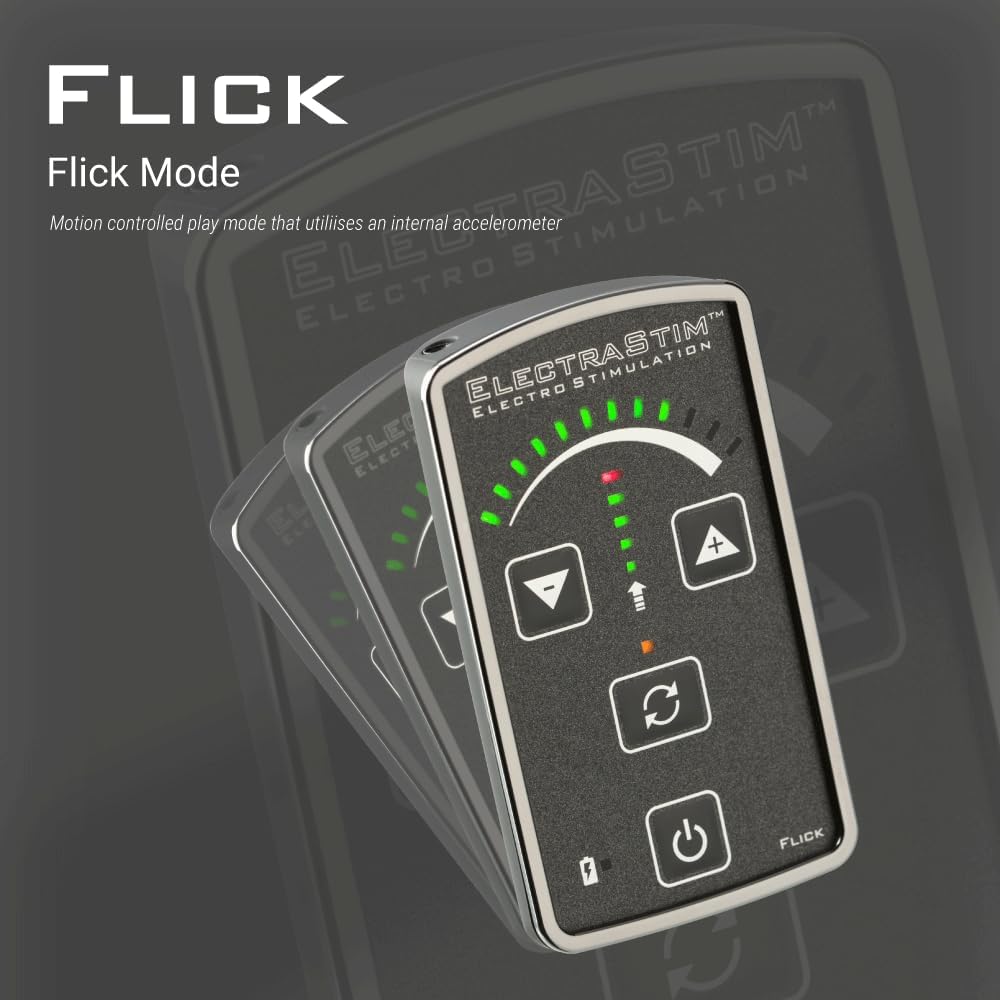
- Once active, the device will respond to your hand movements, providing a dynamic and interactive stimulation experience.
7. Цэнэглэх ба зайны ашиглалтын хугацаа
The ElectraStim EM60 features a rechargeable battery for convenience.

- Цэнэглэх хугацаа: Approximately 3 hours for a full charge using the provided USB cable.
- Зайны хугацаа: The device will run for approximately 6 hours at 50% intensity. Actual battery life may vary depending on the selected intensity level and mode.
- Цэнэглэх заалт: The battery indicator on the device will show the charging status.
8. Засвар үйлчилгээ, арчилгаа
- Төхөөрөмжийг цэвэрлэх: Wipe the EM60 unit with a soft, damp cloth. Do not submerge the device in water or use abrasive cleaners.
- Электродын дэвсгэр: After each use, gently re-apply the electrode pads to their protective backing to maintain their adhesive quality. Replace pads when they lose their stickiness.
- Хадгалах: Store the device and accessories in the provided microfibre bag in a cool, dry place, away from direct sunlight and extreme temperatures.

9. Алдаа засах
| Асуудал | Боломжит шалтгаан | Шийдэл |
|---|---|---|
| Төхөөрөмж асахгүй байна. | Батерей дуусч байна. | USB кабель ашиглан төхөөрөмжийг цэнэглэ. |
| Ямар ч өдөөлт мэдрэгдсэнгүй. |
|
|
| Stimulation feels weak or inconsistent. |
|
|
10. Техникийн үзүүлэлтүүд
| Загвар | EM60 Flick |
| Брэнд | ElectraStim |
| Өдөөлтийн тохиргоо | 7 загвар |
| Эрчим хүчний түвшин | 24 түвшин |
| Сувгууд | Single Channel (for up to 2 unipolar accessories) |
| Эрчим хүчний эх үүсвэр | Цэнэглэдэг USB |
| Цэнэглэх хугацаа | Ойролцоогоор 3 цаг |
| Ажиллах цаг | Approx. 6 hours (at 50% intensity) |
| ASIN | B00AJ0G7FS |
| Үйлдвэрлэгч | ElectraStim |
11. Баталгаат хугацаа ба дэмжлэг
The ElectraStim EM60 Flick Stimulator comes with a standard warranty. An image in the product listing indicates a "Free 3 year warranty upgrade." Please refer to the product packaging or the official ElectraStim webтусгай баталгаат нөхцөл, болзлын сайт.
For technical support, troubleshooting assistance, or warranty claims, please contact ElectraStim customer service through their official webтухайн бүтээгдэхүүнийг худалдаж авсан сайт эсвэл жижиглэнгийн худалдаачин.


