1. Танилцуулга
This manual provides detailed instructions for the setup, operation, and maintenance of your Vibe Axcess 5-in-1 Universal Remote. Please read this manual thoroughly before using the remote control to ensure proper functionality and to maximize your user experience. This remote is designed to control up to five different audio/video devices.
2. Бүтээгдэхүүн дууссанview
The Vibe Axcess 5-in-1 Universal Remote is designed to consolidate control of multiple home entertainment devices into a single unit. It features dedicated buttons for various functions and device types.
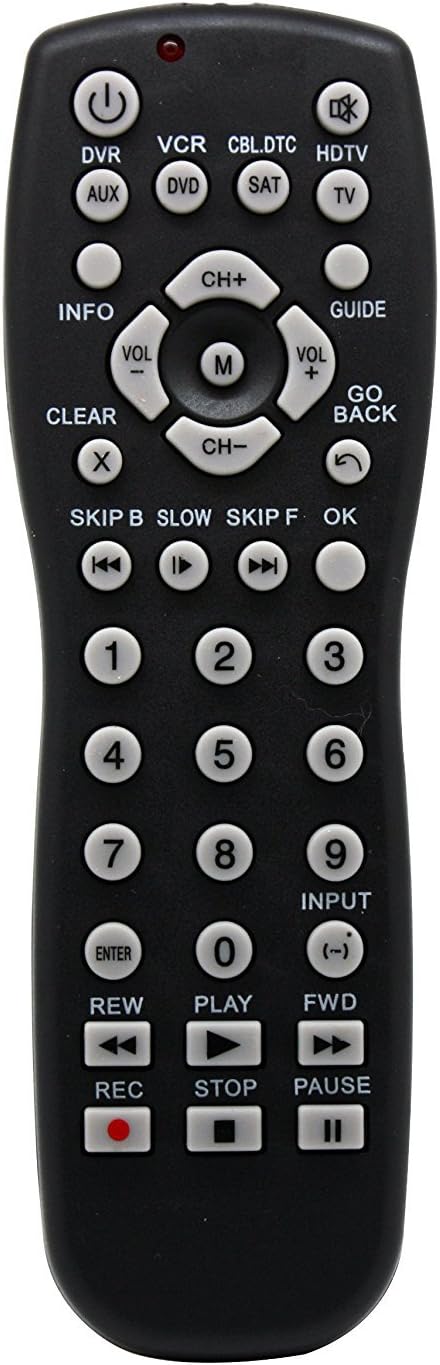
Зураг 1: Урд view of the Vibe Axcess 5-in-1 Universal Remote. This image displays the remote's layout, including device selection buttons (DVR, VCR, CBL.DTC, HDTV, AUX, DVD, SAT, TV), navigation pad, number keys, and media control buttons (REW, PLAY, FWD, REC, STOP, PAUSE).

Зураг 2: Packaging of the Vibe Axcess 5-in-1 Universal Remote. The packaging highlights the remote's 5-in-1 capability and compatibility with various device types such as DVD/VCR, HDTV, DVD, AUX, and CBL/SAT/CABLE.
3. Тохиргоо
3.1 Батерей суурилуулах
- Алсын удирдлагын ар талд байгаа зайны тасалгааны тагийг ол.
- Slide the cover downwards or press the latch and lift to open.
- Хоёр (2) AAA батерейг хийж, эерэг (+) ба сөрөг (-) терминалууд нь тасалгааны доторх диаграммуудтай тохирч байгаа эсэхийг шалгаарай.
- Батерейны тасалгааны тагийг сайтар товших хүртэл нь буцааж байранд нь оруулаарай.
Жич: Always use fresh batteries and replace both batteries at the same time. Do not mix old and new batteries or different types of batteries.
3.2 Programming the Remote
To control your devices, the universal remote must be programmed with the correct codes for each device. There are typically two methods for programming:
3.2.1 Шууд код оруулах
This method involves entering a specific code from a code list (usually provided with the remote or available online) for your device's brand.
- Удирдахыг хүссэн төхөөрөмжөө (жишээлбэл, ТВ, DVD тоглуулагч) асаана уу.
- Press and hold the desired device button on the remote (e.g., TV, DVD) for approximately 3 seconds until the indicator light (usually red) illuminates and stays on.
- While the indicator light is on, enter the 3-digit or 4-digit code for your device's brand using the number keys.
- If the code is valid, the indicator light will turn off. If the light flashes and remains on, the code was invalid; re-enter the code.
- Алсын удирдлагыг дарж шалгана уу ХҮЧ button. If the device turns off, the code is correct. If not, try the next code listed for your brand.
3.2.2 Автомат код хайх
If you cannot find a code or direct code entry fails, use the auto code search method.
- Удирдахыг хүссэн төхөөрөмжөө асаана уу.
- Хүссэн төхөөрөмжийн товчийг дараад барина уу (жишээ нь, TV) for approximately 3 seconds until the indicator light illuminates and stays on.
- While holding the device button, press the ХҮЧ button once. The indicator light will start flashing, indicating it is searching for a code.
- Point the remote at the device and wait for the device to turn off. This may take several minutes as the remote cycles through codes.
- Төхөөрөмж унтарсны дараа нэн даруй дарна уу ENTER Кодыг хадгалах товчийг дарна уу. Заагч гэрэл унтарна.
- Test the remote's functions. If some functions do not work, repeat the auto search process to find a more compatible code.
4. Ашиглалтын заавар
Once programmed, operating your Vibe Axcess 5-in-1 Universal Remote is straightforward.
- Төхөөрөмж сонгох: Төхөөрөмжийн харгалзах товчийг дарна уу (жишээ нь, TV, DVD, CBL.DTC) for the device you wish to control. The indicator light will briefly illuminate to confirm selection.
- Асаах/унтраах: дээр дарна уу ХҮЧ сонгосон төхөөрөмжийг асаах эсвэл унтраах товчийг дарна уу.
- Дууны хяналт: -г ашиглана уу VOL+ болон VOL- дууны хэмжээг тохируулах товчлуурууд.
- Сувгийн хяналт: -г ашиглана уу CH+ болон CH- сувгийг өөрчлөх товчлуурууд.
- Тоон түлхүүрүүд: Use the number keys (0-9) to directly enter channel numbers or other numerical inputs.
- Навигац: Use the directional pad (up, down, left, right) and OK цэсний навигацийн товчлуур.
- Хэвлэл мэдээллийн удирдлага: Ашиглах ТОГЛОХ, ЗУРАГСАХ, ЗОГС, REW, FWD, ба REC for controlling media playback on compatible devices.
5. Засвар үйлчилгээ
5.1 Цэвэрлэгээ
To clean your remote, gently wipe it with a soft, dry cloth. Do not use abrasive cleaners, solvents, or harsh chemicals, as these can damage the remote's finish or internal components.
5.2 Батерейг солих
When the remote's performance degrades or the indicator light fails to illuminate, it is time to replace the batteries. Follow the battery installation steps in Section 3.1. Dispose of used batteries responsibly according to local regulations.
6. Алдаа засах
- Алсын удирдлага ажиллахгүй байна:
- Батерейг зөв оруулсан, дуусаагүй эсэхийг шалгана уу. Шаардлагатай бол солино.
- Ensure you have selected the correct device button (e.g., TV for your television).
- Verify that the remote is programmed with the correct code for your device. Re-program if unsure.
- Алсын удирдлага болон төхөөрөмжийн хэт улаан туяаны мэдрэгчийн хооронд ямар нэгэн саад бэрхшээл байхгүй эсэхийг шалгаарай.
- Зарим функц ажиллахгүй байна:
- Some universal remote codes may not support all original remote functions. Try another code for your device brand using the programming steps.
- Ensure the device you are trying to control supports the specific function (e.g., not all TVs have a dedicated 'INFO' button function).
- Заагч гэрэл асахгүй байна:
- Батерейг шалгаж, солих.
- If the issue persists after battery replacement, the remote may be faulty.
7. Техникийн үзүүлэлтүүд
- Загвар: OT795-KO
- Брэнд: Уур амьсгал
- Бүтээгдэхүүний хэмжээ: 10.7 x 4 x 0.8 инч
- Барааны жин: 4 унц
- Батерей: 2 AAA батерей шаардлагатай (оруулаагүй)
- Дэмжигдсэн төхөөрөмжүүдийн хамгийн их тоо: 5
- Холболтын технологи: Хэт улаан туяа
- Онцлог шинж чанар: Бүх нийтийн
8. Баталгаат хугацаа ба дэмжлэг
For information regarding warranty coverage or technical support, please refer to the documentation included with your purchase or contact the retailer where the product was acquired. Specific warranty terms may vary.