1. Танилцуулга
Худалдан авалт хийсэнд баярлалааasing the KLH R5100 Surround Sound Receiver. This receiver is designed to provide high-quality audio and video performance for your home entertainment system. It features multiple audio and video inputs, surround sound processing, and a powerful amplifier to deliver an immersive listening experience. Please read this manual thoroughly before operating the unit to ensure proper setup and optimal performance.
2. Аюулгүй байдлын чухал мэдээлэл
Цахилгаан цочрол, гал түймэр, төхөөрөмжид гэмтэл учруулах эрсдлийг бууруулахын тулд дараах аюулгүй байдлын урьдчилан сэргийлэх арга хэмжээг дагаж мөрдөнө үү.
- Эрчим хүчний эх үүсвэр: Connect the unit only to an AC 120V, 60Hz power supply.
- Агааржуулалт: Хангалттай агааржуулалтыг хангана уу. Агааржуулалтын нүхийг бүү хааж болохгүй. Агаарын урсгалыг хэвийн байлгахын тулд төхөөрөмжийн эргэн тойронд хангалттай зай гаргана уу.
- Ус ба чийг: Төхөөрөмжийг бороо, чийг эсвэл хэт чийгшилд бүү оруул. Ваар гэх мэт шингэнээр дүүргэсэн зүйлсийг төхөөрөмж дээр бүү тавь.
- Дулаан: Төхөөрөмжийг радиатор, халаалтын төхөөрөмж, зуух эсвэл бусад төхөөрөмж (үүнд орно) гэх мэт дулааны эх үүсвэрээс хол байлга. ampөргөгч) дулаан үүсгэдэг.
- Цэвэрлэгээ: Цэвэрлэхийн өмнө төхөөрөмжийг ханын залгуураас салга. Цэвэрлэхийн тулд хуурай даавуу ашиглана уу.
- Үйлчилгээ: Энэ төхөөрөмжийг өөрөө засварлах гэж бүү оролдоорой. Бүх үйлчилгээг мэргэшсэн үйлчилгээний ажилтнуудад шилжүүлээрэй.
- Кабель: Цахилгааны утсыг гишгэх, хавчихаас хамгаалаарай, ялангуяа залгуур, залгуур, төхөөрөмжөөс гарах цэг дээр.
3. Багцын агуулга
Таны багцад дараах зүйлс байгаа эсэхийг шалгана уу:
- KLH R5100 Surround Sound Receiver
- Алсын удирдлагын нэгж
- Хэрэглэгчийн гарын авлага
- Аудио/Видео кабель (RCA төрөл)
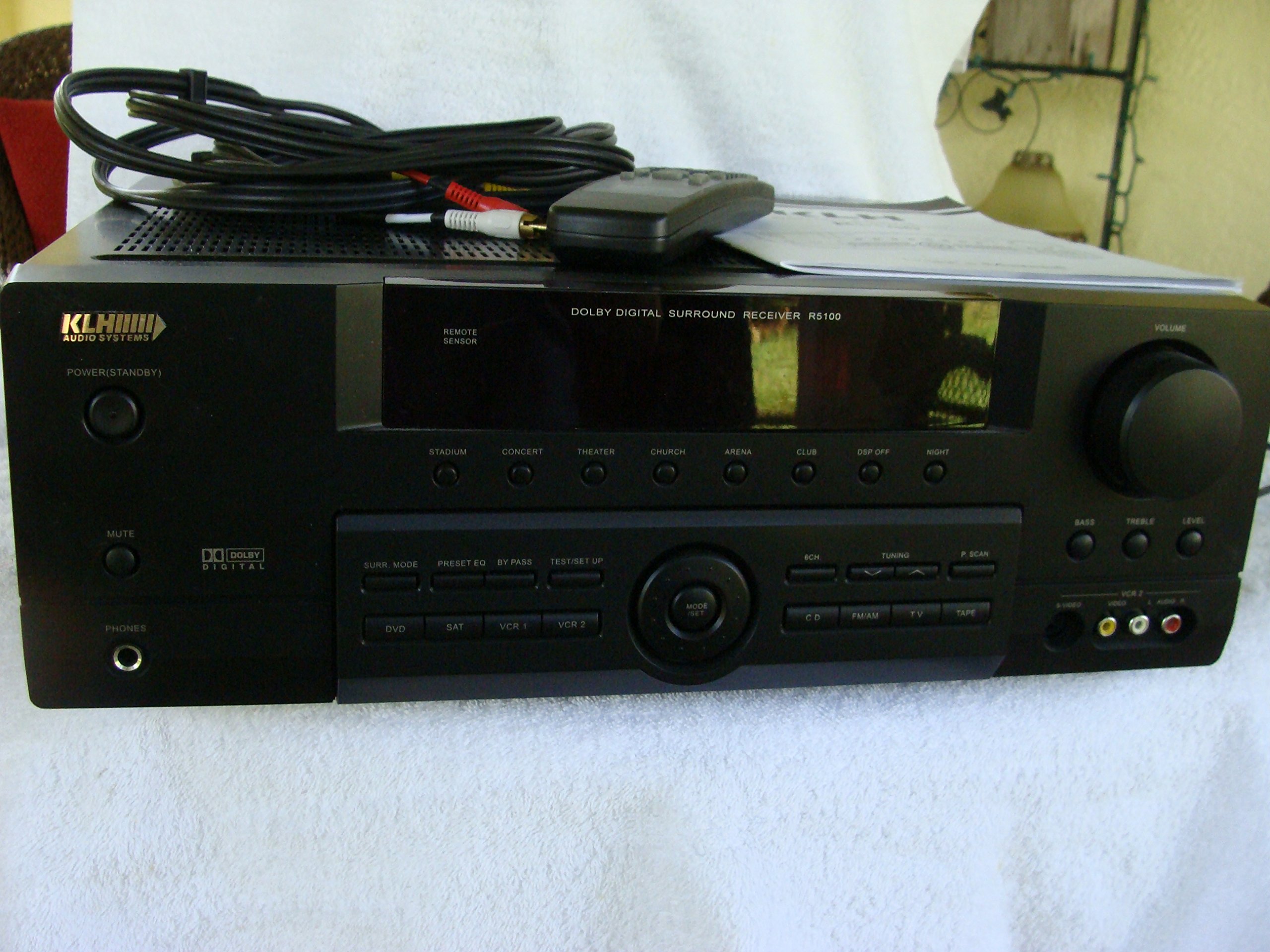
Image: The KLH R5100 receiver, its remote control, user manual, and included audio/video cables.
4. Бүтээгдэхүүн дууссанview
4.1 Урд самбарын удирдлага
The front panel provides access to essential controls and indicators for daily operation.

Зураг: Нарийвчилсан view of the receiver's front panel, highlighting the display, volume control, and input selection buttons.
- Цахилгаан товч: Хүлээн авагчийг асаах эсвэл унтраана.
- Оролтын сонгогчид: Buttons for DVD, SAT, VCR 1, VCR 2, CD, FM/AM, TV, TAPE to choose your audio/video source.
- Эзлэхүүний товчлуур: Нийт гаралтын хэмжээг тохируулна.
- Surround Mode Buttons: Select various sound fields like Stadium, Concert, Theater, Church, Arena, Club, DSP Off, Night.
- Bass/Treble/Level: Controls for adjusting audio tone and individual channel levels.
- Чихэвчний Жак: Хувийн сонсох зориулалттай.
4.2 Арын самбарын холболтууд
The rear panel houses all input and output terminals for connecting your audio and video components, as well as speakers.

Image: The full rear panel of the receiver, displaying all connection ports for audio, video, and speakers.
- Илтгэгч терминалууд: Connections for Main (Front Left/Right), Center, and Rear (Surround Left/Right) speakers.
- Audio Inputs (RCA): For connecting CD players, tape decks, VCRs, TVs, and other stereo audio sources.
- Video Inputs/Outputs (RCA/S-Video): For connecting video sources like DVD players, VCRs, and TVs.
- Дижитал аудио оролтууд (Оптик/Коаксиаль): For connecting digital audio sources like DVD players or set-top boxes.
- 6CH Direct Input: For connecting external multi-channel decoders or players with 5.1 analog outputs.
- Сабвуферын гаралт: Идэвхтэй сабвуферыг холбох RCA гаралт.
- Антенны терминалууд: For FM and AM antennas.
4.3 Алсын удирдлагын нэгж
The remote control provides convenient access to all receiver functions from your listening position.

Зураг: Ойрын зураг view of the remote control unit, detailing its buttons for various functions.
- Асаах/унтраах: Хүлээн авагчийг асаах эсвэл унтраана.
- Оролтын сонгогчид: Dedicated buttons for each input source (DVD, CD, TV, etc.).
- Дууны хэмжээг нэмэгдүүлэх/доошруулах: Мастер дууны хэмжээг тохируулна.
- Дууг хаах: Аудио гаралтыг түр хаадаг.
- Хүрээлэн буй орчны горим: Cycles through available surround sound modes.
- Level/Test: For adjusting individual speaker levels and running a test tone.
- Тохируулагчийн удирдлага: For FM/AM station tuning and memory functions.
5. Тохиргоо
5.1 Чанга яригчаа холбох
Ensure the receiver is unplugged from the power outlet before making any connections.
- Урд чанга яригч: Connect your main left and right speakers to the 'MAIN SPEAKERS (8Ω)' terminals. Ensure correct polarity (+ to + and - to -).
- Төвийн илтгэгч: Connect your center channel speaker to the 'CENTER SPEAKER (8Ω)' terminals.
- Арын чанга яригч: Connect your surround left and right speakers to the 'REAR SPEAKERS (8Ω)' terminals.
- Сабвуфер: Connect an active subwoofer to the 'SUBWOOFER OUT' RCA jack using a single RCA cable.

Зураг: Нарийвчилсан view of the speaker connection terminals on the rear panel.
5.2 Аудио/Видео эх сурвалжийг холбох
Use appropriate cables (RCA, Optical, Coaxial) to connect your source components to the receiver.
- ДВД тоглуулагч: Connect the audio output of your DVD player to the 'DVD' audio input jacks (RCA) on the receiver. For digital audio, use either the 'DIGITAL IN OPTICAL' or 'DIGITAL IN COAXIAL' input. Connect the video output to the 'DVD' video input.
- CD тоглуулагч: Connect the audio output of your CD player to the 'CD' audio input jacks (RCA).
- TV/Cable Box: Connect the audio output of your TV or cable box to the 'TV' audio input jacks (RCA). Connect video output to the 'TV' video input.
- Бусад төхөөрөмжүүд: Use 'SAT', 'VCR 1', 'VCR 2', or 'TAPE' inputs for other audio/video components as needed.

Image: A close-up of the digital audio inputs (Coaxial, Optical) and the 6-channel direct input section on the rear panel.
5.3 Антенны холболт
Connect the supplied FM and AM antennas to their respective terminals on the rear panel for radio reception.
6. Ашиглалтын заавар
6.1 Үндсэн үйл ажиллагаа
- Асаах: Урд самбар эсвэл алсын удирдлага дээрх асаах товчийг дарна уу.
- Оролтоо сонгоно уу: Press the desired input selector button (e.g., 'DVD', 'CD') on the front panel or remote control to choose your source.
- Дууны хэмжээг тохируулах: Turn the Volume knob on the front panel or use the Volume Up/Down buttons on the remote control.
6.2 Surround Sound Modes
The R5100 offers various sound modes to enhance your listening experience:
- Цэнгэлдэх хүрээлэн: Simulates the acoustics of a large stadium.
- Концерт: Creates a concert hall ambiance.
- Театр: Optimized for movie playback, enhancing dialogue and effects.
- Сүм: Replicates the spaciousness of a church.
- Arena: Provides a wide, open sound field.
- Клуб: Simulates a lively club environment.
- DSP Off: Disables digital sound processing for a direct stereo signal.
- Шөнө: Reduces dynamic range for late-night listening without disturbing others.
Press the 'SURR. MODE' button on the remote or front panel to cycle through these modes.
6.3 Аяны хяналт
Use the BASS and TREBLE controls on the front panel or remote to adjust the low and high frequency response. The LEVEL controls allow for fine-tuning of individual speaker output levels.
6.4 Тохируулагчийн ажиллагаа
To listen to radio:
- Press the 'FM/AM' input selector.
- Use the 'TUNING' buttons on the front panel or remote to find stations.
- Press 'MEMORY' to store favorite stations, and 'P.SCAN' to scan through presets.
7. Засвар үйлчилгээ
To ensure the longevity and optimal performance of your KLH R5100 receiver, follow these maintenance guidelines:
- Цэвэрлэгээ: Wipe the exterior surfaces with a soft, dry cloth. Do not use abrasive cleaners, waxes, or solvents as they may damage the finish.
- Агааржуулалт: Regularly check that the ventilation openings are not obstructed by dust or debris. Use a soft brush or vacuum cleaner to gently remove any build-up.
- Цахилгааны утас: Inspect the power cord periodically for any signs of damage. If damaged, discontinue use and contact qualified service personnel.
- Хадгалах: If storing the unit for an extended period, unplug it from the power outlet and cover it to protect against dust.
8. Алдаа засах
If you encounter problems with your receiver, refer to the following common issues and solutions before seeking professional service.
| Асуудал | Боломжит шалтгаан | Шийдэл |
|---|---|---|
| Хүч чадалгүй | Цахилгааны утас салгагдсан; Цахилгааны залгуур идэвхгүй байна | Цахилгааны утсыг найдвартай залгасан эсэхийг шалгана уу; Цахилгааны залгуурыг өөр төхөөрөмжөөр шалгана уу |
| Дуу алга | Incorrect input selected; Speakers not connected properly; Volume too low; Mute function active | Select correct input source; Check speaker connections and polarity; Increase volume; Deactivate Mute |
| Алсын удирдлага ажиллахгүй байна | Batteries depleted; Obstruction between remote and receiver; Remote sensor blocked | Replace batteries; Remove any obstructions; Ensure remote sensor on receiver is clear |
| Радио хүлээн авалт муу | Антен холбогдоогүй эсвэл буруу байрлалтай байна | Connect antennas securely; Adjust antenna position for better reception |
| Гажуудсан дуу чимээ | Input signal too high; Speaker impedance mismatch; Damaged cables | Reduce source volume; Ensure speakers match 8Ω impedance; Check and replace damaged cables |
9. Техникийн үзүүлэлтүүд
The following are the technical specifications for the KLH R5100 Surround Sound Receiver:
- Загварын дугаар: R5100
- Бүтээгдэхүүний хэмжээ: 16.88 x 6.88 x 15.75 инч
- Барааны жин: 24.2 фунт
- Эрчим хүчний эх үүсвэр: AC 120V, 60Гц
- Эрчим хүчний хэрэглээ: 320 Вт
- Аудио гаралтын горим: Хүрээлэн
- Хүрээлэн буй орчны дууны сувгийн тохиргоо: 5.1
- Холболтын технологи: RCA, 3.5mm Jack, Optical, Coaxial
- Тохиромжтой төхөөрөмжүүд: Илтгэгчид
- Хянагчийн төрөл: Алсын удирдлага
- Онцлог шинж чанар: Advanced Room Calibration (as per product listing, though specific details may vary)
- Өнгө: Хар
10. Баталгаат хугацаа ба дэмжлэг
For warranty information and customer support, please refer to the documentation included with your purchase or contact KLH customer service directly. Keep your proof of purchase for any warranty claims.


