Танилцуулга
The Fishman TriplePlay Wireless MIDI Guitar Pickup System (Model PROTRP301) is a high-performance MIDI guitar controller designed to seamlessly connect your guitar to any device that accepts USB MIDI, including Mac and PC. This system allows guitarists to control virtual instruments, layer sounds, and explore new creative possibilities without the constraints of cables.
Тохиргоо
1. Хайрцагнаас задлах ба бүрэлдэхүүн хэсгүүд
Суулгацыг эхлүүлэхийн өмнө бүх бүрэлдэхүүн хэсгүүд байгаа эсэхийг шалгаарай:
- TriplePlay Wireless Controller
- Hexaphonic Pickup
- Утасгүй USB хүлээн авагч
- Mounting Hardware (various brackets and adhesive options)
- USB цэнэглэгч кабель
- Software Suite Download Instructions
2. Техник хангамж суурилуулах
The TriplePlay system is designed for non-permanent installation on most electric and acoustic steel-string guitars. Various mounting options are included to suit different guitar types and user preferences.
- Attach the Hexaphonic Pickup: Position the hexaphonic pickup near the bridge of your guitar, ensuring it is aligned directly beneath the strings. Use the provided adhesive strips or mounting brackets to secure it. The pickup should be close enough to the strings for optimal tracking without interfering with playability.
- Connect the Wireless Controller: The wireless controller unit attaches to your guitar body, typically near the strap button or bridge. Connect the short cable from the hexaphonic pickup to the controller. Secure the controller using the appropriate mounting hardware (e.g., strap button bracket or adhesive).
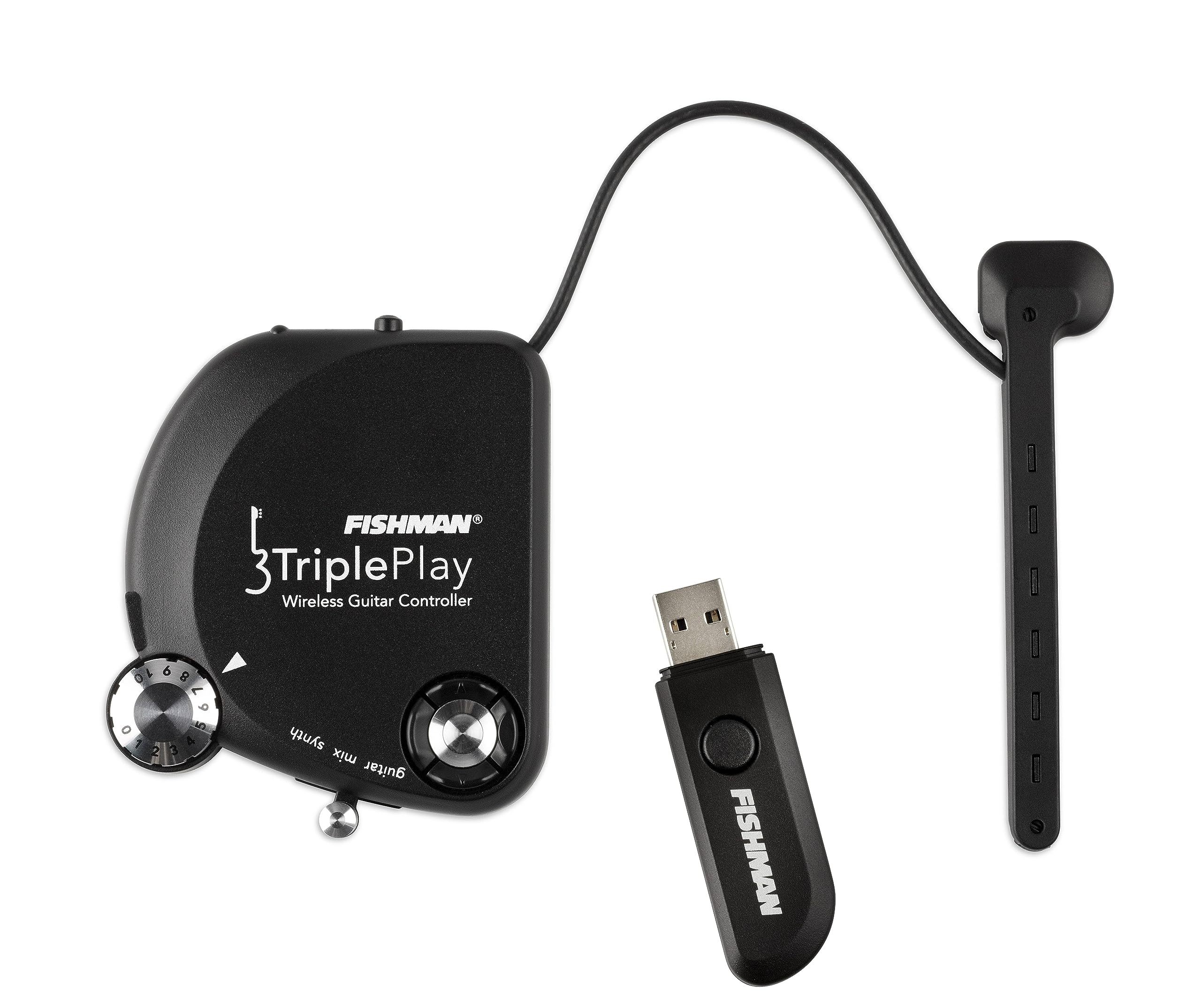
Figure 1: Fishman TriplePlay Wireless MIDI Guitar Controller and Hexaphonic Pickup.

Figure 2: The TriplePlay Wireless MIDI Guitar Controller and Hexaphonic Pickup installed on an electric guitar, showing the low-profile дизайн.
3. USB хүлээн авагчийн холболт
Plug the Wireless USB Receiver into an available USB port on your Mac or PC. The receiver will establish a wireless connection with the TriplePlay controller. An extension cable may be necessary if other USB devices are too wide for adjacent ports.

Figure 3: The compact Fishman TriplePlay Wireless USB Receiver.
4. Програм хангамж суурилуулах
The TriplePlay system includes a comprehensive software suite. Follow the instructions provided in the packaging to download and install the necessary applications. This suite typically includes:
- Fishman TriplePlay Host Application
- Native Instruments KOMPLETE ELEMENTS
- Native Instruments Guitar Rig LE
- IK Multimedia SampleTank 2 XT
- IK мультимедиа AmpliTube Custom Shop
- Notion Music Progression 2
- PreSonus Studio One 2 Artist (TriplePlay Edition)
Note: The software download can be substantial (several gigabytes) and may require individual authorization for each component. Ensure a stable internet connection and allow sufficient time for installation and setup.
Operating the TriplePlay System
1. Асаах болон Хослуулах
Press the power button on the TriplePlay controller. The unit will automatically attempt to pair with the USB receiver. A flashing LED on both units indicates successful pairing.
2. Using the TriplePlay Host Application
The Fishman TriplePlay Host Application is your central hub for managing sounds and settings. It features:
- Synth/Instrument Slots: Load up to four virtual instruments (synths) simultaneously, plus a dedicated guitar path and a pedal tone.
- Mixer Console: Adjust levels, pan, and mute individual synth and guitar channels.
- Fretboard Display: Visualize notes being played and manage split zones.
- Sensitivity and Tuning: Fine-tune the pickup's response for each string and access a MIDI-controlled tuner.
3. Суурин удирдлага
The TriplePlay controller features intuitive onboard controls for live performance and quick adjustments:
- Цэсийн навигацийн товчлуурууд: Use the four-way button system to navigate presets and menu options.
- Дууны хяналт: Adjust the overall output volume of the MIDI sounds.
- Guitar/Synth Mix Switch: Blend between your guitar's natural sound and the generated synth sounds, or mute the synth for guitar-only playing.
4. MIDI Features and Customization
The TriplePlay offers extensive MIDI customization:
- Mono/Poly Mode: Choose between monophonic (each string on its own MIDI channel) or polyphonic (all strings on one MIDI channel) tracking. Monophonic mode is ideal for assigning different sounds to individual strings.
- Dynamic Sensitivity: Adjust the pick attack sensitivity in relation to the velocity of the MIDI notes.
- Хөрвүүлэх: Transpose the MIDI output up or down in octaves.
- Split Zones: Assign different virtual instruments to specific strings or fret ranges on your guitar, allowing for complex layered sounds and creative arrangements.
5. Performance and Latency
The TriplePlay system boasts extremely low latency, making it feel natural to play. Optimal performance is achieved with good guitar technique, as precise picking and fretting contribute to accurate MIDI tracking.
Видео 1: Дууслааview of the Fishman TriplePlay Wireless MIDI Guitar Controller, demonstrating its features and capabilities.
Засвар үйлчилгээ
1. Зайны арчилгаа
The TriplePlay controller is powered by a rechargeable Lithium-Ion battery, offering over 20 hours of life on a full charge. Recharge the unit using the provided USB cable connected to a standard USB power source.
- Avoid fully discharging the battery regularly to prolong its lifespan.
- Төхөөрөмжийг ашиглаагүй үед сэрүүн, хуурай газар хадгална.
2. Цэвэрлэгээ
Wipe the controller and pickup with a soft, dry cloth. Avoid using harsh chemicals or abrasive materials that could damage the finish or electronic components.
3. Хадгалах
When not in use for extended periods, remove the TriplePlay controller from your guitar and store it in a protective case to prevent damage.
Алдааг олж засварлах
1. Tracking Issues / Inaccurate Notes
- Pickup Alignment: Ensure the hexaphonic pickup is correctly aligned directly under the strings and at the optimal height. Refer to the installation guide for precise measurements.
- Тоглоомын техник: MIDI guitar systems are highly sensitive to playing technique. Clean, precise picking and fretting will yield the best results. Avoid excessive string noise or accidental touches.
- Мэдрэмжийн тохиргоо: Adjust the individual string sensitivity settings within the TriplePlay Host Application to match your playing style and guitar.
2. No Sound / No MIDI Output
- Эрчим хүч ба хослох: Verify that both the controller and USB receiver are powered on and successfully paired (indicated by solid LEDs).
- USB холболт: Ensure the USB receiver is securely plugged into your computer and recognized by the operating system.
- Ажиллаж буй програм хангамж: Confirm that the TriplePlay Host Application is open and that virtual instruments are loaded and active.
- Дууны түвшин: Check all volume controls, including the onboard controller, software mixer, and your computer's audio output.
3. Software Compatibility / Installation Problems
- Системийн шаардлага: Ensure your computer meets the minimum system requirements for the TriplePlay software and included VSTs.
- Драйвер суурилуулах: While the TriplePlay is class-compliant, ensure any necessary drivers for your audio interface or specific VSTs are correctly installed and updated.
- Зөвшөөрөл: Verify that all included software components have been properly authorized and activated.
Үзүүлэлтүүд
| Загварын дугаар | PROTRP301 |
| Зүйлийн жин | 1.1 фунт |
| Бүтээгдэхүүний хэмжээс | 0.5 x 2 x 3 инч |
| Батерей | 1 лити ион батерей шаардлагатай. (оруулсан) |
| Өнгөний нэр | Хар |
| Тохиромжтой төхөөрөмжүүд | Компьютер, Mac, Таблет, Ухаалаг утас |
| Холбогч төрөл | USB |
| Гитар авах тохиргоо | MIDI |
| Тоног төхөөрөмжийн интерфейс | USB |
| Дэмжигдсэн програм хангамж | Ableton Live (and included suite) |
| Материалын төрөл | Stainless Steel (for some components) |
| Техник хангамжийн платформ | PC/Mac |
| Холболтын технологи | USB |
| Онцлог шинж чанар | Lightweight, Velocity Sensitive Key |
Баталгаат болон дэмжлэг
Specific warranty information was not provided in the product data. Please refer to the official Fishman website or your retailer for detailed warranty terms and conditions.
For technical support, software updates, and additional resources, visit the Загасчин webсайт or contact their customer service. Fishman is known for its responsive support team.


