1. Оршил ба түүнээс дээшview
This manual provides comprehensive instructions for the setup, operation, maintenance, and troubleshooting of your InFocus IN3124 Projector. Designed for clarity and ease of use, this guide will help you maximize your projector's performance and longevity.
The InFocus IN3124 is a high-performance projector featuring XGA (1024 x 868) native resolution, 4800 lumens of brightness, and a 3000:1 contrast ratio, making it suitable for various presentation environments. Its portable design allows for flexible placement and usage.
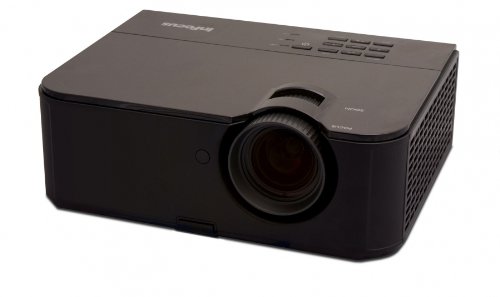
Зураг 1: Урд тал view of the InFocus IN3124 Projector, highlighting the main lens and the top-mounted control panel.
2. Тохиргоо
2.1 Савлах
Carefully remove the projector and all accessories from the packaging. Verify that all components listed in the packing list are present. Retain the original packaging for future transport or storage.
2.2 Байршил
Position the projector on a stable, level surface. Ensure adequate ventilation around the unit to prevent overheating. Maintain a clear path between the projector lens and the projection screen or surface. The optimal projection distance will vary based on the desired screen size.
2.3 Цахилгааныг холбох
- Цахилгааны утсыг проекторын тэжээлийн оролтод холбоно уу.
- Цахилгааны утасны нөгөө үзүүрийг газардуулсан цахилгааны залгуурт холбоно.
2.4 Оролтын эх үүсвэрүүдийг холбох
The IN3124 projector supports various input sources. Connect your video source (e.g., computer, DVD player) to the appropriate input port on the projector. Common ports include VGA and HDMI (if available on your specific model).
- VGA: Use a VGA cable to connect to a computer's video output.
- HDMI: Use an HDMI cable for digital video and audio (check projector for HDMI port availability).
3. Ашиглалтын заавар
3.1 Асаах/унтраах
- Асаахын тулд: Press the power button on the projector's control panel or the remote control. The power indicator light will illuminate.
- Унтраахын тулд: Press the power button twice. The projector will enter a cooling cycle before shutting down completely. Do not unplug the projector during the cooling cycle.
3.2 Фокус болон томруулалтыг тохируулах
Rotate the focus ring on the projector lens until the image appears sharp and clear. Use the zoom ring (if present) to adjust the image size to fit your screen.
3.3 Selecting Input Sources
Press the "Source" or "Input" button on the projector's control panel or remote control to cycle through available input sources (e.g., VGA, HDMI). Select the input corresponding to your connected device.
3.4 Menu Navigation and Keystone Correction
Use the menu buttons on the projector or remote to access the On-Screen Display (OSD). Navigate through the menu options to adjust settings such as brightness, contrast, color, and keystone correction. Keystone correction helps to square the image if the projector is not perfectly perpendicular to the screen.
4. Засвар үйлчилгээ
4.1 Линзийг цэвэрлэх
Проекторын линзийг оптик гадаргууд зориулсан зөөлөн, хөвөнгүй даавуугаар зөөлөн арчина. Зүлгүүрийн цэвэрлэгч эсвэл хэт их хүч хэрэглэж болохгүй, учир нь энэ нь линзийг зурж болзошгүй.
4.2 Cleaning Air Filters
Regularly check and clean the projector's air filters to ensure proper airflow and prevent overheating. Refer to the projector's specific filter access instructions. Use a soft brush or vacuum cleaner to remove dust accumulation.
4.3 лamp Солих
Проектор лamp хязгаарлагдмал хугацаатай. Хэзээ лamp life indicator appears or the image becomes dim, the lamp may need replacement. Consult the full service manual or manufacturer's webдэлгэрэнгүй l сайтamp солих журам болон нийцтэй лamp models. Always allow the projector to cool down completely before attempting lamp солих.
4.4 Хадгалалт
Проекторыг удаан хугацаагаар ашиглахгүй бол сэрүүн, хуурай газар, нарны шууд тусгал болон хэт өндөр температураас хол хадгална уу. Тоос шороо, гэмтлээс урьдчилан сэргийлэхийн тулд анхны сав баглаа боодол эсвэл хамгаалалтын гэрийг ашиглаарай.
5. Алдаа засах
This section addresses common issues you might encounter with your InFocus IN3124 Projector. For more complex problems, contact customer support.
- Зураг харагдахгүй байна:
- Ensure the projector is powered on and the power indicator is solid.
- Verify that the input source cable (VGA, HDMI) is securely connected to both the projector and the source device.
- "Эх сурвалж" товчийг ашиглан зөв оролтын эх үүсвэрийг сонгоно уу.
- Check if the source device is outputting a signal.
- Dim or Faded Image:
- Adjust brightness and contrast settings in the OSD menu.
- l-г баталгаажуулна ууamp is not nearing the end of its lifespan.
- Clean the projector lens and air filters.
- Check the projection mode (e.g., Eco mode might reduce brightness).
- Зураг бүдэг байна:
- Проекторын линз дээрх фокусын цагиргийг тохируулна уу.
- Проекцын гадаргуу тэгш, проектор тогтвортой байгаа эсэхийг шалгаарай.
- Check the resolution settings of your source device to match the projector's native resolution.
- Алсын удирдлага ажиллахгүй байна:
- Алсын удирдлага дахь батерейг солино уу.
- Алсын удирдлага болон проекторын IR хүлээн авагчийн хооронд ямар ч саад бэрхшээл байхгүй эсэхийг шалгаарай.
- Алсын удирдлагыг проектор руу шууд чиглүүл.
6. Техникийн үзүүлэлтүүд
The following table outlines the key technical specifications for the InFocus IN3124 Projector:
| Онцлог | Тодорхойлолт |
|---|---|
| Загварын дугаар | IN3124 |
| Display Resolution (Native) | XGA (1024 x 868) |
| Гэрэлтүүлэг | 4800 люмен |
| Ялгаатай харьцаа | 3000:1 |
| Дэлгэцийн төрөл | LCD, LCoS |
| Зүйлийн жин | 8.16 фунт (3.7 кг) |
| Бүтээгдэхүүний хэмжээ (L x W x H) | 12.83 x 10.43 x 4.8 инч (32.59 x 26.49 x 12.19 см) |
| Онцлог шинж чанар | Зөөврийн |
7. Баталгаат хугацаа ба дэмжлэг
For detailed warranty information, please refer to the warranty card included with your product packaging or visit the official InFocus webсайт. Баталгаа нь ихэвчлэн худалдан авсан өдрөөс хойш тодорхой хугацаанд үйлдвэрлэлийн согогийг хамардаг.
If you encounter issues that cannot be resolved using the troubleshooting guide, or require technical assistance, please contact InFocus customer support. Contact details can usually be found on the manufacturer's webсайт эсвэл таны бүтээгдэхүүний баримт бичигт.


