1. Танилцуулга
This manual provides detailed instructions for the proper use and maintenance of your TFA 38.2028.02 Digital Timer and Stopwatch. This device is designed for precise timekeeping in various applications, featuring a reversible display, touch-sensitive buttons, and magnetic mounting options. Please read this manual thoroughly before operating the device.
2. Бүтээгдэхүүний онцлог
- Reversible Display: Хялбар байхыг зөвшөөрдөг viewөөр өөр өнцгөөс харах.
- Touch-Sensitive Buttons: For intuitive operation.
- Арын гэрэлтүүлэг: Гэрэл багатай нөхцөлд тод харагдах байдлыг хангадаг.
- Соронзон бэхэлгээ: Securely attaches to metallic surfaces.
- Wall or Tabletop Mounting: Олон талт байрлуулах сонголтууд.
- Таймерын хүрээ: Counts up to 99 minutes and 59 seconds.
- Компакт дизайн: Хэмжээ нь 76 x 25 x 76 мм.
3. Багцын агуулга
- TFA 38.2028.02 Digital Timer and Stopwatch Unit
- Хэрэглэгчийн гарын авлага (энэ баримт бичиг)
Note: 2 x 1.5V AAA batteries are required and not included in the package.
4. Тохиргоо
4.1 Батерей суурилуулах
- Төхөөрөмжийн арын хэсэгт зайны тасалгааны тагийг олоорой.
- Тасалгааг нээхийн тулд тагийг нь зөөлөн гулсуулж эсвэл өргөж ав.
- Insert two (2) 1.5V AAA batteries, ensuring correct polarity (+/-) as indicated inside the compartment.
- Зайны тасалгааны тагийг сольж, байрандаа найдвартай товшиж байгаа эсэхийг шалгаарай.
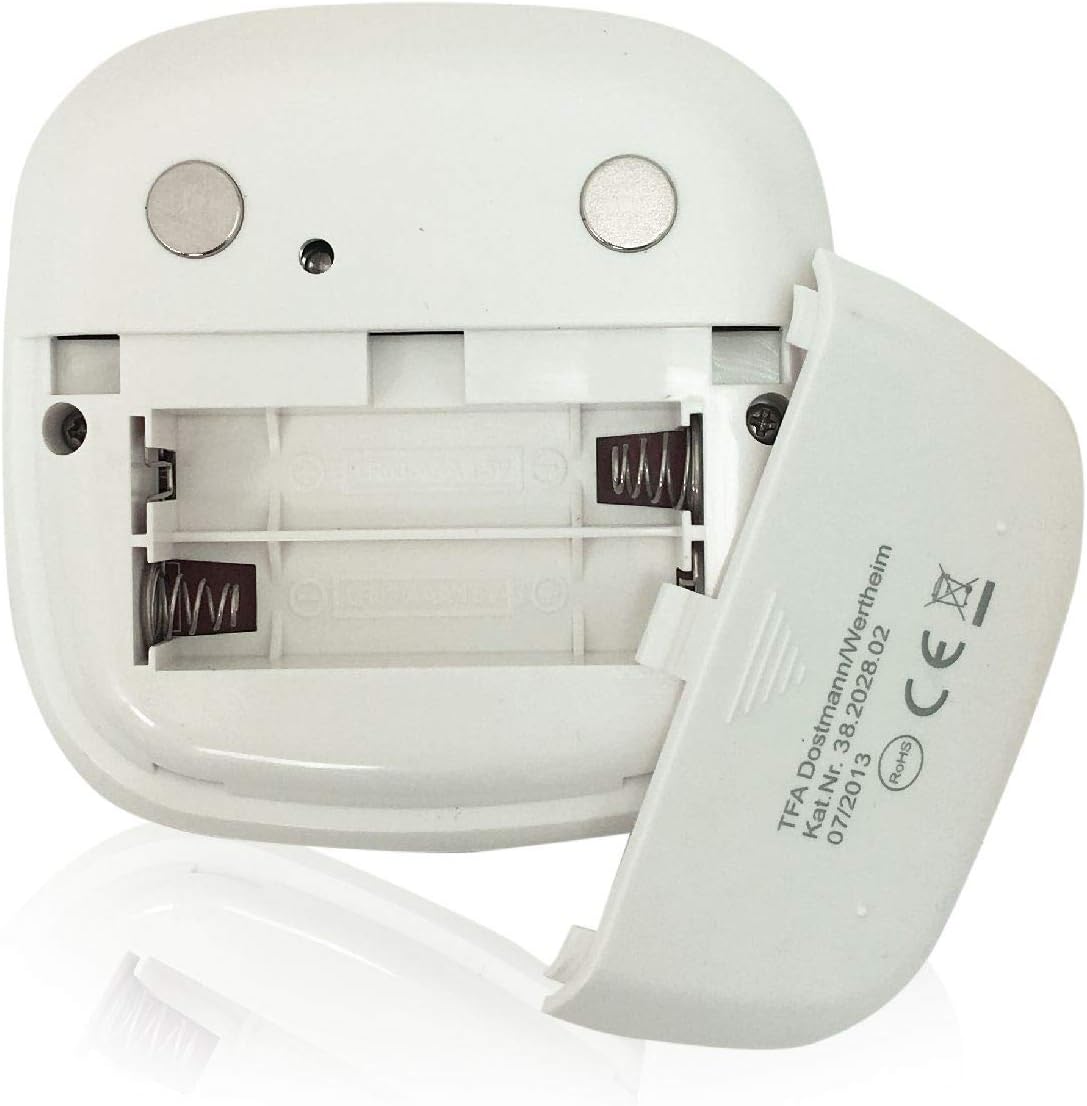
Зураг: Ар талд view of the timer with the battery compartment open, illustrating where to insert the two AAA batteries.
4.2 Анхдагч асаалттай
Once batteries are installed, the display will illuminate, and the device will be ready for use. The default display shows "00:00".
5. Ашиглалтын заавар

Зураг: Урд view of the TFA 38.2028.02 timer, highlighting the digital display and the three touch-sensitive buttons: 'M' for minutes, 'S' for seconds, and 'S/S' for Start/Stop.
5.1 Товчлуурын функцууд
- Д (Минут): Press to increase minutes. Hold to rapidly increase minutes.
- S (секунд): Press to increase seconds. Hold to rapidly increase seconds.
- S/S (Start/Stop): Press to start or stop the timer/stopwatch.
5.2 Setting the Timer (Countdown)
- Ensure the display shows "00:00". If not, press M болон S simultaneously to reset.
- дээр дарна уу M button to set the desired minutes (up to 99 minutes).
- дээр дарна уу S button to set the desired seconds (up to 59 seconds).
- Хүссэн цагийг тохируулсны дараа товчийг дарна уу S/S товчлуурыг дарж тоололыг эхлүүлнэ.
- To pause the countdown, press S/S дахин. дарна уу S/S үргэлжлүүлэх.
- When the timer reaches "00:00", an alarm will sound. Press any button to stop the alarm.
5.3 Using the Stopwatch (Count-up)
- Ensure the display shows "00:00". If not, press M болон S simultaneously to reset.
- дээр дарна уу S/S button to start the count-up. The display will begin counting from "00:00".
- Секундомерыг түр зогсоохын тулд товшино уу S/S дахин. дарна уу S/S үргэлжлүүлэх.
- To reset the stopwatch to "00:00", pause the stopwatch, then press M болон S нэгэн зэрэг.
5.4 Арын гэрэлтүүлгийн функц
The display features a backlight for improved visibility. The backlight activates automatically when buttons are pressed and typically remains on for approximately 30-40 seconds before dimming to conserve battery life.
6. Суурилуулах сонголтууд
The TFA 38.2028.02 timer offers flexible mounting solutions:
- Соронзон хавсралт: The back of the timer is equipped with magnets, allowing it to be securely attached to refrigerators, oven hoods, or any other metallic surface.
- Ширээний тавцангийн байршил: The timer's design allows it to stand upright on a flat surface, such as a kitchen counter or desk.
- Хананд суурилуулах: The unit can also be mounted on a wall using a small hook or screw (not included) through the designated hole on the back.

Зураг: Ар талд view of the timer, showing the integrated magnets for secure attachment to metallic surfaces and the model number.
7. Засвар үйлчилгээ
7.1 Цэвэрлэгээ
To clean the timer, wipe it with a soft, damp cloth. Do not use abrasive cleaners or immerse the device in water. Avoid getting moisture into the battery compartment or display area.
7.2 Батерейг солих
When the display becomes dim or the device stops responding, it is time to replace the batteries. Follow the battery installation steps in Section 4.1. Always use fresh 1.5V AAA batteries and dispose of old batteries responsibly.
8. Алдаа засах
| Асуудал | Боломжит шалтгаан | Шийдэл |
|---|---|---|
| Төхөөрөмж асахгүй байна. | Батерей нь дуусчихсан эсвэл буруу суурилуулсан. | Батерейны туйлшралыг шалгах эсвэл шинэ AAA батерейгаар солино уу. |
| Дэлгэц бүдэгхэн эсвэл анивчих. | Батерейны хүчин чадал бага. | Зайгаа солих. |
| Товчнууд хариу өгөхгүй байна. | Low battery power or temporary software glitch. | Replace batteries. If problem persists, remove batteries for 1 minute and reinsert. |
| Timer alarm is too quiet. | Alarm volume is fixed and cannot be adjusted. | Ensure the timer is placed in a location where the alarm can be heard. |
9. Техникийн үзүүлэлтүүд
| Онцлог | Дэлгэрэнгүй |
|---|---|
| Загварын дугаар | 38.2028.02 |
| Брэнд | TFA |
| Хэмжээ (L x W x H) | 76 x 25 x 76 mm (approximately 2.5P x 7.6l x 7.6H cm) |
| Жин | 92 грамм |
| Материал | Plastic with integrated magnets |
| Эрчим хүчний хангамж | 2 x 1.5V AAA батерей (оруулаагүй) |
| Таймерын хүрээ | Up to 99 minutes, 59 seconds |
| Дэлгэц | Арын гэрэлтүүлэгтэй дижитал |
| Суурилуулах сонголтууд | Magnetic, Tabletop, Wall-mountable |

Image: The timer held in a hand, visually demonstrating its compact size and indicating its dimensions (7.6 cm x 7.6 cm x 2.5 cm).
10. Баталгаат хугацаа ба дэмжлэг
TFA products are manufactured with quality and precision. For specific warranty information, please refer to the documentation provided with your purchase or visit the official TFA website. For technical support or inquiries, please contact TFA customer service through their official channels.
Энэ гарын авлагыг цаашид лавлах зорилгоор хадгална уу.


