1. Танилцуулга
Худалдан авалт хийсэнд баярлалааasing the Fonestar AS-170RU Hi-Fi Amplifier. This device is designed to provide high-fidelity stereo audio amplification, featuring a built-in USB/MP3 player, AM/FM digital tuner, and multiple audio inputs. This manual provides detailed instructions for safe installation, operation, and maintenance of your ampөргөгч. Хэрэглэхийн өмнө энэхүү гарын авлагыг сайтар уншиж, ирээдүйд лавлах зорилгоор хадгална уу.
2. Аюулгүй ажиллагааны заавар
- Эрчим хүчний хангамж: -ийг баталгаажуулах amplifier is connected to a power supply matching the voltage specified on the unit. Disconnect the power cord from the outlet if the unit will not be used for an extended period.
- Агааржуулалт: Агааржуулалтын нүхийг бүү бөглөөрэй. Хэт халалтаас сэргийлж, төхөөрөмжийн эргэн тойронд агаарын урсгалыг хэвийн байлгах хангалттай зайтай байлгаарай.
- Ус ба чийг: Төхөөрөмжийг бороо, чийг, дусалж/цацаж буй шингэнд бүү байлга. Ваар гэх мэт шингэнээр дүүргэсэн зүйлсийг төхөөрөмж дээр бүү тавь.
- Дулааны эх үүсвэрүүд: Төхөөрөмжийг радиатор, халаалтын төхөөрөмж, зуух эсвэл бусад төхөөрөмж (үүнд орно) гэх мэт дулааны эх үүсвэрээс хол байлга. ampөргөгч) дулаан үүсгэдэг.
- Цэвэрлэгээ: Зөвхөн хуурай даавуугаар цэвэрлэ. Шингэн цэвэрлэгч, аэрозол цэвэрлэгч хэрэглэж болохгүй.
- Үйлчилгээ: Энэ бүтээгдэхүүнд өөрөө үйлчлэх гэж бүү оролдоорой. Бүх засвар үйлчилгээг мэргэшсэн үйлчилгээний ажилтнуудад хандаарай.
- Байршил: Place the unit on a stable, flat surface. Avoid placing it in direct sunlight or near strong magnetic fields.
3. Багцын агуулга
Таны багцад дараах зүйлс байгаа эсэхийг шалгана уу.
- Fonestar AS-170RU Hi-Fi Ampнастан
- Алсын удирдлага
- AM Антенна
- FM антен
- Хэрэглэгчийн гарын авлага (энэ баримт бичиг)
4. Бүтээгдэхүүн дууссанview
4.1 Урд самбар
The front panel provides access to essential controls and the display.
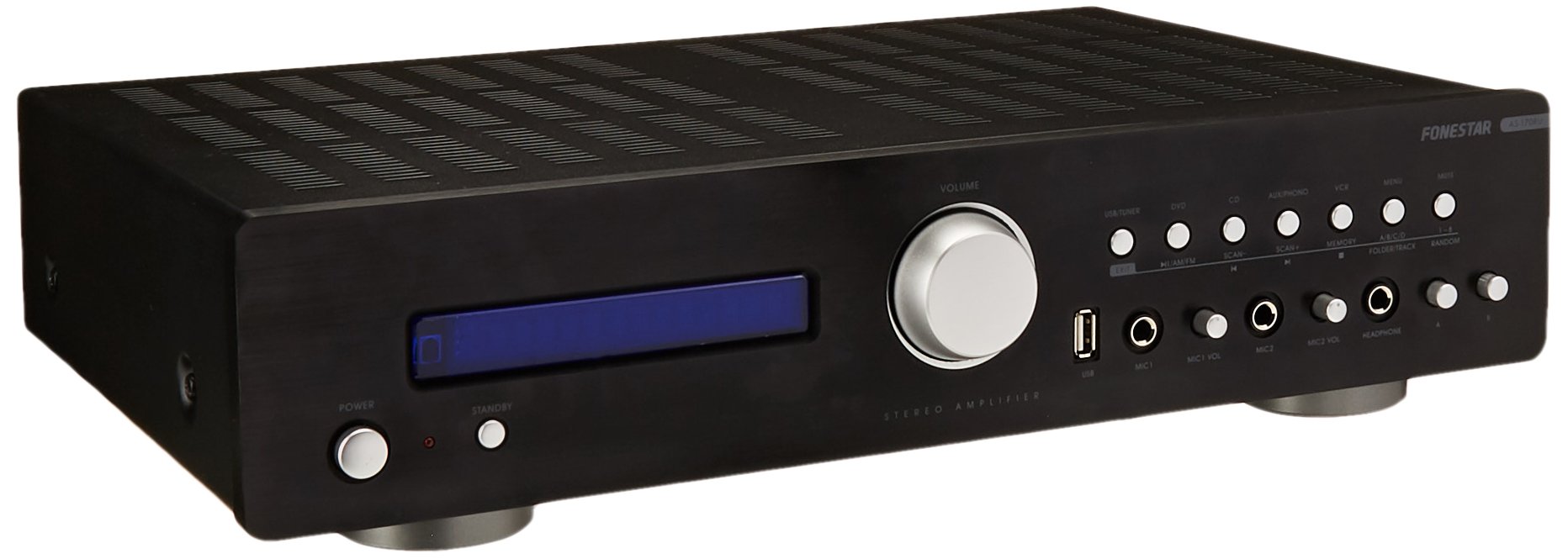
Image: Fonestar AS-170RU Front Panel. Энэ зураг урд талыг харуулж байна view -ийн amplifier, showing the VFD display, USB port, headphone output, input selectors, volume knob, and other control buttons.
- Цахилгаан товч: эргүүлнэ ampилүү амьд асаах эсвэл унтраах.
- VFD дэлгэц: Shows current input, volume level, tuner information (frequency, RDS), and USB/MP3 track details (ID3 tag).
- USB порт: For connecting USB storage devices to play MP3 files.
- Чихэвчний гаралт: Чихэвч холбох 6.3 мм залгуур.
- Оролтын сонгогчид: Buttons for choosing audio sources (CD, DVD, VCR, AUX/Phono, USB/Tuner).
- Дууны хяналт: Rotary knob to adjust the master volume level.
- Микрофоны оролтууд: Two 6.3mm microphone jacks with independent volume control.
- Аяны удирдлага: Buttons or menu options for adjusting Bass, Treble, and Balance.
4.2 Арын самбар
The rear panel contains all the necessary connections for your audio sources, speakers, and antennas.

Image: Fonestar AS-170RU Rear Panel. This image illustrates the rear connections of the amplifier, including speaker terminals (A/B), various RCA input jacks (CD, DVD, VCR, AUX/Phono), REC OUT, PRE OUT, AMP IN, and antenna connections (FM COAX, AM LOOP ANT).
- Чанга яригчийн гаралт (A/B): Terminals for connecting two pairs of speakers. Supports 4-16 ohms for A or B, or 8-16 ohms for A+B.
- Audio Inputs (RCA):
- CD оролт: CD тоглуулагч холбох зориулалттай.
- DVD Input: For connecting a DVD player or other audio source.
- VCR Input: For connecting a VCR or other audio source.
- AUX/PHONO Input: For connecting auxiliary devices or a turntable (Phono input may require a pre-amplifier if your turntable does not have one built-in).
- ДАХИН АВАХ: RCA output for connecting to a recording device.
- УРЬДЧИЛАН: Гадаад цахилгаан тэжээлд холбогдох RCA гаралт ampнастан.
- AMP IN: RCA input for connecting an external pre-ampнастан.
- Антенны холболтууд:
- FM COAX 75Ω: For connecting an FM antenna.
- AM LOOP ANT: For connecting the supplied AM loop antenna.
4.3 Алсын удирдлага
The included remote control allows convenient operation of the ampхолоос өргөгч.

Image: Fonestar AS-170RU Remote Control. This image shows the remote control unit with various buttons for power, input selection, volume, mute, tuner functions, USB playback controls, and tone adjustments.
- БАЙГУУЛЛАГА: Цахилгаан асаах/унтраах.
- Оролтын сонгогчид: Buttons for CD, DVD, VCR, AUX/PHONO, USB/TUNER.
- Дууны хэмжээг нэмэгдүүлэх/доошруулах (VOL +/-): Мастер дууны хэмжээг тохируулна.
- ХААЛТ: Аудио гаралтыг чимээгүй болгоно.
- AM/FM: Switches between AM and FM tuner modes.
- SCAN: Scans for radio stations.
- ДУРСАМЖ: Радио станцын урьдчилсан тохиргоог хадгалдаг.
- USB Playback Controls: Play/Pause, Stop, Skip Track, Folder/Track navigation.
- EQ OFF / BASS / TREBLE: Access tone controls.
- RDS / ID3: Displays RDS information for radio or ID3 tag MP3 дээр files.
5. Тохиргоо
5.1 Чанга яригчийг холбох
- -ийг баталгаажуулах ampөргөгчийг унтрааж, цахилгааны залгуураас салгасан.
- Connect your speakers to the "SPEAKERS OUTPUT" terminals on the rear panel.
- Match the positive (+) terminal of the amplifier (red) to the positive (+) terminal of your speaker, and the negative (-) terminal (black) to the negative (-) terminal.
- The AS-170RU supports two groups of speakers (A and B). You can connect one pair to "SPEAKERS A" and another to "SPEAKERS B".
- Ensure your speakers' impedance matches the amplifier's specifications: 4-16 ohms for A or B, or 8-16 ohms for A+B.
5.2 Аудио эх сурвалжийг холбох
Use RCA cables to connect your audio components to the corresponding input jacks on the rear panel.
- CD тоглуулагч: "CD" оролттой холбогдоно уу.
- ДВД тоглуулагч: Connect to the "DVD" input.
- Видео камер: Connect to the "VCR" input.
- Auxiliary Device (e.g., smartphone, tablet): Connect to the "AUX/PHONO" input.
- Эргэлтийн ширээ: Connect to the "AUX/PHONO" input. If your turntable does not have a built-in pre-amplifier, you may need an external phono pre-ampнастан.
5.3 Антеныг холбох
- FM антен: Connect the supplied FM wire antenna to the "FM COAX 75Ω" terminal. Extend the wire for optimal reception.
- AM антен: Connect the supplied AM loop antenna to the "AM LOOP ANT" terminals. Position the loop for best reception.
5.4 Эрчим хүчний холболт
Бүх аудио болон чанга яригч холболт хийгдсэний дараа залгуурыг залгаарай amplifier's power cord into a suitable AC power outlet.
6. Ашиглалтын заавар
6.1 Үндсэн үйл ажиллагаа
- Асаах/унтраах: Press the Power button on the front panel or the STANDBY button on the remote control to turn the ampилүү амьд асаах эсвэл унтраах.
- Оролтын эх сурвалжийг сонгох: Press the desired input selector button on the front panel (CD, DVD, VCR, AUX/PHONO) or the remote control (CD, DVD, VCR, AUX/PHONO, USB/TUNER).
- Дууны хэмжээг тохируулах: Rotate the Volume knob on the front panel or use the VOL +/- buttons on the remote control to adjust the sound level.
- Дууг хаах: Press the MUTE button on the remote control to temporarily silence the audio. Press it again to restore sound.
6.2 USB/MP3 тоглуулах
- Insert a USB storage device (flash drive) into the USB port on the front panel.
- Select "USB/TUNER" as the input source. The amplifier will automatically detect and begin playing MP3 files.
- Use the playback controls on the remote control (Play/Pause, Stop, Skip Track, Folder/Track) to navigate and control your music.
- The VFD display will show track information, including ID3 tags боломжтой бол.
- The amplifier supports up to 65,000 indexable folders and files, with a maximum of 8 folder levels.
6.3 AM/FM Tuner Operation
- Select "USB/TUNER" as the input source, then press the AM/FM button on the remote control to switch between AM and FM bands.
- Автомат хайлт: Press the SCAN button on the remote control to automatically search for and store available radio stations.
- Гараар тааруулах: Use the tuning buttons (usually arrow keys) on the remote control to manually adjust the frequency.
- Урьдчилан тохируулсан станцууд: The amplifier supports 64 presets. Use the MEMORY button to store and recall your favorite stations.
- RDS функц: If available, press the RDS button on the remote control to display Radio Data System information (e.g., station name, program type).
6.4 микрофоны оролт
- Connect microphones to the 6.3mm MIC 1 and MIC 2 jacks on the front panel.
- Adjust the independent volume controls for each microphone to achieve the desired level.
6.5 Tone and Balance Control
The amplifier allows adjustment of bass, treble, and balance through its menu system or dedicated buttons on the remote control. Refer to the remote control section for specific buttons like EQ OFF, BASS, TREBLE.
7. Засвар үйлчилгээ
- Цэвэрлэгээ: Disconnect the power before cleaning. Use a soft, dry cloth to wipe the exterior surfaces. Do not use abrasive cleaners, waxes, or solvents.
- Агааржуулалт: Агааржуулалтын нүхнүүд тоос шороо, хог хаягдлаас цэвэрлэгдсэн эсэхийг үе үе шалгаж байгаарай.
- Хадгалах: Хэрэв төхөөрөмжийг удаан хугацаагаар хадгалах бол цахилгааны залгуураас салгаад сэрүүн, хуурай, нарны шууд тусгал болон хэт өндөр температураас хол газар хадгална уу.
8. Алдаа засах
If you encounter problems with your ampлифт, боломжит шийдлүүдийг дараах хүснэгтээс харна уу.
| Асуудал | Боломжит шалтгаан | Шийдэл |
|---|---|---|
| Хүч чадалгүй | Цахилгааны утас холбогдоогүй байна; Цахилгааны залгуур эвдэрсэн байна; Ampзогсолтын горимд өргөгч. | Ensure power cord is securely plugged in. Test the outlet with another device. Press the Power/STANDBY button. |
| Дуу алга | Буруу оролт сонгогдсон; Дууны түвшин хэт бага; Чанга яригч зөв холбогдоогүй; Дуугүй болгох функц идэвхтэй байна. | Select the correct input source. Increase volume. Check speaker connections. Deactivate MUTE. |
| Радио хүлээн авалт муу | Антен холбогдоогүй эсвэл буруу байрлалтай; Хөндлөнгийн оролцоо. | Connect and adjust the position of the AM/FM antennas. Move the ampөргөгчийг бусад электрон төхөөрөмжөөс хол байлга. |
| USB тоглуулах ажиллахгүй байна | USB device not inserted correctly; Incompatible file format; USB device faulty. | Ensure USB device is fully inserted. Check if files нь MP3 форматтай. Өөр USB төхөөрөмж ашиглаж үзнэ үү. |
| Amplifier turns off unexpectedly or cycles power | Overheating; Short circuit in speaker wiring; Internal fault. | Ensure adequate ventilation. Check speaker wires for frayed strands causing short circuits. If the problem persists, disconnect power and contact qualified service personnel. |
9. Техникийн үзүүлэлтүүд
- Загвар: AS-170RU
- Эрчим хүчний гаралт: 80 + 80 W RMS at 4 Ω
- Чанга яригчийн эсэргүүцэл: 4-16 Ω (A or B), 8-16 Ω (A+B)
- Хамгаалалт: 3 circuits (short circuits, overload, overvoltage)
- USB тоглуулагч: MP3 file playback, ID3 tag support. Max 65,000 indexable folders/files, max 8 folder levels.
- Таалагч: Digital AM/FM, 64 presets, RDS.
- Оролтууд: 2 x Microphone (6.3mm), 4 x RCA (CD, DVD, VCR, AUX/Phono), 1 x RCA (AMP IN).
- Гаралт: 1 x RCA (REC OUT), 1 x RCA (PRE OUT), Headphone (6.3mm).
- Дэлгэц: Blue VFD.
- Ая хянах: Bass, Treble, Balance (via menu/remote).
- Хэмжээ: 40 x 40 x 60 см (ойролцоогоор 15.7 x 15.7 x 23.6 инч)
- Жин: 7.2 кг (ойролцоогоор 15.87 фунт)
10. Баталгаат хугацаа ба дэмжлэг
For warranty information and technical support, please refer to the warranty card included with your product or contact your authorized Fonestar dealer. Do not attempt to repair the unit yourself, as this may void your warranty.


