Танилцуулга
This manual provides comprehensive instructions for the setup, operation, and maintenance of your VTech CS6829-2 2-Handset Cordless Phone with Answering System. This system is designed for home use, offering features such as caller ID, a digital answering machine, backlit keypad, and a full duplex speakerphone for enhanced communication.
Хайрцагт юу байна
Бүх зүйл таны багцад байгаа эсэхийг шалгана уу:
- Үндсэн нэгж
- 2 утасгүй гар утас
- Цэнэглэгч
- 2 адаптер
- 2 батерейны багц
- Утасны шугамын утас
- Хананд холбох хаалт
- Түргэн эхлүүлэх гарын авлага
Тохиргоо
Follow these steps to set up your VTech CS6829-2 phone system:
- Үндсэн нэгжийг холбоно уу:
Plug one end of the telephone line cord into the TEL LINE jack on the back of the base unit. Plug the other end into a telephone wall jack. Plug the small end of the power adapter into the POWER jack on the back of the base unit. Plug the large end of the power adapter into a wall outlet not controlled by a wall switch.
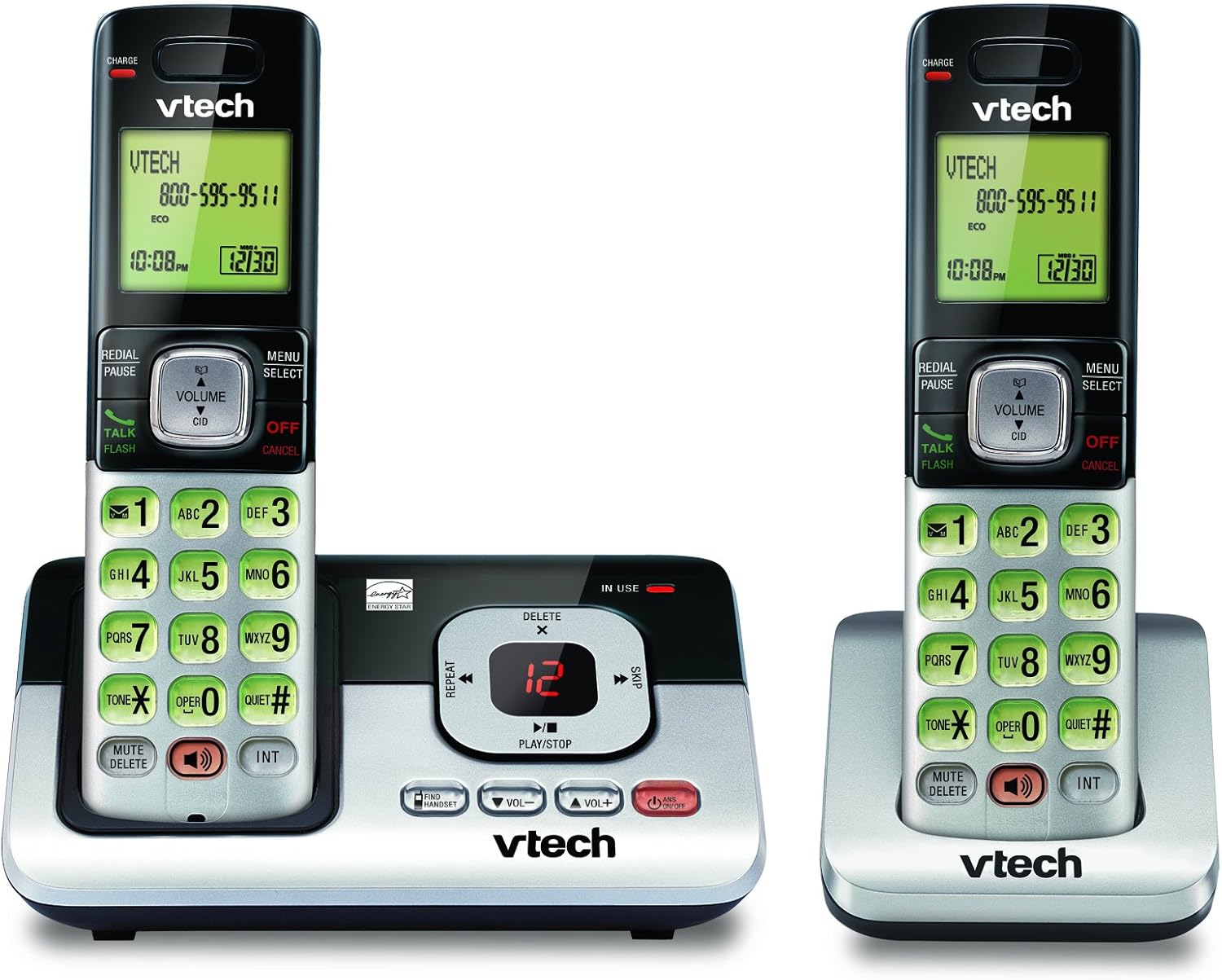
Image: The VTech CS6829-2 base unit with one handset docked, and a second handset with its charging cradle. This illustrates the main components of the phone system.
- Гар утасны батерейг суурилуулах:
Open the battery compartment cover on the back of each handset. Connect the battery pack connector securely into the jack inside the compartment. Place the battery pack with the label facing up and tuck the wires inside the compartment. Close the battery compartment cover.
- Гар утас цэнэглэх:
Place each handset in the base unit or charger with the display facing up. The CHARGE light on the handset will illuminate, indicating proper charging. Allow the handsets to charge for at least 16 hours before initial use for optimal battery performance.

Зураг: өнцөгт view of the VTech CS6829-2 base unit with one handset docked, and the second handset in its separate charging cradle. This shows how the handsets are placed for charging.
- Огноо, цагийг тохируулах:
After the handsets are charged, follow the on-screen prompts or refer to the quick start guide to set the date and time. This is important for accurate caller ID and answering system timestamps.
Ашиглалтын заавар
Дуудлага хийх, хариулах
- Дуудлага хийхийн тулд: дарна уу ЯРИА / Гялбаа or any dialing key to get a dial tone, then dial the phone number.
- Дуудлагад хариулахын тулд: Утас дуугарах үед дарна уу ЯРИА / Гялбаа эсвэл ямар нэгэн залгах товчлуур.
- Дуудлага дуусгахын тулд: дарна уу Унтраах/Цуцлах or place the handset back in the base unit/charger.
Дижитал хариултын систем
- Мессежүүдийг тоглуулах: Үндсэн нэгж дээр дарна уу ТОГЛОХ/ЗОГСООХ. On a handset, press ЦЭС/СОНГОХ, scroll to "Answering System", then select "Play Messages".
- Recording an Outgoing Announcement: On the base unit or handset, navigate to the answering system menu and select "Record OGM" (Outgoing Message).
- Мессежүүдийг устгаж байна: While a message is playing, press УСТГАХ on the base unit or handset.
Чанга яригч функц
- To Use Speakerphone: Дуудлагын үеэр ИЛТГЭГЧ button on the handset. Press it again to switch back to the handset earpiece.
Гол онцлогууд
- Digital Answering System with LED Indicator and Volume Control: This system records up to 14 minutes of messages, announcements, and memos. An LED indicator notifies you of new messages. Volume control keys on the base allow easy adjustment of message playback volume.
- Caller ID / Call Waiting — Stores up to 50 Calls: Displays the name, number, time, and date of incoming calls, helping you identify callers before answering.
- Бүрэн дуплекс чанга яригч: The handset features a full duplex speakerphone, enabling natural two-way conversations where both parties can speak and be heard simultaneously.
- Арын гэрэлтүүлэгтэй товчлуур ба дэлгэц: The entire keypad and LCD screen on the handset illuminate, ensuring clear visibility and easy dialing even in low-light conditions.
- ECO Mode Power-Conserving Technology: This technology optimizes power consumption for extended battery performance and energy efficiency.
- Чимээгүй горим: Allows you to silence the ringer on both the handset and base unit immediately or for a set period, providing peace and quiet when needed.
Засвар үйлчилгээ
- Цэвэрлэгээ: Утас болон суурь хэсгийг зөөлөн, d аргаар цэвэрлэнэ үүamp даавуу. Цэвэрлэгээний шүршигч эсвэл шингэн цэвэрлэгч хэрэглэж болохгүй.
- Батерейны арчилгаа: Replace batteries when they no longer hold a charge. Use only the specified battery type. Dispose of old batteries responsibly according to local regulations.
- Байгаль орчны нөхцөл: Avoid placing the phone in direct sunlight, near heat sources, or in areas with excessive moisture.
Алдааг олж засварлах
If you experience issues with your phone, try the following solutions:
| Асуудал | Шийдэл |
|---|---|
| Залгах аялгуу алга. | Ensure the telephone line cord is securely plugged into both the base unit and the wall jack. Check that the power adapter is plugged into a working electrical outlet. |
| Гар утас цэнэглэхгүй байна. | Ensure the handset is properly seated in the base unit or charger. Clean the charging contacts on both the handset and base/charger with a dry cloth. Verify the power adapter is connected. |
| Дууны чанар муу / Статик. | Move the handset closer to the base unit. Avoid placing the phone near other electronic devices (e.g., microwaves, computers) that may cause interference. Check the telephone line cord for damage. |
| Хариулах систем нь мессеж бичихгүй байна. | Автомат хариулагч асаалттай байгаа эсэхийг шалгана уу. Санах ой дүүрсэн эсэхийг шалгана уу; шаардлагатай бол хуучин мессежүүдийг устгана уу. |
Үзүүлэлтүүд
| Онцлог | Дэлгэрэнгүй |
|---|---|
| Загварын дугаар | CS6829-2 |
| Бүтээгдэхүүний хэмжээс | 5.77 x 3.41 x 6.77 инч |
| Зүйлийн жин | 1.41 фунт |
| Батерей | 2 Бүтээгдэхүүний тусгай батерей шаардлагатай (оруулсан) |
| Хариулах системийн төрөл | Дижитал |
| Дуудлага хийгчийн ID санах ой | Up to 50 calls |
| Хариулах системийн бичлэгийн хугацаа | 14 минут хүртэл |
| Өнгө | Хар/Мөнгө |
| Утасны төрөл | Утасгүй |
Баталгаат болон дэмжлэг
Баталгаат хугацааны мэдээлэл болон техникийн дэмжлэг авахыг хүсвэл бүтээгдэхүүнтэй хамт ирсэн баталгаат картыг үзэх эсвэл албан ёсны VTech-д зочилно уу webсайт. Худалдан авалтын баримтаа баталгаат нэхэмжлэлд зориулж худалдан авалтын баталгаа болгон хадгална уу.
Та мөн зочилж болно Амазон дээрх VTech дэлгүүр нэмэлт бүтээгдэхүүний мэдээлэл болон туслах эх сурвалжийг авах.


