1. Танилцуулга
This manual provides essential information for the safe and effective operation of the Rigol DG5352 Function/Arbitrary Waveform Generator. The DG5352 is a high-performance, 2-channel device capable of generating various waveforms with a maximum frequency of 350 MHz and a sampling rate of 1 GSa/s. Please read this manual thoroughly before using the instrument to ensure proper functionality and to prevent damage.
2. Аюулгүй байдлын мэдээлэл
Observe the following safety precautions to prevent injury and avoid damage to the instrument or any connected products.
- Эрчим хүчний эх үүсвэр: Connect the instrument to a power source that provides the specified voltage муж.
- Газардуулга: Цахилгаан цочролоос урьдчилан сэргийлэхийн тулд багажийг зөв газардуулсан эсэхийг шалгаарай.
- Агааржуулалт: Агааржуулалтын нүхийг бүү бөглөөрэй. Багажны эргэн тойронд хангалттай агаарын урсгалыг хангана уу.
- Байгаль орчин: Operate the instrument in a dry, well-ventilated area, away from direct sunlight, high temperatures, and excessive dust.
- Цэвэрлэгээ: Цэвэрлэхийн өмнө цахилгааныг салга. Зөөлөн ашиглах, damp даавуу; зүлгүүрийн цэвэрлэгч эсвэл уусгагчаас зайлсхий.
- Үйлчилгээ: Бүх засвар үйлчилгээг мэргэшсэн үйлчилгээний ажилтнуудад даатга. Багажийг өөрөө засах гэж бүү оролд.
3. Бүтээгдэхүүн дууссанview
The Rigol DG5352 is a versatile function/arbitrary waveform generator designed for a wide range of applications in electronics testing and development. It features two independent output channels, allowing for simultaneous generation of different waveforms or synchronized signals.
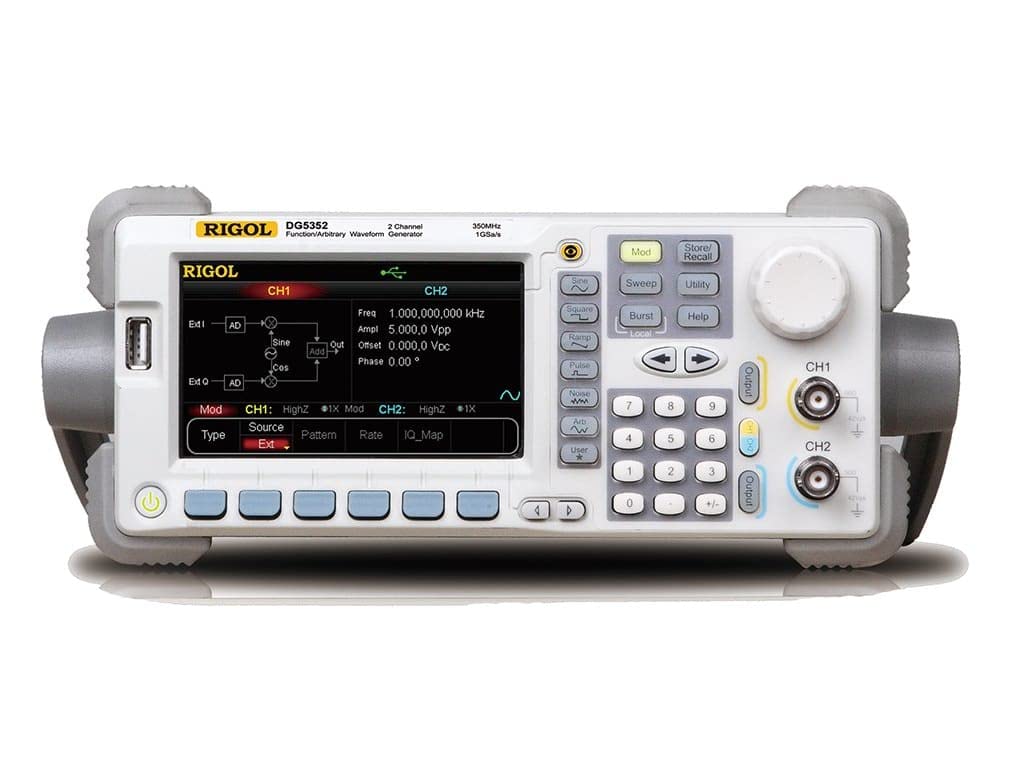
Figure 3.1: Front Panel of the Rigol DG5352. This image displays the front panel of the Rigol DG5352, highlighting its main display, control buttons, rotary knob, and output connectors for Channel 1 (CH1) and Channel 2 (CH2). The display shows current settings for frequency, amplitude, offset, and phase, along with waveform type and modulation options.
Гол онцлогууд:
- Сувгууд: 2 independent output channels.
- Давтамжийн хүрээ: Up to 350 MHz.
- Sampханш: 1 GSa/s.
- Долгион хэлбэрийн төрлүүд: Синус, Талбай, Рamp, Pulse, Noise, Arbitrary, and more.
- Modulation Functions: AM, FM, PM, FSK, ASK, PSK, PWM, Sweep, Burst.
- Хэрэглэгчийн интерфейс: Intuitive front panel with a clear display, dedicated function buttons, and a rotary knob for precise adjustments.
4. Тохиргоо
- Савлах: Carefully remove the DG5352 from its packaging. Verify that all accessories listed in the packing list are present.
- Эрчим хүчний холболт: Connect the provided power cord to the AC input on the rear panel of the instrument, then plug the other end into a grounded AC power outlet.
- Асаах: Press the power button located on the front panel to turn on the instrument. The display will illuminate, and the system will perform a self-test.
- Гаралтын холболтууд: Connect your test leads or cables to the desired output channels (CH1 or CH2) on the front panel. Ensure proper impedance matching for your application.
- USB/LAN Connection (Optional): For remote control or data transfer, connect a USB cable to the USB host/device port or an Ethernet cable to the LAN port on the rear panel.
5. Ашиглалтын заавар
This section outlines basic operation procedures for generating standard waveforms.
5.1. Generating a Standard Waveform (e.g., Sine Wave)
- Суваг сонгох: дээр дарна уу CH1 or CH2 button on the front panel to select the desired output channel. The active channel will be highlighted on the display.
- Select Waveform Type: дээр дарна уу Синус button (or other waveform buttons like Дөрвөлжин, Ramp, Судасны цохилт) located on the left side of the control panel. The display will show the default sine wave parameters.
- Тохируулах давтамж: Use the numeric keypad to enter the desired frequency value, then press the corresponding unit button (e.g., МГц, kHz). Alternatively, use the rotary knob to adjust the frequency.
- Тохируулах Ampөргөрөг: дээр дарна уу Ampl softkey on the display. Use the numeric keypad and unit buttons (e.g., Vpp) or the rotary knob to set the peak-to-peak ampөргөрөг
- Set Offset: дээр дарна уу Офсет softkey. Use the numeric keypad and unit buttons (e.g., Vdc) or the rotary knob to set the DC offset voltage.
- Гаралтыг идэвхжүүлэх: дээр дарна уу Гаралт button for the selected channel (CH1 or CH2) to enable the waveform output. The button will illuminate when active.
5.2. Modulation Functions
The DG5352 supports various modulation types. To access these, press the Мод button on the front panel. Follow the on-screen prompts and use the softkeys and rotary knob to configure the desired modulation parameters (e.g., AM, FM, PM).
5.3. Storing and Recalling Settings
To save current instrument settings, press the Хадгалах/Эргэн татах button. Select a memory location using the softkeys and rotary knob, then confirm to save. To recall settings, press Хадгалах/Эргэн татах again, select the desired memory location, and confirm.
6. Засвар үйлчилгээ
- Цэвэрлэгээ: Багажны гадна талыг зөөлөн, хуурай даавуугаар тогтмол цэвэрлээрэй. Зөөлөн бохирдсон тохиолдолд зөөлөн даавуугаар арчина уу.ampусаар төгссөн. Хүчтэй химийн бодис, уусгагчийг бүү ашигла.
- Агааржуулалт: Ensure that the ventilation openings on the instrument remain clear of dust and obstructions to prevent overheating.
- Хадгалах: When not in use for extended periods, store the DG5352 in a clean, dry environment within its specified operating temperature range.
- Шалгалт тохируулга: Periodic calibration by qualified personnel is recommended to maintain measurement accuracy. Refer to Rigol's official support for calibration services.
7. Алдаа засах
| Асуудал | Боломжит шалтгаан | Шийдэл |
|---|---|---|
| Төхөөрөмж асахгүй байна. | Power cord not connected; power outlet faulty; internal fuse blown. | Check power cord connection; test power outlet; contact service for fuse replacement. |
| Гаралтын дохио байхгүй. | Output channel not enabled; incorrect waveform parameters; faulty cable. | дээр дарна уу Гаралт button for the channel; verify frequency/amplitude settings; check/replace cables. |
| Дэлгэц нь алдааны мессежийг харуулна. | System error; invalid input. | Refer to the on-screen message for specific instructions; restart the instrument; contact support if persistent. |
8. Техникийн үзүүлэлтүүд
The following are key specifications for the Rigol DG5352 Function/Arbitrary Waveform Generator.
- Загварын дугаар: DG5352
- Үйлдвэрлэгч: Ригол
- Сувгууд: 2
- Хамгийн их давтамж: 350 МГц
- Sampханш: 1 GSa/s
- ASIN: B00EPECMLC
- Эхний боломжтой: 3 оны есдүгээр сарын 2014
9. Баталгаат хугацаа ба дэмжлэг
Rigol products typically come with a standard manufacturer's warranty. For detailed warranty terms, technical support, or service inquiries, please refer to the official Rigol website or contact your local Rigol distributor. Keep your purchase receipt as proof of purchase for warranty claims.


