1. Танилцуулга
Thank you for choosing the Antec HCG-850M 850W Power Supply. This manual provides essential information for the safe and efficient installation, operation, and maintenance of your power supply unit. Please read this manual thoroughly before installation and retain it for future reference.
2. Аюулгүй байдлын мэдээлэл
Always observe the following safety precautions to prevent injury or damage to your system:
- Битгий цахилгаан хангамжийг нээх casing. Өндөр ботьtages нь нэгжийг салгасан байсан ч дотор нь байдаг.
- Битгий insert any objects into the power supply's ventilation openings.
- Ensure the power supply is installed in a well-ventilated area.
- Use only the modular cables provided with this power supply. Using incompatible cables can cause damage.
- Disconnect the AC power cord from the wall outlet before installing or removing the power supply.
- This product is designed for use in personal computers only.
3. Багцын агуулга
Таны багцад бүх зүйл байгаа эсэхийг шалгана уу:
- Antec HCG-850M 850W Power Supply
- Modular Cable Set (PCI-E, SATA, Peripheral, CPU)
- Хувьсах гүйдлийн цахилгааны утас
- Суурилуулах эрэг
- Хэрэглэгчийн гарын авлага (энэ баримт бичиг)
4. Бүтээгдэхүүн дууссанview
The Antec HCG-850M is an 850-watt, 80 PLUS Bronze certified, semi-modular power supply designed for high-performance personal computers. It features a quiet 135mm fan for efficient cooling and robust protection circuits to ensure stable power delivery.
4.1 Гол онцлогууд
- 850 Watts Continuous Power
- 80 PLUS Bronze Certified Efficiency
- Semi-Modular Cable Management
- 135мм чимээгүй сэнс
- ATX форм фактор
- Multiple Protection Circuits (OCP, OVP, UVP, SCP, OPP, OTP)
4.2 Цахилгаан хангамжийн нэгж
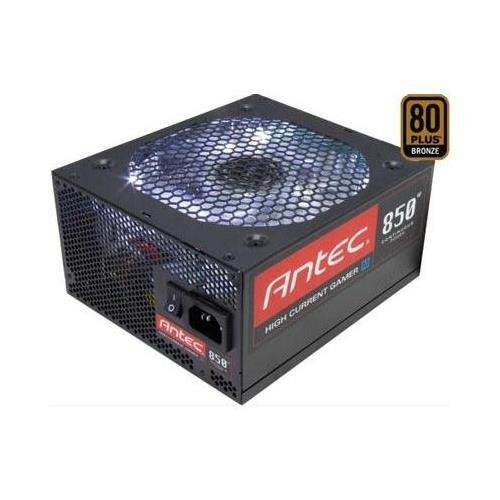
Зураг 1: Урд view of the Antec HCG-850M 850W Power Supply, showing the fan grille and modular cable connectors. This unit provides stable power to your computer components.
5. Тохиргоо ба суурилуулалт
Follow these steps to install your Antec HCG-850M power supply:
- Системээ бэлтгэ: Компьютерээ бүрэн унтрааж, залгуураас салгасан эсэхийг шалгаарай. Компьютерийнхээ гэрийг нээ.
- Хуучин PSU-г арилгах (хэрэв байгаа бол): Хуучин цахилгаан тэжээлийн эх үүсвэрээс бүх кабелийг салга. Хуучин цахилгаан тэжээлийн эх үүсвэрийг гэрнээс нь салгаж ав.
- Шинэ цахилгаан тэжээлийн блокийг суурилуулах: Carefully place the Antec HCG-850M into the power supply bay of your computer case. Secure it with the provided mounting screws. Ensure the fan is oriented correctly for optimal airflow (typically facing down if there's a bottom vent, or up if not).
- Үндсэн кабелийг холбох:
- Connect the 24-pin ATX motherboard power cable.
- Connect the 4+4-pin or 8-pin EPS/CPU power cable to your motherboard.
- Модульчлагдсан кабелийг холбох: Attach the necessary modular cables for your components (e.g., PCI-E for graphics cards, SATA for hard drives/SSDs, Peripheral for fans/accessories). Connect them securely to both the power supply and the respective components.
- Кабелийн менежмент: Агаарын урсгал болон гоо зүйн байдлыг сайжруулахын тулд кабелиудыг сайтар чиглүүлээрэй.
- Кейс хааж, асаалттай: Close your computer case. Connect the AC power cord to the power supply and then to a wall outlet. Flip the power switch on the PSU to the 'ON' position. Power on your computer.
6. Ашиглалтын заавар
Once installed, the Antec HCG-850M operates automatically. Here are some general operating guidelines:
- Асаах/унтраах: Use your computer's power button to turn the system on or off. The switch on the power supply itself should generally remain in the 'ON' position during normal operation.
- Системийн тогтвортой байдал: Ensure your system is stable. If you experience unexpected shutdowns or reboots, refer to the troubleshooting section.
- Агааржуулалт: Maintain good airflow around your computer case to prevent overheating of components, including the power supply.
7. Засвар үйлчилгээ
Тохиромжтой засвар үйлчилгээ нь таны цахилгаан хангамжийн ашиглалтын хугацааг уртасгах боломжтой:
- Тоос цэвэрлэх: Periodically clean dust from the power supply's fan grille and the interior of your computer case using compressed air. Always disconnect the AC power cord before cleaning.
- Кабель шалгах: Occasionally check that all power cables are securely connected to the power supply and components.
- Байгаль орчин: Operate the power supply in a clean, dry environment with stable temperatures.
8. Алдаа засах
If you encounter issues with your power supply, try the following steps:
8.1 No Power to System
- Хувьсах гүйдлийн цахилгааны утсыг ханын залгуур болон тэжээлийн хангамжид найдвартай залгасан эсэхийг шалгаарай.
- Check that the power supply's ON/OFF switch is in the 'ON' position.
- Verify all internal power cables (24-pin ATX, CPU, PCI-E) are correctly and firmly connected.
- Ханын залгуурт тэжээл байгаа эсэхийг өөр төхөөрөмжөөр шалгана уу.
- Боломжтой бол цахилгаан хангамжийг өөр мэдэгдэж буй ажлын системд эсвэл PSU шалгагчаар туршина уу.
8.2 System Instability or Random Shutdowns
- Таны системийн эрчим хүчний шаардлага нь PSU-ийн 850 Вт-ын хүчин чадлаас хэтрэхгүй байгаа эсэхийг шалгаарай.
- Check for overheating components. Ensure proper case ventilation and clean any dust buildup.
- Verify all power connections are secure. Loose connections can cause intermittent power delivery.
- If the issue persists, it may indicate a fault with the power supply or another component. Consider professional diagnosis.
9. Техникийн үзүүлэлтүүд
| Онцлог | Дэлгэрэнгүй |
|---|---|
| Загварын дугаар | HCG-850M |
| Гаралтын ватtage | 850 ватт |
| Үр ашгийн гэрчилгээ | 80 PLUS хүрэл |
| Form Factor | ATX |
| Хөргөх арга | Air (135mm Fan) |
| Модульчлагдсан төрөл | Хагас модульчлагдсан |
| Тохиромжтой төхөөрөмжүүд | Хувийн компьютер |
| Зүйлийн жин | 9 фунт (ойролцоогоор 4.08 кг) |
| ASIN | B00ESAI3M0 |
10. Баталгаат хугацаа ба дэмжлэг
Antec products are backed by a manufacturer's warranty. For specific warranty terms and conditions, please refer to the warranty card included with your product or visit the official Antec website. For technical support or customer service, please contact Antec directly through their official support channels.
Албан ёсны Антек Webсайт: www.antec.com


