Танилцуулга
The Sony HDR-MV1 Music Video Recorder is designed for capturing high-quality audio and video, particularly for musical performances. It features professional-grade sound recording capabilities and HD video, making it suitable for musicians and content creators. This manual provides detailed instructions for setting up, operating, and maintaining your device.

Урд view of the Sony HDR-MV1 Music Video Recorder, showcasing its compact design and prominent microphone array.
Хайрцагт юу байна
Таны багцад бүх зүйл байгаа эсэхийг шалгана уу:
- Sony HDR-MV1 Music Video Recorder (Black)
- Цэнэглэдэг батерейны багц (NP-BX1)
- Микро USB кабель
- Линзний таг
- Cap String
- Үйлдлийн гарын авлага
Тохиргоо
1. Inserting the Battery Pack
- Open the battery cover located on the side of the recorder.
- Insert the supplied NP-BX1 battery pack with the correct orientation.
- Зайны тагийг сайтар хаа.
2. Санах ойн карт оруулах
The HDR-MV1 supports Micro SD cards. A memory card is required for recording.
- Санах ойн картны үүрний тагийг нээнэ үү.
- Insert a compatible Micro SD card into the slot until it clicks into place.
- Санах ойн картны үүрний тагийг хаа.
3. Батерейг цэнэглэж байна
Use the supplied micro USB cable to charge the battery. Connect one end to the recorder's MULTI terminal and the other end to a USB power source (e.g., AC adapter, computer USB port).

Хажуу тал view of the HDR-MV1, showing the MULTI (USB) port, HDMI OUT, and LINE IN/headphone jack.
4. Асаах/унтраах
-г удаан дар ХҮЧ button located on the top of the device to turn the recorder on or off.

Топ view of the HDR-MV1, highlighting the POWER and START/STOP recording buttons.
5. Connecting to a Smartphone (Wi-Fi/NFC)
The HDR-MV1 can be controlled remotely and files can be transferred to a smartphone or tablet using Wi-Fi and NFC (Near Field Communication).
- NFC Connection: Touch your NFC-compatible smartphone to the N-Mark on the recorder to establish a connection.
- Wi-Fi холболт: Use the "PlayMemories Mobile" app (available for iOS and Android) to connect to the recorder's Wi-Fi network. This allows for remote control and easy sharing of recorded content.
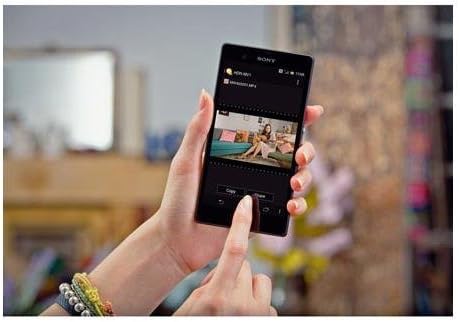
A smartphone screen showing the PlayMemories Mobile app, used for managing and sharing content from the HDR-MV1.
Дуу хураагуурыг ажиллуулах
1. Recording Video and Audio
Бичлэг хийж эхлэхийн тулд товчийг дарна уу START/STOP button. Press it again to stop recording. The recorder captures Full HD 1080p video through its 120-degree wide-angle Carl Zeiss Tessar lens and high-quality audio via its 120-degree X/Y stereo microphones.

Ойролцоогоор урд view of the HDR-MV1, highlighting the Carl Zeiss Tessar lens and the X/Y stereo microphone array.
2. Audio Recording Settings
The HDR-MV1 offers versatile audio recording options:
- LPCM (Linear PCM): For uncompressed, studio-quality audio recording. Ideal for professional use where audio fidelity is paramount.
- CCA: For compressed, internet-ready audio, suitable for sharing online.
- Бага тайрах шүүлтүүр: Reduces unwanted low-frequency noise (e.g., wind, rumble) for clearer recordings.
- Микрофоны түвшин: Adjust the input level of the built-in microphones to prevent distortion or capture quieter sounds.
- Гадаад микрофоны оролт: Connect an external microphone via the 3.5mm jack for alternative audio capture.
3. Видео бичлэгийн онцлогууд
The recorder features a wide-angle lens, capturing a broad field of view, which is beneficial for recording entire bands or large scenes without missing details. It also performs well in low-light conditions thanks to its high-quality sensor.
4. Playback and Sharing
Review your recordings directly on the side display. Use the PlayMemories Mobile app to easily transfer videos and audio to your smartphone for quick sharing on social media or other platforms.

The HDR-MV1's side screen displaying a recorded video, showing the user interface for playback.
5. Бүтээгдэхүүний албан ёсны видео
Official product video for the Sony HDR-MV1, demonstrating its key features and use cases for music recording.
Засвар үйлчилгээ
- Цэвэрлэгээ: Use a soft, dry cloth to clean the camera body. For the lens, use a lens cleaning cloth and solution. Avoid harsh chemicals.
- Батерейны арчилгаа: Store the battery in a cool, dry place when not in use. Do not expose to extreme temperatures.
- Хадгалах: Store the recorder in a protective case to prevent scratches and damage, especially to the lens and microphones.
Алдааг олж засварлах
| Асуудал | Шийдэл |
|---|---|
| Бичлэг хийгч асахгүй байна. | Ensure the battery is correctly inserted and fully charged. Try charging the device for at least 30 minutes. |
| Cannot record while charging. | The Sony HDR-MV1 is designed not to record while connected to a power source for charging. Disconnect the charger to initiate recording. |
| Smartphone app disconnects frequently or does not display properly. | Ensure the recorder's Wi-Fi is enabled and your smartphone is connected to the correct network. Try restarting both the recorder and the PlayMemories Mobile app. Ensure your app is updated to the latest version. |
| Дууны чанар муу. | Check microphone levels to avoid clipping or being too low. Ensure the low-cut filter is appropriately set for your environment. Avoid recording in extremely windy conditions without additional wind protection. |
| Video appears grainy in low light. | While the HDR-MV1 has good low-light performance, extreme darkness may still result in some grain. Ensure adequate lighting for optimal video quality. |
Үзүүлэлтүүд
| Онцлог | Дэлгэрэнгүй |
|---|---|
| Бүтээгдэхүүний хэмжээс | 5.75 x 2.95 x 4.72 инч |
| Зүйлийн жин | 1.32 фунт |
| Загварын дугаар | HDRMV1 |
| Батерей | 1 литийн ион зай шаардлагатай (дагсан) |
| Фото мэдрэгчийн технологи | CMOS |
| Видео бичлэгийн нягтрал | 1080p |
| Хамгийн их фокусын урт | 2.5 миллиметр |
| Флаш санах ойн төрөл | Микро SD |
| Видео бичлэгийн формат | h.264;mpeg-2 |
| Дэмжигдсэн аудио формат | LPCM, AAC |
| Дэлгэцийн хэмжээ | 2.7 инч |
| Холболтын технологи | NFC, USB, Wi-Fi |
| Өнгө | Хар |
| Үйлдвэрлэгч | Sony |
| Эхний боломжтой огноо | 4 оны есдүгээр сарын 2013 |
Баталгаат болон дэмжлэг
For warranty information, technical support, or service inquiries, please refer to the official Sony webсайт эсвэл Sony хэрэглэгчийн үйлчилгээтэй холбогдоно уу. Баталгаат нэхэмжлэл гаргахын тулд худалдан авалтаа нотлох баримтаа хадгалаарай.
Sony-ийн албан ёсны дэмжлэг: https://www.sony.com/electronics/support


