Танилцуулга
Welcome to the user manual for your Alcatel Sigma 260 DECT Cordless Phone. This guide provides detailed instructions on how to set up, operate, maintain, and troubleshoot your new phone. Please read this manual carefully to ensure optimal performance and longevity of your device.
The Alcatel Sigma 260 is a reliable DECT cordless phone featuring a 50-entry phonebook, hands-free function, and caller ID, designed for clear communication and ease of use.
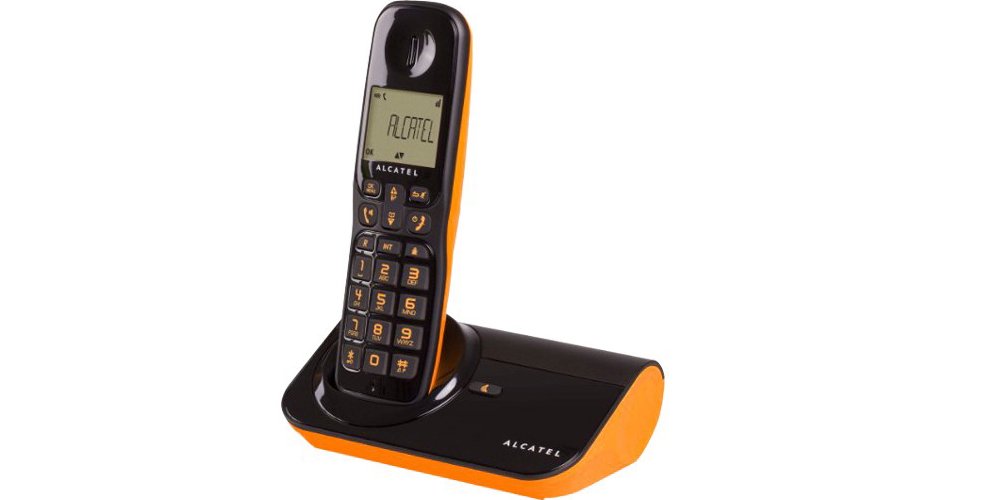
Зураг 1: Alcatel Sigma 260 DECT Cordless Phone Handset and Base Station.
1. Тохиргоо
Follow these steps to set up your Alcatel Sigma 260 phone.
1.1 Хайрцагнаас задлах ба багцын агуулга
Carefully unpack all items and ensure you have the following components:
- Alcatel Sigma 260 Handset
- Alcatel Sigma 260 Base Station
- Суурийн станцын цахилгаан адаптер
- Утасны шугамын утас
- Rechargeable AAA Batteries (typically 2x)
- Хэрэглэгчийн гарын авлага (энэ баримт бичиг)
1.2 Батерей суурилуулах
- Гар утасны арын хэсэгт зайны тасалгааны тагийг олоорой.
- Тасалгааг нээхийн тулд тагийг нь гулсуулж эсвэл өргөж ав.
- Insert the rechargeable AAA batteries, observing the correct polarity (+ and -) as indicated inside the compartment.
- Зайны тасалгааны тагийг сольж, байрандаа найдвартай товшиж байгаа эсэхийг шалгаарай.
Чухал: Only use the supplied rechargeable batteries or equivalent approved replacements. Non-rechargeable batteries may damage the device.
1.3 Суурь станцыг холбох
- Connect one end of the telephone line cord to the TEL socket on the base station.
- Утасны утасны нөгөө үзүүрийг утасныхаа залгуурт холбоно уу.
- Plug the power adapter into the DC IN socket on the base station.
- Цахилгаан адаптерийг тохирох цахилгаан залгуурт холбоно уу.
- Place the handset on the base station to charge the batteries. Allow at least 12-15 hours for the initial charge.
Жич: Position the base station away from other electrical appliances to avoid interference.
1.4 Handset Registration (for additional handsets or re-registration)
Your primary handset is usually pre-registered. If you have additional handsets (up to 4 connectable handsets are supported) or need to re-register a handset, follow these general steps:
- On the base station, press and hold the registration button (often marked with a signal icon or "PAGE") for approximately 5 seconds until an indicator light on the base starts flashing.
- On the handset, access the menu, navigate to "Registration" or "Register Handset" (refer to the handset display for exact menu options).
- Enter the system PIN (default is usually 0000 or 1234).
- The handset will search for the base station and register. A confirmation message will appear on the handset display once successful.
Зөвлөгөө: If registration fails, ensure the handset is close to the base station and try again.
2. Утсаа ажиллуулах
This section covers the basic functions of your Alcatel Sigma 260.
2.1 Дуудлага хийх
- Шууд залгах: Гар утсаа аваад эсвэл дар ЯРИА button. Enter the phone number using the keypad. The call will connect automatically.
- From Phonebook: дээр дарна уу УТАС НОМ button (or navigate via menu). Use the arrow keys to scroll through entries. Press ЯРИА сонгосон дугаар руу залгах.
- Дахин залгах: дээр дарна уу Давтан товчийг дарна уу view a list of recently dialed numbers. Use arrow keys to select, then press ЯРИА.
2.2 Дуудлага хүлээн авах
- Утас дуугарах үед товчийг дарна уу ЯРИА дуудлагад хариулах товчлуур.
- Дуудлага дуусгахын тулд товчийг дарна уу Төгсгөл товчлуур дээр дарах эсвэл утсаа үндсэн станц дээр буцааж байрлуул.
2.3 Phonebook (50 Entries)
Your phone can store up to 50 names and numbers.
- Харилцагч нэмэх: Access the menu, select "Phonebook", then "Add New Entry". Enter the name and number using the keypad. Save the entry.
- Харилцагчийг засах: Access the phonebook, select the contact, then "Edit". Make changes and save.
- Deleting a Contact: Access the phonebook, select the contact, then "Delete". Confirm deletion.
2.4 Hands-Free Function
To activate the hands-free speakerphone during a call, press the ИЛТГЭГЧ button (often marked with a speaker icon). Press it again to switch back to handset mode.
2.5 дуудлагын дугаар
If you subscribe to Caller ID service from your telephone provider, the caller's number (and name, if available in your phonebook or provided by the service) will be displayed on the handset screen before you answer the call.
3. Засвар үйлчилгээ
Proper care ensures the longevity of your Alcatel Sigma 260.
3.1 Цэвэрлэгээ
Wipe the handset and base station with a soft, damp cloth. Do not use abrasive cleaners, solvents, or strong chemicals, as these can damage the surfaces. Ensure no liquid enters the device openings.
3.2 Батерейны арчилгаа
- Always return the handset to the base station when not in use to ensure it remains charged.
- Хэрэв утсыг удаан хугацаагаар ашиглахгүй бол гоожихоос сэргийлж батерейг нь салга.
- Replace batteries when their performance significantly degrades. Use only approved rechargeable AAA batteries.
4. Алдаа засах
If you encounter issues with your phone, try the following solutions before seeking professional assistance.
| Асуудал | Боломжит шалтгаан / шийдэл |
|---|---|
| Залгах ая байхгүй |
|
| Дуудлага хийх эсвэл хүлээн авах боломжгүй |
|
| Дууны чанар муу / Статик |
|
| Гар утас цэнэглэхгүй байна |
|
| Дэлгэц хоосон эсвэл унших боломжгүй |
|
5. Техникийн үзүүлэлтүүд
Below are the key technical specifications for the Alcatel Sigma 260 DECT Cordless Phone:
| Брэнд | Alcatel |
| Загварын дугаар | Сигма 260 |
| Утасны төрөл | DECT утасгүй утас |
| Эрчим хүчний эх үүсвэр | Battery Powered (Rechargeable AAA) |
| Товчлуурын төрөл | Ганц товчлуур |
| Дуудлага хийгчийн ID | Тиймээ |
| Утасны дэвтрийн багтаамж | 50 оруулгууд |
| Гар чөлөөтэй функц | Тиймээ |
| Connectable Handsets | 4 хүртэл |
| Дэлгэцийн төрөл | Үсэг, тоон |
| Хариулах машин | Үгүй |
6. Баталгаат хугацаа ба дэмжлэг
For information regarding warranty terms and conditions, please refer to the warranty card included with your product or contact your retailer. Specific warranty details are not provided in this manual.
For technical support or inquiries, you may contact the seller directly via email:
Имэйл: tecnotorba.amazon@gmail.com
Please provide your product model (Alcatel Sigma 260) and a detailed description of your issue when contacting support.


