1. Танилцуулга
The D-Link DIR-808L Wireless AC600 Dual-Band Cloud Router provides high-speed Wi-Fi connectivity with dual-band technology and Fast Ethernet ports. This device is designed to deliver a reliable networking experience for home use, supporting activities such as HD media streaming, online gaming, and web browsing. It includes security features and mydlink Cloud Services for remote network management.
The DIR-808L is backward compatible with existing Wi-Fi devices (802.11a/b/g/n) for seamless integration into your current network setup.
2. Багцын агуулга
Таны багц дараах зүйлсийг агуулж байгаа эсэхийг шалгана уу.
- Wireless AC600 Dual Band Cloud Router (DIR-808L)
- Эрчим хүчний адаптер
- Ethernet кабель
- Шуурхай суулгах гарын авлага
Дээрх зүйлсийн аль нэг нь дутуу эсвэл гэмтсэн бол орон нутгийн D-Link борлуулагчтай холбогдоно уу.
3. Системийн хамгийн бага шаардлага
To set up and use the D-Link DIR-808L router, ensure your computer meets the following minimum requirements:
- Үйлдлийн систем: Windows® 8, Windows® 7, Windows Vista®, Windows® XP SP3, or Mac OS® X (v10.4 or higher)
- Web Хөтөч: Internet Explorer® v6, Mozilla® Firefox®, Google Chrome, or Safari 4 or higher
- Техник хангамж: Сүлжээний интерфейс карт (NIC)
For Internet access, you will also need:
- Кабель эсвэл DSL модем
- Интернэт үйлчилгээ үзүүлэгч (ISP)-ийн захиалга
4. Техник хангамж дууссанview
Familiarize yourself with the physical components and ports of your DIR-808L router.

Зураг 4.1: Урд view of the DIR-808L router with power and internet status indicators.

Зураг 4.2: Rear panel of the DIR-808L router, detailing port layout.
Арын самбарын тайлбар:
- LAN портууд (1-4): Four Fast Ethernet ports for connecting wired devices such as computers, gaming consoles, or network storage.
- Интернет порт: Таны модемтой холбогдож интернетэд холбогдоно.
- Дахин тохируулах товч: Press and hold for 10 seconds to restore the router to factory default settings.
- Эрчим хүчний оролт: Энд багтсан цахилгаан адаптерийг холбоно уу.
- WPS товчлуур: Use for easy, secure wireless connection to WPS-compatible devices.
5. Тохиргоо ба суурилуулалт
Follow these steps to set up your D-Link DIR-808L router.
5.1 Физик холболт
- Унтраах: Модем болон чиглүүлэгчийнхээ хүчийг салга (боломжтой бол).
- Модемийг холбох: Connect an Ethernet cable from your modem's Ethernet port to the Интернет port on the back of your DIR-808L router.
- Компьютер холбох (заавал биш): For initial setup, connect an Ethernet cable from your computer's Ethernet port to any of the LAN ports (1-4) on the back of your DIR-808L router. You can also connect wirelessly using the default Wi-Fi name and password found on the device label.
- Модемийг асаах: Connect the power adapter to your modem and power it on. Wait for the modem's indicator lights to stabilize, indicating an active internet connection.
- Чиглүүлэгчийг асаах: Дагалдах тэжээлийн адаптерийг холбоно уу Эрчим хүчний оролт on the back of your DIR-808L router and plug it into a power outlet. The power LED on the front of the router should illuminate.
5.2 Анхны тохиргоо (Web Хөтөч)
After physical connections are made, configure your router using a web хөтөч.
- Нээлттэй a web browser (e.g., Chrome, Firefox, Edge) on a computer connected to the router.
- Хаягийн мөрөнд бичнэ үү
http://dlinkrouter.localor192.168.0.1болон Enter дарна уу. - The D-Link Setup Wizard should appear. Follow the on-screen instructions to configure your Internet connection, wireless network name (SSID), and password.
- Create a unique password for your router's administration interface for security.
5.3 Quick Router Setup Mobile App
Alternatively, you can use the D-Link Quick Router Setup mobile app for convenient setup from your smartphone or tablet.
- Download the "D-Link QRS Mobile" app from the Apple App Store or Google Play Store.
- Connect your mobile device to the router's default Wi-Fi network (SSID and password are on the router's label).
- Launch the QRS Mobile app and follow the instructions to complete the setup.
6. Үйл ажиллагаа
This section covers the basic operation of your DIR-808L router.
6.1 Dual-Band Wireless Performance
The DIR-808L operates on two frequency bands: 2.4 GHz and 5 GHz.
- 2.4 GHz зурвас: Provides wider coverage and better penetration through walls, suitable for general internet use and older devices.
- 5 GHz зурвас: Offers faster speeds and less interference, ideal for high-bandwidth activities like HD video streaming and online gaming, but with a shorter range.
You can configure separate SSIDs (network names) for each band or use a single SSID for both, allowing the router to intelligently assign devices to the optimal band.
6.2 Утастай холболт
The four Fast Ethernet LAN ports allow you to connect up to four wired devices directly to the router for stable and fast connections.
6.3 mydlink Cloud Management
mydlink Cloud Services enable you to monitor and manage your network remotely from anywhere using the mydlink Lite app or the mydlink web портал.
- Алсын хандалт: View connected devices, block unwanted users, and receive notifications.
- Эцэг эхийн хяналт: Manage internet access schedules and block specific webсайтууд.
To use mydlink services, you will need to register your router with a mydlink account during or after the initial setup process.
6.4 Утасгүй хамгаалалт
The DIR-808L supports WPA/WPA2 encryption to secure your wireless network. It is recommended to use WPA2-PSK (AES) for the strongest security.
- WPS (Wi-Fi хамгаалагдсан тохиргоо): Provides a simple way to connect WPS-compatible devices to your wireless network by pressing the WPS button on the router and the device.
7. Засвар үйлчилгээ
Зөв засвар үйлчилгээ нь таны чиглүүлэгчийн оновчтой гүйцэтгэл, урт наслалтыг баталгаажуулдаг.
- Програм хангамжийн шинэчлэлтүүд: D-Link дэмжлэгийг үе үе шалгаж байгаарай website for firmware updates. Updating firmware can improve performance, add new features, and fix security vulnerabilities. Instructions for updating firmware are typically provided with the update package.
- Цэвэрлэгээ: Keep the router in a clean, dust-free environment. Use a soft, dry cloth to clean the exterior. Do not use liquid cleaners or aerosols.
- Байршил: Place the router in a central location, away from obstructions and devices that may cause interference (e.g., cordless phones, microwaves).
8. Алдаа засах
This section addresses common issues you might encounter with your DIR-808L router.
8.1 Интернет холболт байхгүй
- Кабель шалгах: Бүх Ethernet кабель чиглүүлэгч болон модем дээрх зөв портуудад найдвартай холбогдсон эсэхийг шалгаарай.
- Эрчим хүчний мөчлөг: Power off your modem, then your router. Wait 30 seconds, then power on your modem first. Once the modem is fully online (indicator lights stable), power on your router.
- Модемийн төлөв: Verify that your modem has an active internet connection. Check its indicator lights or consult your modem's manual.
- ISP тохиргоо: Confirm your Internet Service Provider (ISP) settings are correctly entered in the router's web интерфейс.
8.2 Slow Wireless Speed or Poor Range
- Чиглүүлэгчийн байршил: Position the router in a central location, elevated, and away from large metal objects, concrete walls, and other electronic devices that may cause interference.
- хөндлөнгийн оролцоо: Бусад утасгүй төхөөрөмжүүд (утасгүй утас, богино долгионы зуух, Bluetooth төхөөрөмж) нь Wi-Fi дохионд саад учруулж болзошгүй. Чиглүүлэгчийн тохиргоонд утасгүй сувгийг өөрчилж үзнэ үү.
- Dual-Band Usage: Connect devices that require high bandwidth (e.g., streaming devices) to the 5 GHz band, and other devices to the 2.4 GHz band.
- Програм хангамж: Чиглүүлэгчийнхээ програм хангамж шинэчлэгдсэн эсэхийг шалгаарай.
8.3 Чиглүүлэгч рүү нэвтрэх боломжгүй Web Интерфэйс
- IP хаяг: Таны компьютер IP хаягийг автоматаар (DHCP) авахаар тохируулагдсан эсэхийг шалгаарай.
- Зөв хаяг: Та зөв хаяг бичиж байгаа эсэхээ дахин шалгана уу:
http://dlinkrouter.localor192.168.0.1. - Temporary Disable Firewall/Antivirus: Таны компьютер дээрх хандалтыг хааж болзошгүй галт хана эсвэл вирусны эсрэг программ хангамжийг түр идэвхгүй болго.
- Чиглүүлэгчийг дахин тохируулах: If all else fails, perform a factory reset by pressing and holding the Reset button on the back of the router for 10 seconds. Жич: Энэ нь таны бүх хувийн тохиргоог устгах болно.
9. Техникийн үзүүлэлтүүд
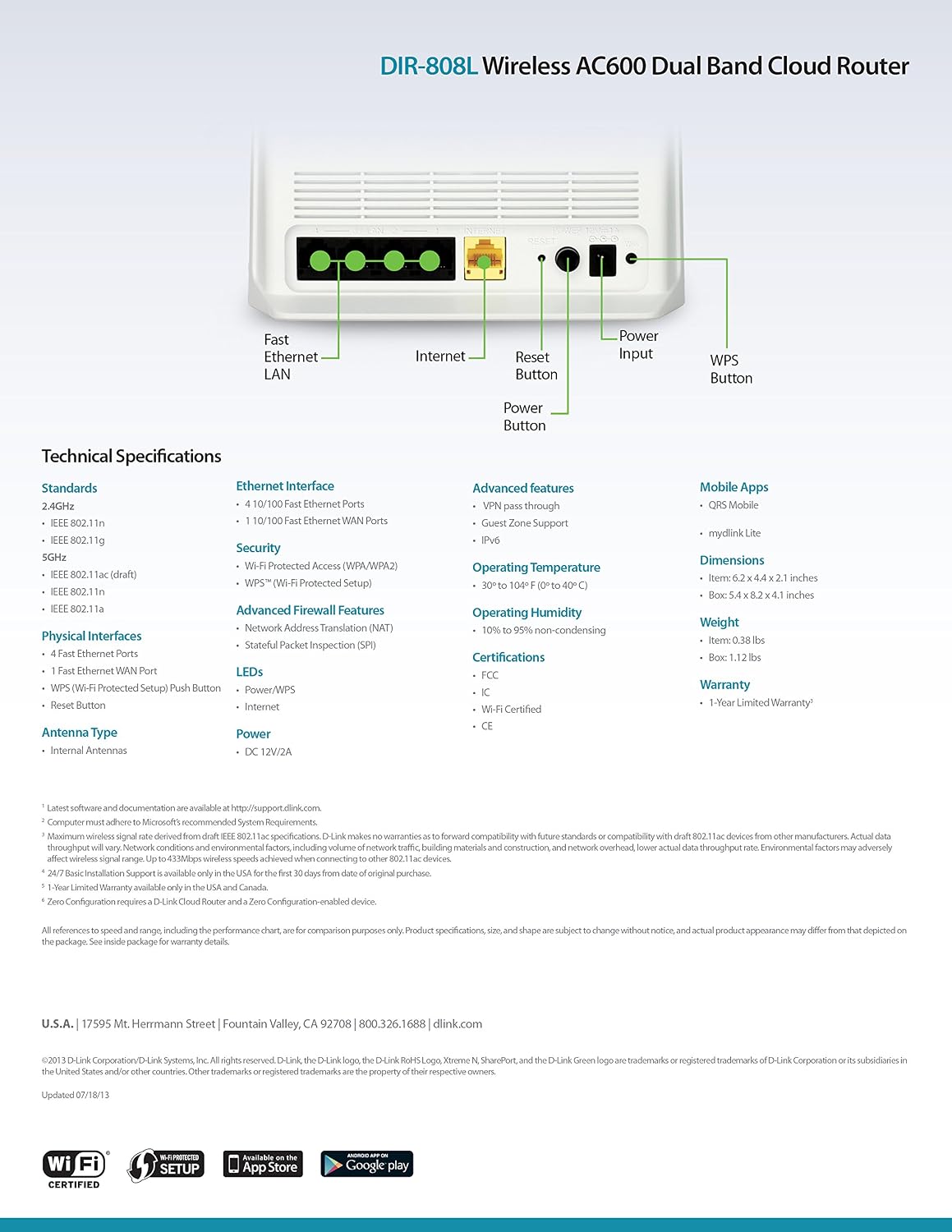
Зураг 9.1: Technical specifications and rear panel diagram of the DIR-808L router.
| Онцлог | Тодорхойлолт |
|---|---|
| Загварын нэр | DIR-808L |
| Утасгүй төрөл | 802.11ac (AC600), 802.11a/b/g/n |
| Давтамжийн зурвасын ангилал | Хос зурвас (2.4 GHz & 5 GHz) |
| Утастай холболт | 4 x Fast Ethernet LAN Ports, 1 x Fast Ethernet WAN Port |
| Аюулгүй байдал | WPA/WPA2, WPS (Wi-Fi Protected Setup) |
| Үйлдлийн системийн нийцтэй байдал | Windows, Mac, Android |
| Хэмжээ (LxWxH) | 2.1 x 6.1 x 4.4 инч |
| Зүйлийн жин | 7.2 унц (0.45 фунт) |
| Эрчим хүчний оролт | 12V DC, 1A байна |
| Ашиглалтын температур | 0-ээс 40°C (32-104°F) |
| Ашиглалтын чийгшил | 10% -аас 95% хүртэл конденсацигүй |
| Гэрчилгээ | FCC, Wi-Fi Certified, CE |
10. Баталгаат хугацааны мэдээлэл
The D-Link DIR-808L Wireless AC600 Dual-Band Cloud Router comes with a 1 жилийн хязгаарлагдмал баталгаат хугацаа худалдан авсан өдрөөс. Энэхүү баталгаа нь ердийн ашиглалтын үед хийгдсэн материал, хийцийн согогийг хамарна.
For full warranty terms and conditions, please refer to the warranty card included with your product or visit the official D-Link webсайт.
Legal Disclaimer: D-Link is not responsible for honoring warranty claims from unauthorized resellers. Please contact the manufacturer directly for official warranty service.
11. Техникийн дэмжлэг
If you encounter problems that are not addressed in this manual, or require further assistance, please contact D-Link Technical Support.
- D-Link дэмжлэг Webсайт: зочилно уу support.dlink.com for FAQs, documentation, and firmware downloads.
- Phone Support (U.S.): You may contact D-Link customer support at 1-877-453-5465. Please have your product model number (DIR-808L) and serial number ready when calling.


