Танилцуулга
This manual provides essential information for the proper use and care of your Beats Studio Wireless Over-Ear Headphones. Please read these instructions carefully before using your headphones to ensure optimal performance and longevity. The Beats Studio Wireless headphones offer a premium audio experience with wireless connectivity and Adaptive Noise Canceling technology.
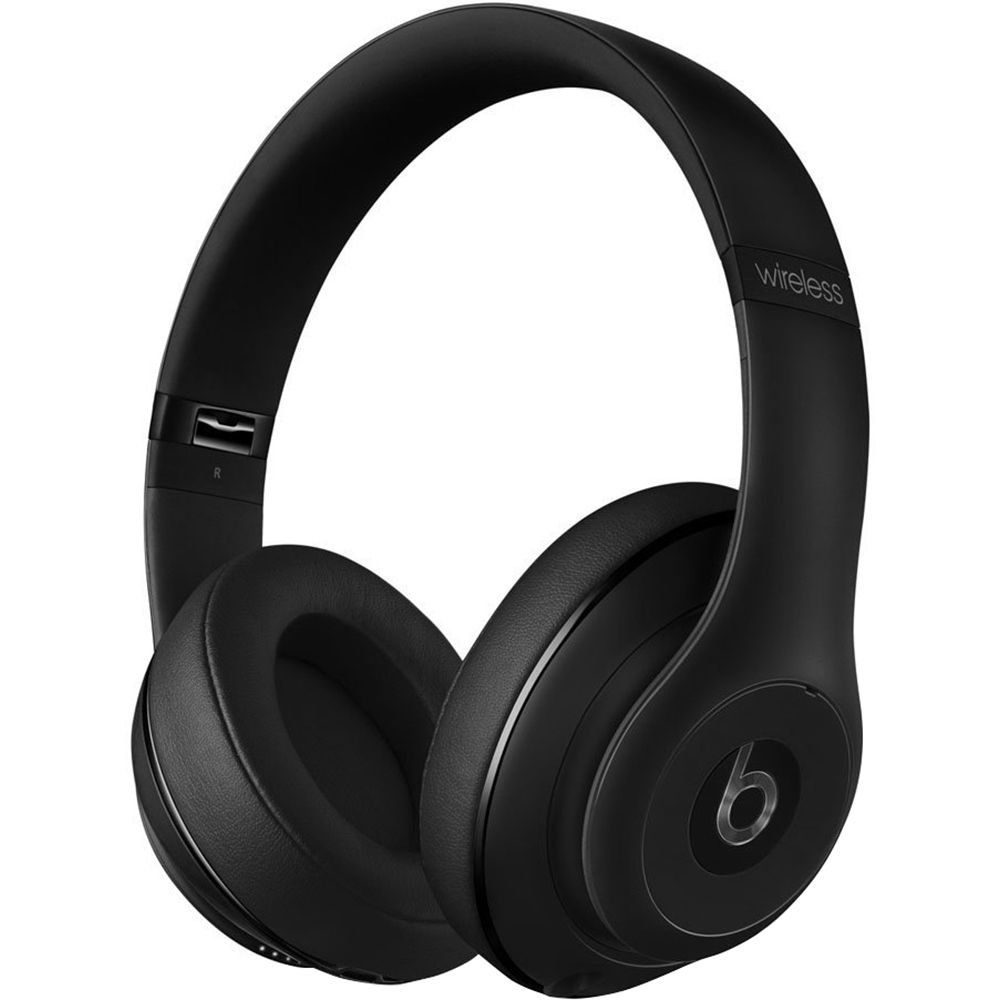
Image: Beats Studio Wireless Over-Ear Headphones in Matte Black, showcasing дэгжин загвар.
Хайрцагт юу байна
Таны багцад бүх зүйл байгаа эсэхийг шалгана уу:
- Beats Studio Wireless over-ear headphones
- 3.5mm audio cable with RemoteTalk (for wired connection and controls)
- Standard 3.5 mm audio cable (for wired connection without RemoteTalk features)
- USB 2.0 cable (USB-A to USB Micro-B) for charging
- Hard-shell carrying case with carabiner clip

Image: The Beats Studio Wireless headphones, hard-shell carrying case, and various cables laid out from the packaging.
Тохиргоо
1. Чихэвчийг цэнэглэх
Before first use, fully charge your Beats Studio Wireless headphones. A full charge provides approximately 12 hours of wireless playback or 20 hours of wired playback with Adaptive Noise Canceling enabled.
- Connect the small end of the USB 2.0 cable (USB-A to USB Micro-B) to the Micro-USB port on the right earcup of the headphones.
- Connect the larger end of the USB cable to a USB power adapter (not included) or a powered USB port on a computer.
- The Fuel Gauge LEDs on the right earcup will indicate charging status. When all five LEDs are solid white, the headphones are fully charged.
Жич: The headphones cannot be used while charging.
2. Bluetooth хослол
Утасгүй аудио авахын тулд чихэвчээ Bluetooth идэвхжүүлсэн төхөөрөмжтэйгээ холбоно уу.
- Ensure your headphones are charged and powered off.
- Press and hold the power button on the right earcup for 3-5 seconds until the Fuel Gauge LEDs begin to pulse. This indicates pairing mode.
- Төхөөрөмж дээрээ Bluetooth тохиргоо руу очоод Bluetooth-г идэвхжүүлнэ үү.
- Select "Beats Studio Wireless" from the list of available devices.
- Once paired, the Fuel Gauge LEDs will turn solid white.
The headphones have a Bluetooth range of up to 30 feet (9 meters).
3. Утастай холболт
For a wired connection, use the provided 3.5mm audio cables.
- Plug one end of the 3.5mm audio cable into the audio input port on the left earcup.
- Нөгөө үзүүрийг төхөөрөмжийнхөө 3.5 мм-ийн аудио гаралтын залгуурт залгаарай.
The RemoteTalk cable allows for inline control of music and calls when connected to compatible devices.
Ашиглалтын заавар
1. Асаах/унтраах
- Асаахын тулд: Press and hold the power button on the right earcup until the Fuel Gauge LEDs illuminate.
- Унтраахын тулд: Press and hold the power button until the Fuel Gauge LEDs turn off.
2. Controls (Wireless Mode)
The "b" button on the left earcup and the volume buttons control playback and calls.
- Тоглуулах/түр зогсоох: Press the "b" button once.
- Дараагийн дуу: Press the "b" button twice quickly.
- Өмнөх бичлэг: Press the "b" button three times quickly.
- Дууг нэмэгдүүлэх: Дээд түвшний дууны товчийг дарна уу.
- Дууг багасгах: Доод түвшний товчийг дарна уу.
- Дуудлагад хариулах/дуусах: Press the "b" button once during an incoming call or active call.
- Дуудлагаас татгалзах: Press and hold the "b" button for 2 seconds during an incoming call.
- Дуут туслахыг идэвхжүүлэх: Press and hold the "b" button for 2 seconds (functionality depends on device).
3. Adaptive Noise Canceling (ANC)
The Beats Studio Wireless headphones feature Dual-Mode Adaptive Noise Canceling. ANC is automatically active when the headphones are powered on. There are two modes:
- Full ANC: Engaged when listening to music or media, providing maximum noise reduction.
- ANC Only: When the audio cable is unplugged and the headphones are powered on, ANC will automatically switch to a more aggressive mode to reduce external noise without playing audio.
Засвар үйлчилгээ
1. Цэвэрлэгээ
Чихэвчнийхээ гадаад төрх байдал болон гүйцэтгэлийг хадгалахын тулд:
- Чихний шил болон толгойн боолтыг зөөлөн, хуурай, хөвөнгүй даавуугаар арчина.
- Зүлгүүрийн цэвэрлэгч, архи, химийн уусгагчийг бүү ашигла.
- Аливаа нүхэнд чийг орохоос зайлсхий.
2. Хадгалах
When not in use, store your headphones in the provided hard-shell carrying case to protect them from damage.
- Fold the headphones carefully to fit into the case.
- Keep headphones away from extreme temperatures and humidity.
3. Зайны арчилгаа
Батерейны ашиглалтын хугацааг уртасгахын тулд:
- Байнга зайгаа бүрэн цэнэглэхээс зайлсхий.
- Чихэвчийг удаан хугацаагаар ашиглаагүй байсан ч тогтмол цэнэглээрэй.
- Хуурай сэрүүн газар хадгална.
Алдааг олж засварлах
If you encounter issues with your Beats Studio Wireless headphones, try the following solutions:
Цахилгаангүй/Асаагүй байна
- Ensure the headphones are fully charged. Connect them to a power source using the USB cable.
- USB кабель болон цэнэглэгч портод гэмтэл байгаа эсэхийг шалгана уу.
No Sound / Intermittent Audio
- Утасгүй:
- Чихэвчээ хосолсон бөгөөд төхөөрөмждөө холбосон эсэхээ шалгаарай.
- Чихэвч болон төхөөрөмж дээрх дууны түвшинг шалгана уу.
- Move closer to your device to avoid interference or exceeding Bluetooth range.
- Чихэвчээ төхөөрөмжтэйгээ салгаад дахин хослуулахыг оролдоно уу.
- Утастай:
- Ensure the 3.5mm audio cable is securely plugged into both the headphones and your audio source.
- Try a different 3.5mm audio cable if available.
Хослуулах асуудал
- Ensure the headphones are in pairing mode (pulsing Fuel Gauge LEDs).
- Унтраад дараа нь төхөөрөмжийнхөө Bluetooth-г асаана уу.
- Forget "Beats Studio Wireless" from your device's Bluetooth list and attempt to pair again.
- Ensure no other Bluetooth devices are interfering with the pairing process.
Adaptive Noise Canceling (ANC) Not Working
- Ensure the headphones are powered on. ANC requires power.
- Check for any obstructions around the external microphones on the earcups.
Үзүүлэлтүүд
Key technical specifications for the Beats Studio Wireless Over-Ear Headphones:
- Загварын нэр: Студи
- Холболтын технологи: Bluetooth (Утасгүй), 3.5 мм-ийн залгуур (Утастай)
- Утасгүй холбооны технологи: Bluetooth
- Bluetooth хүрээ: 30 фут (9 метр) хүртэл
- Дуу чимээний хяналт: Active Noise Cancellation (Dual-Mode Adaptive Noise Canceling)
- Зайны хугацаа: Approximately 12 hours (wireless), 20 hours (wired with ANC)
- Зайны төрөл: 1 ширхэг литийн ион батерей (дахин цэнэглэдэг)
- Хяналтын төрөл: Media Control (on-earcup "b" button, volume buttons)
- Микрофон: Гар ашиглахгүй дуудлага хийх зориулалттай
- Формат хүчин зүйл: Чихний дээгүүр
- Чихний байрлал: Чихний дээгүүр
- Материал: Хуванцар
- Барааны жин: Ойролцоогоор 9.2 унц (0.26 килограмм)
- Бүтээгдэхүүний хэмжээ: 9.6 x 7.3 x 4.5 инч
- Үйлдвэрлэгч: Beats Electronics, ХХК
- Эхний боломжтой огноо: 1 оны арванхоёрдугаар сарын 2013

Зураг: Ойрын зураг view of the headphone's inner band, displaying the model number B0501.
Баталгаат болон дэмжлэг
For warranty information and customer support, please refer to the official Beats webсайт эсвэл харилцагчийн үйлчилгээтэй шууд холбогдоно уу. Баталгаат нэхэмжлэл гаргахын тулд худалдан авалтаа нотлох баримтаа хадгалаарай.
Жич: This product is an older model. Specific warranty terms may vary based on purchase date and region. Please consult the manufacturer's official resources for the most accurate and up-to-date information.
Нэмэлт тусламж авахыг хүсвэл зочилно уу: Beats Support