1. Танилцуулга
This manual provides essential instructions for the safe operation and maintenance of your VTech VM333 Safe & Sound Video Baby Monitor. Please read this manual thoroughly before using the product to ensure proper setup and functionality. The VTech VM333 is designed to help you monitor your baby with a high-resolution color LCD screen, automatic night vision, and two-way audio communication.
2. Бүтээгдэхүүн дууссанview
The VTech VM333 system includes a Parent Unit (monitor) and a Baby Unit (camera). Familiarize yourself with the components and controls of each unit.
2.1. Parent Unit
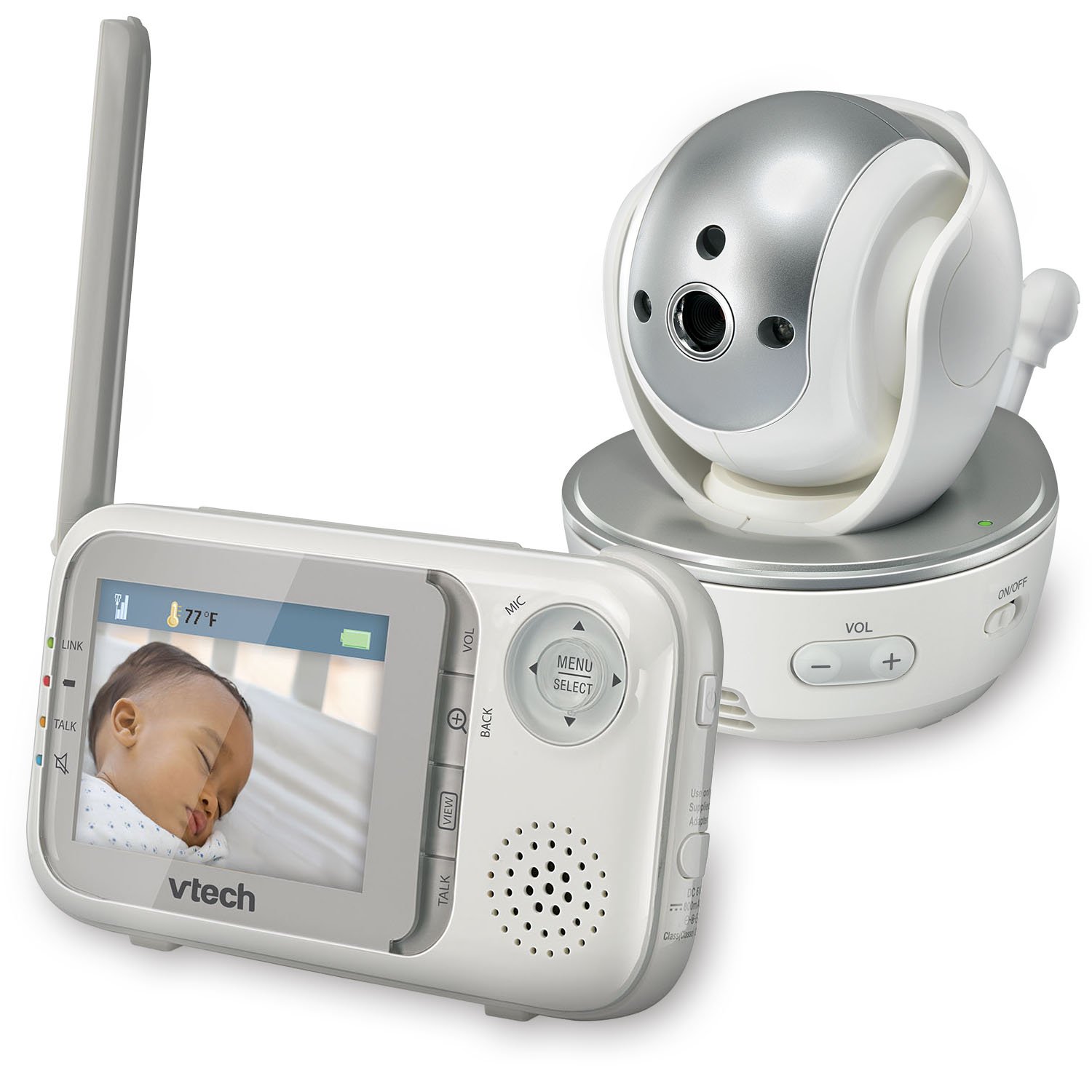
Зураг: Урд view of the VTech VM333 Parent Unit.
- 2.8 инчийн өнгөт LCD дэлгэц: Displays live video feed from the Baby Unit.
- ЦЭС/СОНГОЛТ товч: Accesses menu options and confirms selections.
- Чиглэлтэй сумнууд (Дээш/Доош/Зүүн/Баруун): Navigates menus and controls camera pan/tilt.
- ZOOM Button (+/-): Magnifies the video image.
- TALK товч: Activates two-way audio communication.
- VOLUME товчлуурууд (+/-): Adjusts the Parent Unit speaker volume.
- LINK заагч: Shows connection status between units.
- Зайны үзүүлэлт: Одоогийн батерейны түвшинг харуулна.
- Температурын дэлгэц: Shows the temperature detected by the Baby Unit.
2.2. Хүүхдийн хэсэг (Камер)

Зураг: Урд view of the VTech VM333 Baby Unit camera.
- Камерын линз: Видео бичлэг.
- Хэт улаан туяаны LED: Provide night vision in low light conditions.
- Микрофон: Detects sound from the baby's room.
- Илтгэгч: Хоёр талын аудио харилцааны хувьд.
- Температур мэдрэгч: Өрөөний температурыг хянадаг.
- Асаах/унтраах унтраалга: Turns the Baby Unit on or off.
- Эрчим хүчний Жак: Цахилгаан адаптерт холбогдоно.

Зураг: хажуу тал view of the VTech VM333 Baby Unit, illustrating the wall-mount bracket.
3. Тохиргоо
3.1. Powering On the Units
- Хүүхдийн нэгжийг холбоно уу: Plug the small end of the power adapter into the power jack on the back of the Baby Unit. Plug the large end into a wall outlet.
- Connect the Parent Unit: Plug the small end of the power adapter into the power jack on the side of the Parent Unit. Plug the large end into a wall outlet. The Parent Unit battery will begin charging.
- Асаах: Slide the ON/OFF switch on the Baby Unit to the ON position. Press and hold the POWER button on the Parent Unit until the screen turns on.
The units are pre-linked. If they do not link automatically, refer to the "Troubleshooting" section for re-pairing instructions.
3.2. Хүүхдийн төхөөрөмжийг байрлуулах (камер)
Place the Baby Unit at least 3 feet (1 meter) away from your baby to avoid potential hazards. Ensure the camera is positioned to capture the desired viewing area. Avoid placing the Baby Unit where it can be easily reached by children.
- For optimal performance, place the Baby Unit on a flat surface or mount it to a wall using the included wall-mount bracket.
- Keep the Baby Unit and Parent Unit within range (up to 1,000 feet / 300 meters in open space). Obstacles like walls and furniture can reduce the range.
Image: Proper placement of the Baby Unit near a crib.
4. Үйл ажиллагаа
4.1. Basic Monitoring
Once both units are powered on and linked, the Parent Unit will display live video from the Baby Unit. Adjust the volume using the VOL+ болон VOL - buttons on the Parent Unit.
4.2. Pan, Tilt, and Zoom
The Baby Unit camera can be remotely controlled from the Parent Unit to adjust its viewing angle and zoom level.
- Товчлуур/Найлгах: -г ашиглана уу Чиглэлийн сумнууд (Up, Down, Left, Right) on the Parent Unit to move the camera lens horizontally (up to 270 degrees) and vertically (up to 124 degrees).
- Томруулах: дээр дарна уу ZOOM + button to zoom in (2x magnification) and ZOOM - жижигрүүлэх.
Video: Demonstration of the VTech VM333's pan, tilt, and zoom features, showing remote camera control from the Parent Unit.
4.3. Хоёр талын яриа
You can speak to your baby through the Baby Unit's speaker.
- -г удаан дар ЯРИА Эцэг эхийн хэсэг дээрх товчлуур.
- Эцэг эхийн хэсэг дээрх микрофон руу тодорхой ярь.
- -г суллана ЯРИА button to stop speaking and hear your baby again.

Image: Using the two-way talk feature on the Parent Unit.
4.4. Automatic IR Night Vision
The Baby Unit is equipped with infrared LEDs that automatically activate in low light conditions, providing a clear black and white video image of your baby in the dark.
Image: The Baby Unit operating in night vision mode.
4.5. Дуу идэвхжүүлэх горим
This mode allows the Parent Unit screen to turn off automatically to save power and reduce light disturbance, and then turn back on when sounds are detected from the Baby Unit.
- дээр дарна уу ЦЭС/СОНГОХ Эцэг эхийн хэсэг дээрх товчлуур.
- руу шилжих VOX мэдрэмж or Дууны идэвхжүүлэлт тохиргоо.
- Select your desired sound sensitivity level. A higher sensitivity will activate the screen with softer sounds.
Image: Parent Unit displaying the sound activation icon.
4.6. Temperature Monitoring and Alerts
The Baby Unit monitors the room temperature and displays it on the Parent Unit screen. You can set alerts for temperature deviations.
- дээр дарна уу ЦЭС/СОНГОХ товч.
- руу шилжих Температурын дохиолол тохиргоо.
- Set your desired minimum and maximum temperature thresholds. The Parent Unit will beep if the temperature goes outside this range.
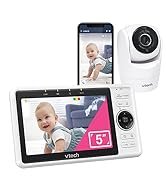
Image: Parent Unit displaying room temperature.
4.7. Multiple Camera Monitoring (Expandable System)
The VM333 system supports up to four cameras (additional cameras sold separately). You can view multiple cameras in different modes.
- Ганц бие View: Displays video from one camera at a time. Use the VIEW холбогдсон камеруудаар шилжих товчлуур.
- Хуваах View: Displays video from multiple cameras simultaneously on a split screen.
- Эргүүл хамгаалалтын горим: Automatically cycles through all connected cameras, displaying each for a few seconds.
Video: Demonstration of multi-camera viewing modes, including single view, хуваах view, and patrol mode.
5. Засвар үйлчилгээ
- Цэвэрлэгээ: Clean the surfaces of the Parent Unit and Baby Unit with a soft, damp даавуу. Цэвэрлэгээний шүршигч эсвэл шингэн цэвэрлэгч хэрэглэж болохгүй.
- Батерейны арчилгаа: The Parent Unit uses a rechargeable Lithium-Ion battery. For optimal battery life, fully charge the unit before first use. Avoid extreme temperatures. If storing the unit for an extended period, remove the battery.
- Линзний арчилгаа: Keep the camera lens clean to ensure clear video quality. Use a soft, lint-free cloth to gently wipe the lens if needed.
6. Алдаа засах
| Асуудал | Шийдэл |
|---|---|
| No video/audio on Parent Unit. |
|
| Видео чанар муу. |
|
| Parent Unit beeps (low battery, out of range, temperature). |
|
| Interference with other devices. |
|
7. Техникийн үзүүлэлтүүд
| Онцлог | Дэлгэрэнгүй |
|---|---|
| Загварын дугаар | VM333 |
| Дэлгэцийн хэмжээ | 2.8 инч (LCD) |
| Утасгүй технологи | 2.4 GHz FHSS digital transmission |
| Хүрээ | Нээлттэй орон зайд 1,000 фут (300 метр) хүртэл |
| Пан өнцөг | Up to 270 degrees horizontal |
| Налалтын өнцөг | Up to 124 degrees vertical |
| Томруулах | 2x дижитал томруулалт |
| Шөнийн хараа | Automatic infrared (IR) |
| Хоёр талын аудио | Тиймээ |
| Дууны идэвхжүүлэлт | Тийм (VOX) |
| Температур мэдрэгч | Yes, with alerts |
| Өргөтгөх боломжтой | 4 хүртэлх камер (нэмэлт камеруудыг тусад нь зардаг) |
| Эцэг эхийн нэгжийн батерейны ашиглалтын хугацаа | Up to 3.5 hours (video streaming) |
| Эрчим хүчний эх үүсвэр | Rechargeable Lithium-Ion battery (Parent Unit), AC power (Baby Unit) |
| Өнгө | Цагаан / Мөнгө |
| Зүйлийн жин | 2 фунт |
8. Баталгаат хугацаа ба дэмжлэг
For warranty information and technical support, please contact VTech customer service.
- Хэрэглэгчийн тусламжийн дугаар: (800) 595-9511
- Webсайт: www.vtechbabycare.com
- Имэйл: support@vtechbabycare.com
Худалдан авалтын баримтаа баталгаат хугацаанд хадгалахын тулд худалдан авалтын баримт болгон хадгална уу.


