Танилцуулга
This user manual provides comprehensive instructions for the setup, operation, and maintenance of your Reloop RP-8000 Advanced Hybrid Torque Turntable. The RP-8000 combines traditional direct-drive turntable functionality with advanced digital control features, making it a versatile tool for DJs and audio enthusiasts.
Тохиромжтой ашиглах, ашиглалтын хугацаа, ашиглалтыг нэмэгдүүлэхийн тулд төхөөрөмжийг ажиллуулахын өмнө энэхүү гарын авлагыг сайтар уншина уу.
Аюулгүй ажиллагааны зааварчилгаа
- Цахилгаан хангамж нь ботьтой таарч байгаа эсэхийг шалгаарайtagтөхөөрөмж дээр заасан шаардлага.
- Төхөөрөмжийг бороо, чийг, хэт өндөр температурт бүү гарга.
- Төхөөрөмжийг дулааны эх үүсвэрийн ойролцоо эсвэл нарны шууд тусгалд байрлуулахаас зайлсхий.
- c-г нээж болохгүйasing; бүх үйлчилгээг мэргэшсэн боловсон хүчинд шилжүүлэх.
- Always disconnect the power cable before cleaning or moving the unit.
- Хүүхдийн гар хүрэхгүй газар хадгална.
Багцын агуулга
Бүх зүйл багцад байгаа эсэхийг шалгана уу:
- Эргэдэг ширээний үндсэн хэсэг
- Цахилгаан кабель
- USB кабель
- RCA Cable (with ground wire)
- Слипмат
- Эсрэг жин
- Headshell (cartridge not included)
- Хэрэглэгчийн гарын авлага (энэ баримт бичиг)
Бүтээгдэхүүн дууссанview
Familiarize yourself with the various components of your Reloop RP-8000 turntable.
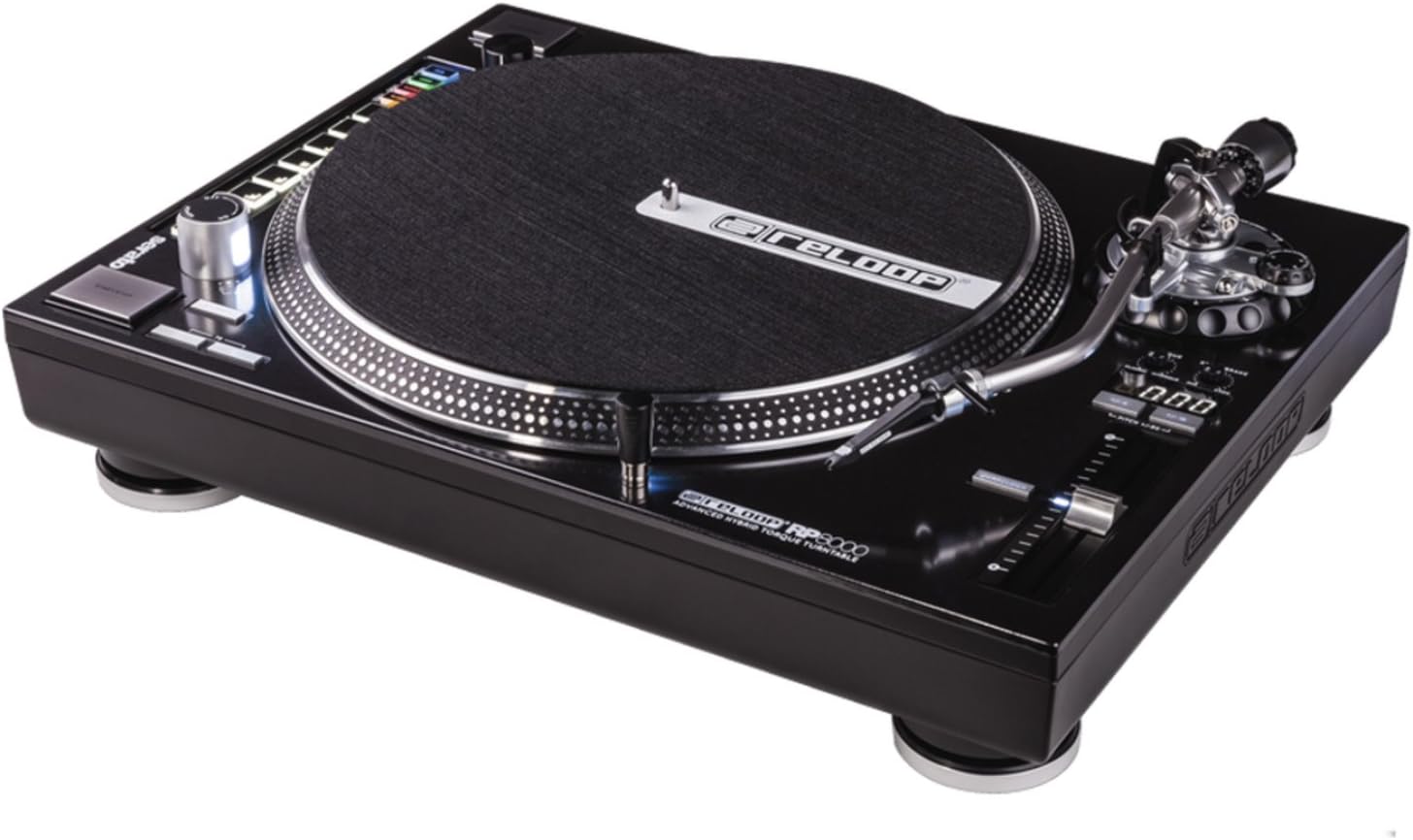
Зураг 1: Дээрээс доош view of the Reloop RP-8000 turntable, showcasing the platter, tone arm, pitch fader, and MIDI control section with performance pads.

Зураг 2: Өнцөгтэй view of the Reloop RP-8000, highlighting the robust construction, the illuminated platter edge, and the integrated MIDI controls on the left side.

Зураг 3: Rear panel of the Reloop RP-8000, showing the audio output (Phono/Line), USB ports (USB A and TT Link), power input, and power switch. Note the additional start/stop button for vertical setup.
Гол бүрэлдэхүүн хэсгүүд:
- Таваг: Бичлэгүүдийг байрлуулдаг эргэлдэгч гадаргуу.
- Аяны гар: Holds the cartridge and stylus, tracking the record's grooves.
- Давирхай Fader: Adjusts the playback speed (BPM).
- Start/Stop товчлуурууд: Controls platter rotation. An additional button is provided for battle setup.
- MIDI Control Section: Features a Trax encoder, 8 backlit drum pads, and mode selection buttons for software control.
- Phono/Line Output: RCA jacks for audio output, with a switch to select between phono (turntable level) and line (mixer/amp level) output.
- USB портууд: For connecting to a computer and linking multiple turntables.
Тохиргоо
1. Савлах ба байрлуулах
- Эргүүлэгч тавиурыг савлагаанаас нь болгоомжтой салга.
- Place the unit on a stable, level surface away from direct vibrations.
- Төхөөрөмжийн эргэн тойронд хангалттай агааржуулалтыг хангах.
2. Tone Arm and Cartridge Assembly
- Attach your preferred headshell and cartridge (sold separately) to the tone arm.
- Install the counterweight onto the rear of the tone arm.
- Adjust the counterweight to balance the tone arm horizontally. Refer to your cartridge's instructions for recommended tracking force.
- Set the anti-skate dial to match the tracking force.
3. Холболтууд
- Аудио холболт: Connect the RCA cables from the turntable's PHONO/LINE output to your mixer or ampнастан.
- If connecting to a PHONO input on your mixer/amp, set the turntable's PHONO/LINE switch to УТАС.
- If connecting to a LINE input, set the turntable's PHONO/LINE switch to ШУГАМ.
- Connect the ground wire to the ground terminal on your mixer/amp to reduce hum.
- USB холболт: Connect the USB cable from the turntable's USB port to your computer for MIDI control and DVS (Digital Vinyl System) functionality.
- Turntable Link (TT Link): For linking multiple RP-8000 units, connect them in series using standard USB cables. Only one turntable needs to be connected to the computer.
- Эрчим хүчний холболт: Connect the power cable to the turntable and then to a suitable power outlet.
Ашиглалтын заавар
1. Үндсэн тоглуулах
- Place a record on the platter and put the slipmat on top.
- Select the desired speed (33, 45, or 78 RPM) using the speed selection buttons.
- Press the START/STOP button to begin platter rotation.
- Carefully lower the tone arm onto the record using the cue lever.
- Adjust the pitch using the pitch fader as needed.
2. Дууны давтамжийн хяналт
- The pitch fader allows for precise adjustment of playback speed.
- Use the Pitch Range buttons (+/-8%, +/-16%, +/-50%) to select the desired pitch adjustment range.
- The LCD display shows the current pitch percentage.
- Press the Quartz Lock button to return the pitch to 0% (nominal speed).
3. MIDI Control and Performance Modes
The RP-8000 features an integrated MIDI control section for seamless integration with DJ software.
- Trax Encoder: Use this large encoder to browse through playlists and load tracks in your DJ software.
- Гүйцэтгэлийн дэвсгэр: The 8 backlit drum pads offer various performance modes:
- Hot Cue горим: Trigger up to 8 hot cue points.
- Давталтын горим: Set and trigger loops.
- Sample горим: Access and play samples.
- Хэрэглэгчийн горим: Freely assign MIDI functions to the pads and other control elements.
- Dual Performance Mode: Activate two modes simultaneously (e.g., Hot Cue and Loop) by pressing their respective buttons. The pads will be split to control both functions.
- Turntable Link Mode: Connect up to four RP-8000 turntables via USB. The units automatically assign themselves to available decks in your DJ software, requiring only one USB connection to your computer.
- Урвуу товчлуур: Instantly reverses platter rotation.
- Adjustable Start/Stop Time: Use the dedicated dials to fine-tune the platter's start and brake times for customized performance.
Засвар үйлчилгээ
- Цэвэрлэгээ: Use a soft, dry cloth to wipe down the unit. For stubborn dirt, a slightly damp cloth can be used, but ensure no liquid enters the unit. Avoid abrasive cleaners.
- Stylus арчилгаа: Regularly clean your stylus with a soft brush designed for this purpose. Replace the stylus when it shows signs of wear to prevent damage to your records.
- Тоосны бүрхэвч: Use a dust cover (if available) when the turntable is not in use to protect it from dust and debris.
Алдааг олж засварлах
| Асуудал | Боломжит шалтгаан | Шийдэл |
|---|---|---|
| Дуугүй эсвэл дуу багатай | Incorrect PHONO/LINE switch setting; loose RCA cables; faulty cartridge/stylus. | Ensure PHONO/LINE switch matches input; check cable connections; inspect/replace cartridge/stylus. |
| Чимээний чимээ | Ground wire not connected; interference from other electronics. | Connect ground wire to mixer/amp; move turntable away from other electronic devices. |
| Таваг эргэхгүй байна | Power not connected; power switch off; START/STOP button not pressed. | Check power cable; ensure power switch is ON; press START/STOP button. |
| MIDI controls not responding | USB cable not connected; incorrect software settings; outdated firmware. | Ensure USB cable is connected; check DJ software MIDI settings; update turntable firmware if available. |
If the problem persists after attempting these solutions, please contact Reloop customer support.
Үзүүлэлтүүд
| Онцлог | Дэлгэрэнгүй |
|---|---|
| Загварын нэр | RP-8000 MK2 (AMS-RP-8000) |
| Моторын төрөл | AC Motor, Quartz-driven Direct Drive |
| Зүйлийн жин | 22 фунт (ойролцоогоор 9.98 кг) |
| Бүтээгдэхүүний хэмжээ (L x W x H) | 20.66 x 16.53 x 7.48 инч (ойролцоогоор 52.5 x 42 x 19 см) |
| Холболтын технологи | Wired (RCA, USB 2.0) |
| Эрчим хүчний эх үүсвэр | Утастай цахилгаан |
| Ботьtage | 220 Volts (Note: Check specific unit for local voltage compatibility) |
| Тоног төхөөрөмжийн интерфейс | USB 2.0 |
| Тохиромжтой төхөөрөмжүүд | Хувийн компьютер |
| Дохионы формат | Дижитал |
Баталгаат болон дэмжлэг
For information regarding warranty coverage, please refer to the warranty card included with your product or visit the official Reloop website. Reloop offers various protection plans for extended coverage, which may be purchased separately.
For technical support, troubleshooting assistance beyond this manual, or spare parts, please contact Reloop customer service through their official webсайт эсвэл эрх бүхий дистрибьютерүүд. Худалдан авалтын баримтаа баталгаат нэхэмжлэлд зориулж худалдан авалтын баталгаа болгон хадгална уу.
Жич: The user manual (PDF) is also available for download at https://manuals.plus/m/8eb0b60ccb1c6d10ac93577b129a938bfbac889fdb461902d354afc8d19b78dd.


