1. Танилцуулга
This manual provides detailed instructions for the installation, operation, and maintenance of your Axis P1355 Surveillance/Network Camera. The Axis P13 series offers high-performance fixed cameras designed for both indoor and outdoor surveillance, delivering superb image quality with H.264 compression. These models support HDTV 720p/1080p video and are equipped with features like Wide Dynamic Range and Day/Night functionality for clear imaging in various lighting conditions. Specific models within the P13 series, including HDTV 720p, incorporate Axis Lightfinder technology for enhanced low-light sensitivity, while HDTV 1080p and 5-megapixel cameras feature P-iris control for optimized depth of field and lens resolution.
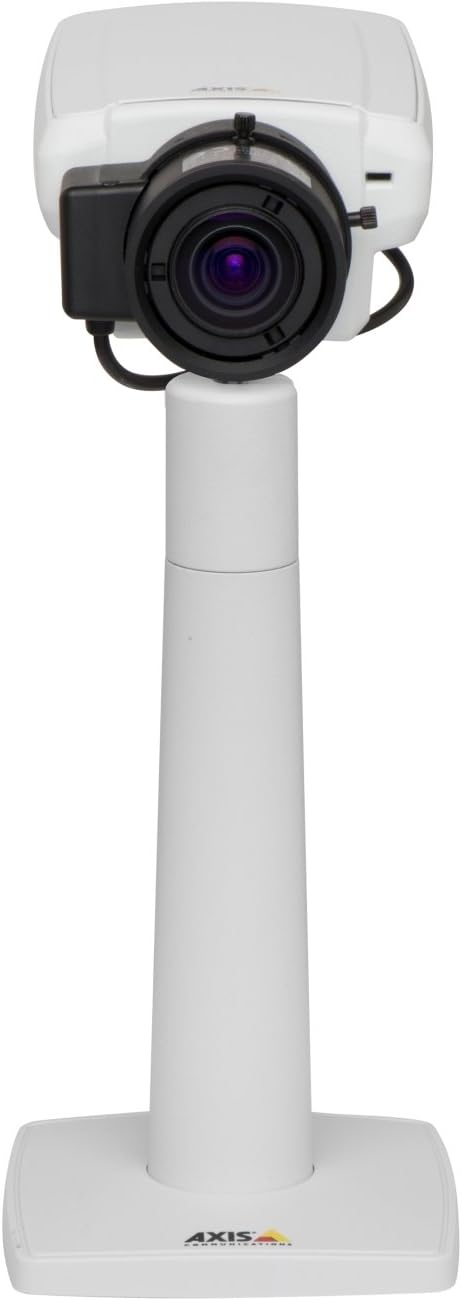
Зураг 1: The Axis P1355 Surveillance Camera shown mounted on its stand. This image illustrates the camera's physical appearance and typical mounting configuration.
2. Аюулгүй байдлын мэдээлэл
Please read all safety instructions before installing or operating the camera.
- Ensure the power source matches the camera's requirements to prevent electrical hazards.
- Суурилуулалтыг орон нутгийн цахилгааны дүрмийн дагуу мэргэшсэн ажилтан гүйцэтгэнэ.
- Камерыг хэт өндөр температур, чийгшил эсвэл идэмхий орчинд бүү байлга.
- Нар гэх мэт хүчтэй гэрлийн эх үүсвэрт линзийг шууд өртүүлэхээс зайлсхий, учир нь энэ нь дүрс мэдрэгчийг гэмтээж болзошгүй.
- Disconnect power before cleaning or servicing the camera.
3. Тохиргоо ба суурилуулалт
The Axis P1355 camera is designed for both indoor and outdoor use and supports various mounting options.
3.1 Суурилуулалт
The camera is typically designed for wall mount installation. Ensure the mounting surface is strong enough to support the camera's weight (approximately 2 pounds). Use appropriate screws and anchors for the chosen surface.
- Хамгийн оновчтой хяналтын хамрах хүрээг бий болгохын тулд тохиромжтой байршлыг сонгоно уу.
- Суурилуулах хаалтыг хананд найдвартай бэхлэнэ.
- Mount the camera onto the bracket, ensuring it is firmly in place.
- Adjust the camera's angle for the desired field of view.
3.2 холболт
The Axis P1355 camera primarily uses wired connectivity for reliable data transmission and power.
- Эрчим хүчний холболт: Connect the provided power adapter to the camera's power input and then to a suitable electrical outlet. The camera operates on a corded electric power source.
- Сүлжээний холболт: Connect an Ethernet cable from the camera's network port to your network switch or router. This provides wired connectivity for video streaming and control.
- Wireless Connectivity (Optional/Configuration): While primarily wired, the camera supports Wi-Fi for certain configurations. Refer to the Axis product documentation for specific wireless setup instructions if applicable to your model variant.
4. Ашиглалтын заавар
Once installed and connected, the Axis P1355 camera can be configured and operated via a network interface.
4.1 Анхны хандалт ба тохиргоо
- Use the Axis IP Utility or a similar network discovery tool to find the camera's IP address on your network.
- Нээлттэй a web хөтөч рүү орж, камерын IP хаягийг оруулаад түүнд хандах боломжтой web интерфейс.
- Log in using the default credentials (refer to Axis documentation for default username/password, typically 'root' and 'pass' or similar, which should be changed immediately).
- Follow the on-screen prompts to set up basic network settings, date/time, and user accounts.
4.2 Video Monitoring and Features
- Амьд View: Access the live video feed through the web interface or compatible video management software.
- Шийдвэр: The camera supports video capture resolutions up to 720p and effective video resolutions of 1080 pixels, with effective still resolution of 2 MP.
- Color and Monochrome Modes: The camera can operate in both color and monochrome (black and white) modes, automatically switching based on light conditions or configured manually.
- Шөнийн хараа: Utilize the integrated night vision capabilities for surveillance in low-light or complete darkness.
- Оптик томруулалт: Adjust the optical zoom for detailed views of specific areas.
- P-Iris Control: For models equipped with P-iris, this feature allows precise control over the iris position to optimize depth of field and lens resolution, enhancing image sharpness. This can be configured via the web интерфейс.
- Видео формат: Video is typically captured in MP4 format.
- Алсын удирдлага: The camera supports remote control for various settings and adjustments.
5. Засвар үйлчилгээ
Regular maintenance ensures optimal performance and longevity of your Axis P1355 camera.
- Цэвэрлэгээ: Gently clean the camera lens and housing with a soft, damp даавуу. Зүлгүүрийн цэвэрлэгч эсвэл уусгагчаас зайлсхий.
- Програм хангамжийн шинэчлэлтүүд: Axis Communications-ийг үе үе шалгаж байх webпрограм хангамжийн шинэчлэлтийн сайт. Програм хангамжийг шинэчилж байх нь хамгийн сүүлийн үеийн функцууд, аюулгүй байдлын засварууд болон гүйцэтгэлийн сайжруулалтад хандах боломжийг олгоно.
- Кабелийн үзлэг: Ялангуяа гадаа суурилуулах үед бүх кабелийг элэгдэл, гэмтлийн шинж тэмдэг байгаа эсэхийг тогтмол шалгаж байгаарай.
- Байгаль орчны шалгалт: Камерын ажиллах орчин нь тогтоосон температур болон чийгшлийн хязгаарт байгаа эсэхийг шалгаарай.
6. Алдаа засах
This section addresses common issues you might encounter with your Axis P1355 camera.
- Эрчим хүчгүй:
- Verify the power adapter is securely connected to both the camera and a working power outlet.
- Цахилгааны кабельд гэмтэл байгаа эсэхийг шалгана уу.
- Сүлжээний холболт байхгүй:
- Ensure the Ethernet cable is properly connected to the camera and the network switch/router.
- Сүлжээний шилжүүлэгч/чиглүүлэгчийн статусыг шалгана уу.
- Confirm the camera has a valid IP address and is on the same network segment as your viewтөхөөрөмж.
- Зургийн чанар муу:
- Камерын линзийг цэвэрлэ.
- Adjust focus and zoom settings via the web интерфейс.
- Check lighting conditions; enable night vision or adjust exposure settings if necessary.
- Ensure P-iris control is correctly configured for optimal sharpness (if applicable).
- Нэвтрэх боломжгүй Web Интерфэйс:
- Verify the camera's IP address.
- Таны компьютер камертай ижил сүлжээнд холбогдсон эсэхийг шалгаарай.
- Try restarting the camera and your network equipment.
7. Техникийн үзүүлэлтүүд
| Онцлог | Дэлгэрэнгүй |
|---|---|
| Брэнд | Тэнхлэгийн харилцаа холбоо |
| Загварын дугаар | тэнхлэг P1355 |
| Дотор/гадаа ашиглах | Дотор, гадаа |
| Холболтын технологи | Wired (Wi-Fi capable for certain configurations) |
| Онцлог шинж чанар | Шөнийн хараа |
| Эрчим хүчний эх үүсвэр | Утастай цахилгаан (7.1 ватт) |
| Видео бичлэгийн нягтрал | 720p |
| Үр дүнтэй видео нягтрал | 1080 пиксел |
| Үр дүнтэй шийдэл | 2 МП |
| Томруулах төрөл | Optical Zoom (2.9x Optical) |
| Хянагчийн төрөл | Iris (P-iris control) |
| Суурилуулах төрөл | Ханын бэхэлгээ |
| Бүтээгдэхүүний хэмжээ (L x W x H) | 3.07 x 5.94 x 1.69 инч |
| Зүйлийн жин | 2 фунт |
| Олон улсын хамгаалалтын зэрэглэл | IP54 |
| Видео бичлэгийн формат | MP4 |
8. Баталгаат хугацаа ба дэмжлэг
Баталгаат хугацааны дэлгэрэнгүй мэдээлэл болон техникийн дэмжлэг авахыг хүсвэл Axis Communications-ийн албан ёсны хаягаар лавлана уу. webсайт эсвэл харилцагчийн үйлчилгээтэй шууд холбогдоно уу.
Үйлдвэрлэгч: AXIS COMMUNICATION INC.
Webсайт: www.axis.com (Албан тушаалтан дээр очно уу website for the most current support resources, drivers, and documentation.)


