1. Танилцуулга
This manual provides comprehensive instructions for the installation, operation, and maintenance of your Swann SWDVK-163208S-US 3200S 16-Channel 960H DVR Security System. Please read this manual thoroughly before using the product to ensure proper setup and functionality. Keep this manual for future reference.
The system includes a 16-channel 960H Digital Video Recorder (DVR) with a pre-installed 1TB hard drive and eight 700TVL security cameras designed for both indoor and outdoor use. It supports continuous recording, motion detection, and remote viewчадварууд.
2. Аюулгүй байдлын мэдээлэл
- Ensure all power connections are secure and correctly rated for the device.
- Do not expose the DVR or cameras to water or excessive moisture.
- DVR-г нарны шууд тусгал эсвэл дулааны эх үүсвэрийн ойролцоо байрлуулахаас зайлсхий.
- Use only the power adapters supplied with the system.
- Do not attempt to open or service the DVR or cameras yourself. Refer all servicing to qualified personnel.
- Кабелиудыг бүдрэх аюулаас урьдчилан сэргийлэх, агааржуулалтыг зөв хангахын тулд цэгцтэй байлга.
3. Багцын агуулга
Verify that all items listed below are present in your package. If any items are missing or damaged, contact Swann customer support.
- Swann SWDVK-163208S-US 16-Channel 960H DVR with 1TB HDD
- 8 x 700TVL Security Cameras
- 8 x BNC Cables (60ft/18m)
- Power Adapters for DVR and Cameras
- Ethernet кабель
- HDMI кабель
- USB хулгана
- Суурилуулах эрэг ба залгуур
- Түргэн эхлүүлэх гарын авлага
- Хулгайгаас урьдчилан сэргийлэх наалт
4. Систем дууссанview
4.1 DVR Front Panel
The front panel of the DVR provides access to essential controls and indicators.
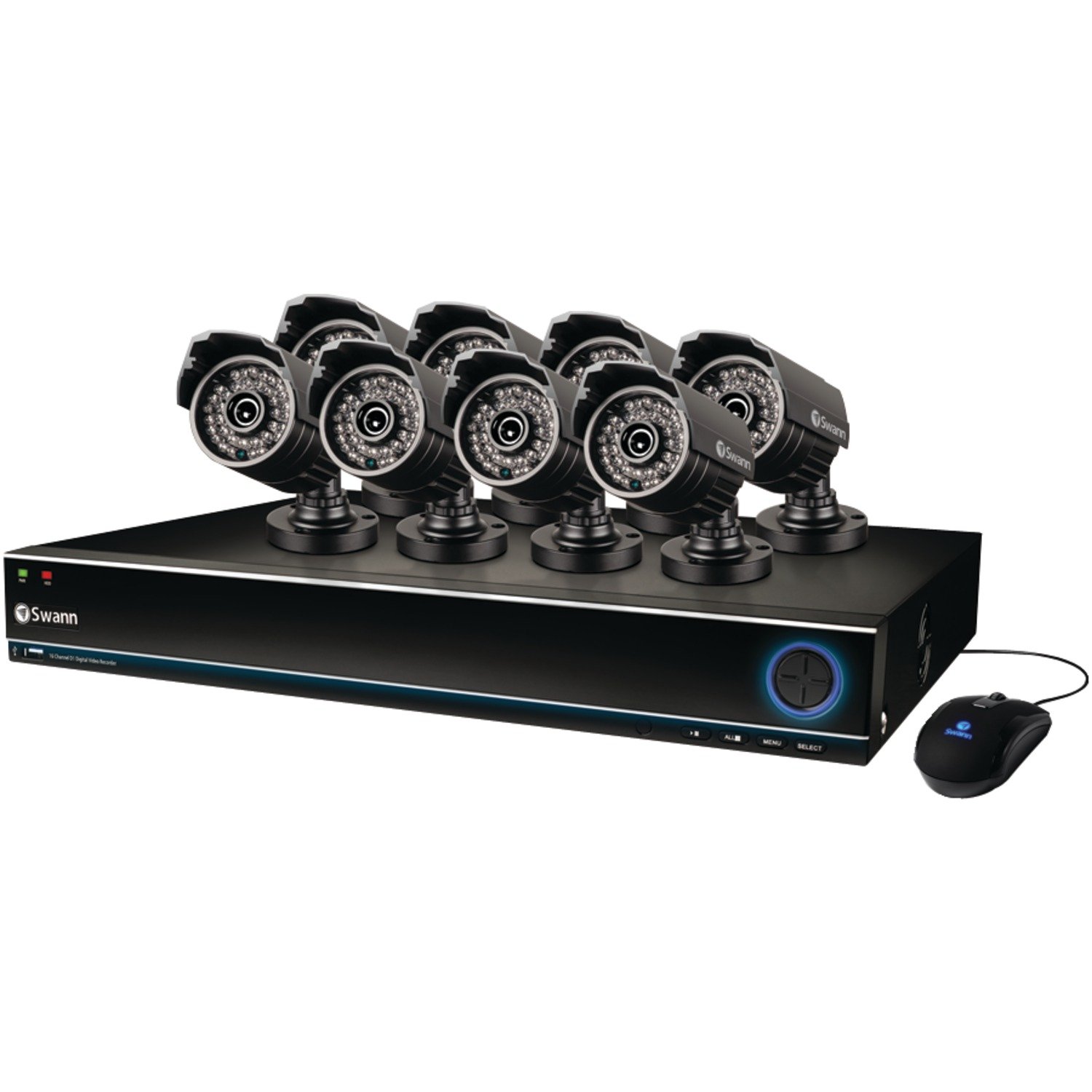
Image: The Swann SWDVK-163208S-US security system, showing the DVR unit and several cameras. The DVR features a blue-lit front panel with control buttons and status indicators.
- Эрчим хүчний үзүүлэлт: Illuminates when the DVR is powered on.
- HDD үзүүлэлт: Хатуу диск идэвхтэй байх үед анивчдаг.
- Сүлжээний үзүүлэлт: Сүлжээний холболтыг илтгэнэ.
- USB порт: For connecting a USB mouse or for data backup.
- Хяналтын товчлуурууд: Navigate menus and control playback.
4.2 DVR Rear Panel
The rear panel contains all the necessary ports for connecting cameras, monitors, and network cables.
- Видео оролт (BNC): 16 ports for connecting security cameras.
- Видео гаралт (HDMI/VGA): For connecting a monitor or TV.
- Аудио оролт/гаралт (RCA): For connecting microphones and speakers (if supported).
- Ethernet порт (RJ45): Сүлжээний холболтын хувьд.
- USB портууд: Захын төхөөрөмжүүдэд зориулсан нэмэлт USB портууд.
- eSATA порт: For connecting an external hard drive for expanded storage.
- Эрчим хүчний оролт: For connecting the DVR power adapter.
4.3 Камерын онцлог
The included 700TVL cameras offer clear video surveillance with night vision capabilities.
- Шийдвэр: 700TVL (Television Lines) for detailed images.
- Шөнийн хараа: Infrared LEDs provide visibility up to 82ft (25m) in low light or complete darkness.
- Цаг агаарт тэсвэртэй: Designed for both indoor and outdoor installation.
- Суурилуулалт: Adjustable brackets for flexible positioning.
5. Тохиргоо
5.1 DVR-г холбох
- Connect the included USB mouse to one of the USB ports on the DVR.
- Connect the HDMI cable from the DVR's HDMI output to an HDMI input on your TV or monitor. Alternatively, use a VGA cable for VGA connections.
- Алсын хувьд viewing, connect an Ethernet cable from the DVR's Ethernet port to your router or network switch.
5.2 Камеруудыг холбох
- Mount each camera in your desired location using the provided screws and plugs. Ensure the camera has a clear field of view and is protected from direct impact.
- Connect one end of the BNC cable to the camera's video output.
- Connect the other end of the BNC cable to a video input port on the DVR (e.g., Video In 1, Video In 2, etc.).
- Connect the camera's power input to the power splitter cable, then connect the power adapter to the splitter and a power outlet.
5.3 Асаах
- Connect the DVR power adapter to the DVR's power input and then to a power outlet.
- The DVR will power on automatically. The power indicator light on the front panel will illuminate.
- Wait for the system to boot up. The Swann logo will appear on your connected monitor, followed by the live view харуулах.
5.4 Анхны тохиргоо
Upon first boot-up, the DVR will guide you through an initial setup wizard.
- Хэлний сонголт: Өөрийн дуртай хэлээ сонгоно уу.
- Огноо ба цаг: Set the correct date, time, and time zone. This is crucial for accurate recording timestamps.
- Сүлжээний тохиргоо: Configure network settings (DHCP is usually sufficient for automatic setup).
- Нууц үгийн тохиргоо: Create a strong password for the administrator account to secure your system.
- Хатуу дискний формат: The system may prompt to format the hard drive. Confirm to proceed.
6. Системийг ажиллуулах
6.1 Амьд View
Анхны тохиргооны дараа DVR шууд дамжуулалтыг харуулах болно view from all connected cameras. You can switch between single-camera view, multi-camera grids (e.g., 4-channel, 8-channel, 16-channel), and sequence modes using the on-screen menu or front panel controls.
6.2 Бичлэг хийх горимууд
DVR нь янз бүрийн бичлэгийн горимуудыг дэмждэг:
- Үргэлжлүүлэн бичлэг хийх: Records 24/7, overwriting the oldest footagхатуу диск дүүрсэн үед.
- Хөдөлгөөн илрүүлэх бичлэг: Камерт хөдөлгөөн илэрсэн үед л бичлэг хийнэ view. This conserves hard drive space. Sensitivity and detection areas can be configured for each camera.
- Хуваарьт бичлэг: Өдөр эсвэл долоо хоногийн тодорхой цагуудад тэмдэглэл хөтөлдөг.
- Гараар бичлэг хийх: Start and stop recording manually from the DVR interface.
Access recording settings via the DVR's main menu: Menu > Record > Record Schedule.
6.3 Тоглуулах
Дахин хэлэхэдview foo бүртгэгдсэнtage:
- Шууд нэвтрүүлгээс view, right-click with the mouse to open the main menu.
- Сонго Тоглуулах.
- Хүссэн огноо, камерын сувгийг сонгоно уу.
- Use the timeline to navigate through recorded events. Different colors on the timeline indicate different recording types (e.g., continuous, motion).
- Дахин тоглуулахын тулд тоглуулах удирдлагыг (тоглуулах, түр зогсоох, хурдан урагшлуулах, ухраах) ашиглана ууview footage.
6.4 Нөөцлөлт
You can back up important video footage to a USB flash drive or external hard drive.
- Insert a USB storage device into a USB port on the DVR.
- руу оч Menu > Backup.
- Select the camera channel, date, and time range for the footage you wish to back up.
- Choose the backup device and file format (e.g., AVI).
- дарна уу Эхлэх to begin the backup process.
6.5 Алсын Viewing (SwannLink & SwannView)
The SwannLink and SwannView applications allow you to view your cameras remotely from a smartphone or tablet.
- Ensure your DVR is connected to the internet via the Ethernet port.
- Download the SwannView таны төхөөрөмжийн апп дэлгүүрээс програм.
- Open the app and follow the on-screen instructions to add your DVR. This typically involves scanning a QR code displayed on the DVR's monitor (Menu > Network > SwannLink) or manually entering the device ID.
- Enter the DVR's username and password when prompted.
- Та одоо чадах боломжтой байх ёстой view амьд footage and access playback remotely.
7. Засвар үйлчилгээ
7.1 Хатуу дискний менежмент
1TB хатуу диск нь хамгийн хуучин файлыг автоматаар дарж бичнэtage when full. To ensure optimal performance, it is recommended to periodically check the hard drive status via Menu > HDD > Disk Manage. You can also connect an external hard drive to the eSATA port for additional storage capacity.
7.2 Cleaning Cameras
Камерын линзийг үе үе зөөлөн, d аргаар цэвэрлэж байгаарайamp тоос шороо, шороо, эсвэл усны толбыг арилгахын тулд даавуугаар view. Do not use harsh chemicals or abrasive materials.
7.3 Програм хангамжийн шинэчлэлтүүд
Swann may release firmware updates to improve system performance or add new features. Check the Swann support website for the latest firmware for your model. Follow the instructions provided with the firmware update carefully to avoid damaging the DVR.
8. Алдаа засах
| Асуудал | Боломжит шалтгаан | Шийдэл |
|---|---|---|
| Монитор дээр зураг байхгүй | Видео кабель сул, монитор дээр буруу оруулсан оролт, DVR асаагүй байна. | HDMI/VGA кабелийн холболтыг шалгана уу. Монитор зөв оролт дээр байгаа эсэхийг шалгаарай. DVR-ийн хүчийг шалгана уу. |
| Камерын зураг байхгүй | Loose BNC cable, camera power issue, faulty camera. | Check BNC and power connections for the specific camera. Test camera with a known working cable/power supply. |
| DVR бичлэг хийхгүй байна | Recording schedule not set, hard drive full or faulty, motion detection not configured. | Check recording schedule. Verify hard drive status. Ensure motion detection is enabled and configured correctly. |
| Чадахгүй view алсаас | No network connection, incorrect network settings, app configuration error. | Verify DVR has internet access. Check network settings (DHCP). Reconfigure the DVR in the SwannView апп. |
| Purple image on camera | IR filter stuck, camera malfunction. | Power cycle the camera. If the issue persists, the camera may be faulty and require replacement. |
9. Техникийн үзүүлэлтүүд
- Загварын дугаар: SWDVK-163208S-US
- Видео оролт: 16 Channels BNC
- Видео гаралт: hdmi, vga
- Дэлгэцийн нягтрал: Up to 1080p (HDMI)
- Бичлэгийн шийдвэр: 960H (960x576/960x480)
- Хатуу диск: 1TB SATA HDD (expandable via eSATA)
- Шахалтын формат: H.264
- Сүлжээний интерфейс: RJ45 Ethernet порт
- USB интерфэйс: 3 x USB 2.0 порт
- Камерын нягтрал: 700TVL
- Camera Night Vision: 82 фут (25 метр) хүртэл
- Camera Weatherproof Rating: IP66 (гадаа ашиглах зориулалттай)
- Dimensions (DVR): 22.5 x 15.3 x 8.1 инч (ойролцоогоор)
- Weight (DVR): 14 фунт (ойролцоогоор)
- Эрчим хүчний эх үүсвэр: DC 12V
10. Баталгаат хугацааны мэдээлэл
Swann products are covered by a limited warranty. The specific terms and duration of your warranty may vary by region and product. Please refer to the warranty card included with your product or visit the official Swann webБаталгаат хугацааны дэлгэрэнгүй мэдээлэл болон бүртгэлийн журмыг сайтаас авна уу. Баталгаат хугацааны нэхэмжлэл гаргахын тулд худалдан авалтын баримтаа хадгална уу.
11. Дэмжлэг
For technical assistance, product support, or to download the latest software and manuals, please visit the official Swann support website. You can typically find FAQs, troubleshooting guides, and contact information for customer service there. Have your product model number (SWDVK-163208S-US) ready when contacting support.
Swann дэмжлэг Webсайт: https://www.swann.com/us/support


