1. Танилцуулга
Thank you for choosing the Rothenberger ROSCOPE i2000 Set Pipe 25/16 Inspection Camera. This manual provides essential information for the safe and efficient operation, maintenance, and troubleshooting of your device. Please read this manual thoroughly before using the product and keep it for future reference.
The ROSCOPE i2000 is designed for professional inspection of pipes and drains, featuring a robust design and clear imaging capabilities to assist in diagnostic tasks.
2. Аюулгүй байдлын мэдээлэл
Төхөөрөмжийг гэмтээх, гэмтээхгүйн тулд дараах аюулгүй байдлын арга хэмжээг үргэлж дагаж мөрдөөрэй.
- Бүх зааврыг уншина уу: Хэрэглэхийн өмнө ашиглалтын заавар болон аюулгүй ажиллагааны заавартай танилцана уу.
- Use in appropriate environments: Энэ төхөөрөмж нь ус нэвтэрдэггүй. Avoid exposure to water or excessive moisture to prevent electrical shock or damage.
- Батерейны аюулгүй байдал: Use only specified Lithium-ion batteries. Ensure correct polarity when inserting. Do not expose batteries to extreme temperatures or dispose of them in fire.
- Avoid damage to the cable: Do not bend, pinch, or stretch the camera cable excessively.
- Засвар үйлчилгээ: Only perform maintenance as described in this manual. Refer all other servicing to qualified personnel.
- Хувийн хамгаалах хэрэгсэл: Wear appropriate PPE, such as gloves and eye protection, when working in potentially hazardous environments.
3. Багцын агуулга
Таны багцад бүх зүйл байгаа эсэхийг шалгана уу:
- Rothenberger ROSCOPE i2000 Camera Unit
- ROSCOPE i2000 Module 25/16-tec100 (16m cable length)
- Lithium-ion Battery (1 required, may be pre-installed or separate)
- Хэрэглэгчийн гарын авлага (энэ баримт бичиг)
4. Тохиргоо
4.1. Зай суурилуулах
- Locate the battery compartment on the ROSCOPE i2000 camera unit.
- Тасалгааны тагийг нээ.
- Лити-ион батерейг оруулаад зөв туйлшралыг шалгана уу.
- Зайны тасалгааны тагийг сайтар хаа.
- Charge the battery fully before first use according to the charger's instructions (charger not explicitly listed, assume standard charging process).
4.2. Connecting the Camera Module
- Align the connector of the ROSCOPE i2000 Module 25/16-tec100 with the port on the main camera unit.
- Gently push the connector in until it clicks into place, ensuring a secure connection.
- To disconnect, press any release buttons or twist the connector collar as indicated on the device, then pull apart.

Figure 1: Rothenberger ROSCOPE i2000 inspection camera with the 16m cable module coiled on its stand.
5. Ашиглалтын заавар
5.1. Асаах/унтраах
- Асаахын тулд: Press and hold the power button (usually marked with ⏻ or similar icon) until the LCD screen illuminates.
- Унтраахын тулд: Төхөөрөмж унтрах хүртэл асаах товчийг дахин дараад барина уу.
5.2. Basic Inspection
- Ensure the camera module is securely connected and the device is powered on.
- Carefully insert the camera probe into the pipe or area to be inspected. Guide the cable smoothly to avoid kinks or damage.
- Observe the live feed on the integrated LCD screen. The screen provides a 720p video resolution for clear viewing.
- Use the control buttons on the unit to adjust settings such as illumination, zoom (optical zoom available), or to capture images/videos if supported by the model.
- Slowly retract the camera after inspection.
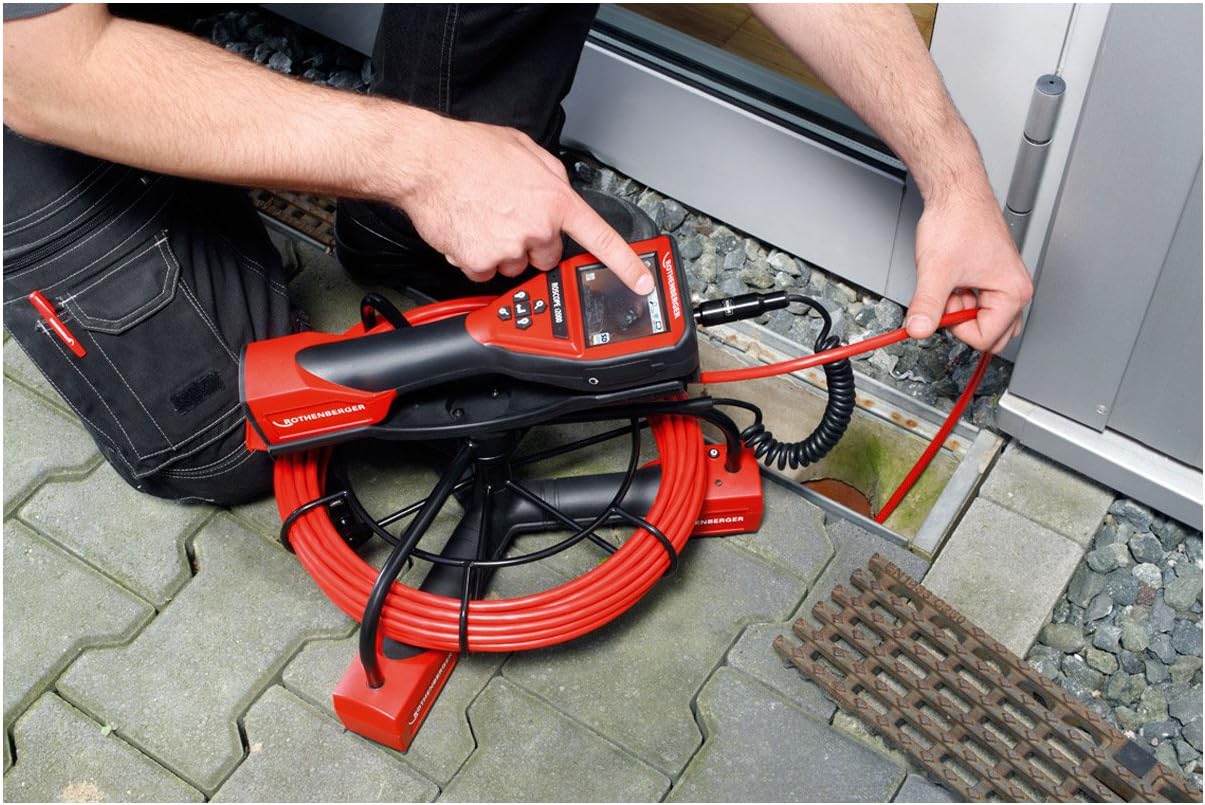
Figure 2: A user inserting the camera probe of the ROSCOPE i2000 into a drain for inspection.
5.3. Viewing болон Бичлэг
- The device features an LCD screen for direct viewing.
- For external display or recording, the device supports HDMI connectivity. Connect an HDMI cable from the camera unit to a compatible monitor or recording device.
- Refer to the on-screen menu for options to capture still images or record video footage. Saved media can typically be stored on an SD card (if slot available) or transferred via compatible connectivity options.

Figure 3: A user pointing at the live inspection feed displayed on the ROSCOPE i2000's LCD screen.
6. Засвар үйлчилгээ
6.1. Цэвэрлэгээ
- After each use, gently wipe the camera probe and cable with a soft, damp хог хаягдлыг арилгах даавуу.
- Чухал: Төхөөрөмж нь ус нэвтэрдэггүй. Do not immerse the main unit or camera probe in water. Avoid using harsh chemicals or abrasive cleaners.
- LCD дэлгэцийг зөөлөн, хөвөнгүй даавуугаар цэвэрлэ.
6.2. Хадгалах
- Store the ROSCOPE i2000 in a clean, dry place, away from direct sunlight and extreme temperatures.
- Ensure the cable is neatly coiled and not kinked to prevent damage.
- If storing for an extended period, remove the battery or ensure it is partially charged to prolong its lifespan.
7. Алдаа засах
If you encounter issues with your ROSCOPE i2000, refer to the following common problems and solutions:
- Төхөөрөмж асахгүй байна:
- Check if the battery is correctly installed and fully charged.
- Зайны тасалгаа найдвартай хаагдсан эсэхийг шалгаарай.
- Дэлгэц дээр зураг байхгүй:
- Verify that the camera module is securely connected to the main unit.
- Check for any damage to the camera cable or lens.
- Ensure the device is powered on and not in a standby mode.
- Зургийн чанар муу:
- Камерын линзийг цэвэрлэ.
- Adjust the illumination settings if available.
- Ensure there is sufficient light in the inspection area.
If the problem persists, contact Rothenberger customer support for assistance.
8. Техникийн үзүүлэлтүүд
| Брэнд | Ротенбергер |
| Загвар | ROSCOPE i2000 |
| Модуль | 25/16-tec100 |
| Кабелийн урт | 16 метр |
| Видеоны нягтрал | 720p |
| Дэлгэцийн төрөл | LCD дэлгэц |
| Холболтын технологи | HDMI |
| Зураг тогтворжуулах | Дижитал |
| Томруулах төрөл | Оптик томруулалт |
| Фокусын төрөл | Автомат фокус |
| Өртөлтийг хянах төрөл | Автомат |
| Дэмжигдсэн медиа форматууд | Бүтээгдэхүүний дүрс, сайжруулсан контент |
| Эрчим хүчний эх үүсвэр | 1 литийн ион батерей (шаардлагатай) |
| Усны эсэргүүцлийн түвшин | Ус нэвтэрдэггүй |
| Зүйлийн жин | 28.11 фунт (ойролцоогоор 12.75 кг) |
| Багцын хэмжээ | 78.5 x 64 x 45 см |
9. Баталгаат хугацаа ба дэмжлэг
For warranty information, please refer to the documentation provided with your purchase or visit the official Rothenberger webсайт.
Сэлбэг хэрэгслийн бэлэн байдал: Spare parts are generally available within 3 days.
For technical support, service, or to inquire about spare parts, please contact your local Rothenberger dealer or customer service center.


