1. Танилцуулга
This manual provides essential information for the safe and efficient installation, operation, and maintenance of your APEX AL-A300ATX 300W ATX12V Power Supply. Please read this manual thoroughly before installation and retain it for future reference.
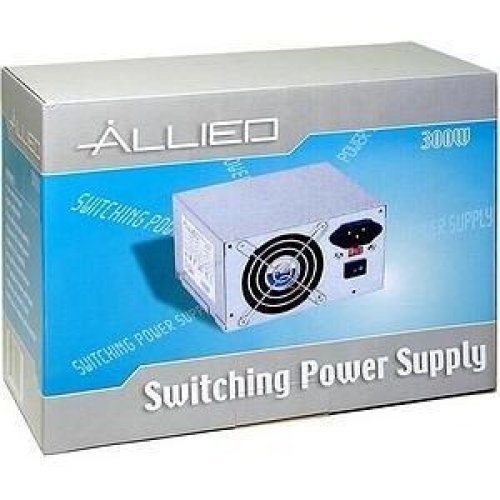
Image: The AL-A300ATX 300W ATX12V Power Supply shown in its retail packaging, indicating it is a "Switching Power Supply" from "ALLIED".
2. Аюулгүй байдлын мэдээлэл
Always observe the following safety precautions to prevent injury or damage to the power supply or other components:
- Суулгах эсвэл зайлуулахын өмнө цахилгаан тэжээлийг АС залгуураас салгасан эсэхийг шалгаарай.
- Цахилгаан хангамжийг нээж болохгүй casing. Өндөр ботьtages are present inside, even when disconnected. There are no user-serviceable parts.
- Install the power supply in a well-ventilated area. Do not block ventilation openings.
- Цахилгаан хангамжийг чийг эсвэл хэт өндөр температурт өртөхөөс зайлсхий.
- Use only the cables provided or approved for use with this power supply.
- If the power supply is damaged or malfunctioning, discontinue use immediately and contact support.
3. Багцын агуулга
Бүх зүйл багцад байгаа эсэхийг шалгана уу:
- APEX AL-A300ATX 300W ATX12V Power Supply Unit
- AC Power Cord (may vary by region)
- Суурилуулах эрэг
- Хэрэглэгчийн гарын авлага (энэ баримт бичиг)
4. Тохиргоо ба суурилуулалт
Компьютерийн системд цахилгаан хангамжийг суулгахын тулд дараах алхмуудыг дагана уу.
- Бэлтгэл:
- Компьютероо унтраагаад, AC тэжээлийн утсыг хананы залгуураас салга.
- Компьютерийн гэрээ нээнэ үү. Тодорхой зааврыг компьютерийн гэрийнхээ гарын авлагаас үзнэ үү.
- If replacing an existing power supply, disconnect all cables from the old PSU and remove it from the case.
- Цахилгаан хангамжийн хэсгийг суурилуулах:
- Carefully slide the AL-A300ATX power supply into the designated PSU bay in your computer case.
- Цахилгаан хангамж дээрх шурагны нүхийг хайрцаг дээрх нүхнүүдтэй зэрэгцүүлнэ.
- Өгөгдсөн бэхэлгээний эрэг ашиглан тэжээлийн хангамжийг хамгаална.
- Холбох кабель:
- 24-Pin ATX Main Power Connector: Connect this large connector to the corresponding port on your motherboard. Ensure it clicks into place.
- CPU Power Connector (4-pin or 8-pin): Connect the appropriate CPU power cable to the CPU power port on your motherboard.
- SATA цахилгаан холбогч: Connect these flat connectors to your SATA hard drives, SSDs, and optical drives.
- Molex (Peripheral) Connectors: Connect these 4-pin connectors to older drives or case fans if needed.
- PCI-E Power Connectors (if applicable): If your graphics card requires additional power, connect the appropriate PCI-E power cable from the PSU to the graphics card. This model is listed with a "24 Pin" PCI-Express Connector Configuration, implying the main ATX connector.
- Кабелийн менежмент: Route cables neatly to improve airflow and aesthetics within your case.
- Эцсийн шалгалт: Аюулгүй эсэхийг шалгахын тулд бүх холболтыг давхар шалгана уу.
- Кейс хаах: Close your computer case and secure it.
5. Ашиглалтын заавар
Амжилттай суулгасны дараа системийг асаахын тулд дараах алхмуудыг дагана уу:
- Хувьсах гүйдлийн хүчийг холбоно уу: Plug the AC power cord into the power supply's inlet and then into a grounded wall outlet or surge protector.
- Эрчим хүч солих: Locate the power switch on the back of the power supply (usually a rocker switch labeled "I" for ON and "O" for OFF). Ensure it is in the "ON" (I) position.
- Компьютерийг асаах: Press the power button on your computer case. The system should now power on.
To turn off your computer, always use the operating system's shutdown procedure. Do not use the power supply's switch for regular shutdowns, as this can lead to data loss or system instability.
6. Засвар үйлчилгээ
Proper maintenance helps ensure the longevity and optimal performance of your power supply:
- Тоос цэвэрлэх: Periodically (every 3-6 months, depending on environment) clean dust from the power supply's fan and ventilation grilles using compressed air. Ensure the computer is powered off and unplugged before cleaning.
- Агаарын урсгал: Ensure that the computer case has adequate airflow and that the power supply's fan is not obstructed.
- Кабелийн менежмент: Агаарын урсгалд саад учруулахаас сэргийлж кабелийн чиглэлийг цэвэр байлга.
7. Алдаа засах
Хэрэв танд цахилгаан хангамжид асуудал тулгарвал дараах нийтлэг асуудал, шийдлүүдийг үзнэ үү.
| Асуудал | Боломжит шалтгаан | Шийдэл |
|---|---|---|
| Компьютер асахгүй байна. |
|
|
| Систем асаалттай боловч шууд унтарна. |
|
|
| Fan is noisy or not spinning. |
|
|
If the problem persists after attempting these solutions, contact APEX customer support or a qualified technician.
8. Техникийн үзүүлэлтүүд
| Онцлог | Дэлгэрэнгүй |
|---|---|
| Загварын нэр | AL-A300ATX |
| Брэнд | APEX |
| Гаралтын ватtage | 300 ватт |
| Form Factor | ATX12V |
| Тохиромжтой төхөөрөмжүүд | Хувийн компьютер |
| Холбогч төрөл | ATX (24 Pin PCI-Express Connector Configuration) |
| Хөргөх арга | Агаар |
| Хамгийн бага оролтын хэмжээtage | 110 вольт (AC) |
| Зүйлийн жин | 3.64 фунт |
| Багцын хэмжээ | 9.6 x 7.2 x 4.1 инч |
| Эхний боломжтой огноо | 22 оны дөрөвдүгээр сарын 2014 |
9. Баталгаат хугацаа ба дэмжлэг
For information regarding warranty coverage, technical support, or service, please refer to the official APEX webсайт эсвэл харилцагчийн үйлчилгээтэй шууд холбогдоно уу. Худалдан авалтын баримтаа худалдан авалтын баталгаа болгон хадгалаарай.
APEX Contact Information: Please visit the official APEX webхамгийн сүүлийн үеийн холбоо барих мэдээлэл болон тусламжийн эх сурвалжийг авах сайт.


