1. Танилцуулга
The PreSonus AudioBox iTwo is a versatile 2x2 USB/iPad audio interface designed for musicians, guitarists, sound designers, and podcasters. This device is bus-powered via USB 2.0, ensuring portability and ease of use without requiring an external power supply. It is compatible with Apple iPad, Mac, and Windows operating systems, supporting a wide range of recording software.
This manual provides essential information for setting up, operating, and maintaining your AudioBox iTwo, along with troubleshooting tips and detailed specifications.
2. Үндсэн шинж чанарууд
- Автобусаар ажилладаг үйл ажиллагаа: USB 2.0 bus-powered for both Mac/Windows and iPad, eliminating the need for an external power adapter.
- High-Quality Inputs: Two combo microphone/instrument/line inputs featuring low-noise, high-headroom Class A preamplifiers. Includes +48V phantom power for condenser microphones.
- Professional Audio Resolution: Supports up to 24-bit/96 kHz recording and playback for studio-grade audio quality.
- Олон талт гаралт: Two balanced ¼” TRS main line-level outputs and a stereo headphone output with independent level control.
- Тэг хоцролттой хяналт: An internal analog mixer (direct button) enables real-time, zero-latency monitoring of your inputs.
- MIDI холболт: 1x1 MIDI In/Out for connecting MIDI controllers and instruments.
- Бат бөх барилга: Features a durable metal chassis designed for travel and reliability.
- Програм хангамжийн багц: Includes Studio One Artist DAW software for Mac/Windows and Capture Duo for iPad recording software, with wireless transfer capabilities to Studio One. Also compatible with Ableton Live Lite and the Studio Magic Plug-in Suite.
3. Тохируулах гарын авлага
3.1 Сав баглаа боодол, анхны үзлэг
Carefully remove the AudioBox iTwo from its packaging. Verify that all components are present and inspect the unit for any signs of damage. If any items are missing or damaged, contact PreSonus support immediately.
3.2 Програм хангамж суурилуулах
Before connecting your AudioBox iTwo, it is recommended to install the necessary drivers and software. Visit the official PreSonus website to download the latest drivers for your operating system (Mac or Windows). The included Studio One Artist and Capture Duo software can also be downloaded and registered via your PreSonus account.

Image: The PreSonus AudioBox iTwo interface shown alongside a computer screen displaying the Studio One Artist DAW software, highlighting the included recording software.
3.3 Техник хангамжийн холболт
- USB холболт: Connect the AudioBox iTwo to your computer (Mac/Windows) or iPad using the provided USB cable. The device is bus-powered, so no external power adapter is needed for most setups.
- iPad Specific Connection: For iPad Pro models with USB-C, use an Apple USB-C Digital AV Multiport Adapter or similar adapter. Connect the USB PC/Mac Power cable from the AudioBox iTwo to your iPad adapter. Ensure the "DEVICE" USB port on the back of the AudioBox iTwo remains empty when connecting to an iPad for proper recognition.
- Микрофон/Хэмжүүрийн оролтууд: Connect microphones, guitars, or line-level instruments to the combo inputs on the front panel.
- Үндсэн гарцууд: Connect your studio monitors or speakers to the balanced ¼” TRS main outputs on the rear panel.
- Чихэвчний гаралт: Plug your headphones into the ¼” stereo headphone jack on the front panel.
- MIDI I / O: Connect MIDI devices (e.g., keyboards, controllers) to the MIDI In and Out ports on the rear panel.
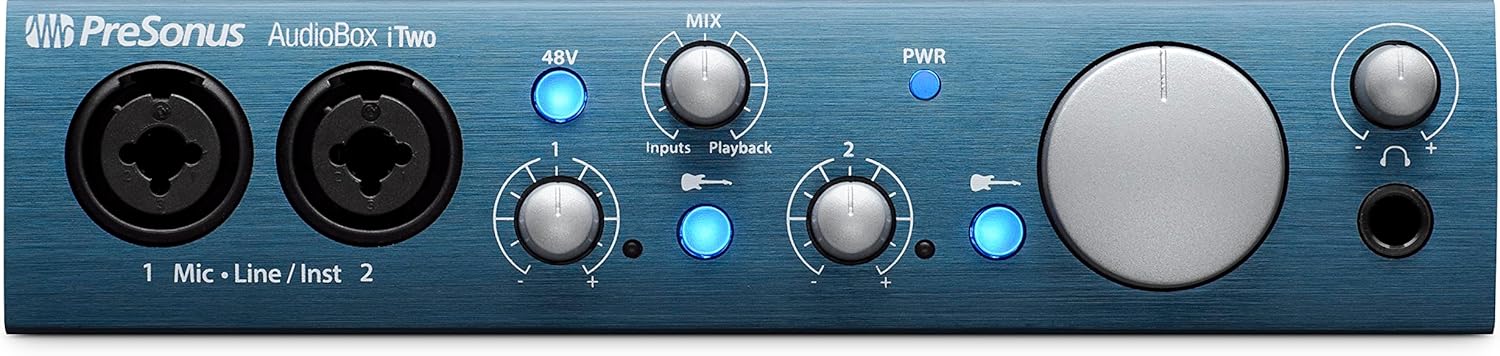
Image: The front panel of the PreSonus AudioBox iTwo, showing the two combo inputs, gain knobs, 48V phantom power button, mix knob, main volume knob, and headphone output.

Image: The rear panel of the PreSonus AudioBox iTwo, displaying MIDI In/Out ports, USB 2.0 PC/MAC POWER port, DEVICE (MFi) port, and Main R/L outputs.
4. Ашиглалтын заавар
4.1 Асаах
Once connected via USB, the AudioBox iTwo will power on automatically. The PWR indicator light on the front panel will illuminate.
4.2 Оролтын олшруулалтын тохируулга
Use the "Input 1" and "Input 2" gain knobs on the front panel to adjust the input level for your connected microphones or instruments. Monitor the corresponding signal LEDs to ensure levels are strong but not clipping (peaking).
4.3 Phantom Power (+48V)
Press the "48V" button to engage phantom power for condenser microphones connected to either input. Ensure phantom power is only used with microphones that require it and is disengaged when not needed or when using dynamic microphones.
4.4 Direct Monitoring (Mix Knob)
The "MIX" knob allows you to blend between the direct input signal ("Inputs") and the playback signal from your computer/iPad ("Playback"). This feature provides zero-latency monitoring, allowing you to hear your input signal without any delay while recording.
4.5 Main Output and Headphone Volume
- The large "MAIN" knob controls the overall output volume to your studio monitors connected to the main outputs.
- The "PHONES" knob controls the volume of the headphone output independently.

Image: The PreSonus AudioBox iTwo interface positioned on a desk, with a person playing a guitar in the background, demonstrating a typical recording setup.

Image: The PreSonus AudioBox iTwo connected to an iPad, with a person playing a ukulele, illustrating mobile recording capabilities.
5. Засвар үйлчилгээ
- Цэвэрлэгээ: Use a soft, dry cloth to clean the exterior of the AudioBox iTwo. Avoid using abrasive cleaners or solvents.
- Хадгалах: Ашиглаагүй үед төхөөрөмжийг сэрүүн, хуурай газар, нарны шууд тусгал болон хэт өндөр температураас хол хадгална уу.
- Кабелийн менежмент: Ensure all cables are connected securely and are not under undue strain. Avoid sharp bends in cables.
- Програм хангамжийн шинэчлэлтүүд: PreSonus-г тогтмол шалгаж байгаарай website for driver and firmware updates to ensure optimal performance and compatibility.
6. Алдаа засах
| Асуудал | Боломжит шалтгаан | Шийдэл |
|---|---|---|
| No power/PWR LED off | USB кабель холбогдоогүй эсвэл гэмтэлтэй; USB тэжээл хангалтгүй. | Ensure USB cable is securely connected to a powered USB port. Try a different USB port or cable. If using a USB hub, ensure it is powered. |
| No sound from outputs | Volume knobs turned down; incorrect audio device selected in software; faulty cables. | Check MAIN and PHONES volume knobs. Verify "PreSonus AudioBox iTwo" is selected as the audio output device in your operating system and DAW. Test with different cables. |
| Оролтын дохио байхгүй | Input gain too low; incorrect input selected in software; phantom power not engaged for condenser mics; faulty microphone/instrument. | Increase input gain. Ensure the correct input is selected in your DAW. Activate 48V phantom power if using a condenser microphone. Test with a different microphone or instrument. |
| iPad not recognizing device | Incorrect USB connection for iPad; adapter issues. | For iPad, connect the USB PC/Mac Power cable to your iPad's adapter. Leave the "DEVICE" USB port on the AudioBox iTwo empty. Ensure your iPad adapter is functioning correctly and provides sufficient power. |
| Хяналтын үеийн саатал | Direct monitoring not engaged; high buffer size in DAW. | Use the "MIX" knob to blend towards "Inputs" for zero-latency direct monitoring. Reduce the buffer size in your DAW's audio settings. |
7. Техникийн үзүүлэлтүүд
- Барааны жин: 1.04 фунт
- Бүтээгдэхүүний хэмжээ: 17.88 x 8.38 x 8.88 инч
- Загварын дугаар: AudioBox iTwo
- Техник хангамжийн интерфейс: USB 2.0
- Дэмжигдсэн програм хангамж: Studio One Artist, Ableton Live Lite, and Studio Magic plug-in suite
- Үйлдлийн системийн нийцтэй байдал: Windows, Mac, iOS
- Холболтын технологи: USB
- Сувгийн тоо: 2
- Урьдчилсанampамьдрагчид: 2 Class A microphone preamplifiers with +48V phantom power
- Хөрвүүлэгчид: 24 бит/96 кГц
- MIDI: 1x1 MIDI In/Out

Image: The PreSonus AudioBox iTwo held in a hand, illustrating its compact and portable size.
8. Баталгаат хугацаа ба дэмжлэг
Баталгаат хугацаа, техникийн дэмжлэг болон нэмэлт эх сурвалжийн талаар албан ёсны PreSonus вэбсайтаас авна уу website. You can find drivers, software updates, and detailed FAQs there.


