1. User Guide & Product Overview
The Valcom VC-V-400 is an omni-directional dynamic desktop microphone designed for clear audio capture in various applications. It features a low impedance design and includes a push-to-talk switch with a locking bar for convenient operation. This manual provides essential information for setting up, operating, and maintaining your Valcom VC-V-400 microphone.
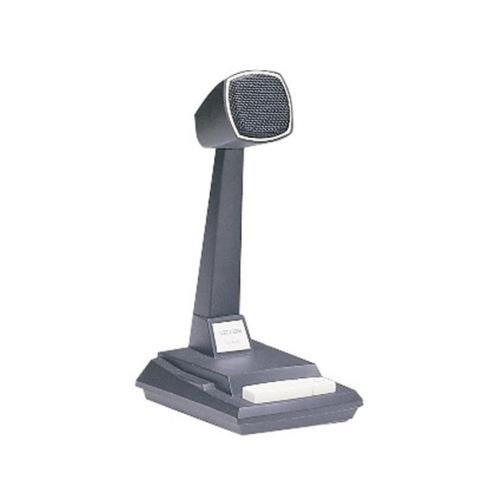
Figure 1: Valcom VC-V-400 Dynamic Desktop Microphone. An image showing the Valcom VC-V-400 Dynamic Desktop Microphone, featuring a dark grey base with a white push-to-talk bar, and a tall stand supporting the microphone head with a metallic grille.
2. Тохируулах заавар
To ensure proper functionality, the Valcom VC-V-400 microphone requires the Valcom V-9939B Microphone Adapter (sold separately) for connection to your system.
2.1 Савлах
- Микрофоныг сав баглаа боодолоос нь болгоомжтой авч хая.
- Verify that all components are present: Valcom VC-V-400 Microphone.
2.2 Холболт
- Ensure your audio system or device is powered off before making connections.
- Connect the XLR connector of the Valcom VC-V-400 microphone to the appropriate input on the Valcom V-9939B Microphone Adapter.
- Connect the Valcom V-9939B Microphone Adapter to your audio system or PC as per the adapter's instructions.
- Once all connections are secure, you may power on your audio system.
3. Ашиглалтын заавар
The Valcom VC-V-400 microphone is designed for ease of use with its integrated push-to-talk functionality.
3.1 Push-to-Talk (PTT) Operation
- To activate the microphone for speaking, press and hold the white push-to-talk bar located on the base of the microphone.
- Release the bar to mute the microphone.
3.2 Locking Bar Feature
- For continuous microphone activation, push the white push-to-talk bar down and slide the locking bar (if present and functional on your model) to hold it in the depressed position.
- To disengage, slide the locking bar back and allow the push-to-talk bar to return to its original position.
3.3 Микрофон байрлуулах
As an omni-directional microphone, the VC-V-400 picks up sound equally from all directions. Position the microphone centrally within the desired speaking area for optimal audio capture.
4. Засвар үйлчилгээ
Proper care and maintenance will extend the life of your Valcom VC-V-400 microphone.
- Цэвэрлэгээ: Микрофоны гадна талыг зөөлөн, хуурай даавуугаар арчина. Шингэн цэвэрлэгч эсвэл зүлгүүрийн материал бүү хэрэглэ.
- Хадгалах: Ашиглаагүй үед микрофоныг цэвэр, хуурай орчинд, хэт өндөр температур, чийгшилээс хол хадгална уу.
- Харьцуулах: Микрофоныг унагаах эсвэл хүчтэй цохилтод өртүүлэхээс зайлсхий, учир нь энэ нь дотоод эд ангиудыг гэмтээж болзошгүй.
5. Алдаа засах
If you encounter issues with your Valcom VC-V-400 microphone, refer to the following common problems and solutions:
| Асуудал | Боломжит шалтгаан | Шийдэл |
|---|---|---|
| Аудио гаралт байхгүй |
|
|
| Poor audio quality (e.g., static, low volume) |
|
|
6. Техникийн үзүүлэлтүүд
| Онцлог | Дэлгэрэнгүй |
|---|---|
| Брэнд | Валком |
| Загварын нэр | VC-V-400 |
| Микрофоны хэлбэр хүчин зүйл | Хүснэгтийн массив |
| Туйлын загвар | Бүх чиглэлтэй |
| Холболтын технологи | XLR |
| Холбогч төрөл | XLR |
| Онцлог шинж чанар | Push-to-talk with locking bar, Lift-to-talk mode |
| Тохиромжтой төхөөрөмжүүд | Personal Computer (requires V-9939B adapter) |
| Өнгө | White (microphone base) |
| Оруулсан бүрэлдэхүүн хэсгүүд | Микрофон |
| Зүйлийн жин | 3.4 фунт (ойролцоогоор 1.54 кг) |
| Эрчим хүчний эх үүсвэр | Corded Electric (via adapter) |
| Дуу шуугианы харьцаа | 60 дБ |
| Сувгийн тоо | 1 |
| Давтамжийн хариу үйлдэл | 15 кГц |
| Үйлдвэрлэгч | VALCOM |
| UPC | 809390045079, 807035655225 |
| Эхний боломжтой огноо | 11 оны зургадугаар сарын 2014 |
7. Баталгаат хугацааны мэдээлэл
Specific warranty details for the Valcom VC-V-400 Dynamic Desktop Microphone are not provided in this document. Please refer to the product packaging or contact Valcom directly for comprehensive warranty information.
8. Дэмжлэг
For technical assistance, product inquiries, or further support regarding your Valcom VC-V-400 microphone, please contact Valcom customer service. Contact information can typically be found on the manufacturer's official webсайт эсвэл бүтээгдэхүүний сав баглаа боодол.


