1. Бүтээгдэхүүн дууссанview
The Philips HDP1590 Screeneo is a smart ultra-short throw projector designed for versatile media display. It incorporates LED technology for long-lasting projection and offers various connectivity options for integration with multiple devices.
- Projects an image up to 100 inches when placed 18 inches from a wall.
- Utilizes DLP (Digital Light Processing) LED technology, providing up to 30,000 hours of projection.
- Supports multiple connectivity options for set-top boxes, DVD/Blu-ray players, game consoles, and media servers.
- Enables audio streaming from smartphones or tablets via Bluetooth or Wi-Fi/DLNA.
- Wireless screen mirroring from tablets or smartphones is possible using Miracast.
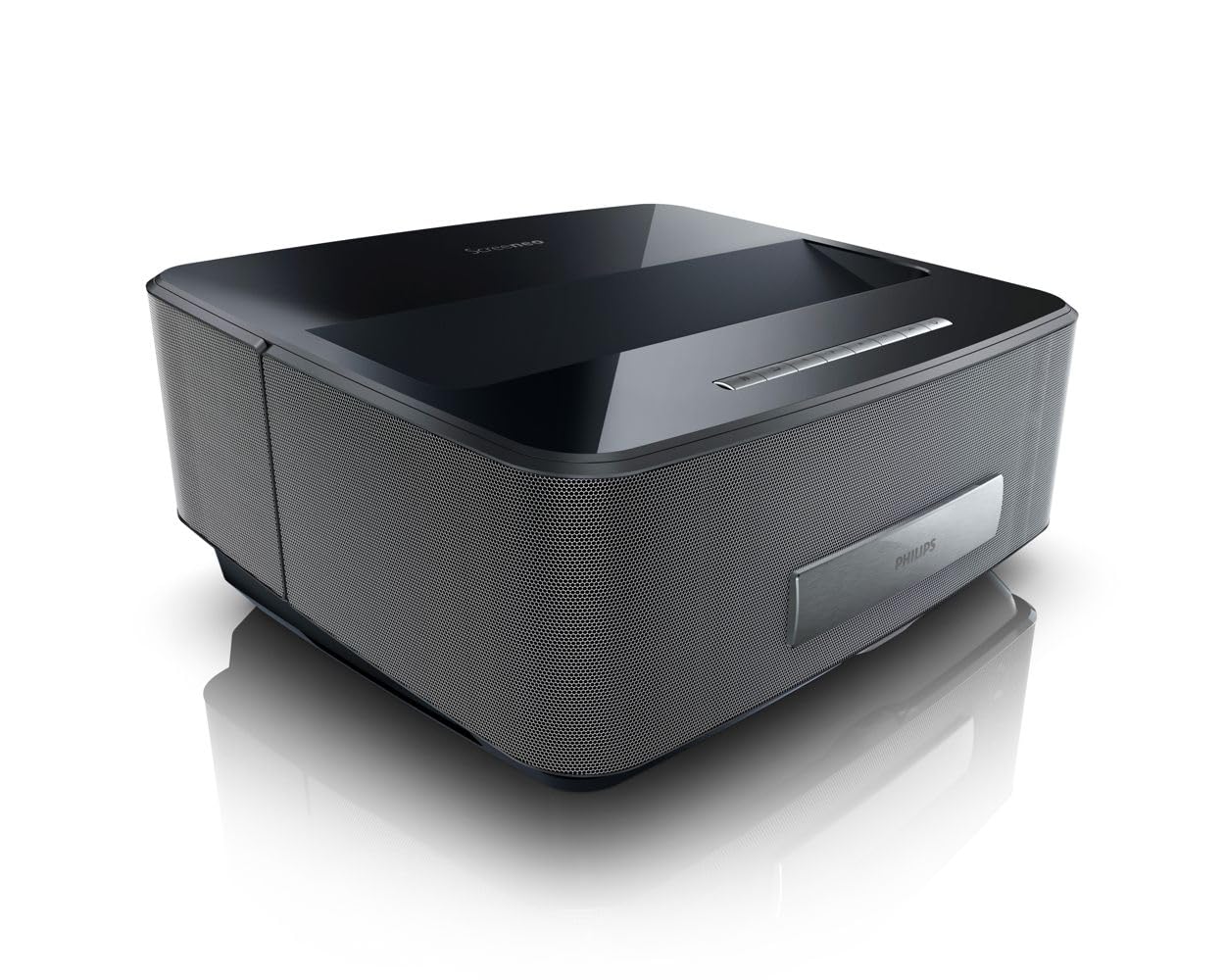
Зураг 1: Урд view of the Philips HDP1590 Screeneo Smart Projector.
2. Багцын агуулга
Бүх зүйл багцад байгаа эсэхийг шалгана уу:
- Philips HDP1590 Screeneo Smart Projector
- Цахилгаан кабель
- Алсын удирдлага (2 AAA батерейтай)
- Түргэн эхлүүлэх гарын авлага
- Other accessories as specified on the packaging
Видео 1: Хайрцагнаас задлах, эхний үг дууссанview of the Philips HDP1590 Screeneo Smart Projector.
3. Тохиргоо
- Байршил: Position the projector on a stable, flat surface. For a 100-inch image, place the projector approximately 18 inches from the projection surface (wall or screen). Ensure the projection path is clear of obstructions.
- Эрчим хүчний холболт: Connect the power cable to the projector's power input and then to a suitable electrical outlet.
- Эх сурвалжийн холболт:
- For HDMI devices (e.g., Blu-ray player, game console, set-top box), connect an HDMI cable from the device to an HDMI input port on the projector.
- For USB media, insert a USB drive into the designated USB port.
- Анхны асаалт: Press the power button on the projector or the remote control to turn on the device. Follow any on-screen prompts for initial setup, such as language selection.
4. Үйл ажиллагаа
- Асаах/унтраах: Төхөөрөмжийг асаах эсвэл унтраахын тулд проектор эсвэл алсын удирдлага дээрх асаах товчийг дарна уу.
- Цэсийн навигаци: Use the arrow keys and 'OK' button on the remote control to navigate through the on-screen menus.
- Эх сурвалжийн сонголт: Access the input source menu to select between connected HDMI devices, USB, or internal smart features.
- Анхаарал төвлөрөл ба гол чулууны залруулга: Adjust the focus manually or via the menu. Utilize the digital keystone correction feature to square the image if the projector is not perfectly perpendicular to the screen.
- Дууны хяналт: Adjust the audio volume using the dedicated volume buttons on the remote control.
5. Холболт
The Philips HDP1590 Screeneo offers a range of connectivity options:
- HDMI: Multiple HDMI ports are available for connecting external video sources such as Blu-ray players, gaming consoles, and cable/satellite boxes.
- Wi-Fi: Integrated Wi-Fi allows for network access, enabling smart features, streaming, and DLNA connectivity.
- Bluetooth: Connect Bluetooth-enabled audio devices, such as speakers or headphones, for wireless sound output.
- Миракаст: Wirelessly mirror the screen of compatible Android smartphones and tablets directly to the projector.
- USB: USB ports support playback of media fileUSB хадгалах төхөөрөмжөөс .
6. Засвар үйлчилгээ
Тогтмол засвар үйлчилгээ нь таны проекторын оновчтой ажиллагаа, урт наслалтыг баталгаажуулдаг.
- Линз цэвэрлэх: Use a soft, lint-free cloth specifically designed for optical lenses to gently clean the projector lens. Avoid abrasive materials or harsh chemicals.
- Тоос арилгах: Periodically clean the projector's exterior with a soft, dry cloth. Ensure ventilation openings are free from dust accumulation to prevent overheating.
- Хадгалах: Удаан хугацаагаар ашиглаагүй үед проекторыг сэрүүн, хуурай газар, тоос шороо, нарны шууд тусгалаас хамгаалж хадгална уу.
7. Алдаа засах
If you encounter issues with your Philips HDP1590 Screeneo, consider the following:
- Эрчим хүчгүй: Ensure the power cable is securely connected to both the projector and the electrical outlet. Verify the outlet is functional.
- Зураг байхгүй: Check that the correct input source is selected. Verify that the video source device is powered on and functioning correctly. Ensure all video cables (e.g., HDMI) are securely connected.
- Бүдгэрсэн зураг: Adjust the focus settings. Ensure the projector is placed at the recommended distance from the projection surface.
- Дуугүй: Check the volume level on both the projector and the connected source device. Verify that audio cables are correctly connected or that Bluetooth audio is properly paired.
- Зургийн чанар муу: Ensure the projection surface is clean and flat. Check the resolution settings of the source device to match the projector's native resolution (1280 x 800).
8. Техникийн үзүүлэлтүүд
| Онцлог | Дэлгэрэнгүй |
|---|---|
| Брэнд | Philips |
| Загварын дугаар | HDP1590/F7 |
| Зүйлийн жин | 10.72 фунт |
| Бүтээгдэхүүний хэмжээс | 11.29 x 13.34 x 5.83 инч |
| Батерей | 2 AAA батерей (алсын удирдлагад багтсан) |
| Өнгө | Хар |
| Онцлог шинж чанарууд | Short Throw, Built-in Speakers |
| Чанга яригчийн төрөл | Built-In, Subwoofer |
| Холболтын технологи | Утасгүй (Wi-Fi, Bluetooth) |
| Дэлгэцийн нягтрал | 1280 x 800 |
| Проекцийн технологи | DLP LED |
9. Баталгаат хугацаа ба дэмжлэг
Баталгаат хугацаа, техникийн дэмжлэг эсвэл үйлчилгээний талаарх лавлагаа авахыг хүсвэл бүтээгдэхүүнтэй хамт ирсэн баталгаат картыг үзэх эсвэл Philips-ийн албан ёсны дэмжлэг үзүүлэх төвд зочилно уу. webсайт. Баталгаат нэхэмжлэл гаргахын тулд худалдан авалтаа нотлох баримтаа хадгалаарай.
Online resources and frequently asked questions may also be available on the Philips product support pages.