Танилцуулга
Худалдан авалт хийсэнд баярлалааasing the Marantz CD5005 CD Player. This manual provides detailed instructions for the proper setup, operation, and maintenance of your new audio component. The CD5005 is designed to deliver high-quality audio playback from various disc formats, including CD, CD-R, CD-RW, MP3, and WMA files. It features high-quality audio components such as the CS4398 DAC and Marantz HDAM SA2, ensuring exceptional sound reproduction. Please read this manual thoroughly before using the unit to ensure optimal performance and longevity.
Аюулгүй ажиллагааны зааварчилгаа
Always follow these basic safety precautions when operating the CD5005 CD Player:
- Эрчим хүчний эх үүсвэр: Төхөөрөмжийг зөвхөн хувьсах гүйдлийн залгуурт холбоно ууtagарын самбар дээр заасан e.
- Агааржуулалт: Хангалттай агааржуулалтыг хангах. Агааржуулалтын нүхийг бүү хаах. Хаалттай орон зайд суурилуулахаас зайлсхий.
- Ус ба чийг: Төхөөрөмжийг бороо, чийг, хэт чийгшилд бүү тавь. Төхөөрөмж дээр шингэнээр дүүрсэн зүйлийг бүү байрлуул.
- Дулаан: Төхөөрөмжийг радиатор, халаалтын төхөөрөмж, зуух эсвэл дулаан үүсгэдэг бусад төхөөрөмж гэх мэт дулааны эх үүсвэрээс хол байлга.
- Цэвэрлэгээ: Цэвэрлэхийн өмнө төхөөрөмжийг ханын залгуураас салга. Зөвхөн хуурай даавууг ашигла.
- Үйлчилгээ: Төхөөрөмжийг өөрөө засварлах гэж бүү оролдоорой. Бүх үйлчилгээг мэргэшсэн үйлчилгээний ажилтнуудад шилжүүлээрэй.
- Дисктэй харьцах: Handle discs by their edges. Avoid touching the shiny surface. Keep discs clean and free from scratches.
Багцын агуулга
Таны багц дараах зүйлсийг агуулж байгаа эсэхийг шалгана уу.
- Marantz CD5005 CD Player
- Салдаг цахилгааны утас
- Audio Cables (L/R Analog)
- Digital Audio Cable (Coaxial)
- Алсын удирдлагын нэгж
- AA Batteries for Remote Control (x2)
- Тохируулгын хурдан гарын авлага (Хэвлэсэн)
- Interactive CD-ROM Manual (except Japan)
Бүтээгдэхүүн дууссанview
Урд самбар

Зураг 1: Урд view of the Marantz CD5005 CD Player. This image shows the disc tray, display, control buttons, and headphone jack on the front panel.
The front panel of the CD5005 features the disc tray, a clear dual-line display, essential playback control buttons (Play, Pause, Stop, Skip), and a headphone output with a dedicated volume control. The power button is located on the left side.
Арын самбар

Зураг 2: Ар талд view of the Marantz CD5005 CD Player. This image displays the various input and output terminals, including analog audio outputs, digital coaxial and optical outputs, and the AC power inlet.
The rear panel provides connectivity options including gold-plated analog audio outputs, digital coaxial output, and digital optical output for connecting to an amplifier or receiver. A remote control input/output terminal is also present for system integration, along with the detachable AC power inlet.
Алсын удирдлага
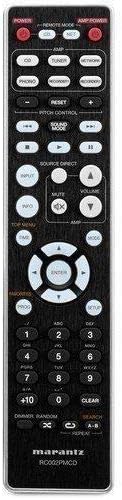
Figure 3: The remote control unit for the Marantz CD5005 CD Player. This remote allows for comprehensive control of the CD player's functions, including playback, track selection, pitch control, and display dimmer.
The included remote control unit provides full functionality for the CD5005, including features not available on the front panel such as pitch control, display dimmer, track randomization, and various repeat functions. It also allows for control of other compatible Marantz components.
Тохиргоо
1. Байрлуулах
Place the CD5005 on a stable, level surface away from direct sunlight, heat sources, and excessive vibration. Ensure there is adequate space around the unit for proper ventilation.
2. Аудио кабелийг холбох
Choose one of the following methods to connect the CD5005 to your ampөргөгч эсвэл хүлээн авагч:
- Аналог холболт: Use the supplied L/R analog audio cables to connect the AUDIO OUT jacks on the CD5005 to the corresponding CD input jacks on your amplifier. Ensure red plugs connect to red jacks (right channel) and white plugs to white jacks (left channel).
- Digital Coaxial Connection: Use the supplied digital coaxial cable to connect the COAXIAL DIGITAL AUDIO OUT jack on the CD5005 to a digital coaxial input on your ampөргөгч эсвэл хүлээн авагч.
- Дижитал оптик холболт: Use an optical digital audio cable (not supplied) to connect the OPTICAL DIGITAL AUDIO OUT jack on the CD5005 to a digital optical input on your ampөргөгч эсвэл хүлээн авагч.
Жич: Do not connect both analog and digital outputs to the same input on your amplifier simultaneously, as this may cause interference or unexpected behavior. Select the appropriate input on your amplifier after connecting.
3. Connecting the Power Cord
Connect the detachable power cord to the AC inlet on the rear panel of the CD5005, then plug the other end into a suitable AC wall outlet.
4. Алсын удирдлагатай батерейг суурилуулах
Open the battery compartment on the back of the remote control unit. Insert two AA batteries, ensuring correct polarity (+/-) as indicated inside the compartment. Close the cover securely.
Ашиглалтын заавар
Үндсэн CD тоглуулах
- дээр дарна уу ХҮЧ төхөөрөмжийг асаахын тулд урд самбар эсвэл алсын удирдлага дээрх товчлуурыг дарна уу.
- дээр дарна уу НЭЭХ/ХААХ товчлуурыг дарж дискний тавиурыг нээнэ үү.
- Place a CD, CD-R, CD-RW, MP3, or WMA disc onto the disc tray with the label side facing up.
- дээр дарна уу НЭЭХ/ХААХ button again to close the disc tray. The unit will read the disc.
- дээр дарна уу ТОГЛОХ тоглуулж эхлэх товчлуур.
- Тоглуулахыг түр зогсоохын тулд товчийг дарна уу ЗУРАГСАХ товч. Үргэлжлүүлэхийн тулд дахин дарна уу.
- Дахин тоглуулахыг зогсоохын тулд ЗОГС товч.
- -г ашиглана уу АЛГАСАХ замуудын хооронд шилжих товчлуурууд.
Advanced Features (Remote Control)
- Дууны давтамжийн хяналт: -г ашиглана уу ҮЙЛЧИЛГЭЭНИЙ ХЯНАЛТ buttons on the remote to adjust the playback speed and pitch.
- CD текст дэлгэц: If a disc supports CD Text, the display will show track and artist information. Use the ДЭЛГҮҮР button on the remote to cycle through display modes.
- Дахин тоглуулах: дээр дарна уу ДАВТАХ button on the remote to select repeat modes (e.g., repeat one track, repeat all tracks, repeat A-B segment).
- Санамсаргүй тоглуулах: дээр дарна уу Санамсаргүй button on the remote to play tracks in a random order.
- Чихэвчний гаралт: Connect headphones to the front panel headphone jack. Adjust the ТҮВШИН knob next to the jack to control headphone volume independently. Note that plugging in headphones does not mute the main analog or digital outputs.
- Програмын хяналт: The CD5005 supports app control via RC-5 with a compatible Marantz network player. Refer to the network player's manual for details on this integration.
Засвар үйлчилгээ
Нэгжийг цэвэрлэх
Wipe the exterior surfaces of the CD5005 with a soft, dry cloth. Do not use abrasive cleaners, waxes, or solvents, as these can damage the finish. Avoid spraying liquids directly onto the unit.
Disc Handling and Care
- Always hold discs by their edges to prevent fingerprints and scratches on the playing surface.
- If a disc is dirty, wipe it gently from the center outwards with a soft, lint-free cloth. Do not use circular motions.
- Do not use solvents such as benzene, thinner, or commercially available record cleaners, as they may damage the disc.
- Дискийг тоос шороо, зурааснаас хамгаалахын тулд ашиглаагүй тохиолдолд хайрцагт хадгална.
- Avoid exposing discs to direct sunlight or high temperatures for extended periods.
Алдааг олж засварлах
If you experience issues with your Marantz CD5005, refer to the following common problems and solutions:
| Асуудал | Боломжит шалтгаан | Шийдэл |
|---|---|---|
| Хүч чадалгүй | Цахилгааны утас найдвартай холбогдоогүй байна. | Төхөөрөмж болон ханын залгуурт холбогдсон цахилгааны утсыг шалгана уу. |
| Дууны гаралт байхгүй | Incorrect audio cable connection; wrong input selected on ampилүү амьд; ampөргөгч хэт бага байна. | Аудио кабелийн холболтыг шалгана уу. Өөрийн зөв оролтыг сонгоно уу ampөргөгч. Нэмэлт ampөсгөгчийн хэмжээ. |
| Диск тоглогдохгүй байна / "Диск байхгүй" алдаа гарлаа | Дискийг буруу оруулсан; диск нь бохир эсвэл зураастай; диск форматыг дэмждэггүй. | Insert disc with label side up. Clean the disc. Try a different disc. Ensure disc format (CD, CD-R/RW, MP3, WMA) is supported. |
| Skipping or intermittent playback | Disc is dirty or scratched; unit is subject to vibration. | Clean the disc. Place the unit on a stable surface away from vibrations. |
| Алсын удирдлага ажиллахгүй байна | Batteries are depleted or inserted incorrectly; obstacle between remote and unit; remote sensor blocked. | Replace batteries, ensuring correct polarity. Remove any obstacles. Ensure the remote sensor on the unit is clear. |
Хэрэв эдгээр шийдлүүдийг туршиж үзсэний дараа асуудал арилахгүй бол Marantz хэрэглэгчийн дэмжлэгтэй холбогдоно уу.
Үзүүлэлтүүд
| Онцлог | Дэлгэрэнгүй |
|---|---|
| Загварын дугаар | CD5005 |
| Дискний нийцтэй байдал | CD, CD-R/RW, MP3, WMA |
| Дижитал-аналог хөрвүүлэгч (DAC) | CS4398 |
| Analog Output Circuit | Marantz HDAM SA2 |
| Гаралт | Analog L/R (Gold-plated), Digital Coaxial, Digital Optical, Headphone |
| Онцлог шинж чанарууд | Pitch Control, CD Text Display, App Control (via RC-5 with Marantz network player), Auto Standby |
| Эрчим хүчний хэрэглээ (зогсоол) | Бага |
| Бүтээгдэхүүний хэмжээ (W x D x H) | 17.3 x 14.6 x 4.1 инч (43.9 x 37.1 x 10.4 см) |
| Зүйлийн жин | 11.02 фунт (5.0 кг) |
| Үйлдвэрлэгч | Маранц |
| Өнгө | Хар |
Баталгаат болон дэмжлэг
For warranty information and customer support, please refer to the warranty card included with your product or visit the official Marantz webсайт. Баталгаат нэхэмжлэл гаргахын тулд худалдан авалтаа нотлох баримтаа хадгалаарай.
Маранцын албан тушаалтан Webсайт: www.marantz.com