1. Бүтээгдэхүүн дууссанview
The Comfast CF-WR150N is a versatile 150M high-speed 802.11n wireless device designed to enhance and extend your Wi-Fi network. It functions as a personal assistant for your existing router, improving transfer rates and expanding coverage.
This device supports three primary operating modes: Access Point (AP), Repeater, and Router, offering flexible solutions for various networking needs. It is backward compatible with all 802.11b/g/n devices.
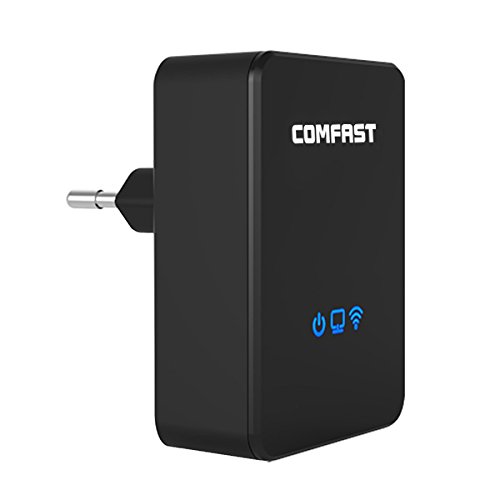
Зураг 1.1: Урд view of the Comfast CF-WR150N Wireless Repeater.
2. Багцын агуулга
Before proceeding with setup, please verify that all items are present in the package:
- 1 x Comfast CF-WR150N Wireless Repeater
- 1 x Network Cable (Ethernet Cable)
- 1 х хэрэглэгчийн гарын авлага (энэ баримт бичиг)
- 1 х Баталгаат карт
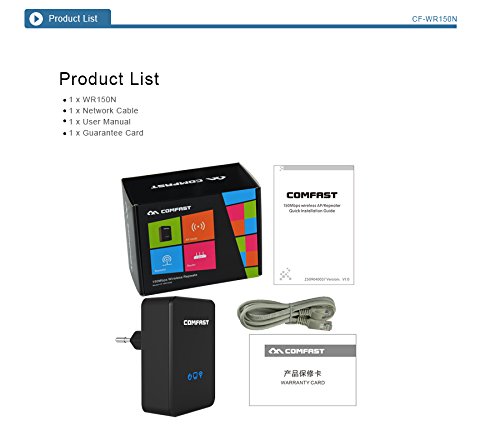
Figure 2.1: Contents included in the Comfast CF-WR150N product package.
3. Төхөөрөмжийн бүрэлдэхүүн хэсгүүд
Familiarize yourself with the various parts and indicators of the CF-WR150N device:
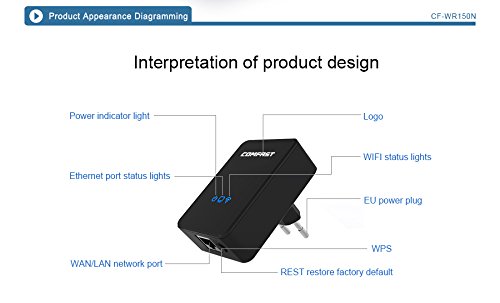
Figure 3.1: Detailed diagram of the CF-WR150N's external components and indicators.
- Цахилгаан индикаторын гэрэл: Эрчим хүчний төлөвийг заана.
- Ethernet Port Status Lights: Indicate activity on the WAN/LAN port.
- WAN/LAN Network Port: Used for wired connections.
- EU Power Plug: For connecting to a power outlet.
- WPS товчлуур: For quick and secure wireless setup.
- REST (Reset) Button: Үйлдвэрийн тохиргоог сэргээхэд ашигладаг.
- Лого: Comfast brand logo.
- WIFI Status Lights: Утасгүй сүлжээний үйл ажиллагааг заана уу.
4. Тохиргоо ба тохиргоо
The Comfast CF-WR150N can be configured to operate in three distinct modes: Access Point (AP) Mode, Repeater Mode, and Router Mode. Choose the mode that best suits your network requirements.
4.1. General Setup Steps
- Асаах: Plug the CF-WR150N into a standard power outlet. Wait for the power indicator light to stabilize.
- Төхөөрөмжид холбогдох:
- Утасгүй холболт: On your computer or mobile device, search for available Wi-Fi networks. Connect to the network named "COMFAST_XXXX" (where XXXX are the last four digits of the device's MAC address). No password is required for the initial connection.
- Утастай холболт: Connect your computer directly to the CF-WR150N's WAN/LAN port using the provided Ethernet cable.
- Хандалт Web Интерфэйс: Нээлттэй a web browser and enter the default IP address (usually 192.168.10.1 or 192.168.1.254) into the address bar. Refer to the label on the device or the quick start guide for the exact IP.
- Нэвтрэх: Enter the default username and password (typically "admin" for both).
- Үйлдлийн горимыг сонгох: Once logged in, you will be prompted to select the desired operating mode (AP, Repeater, or Router).
4.2. Үйлдлийн горимуудыг тайлбарлав
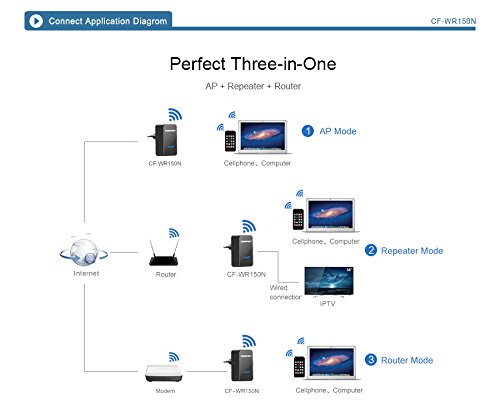
Figure 4.1: Application diagram showing AP, Repeater, and Router modes.
- AP горим (Хандалтын цэг): In this mode, the CF-WR150N connects to a wired network (e.g., from a modem or router) and broadcasts a new wireless network. This is ideal for adding Wi-Fi capability to a wired-only network.
- Давтагч горим (хүрээ өргөтгөгч): This mode extends the coverage of an existing wireless network. The CF-WR150N connects wirelessly to your main router's Wi-Fi signal and re-broadcasts it, effectively eliminating Wi-Fi dead zones.
- Чиглүүлэгчийн горим: When configured as a router, the CF-WR150N connects directly to your internet service provider's modem via the WAN/LAN port and creates a new wireless network, providing internet access to connected devices.
4.3. WPS Setup (Wireless Protected Setup)
For a quick and secure wireless connection to your existing router in Repeater Mode, you can use the WPS function:
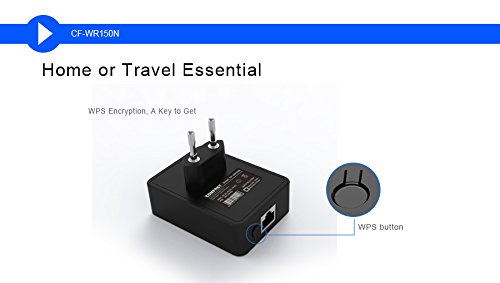
Figure 4.2: Location of the WPS button on the CF-WR150N.
- Plug the CF-WR150N into a power outlet near your main router.
- Үндсэн чиглүүлэгч дээрх WPS товчийг дарна уу.
- Within two minutes, press the WPS button on the CF-WR150N.
- The devices will automatically establish a secure connection. The Wi-Fi status light on the CF-WR150N will indicate a successful connection.
5. Үйл ажиллагаа ба хэрэглээ
Once configured, the CF-WR150N operates automatically based on the selected mode. Ensure the device is placed in an optimal location for signal coverage.
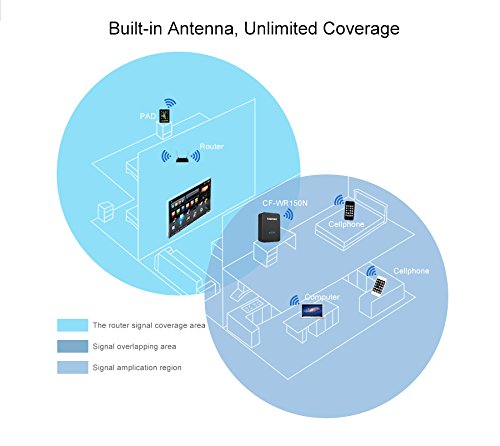
Figure 5.1: Illustration of signal coverage extension with the CF-WR150N.
For Repeater Mode, place the CF-WR150N approximately halfway between your router and the area where you need improved Wi-Fi signal. Avoid placing it in areas with significant interference or physical obstructions.
6. Засвар үйлчилгээ
To ensure optimal performance and longevity of your Comfast CF-WR150N, consider the following maintenance tips:
- Програм хангамжийн шинэчлэлтүүд: Periodically check the Comfast official website for any available firmware updates. Updating firmware can improve performance, add new features, and fix bugs.
- Цэвэрлэгээ: Төхөөрөмжийг цэвэр, тоос шороогүй байлга. Зөөлөн, хуурай даавуугаар гадна талыг арчина. Шингэн цэвэрлэгч, аэрозоль хэрэглэж болохгүй.
- Агааржуулалт: Ensure the device has adequate ventilation to prevent overheating. Do not cover the device or place it in an enclosed space.
- Дахин эхлүүлж байна: If you experience network issues, a simple restart of the device (unplugging and re-plugging after 10 seconds) can often resolve minor glitches.
7. Алдаа засах
This section addresses common issues you might encounter with your Comfast CF-WR150N.
| Асуудал | Боломжит шалтгаан | Шийдэл |
|---|---|---|
| хандах боломжгүй web удирдлагын интерфейс. | Incorrect IP address, device not powered on, or network configuration issue. |
|
| No internet access after setup. | Incorrect mode configuration, weak signal (Repeater Mode), or ISP issue. |
|
| Frequent disconnections or slow speeds. | Хөндлөнгийн оролцоо, буруу байршил, эсвэл сүлжээний ачаалал. |
|
| Forgot login password or device settings are corrupted. | Password forgotten or misconfiguration. |
|
8. Техникийн үзүүлэлтүүд
| Онцлог | Дэлгэрэнгүй |
|---|---|
| Брэнд | Тайван |
| Загварын дугаар | CF-WR150N |
| Холболтын төрөл | Wi-Fi |
| Утасгүй төрөл | 802.11b, 802.11g, 802.11n |
| Утасгүй холбооны стандарт | 802.11b, 802.11g, 802.11n |
| Өгөгдөл дамжуулах хурд | 150 Megabits Per Second (as per product description, not 750 from spec list) |
| Давтамжийн зурвасын ангилал | Single-Band (implied by 802.11n 150M, Dual-Band from spec list seems incorrect for 150M) |
| Онцлог шинж чанарууд | Хандалтын цэгийн горим, LED үзүүлэлт |
| Зүйлийн жин | 180 гр |
| Багцын хэмжээ | 13.8 x 10.4 x 6.2 см |
| Эхний боломжтой огноо | 1 оны долдугаар сарын 2014 |
Note: Data Transfer Rate and Frequency Band Class are based on the primary product description. Some specification lists may contain discrepancies.
9. Баталгаат хугацаа ба дэмжлэг
For detailed information regarding the product warranty, please refer to the Баталгаат карт included in your product package. This card contains specific terms, conditions, and duration of the warranty.
For technical support, troubleshooting assistance beyond this manual, or service inquiries, please contact Comfast customer support through the channels provided on the Guarantee Card or the official Comfast webсайт.


