1. Танилцуулга
Худалдан авалт хийсэнд баярлалааasing the Inateck UA2001 USB 3.0 to IDE/SATA Adapter. This device provides a convenient solution for connecting 2.5-inch/3.5-inch SATA HDDs/SSDs, 2.5-inch/3.5-inch IDE HDDs, and 5.25-inch SATA CD/DVD drives to your computer via a USB 3.0 interface. It supports high-speed data transfer up to 5Gbps and includes a one-touch backup function for secure data management.
2. Аюулгүй байдлын мэдээлэл
- Ensure the power adapter is correctly connected before operating the device.
- Төхөөрөмжийг чийг, хэт өндөр температурт бүү гарга.
- Хатуу дискийг гэмтээхээс сэргийлж болгоомжтой харьц.
- Disconnect the device from the power supply when not in use.
3. Багцын агуулга
- 1 x Inateck UA2001 USB 3.0 to IDE/SATA Adapter
- 1 x USB 3.0 кабель
- 1 x 4-pin Power Cable
- 1 x тэжээлийн адаптер (12V/2A)
- 1 x OTB Software CD
- 1 х хэрэглэгчийн гарын авлага

Image: The Inateck UA2001 adapter shown with its included accessories: USB 3.0 cable, 4-pin power cable, power adapter, OTB software CD, and user manual.
4. Бүтээгдэхүүн дууссанview
The Inateck UA2001 adapter features multiple ports to support various drive types. It includes a dual-head IDE connector for 2.5-inch and 3.5-inch IDE drives, and a SATA II connector for 2.5-inch/3.5-inch SATA HDDs/SSDs and 5.25-inch SATA optical drives. The device also has a power switch, a USB 3.0 port for computer connection, and a 4-pin Molex power input.
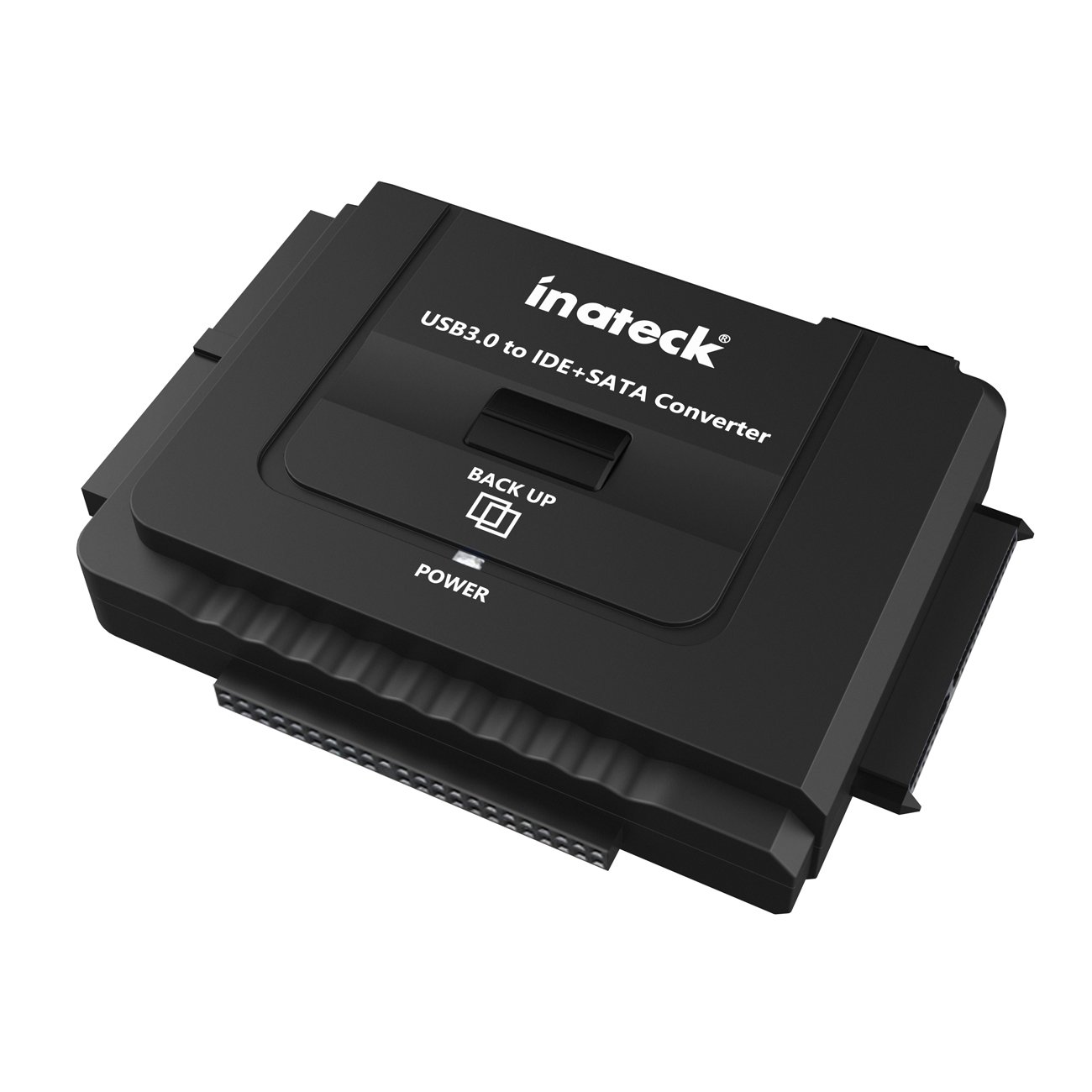
Зураг: дээрээс доош view of the Inateck UA2001 adapter, highlighting its compact design and various connectors.

Зураг: хажуу тал view of the Inateck UA2001 adapter, showing the IDE and SATA connectors.
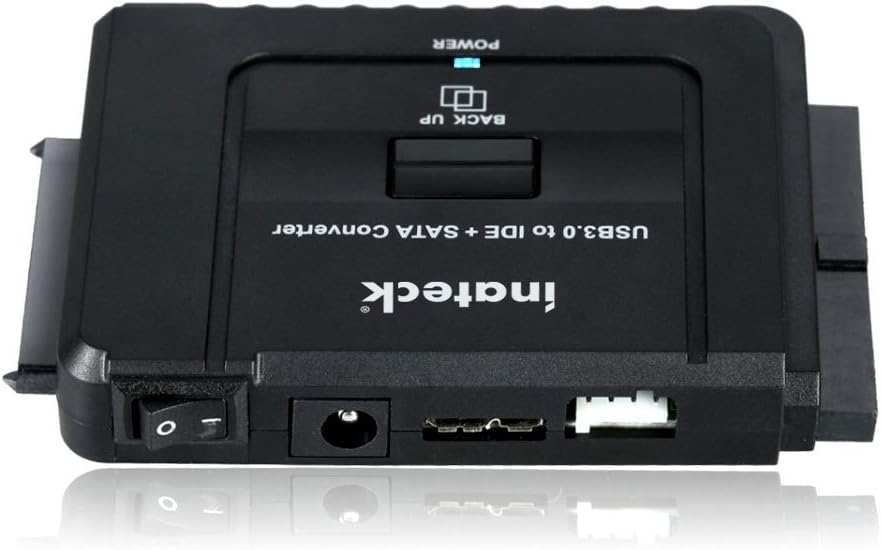
Зураг: Нөгөө тал view of the Inateck UA2001 adapter, displaying the power switch, DC power input, USB 3.0 port, and 4-pin Molex connector.
5. Тохируулах заавар
Хатуу диск эсвэл оптик дискээ компьютертээ холбохын тулд дараах алхмуудыг дагана уу.
- Драйвыг холбоно уу: Identify the correct connector on the Inateck UA2001 adapter for your drive (IDE or SATA). Carefully align and connect your 2.5-inch/3.5-inch HDD/SSD or 5.25-inch optical drive to the adapter.
- Эрчим хүчийг холбох: For 3.5-inch IDE/SATA drives and 5.25-inch optical drives, connect the included 12V/2A power adapter to the DC power input on the Inateck UA2001. If using a 3.5-inch IDE drive, also connect the 4-pin power cable from the adapter to the drive. 2.5-inch drives typically draw power directly from the USB connection and may not require the external power adapter.
- Компьютерт холбогдох: Plug the USB 3.0 cable into the Inateck UA2001 adapter and then connect the other end to an available USB 3.0 port on your computer.
- Асаах: Flip the ON/OFF switch on the adapter to the 'ON' position. The LED indicator will light up, signifying power and activity.
- Драйвер суурилуулах: For Windows XP/Vista/7/8/10 and Mac OS 10.X, the device is typically plug-and-play, requiring no additional drivers. If prompted, allow your operating system to install necessary drivers automatically.
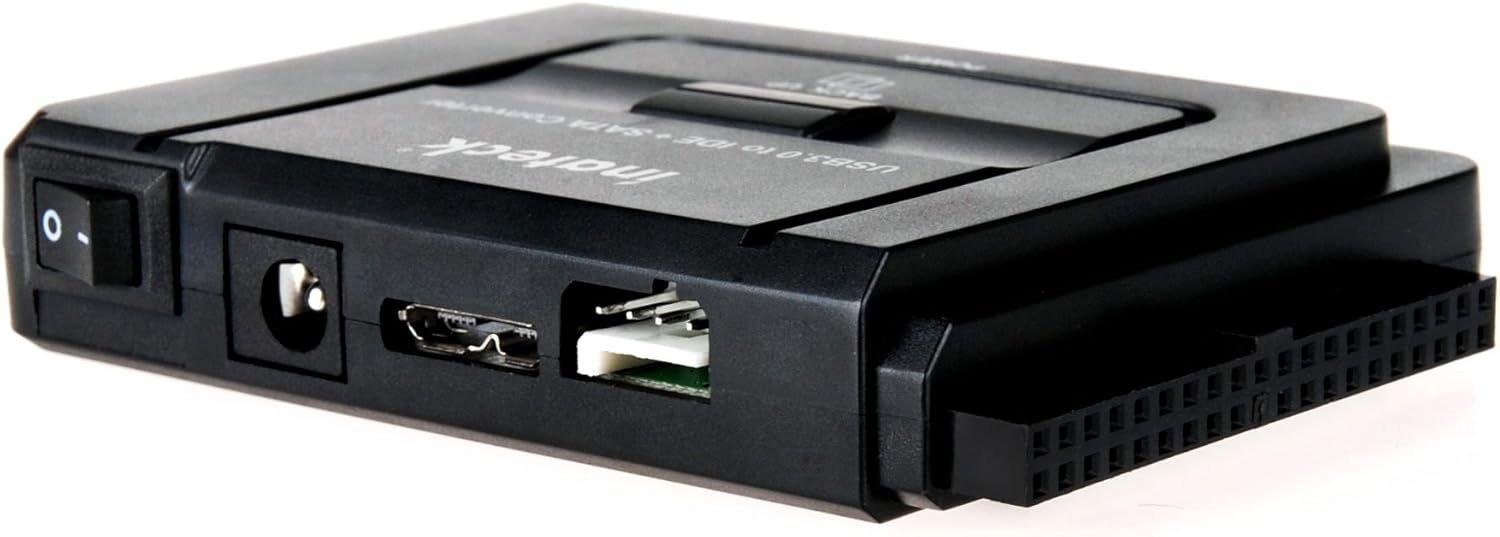
Image: The Inateck UA2001 adapter shown connected to various hard drives, demonstrating its versatility with different drive types.
6. Operating Instructions (One-Touch Backup)
The Inateck UA2001 features a convenient One-Touch Backup (OTB) function. To use this feature:
- Install OTB Software: Insert the included OTB Software CD into your computer's optical drive and follow the on-screen instructions to install the 'AI-OTB' software.
- Програм хангамжийг эхлүүлэх: Once installed, launch the AI-OTB software.
- Set Backup Path: In the software, navigate to the 'OTB Path' tab. Select the folders on your computer that you wish to back up.
- Configure Options: In the 'Option' tab, you can choose settings such as 'Confirm Before Backup' or 'Shutdown After Backup Completed'.
- Perform Backup: With the external drive connected and powered on, press the 'BACK UP' button on the Inateck UA2001 adapter. The software will prompt you to confirm the backup operation. Click 'OK' to start.
- Backup Completion: Once the backup is completed, a notification will appear. Your backed-up files will be stored in the designated folder on the external drive.
Note: OTB mode may not be applicable for Windows 8 and Mac OS. Refer to the software documentation for specific compatibility details.
7. Засвар үйлчилгээ
- Keep the adapter and connected drives clean and free from dust. Use a soft, dry cloth for cleaning.
- Төхөөрөмжийг нарны шууд тусгал, чийгээс хол, сэрүүн, хуурай газар хадгална.
- Төхөөрөмжийг унагах эсвэл хүчтэй нөлөөнд оруулахаас зайлсхий.
8. Алдаа засах
- Drive not recognized:
- Ensure all cables (USB, power, 4-pin Molex if needed) are securely connected.
- Verify the drive is properly seated in the adapter's connector.
- Check if the external power adapter is plugged into a working outlet and the device's power switch is ON.
- For IDE drives, ensure the jumper settings (Master/Slave/Cable Select) are correctly configured for single-drive operation.
- Төхөөрөмжийг компьютер дээрх өөр USB порт руу холбож үзээрэй.
- Ensure the drive is formatted and has a drive letter assigned in Disk Management (Windows) or Disk Utility (Mac).
- Удаан дамжуулах хурд:
- Ensure the adapter is connected to a USB 3.0 port on your computer. USB 2.0 ports will limit speeds.
- The actual transfer speed depends on the speed of the connected hard drive.
- OTB software issues:
- Ensure the OTB software is installed correctly.
- OTB functionality may vary or not be supported on certain operating systems (e.g., Windows 8/10, Mac). Manual drag-and-drop backup is always an option.
9. Техникийн үзүүлэлтүүд
| Загвар | UA2001 |
| Интерфэйс | USB 3.0, SATA, IDE |
| Тохиромжтой байдал | 2.5"/3.5" SATA HDD/SSD, 2.5"/3.5" IDE HDD, 5.25" SATA CD/DVD drives |
| Өгөгдөл дамжуулах хурд | 5 Gbps хүртэл (USB 3.0) |
| Дэмжигдсэн хамгийн их багтаамж | 6 TB |
| Үйлдлийн системийн дэмжлэг | Windows XP/Vista/7/8/10 (32bit and 64bit), Mac OS 10.X |
| Хэмжээ (LxWxH) | 3.86 x 2.95 x 0.71 инч |
| Зүйлийн жин | 2.08 унц |
10. Баталгаат хугацааны мэдээлэл
Inateck products are covered by a limited warranty from the date of purchase. Please refer to the official Inateck website or contact customer support for detailed warranty terms and conditions.
11. Дэмжлэг
For technical support, troubleshooting assistance, or product inquiries, please visit the official Inateck website or contact their customer service team. Contact information can typically be found on the product packaging or the Inateck webсайт.
Official Inateck Webсайт: www.inateck.com


