Танилцуулга
The Nowsonic Switcher is a passive monitor controller designed for connecting a stereophonic audio source and routing it to various monitoring systems. Its passive design ensures that the audio signal remains uncolored and undistorted, preserving the original sound quality. This device allows for precise volume control of the audio source, making it ideal for studio control rooms or editing suites where accurate monitoring is crucial without affecting the working level of the audio signal.
Бүтээгдэхүүн дууссанview
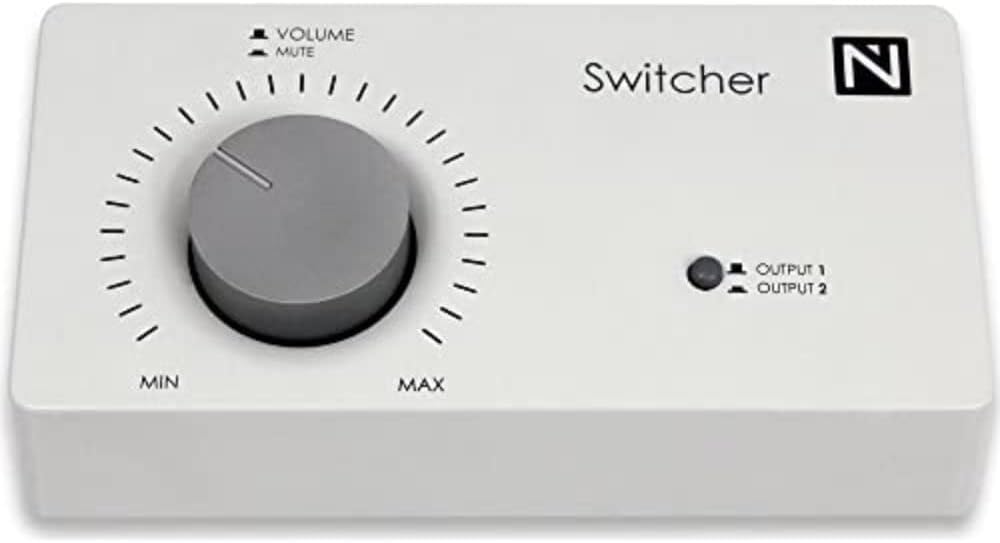
Зураг 1: Урд view of the Nowsonic Switcher Monitor Controller.
This image displays the front panel of the Nowsonic Switcher Monitor Controller. It features a large central volume knob with 'MIN' and 'MAX' markings, and 'VOLUME' and 'MUTE' labels above it. To the right, there is an LED indicator for 'OUTPUT 1' and 'OUTPUT 2', along with the 'Switcher' brand name and 'N' logo.
Тохиргоо
Follow these steps to set up your Nowsonic Switcher Monitor Controller:
- Байршил: Place the Switcher on a stable, flat surface near your audio source and monitoring systems. Ensure adequate ventilation around the unit.
- Аудио оролтын холболт: Connect the stereo output of your audio source (e.g., audio interface, mixer, media player) to the input jacks on the rear panel of the Nowsonic Switcher. Use high-quality balanced or unbalanced cables as appropriate for your equipment.
- Monitor Output Connection: Connect your primary monitoring system (e.g., studio monitors, headphones amplifier) to the "Output 1" jacks on the rear panel. If you have a secondary monitoring system, connect it to the "Output 2" jacks.
- Эрчим хүч: As the Nowsonic Switcher is a passive device, it does not require an external power supply.
- Анхны дууны тохиргоо: Before powering on your audio source and monitors, ensure the volume knob on the Switcher is set to its minimum position (fully counter-clockwise, towards "MIN").
Note: Always ensure all connections are secure before operating your audio equipment to prevent damage or unexpected noise.
Ашиглалтын заавар
The Nowsonic Switcher provides intuitive control over your audio monitoring.
- Дууны хяналт: The large central knob controls the output volume. Rotate clockwise to increase volume (towards "MAX") and counter-clockwise to decrease volume (towards "MIN").
- Дууг хаах функц: The volume knob also features a mute function. Fully rotate the knob counter-clockwise past the "MIN" position to engage the mute function. The audio output will be silenced. Rotate clockwise to disengage mute and restore audio.
- Гаралтын сонголт: The LED indicator on the front panel indicates the currently active output. Press the button next to the LED to toggle between "Output 1" and "Output 2". The LED will illuminate next to the selected output.
- Дохионы зам: Remember that the Switcher is a passive device. It does not amplify the signal but attenuates it. Ensure your audio source provides a sufficient signal level for your monitoring needs.
Засвар үйлчилгээ
Proper care and maintenance will ensure the longevity of your Nowsonic Switcher.
- Цэвэрлэгээ: Use a soft, dry cloth to clean the exterior of the unit. Do not use liquid cleaners, aerosols, or solvents, as these may damage the finish or internal components.
- Хадгалах: Удаан хугацаагаар ашиглаагүй тохиолдолд төхөөрөмжийг сэрүүн, хуурай газар, нарны шууд тусгал болон хэт өндөр температураас хол хадгална уу.
- Харьцуулах: Avoid dropping the unit or subjecting it to strong impacts, which can damage internal circuitry or external casing.
Алдааг олж засварлах
If you encounter issues with your Nowsonic Switcher, refer to the following common problems and solutions:
| Асуудал | Боломжит шалтгаан | Шийдэл |
|---|---|---|
| Дууны гаралт байхгүй. |
|
|
| Гажуудсан эсвэл чанар муутай дуу чимээ. |
|
|
Үзүүлэлтүүд
| Онцлог | Дэлгэрэнгүй |
|---|---|
| Загварын дугаар | 310700 |
| Брэнд | Nowsonic |
| Зүйлийн жин | 299 гр |
| Бүтээгдэхүүний хэмжээс | 16.99 x 5 x 8.71 см |
| Өнгө | цагаан |
| Портын тоо | 2 (Outputs) |
| Төрөл | Идэвхгүй монитор хянагч |
Баталгаат болон дэмжлэг
Information regarding the specific warranty terms and customer support for the Nowsonic Switcher Monitor Controller 310700 was not available in the provided product data. For detailed warranty information, technical support, or service inquiries, please refer to the official Nowsonic webсайт эсвэл харилцагчийн үйлчилгээтэй шууд холбогдоно уу.
You may find contact details and further resources on the Nowsonic official webсайт.

