1. Танилцуулга
Thank you for choosing the Microlife BP A80 Semi-automatic Upper Arm Blood Pressure Monitor. This device is designed for accurate and reliable measurement of blood pressure in adults. Please read this instruction manual thoroughly before using the device to ensure safe and correct operation. Keep this manual for future reference.
2. Аюулгүй байдлын чухал мэдээлэл
- Хэрэв танд ямар нэгэн эмгэг байгаа бол энэ төхөөрөмжийг ашиглахаасаа өмнө эмчээсээ зөвлөгөө аваарай.
- Do not self-diagnose or self-medicate based on blood pressure measurements. Always consult a healthcare professional.
- This device is not suitable for use on infants, children, or pregnant women without medical advice.
- Төхөөрөмжийг хөдөлж буй тээврийн хэрэгсэл эсвэл онгоцонд бүү ашигла.
- Төхөөрөмж болон түүний эд ангиудыг хүүхдүүдийн гар хүрэхгүй газар хадгална уу.
- Use only Microlife-approved cuffs and accessories.
- Avoid strong electromagnetic fields, such as those near mobile phones or microwave ovens, during use.
3. Бүтээгдэхүүн дууссанview
Familiarize yourself with the components of your Microlife BP A80 blood pressure monitor:

Зураг 1: Microlife BP A80 Blood Pressure Monitor showing the main unit, display, power button, cuff, and inflation bulb.
- Үндсэн нэгж: Contains the electronics and display.
- Дэлгэц: Shows blood pressure readings (systolic, diastolic, pulse) and other indicators.
- Цахилгаан товч: Төхөөрөмжийг асаах, унтраахад ашигладаг.
- Ханцуйвч: Applied to the upper arm for measurement.
- Инфляцийн чийдэн: Used to manually inflate the cuff.
- Ханцуйвч холбогч: Port on the main unit for connecting the cuff tube.
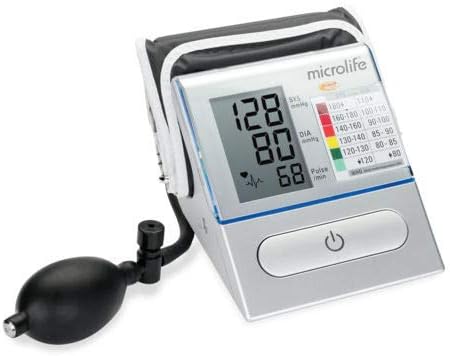
Зураг 2: Нарийвчилсан view of the Microlife BP A80 display, highlighting the blood pressure values (systolic, diastolic, pulse) and the integrated WHO blood pressure classification indicator.
4. Тохиргоо
4.1. Зай суурилуулах
- Open the battery compartment cover located on the bottom or back of the device.
- Insert four 1.5V AA batteries, ensuring correct polarity (+/-) as indicated inside the compartment.
- Зайны тасалгааны тагийг сайтар хаа.
- If the battery symbol appears on the display, replace all batteries.
4.2. Ханцуйвчийг холбох
- Insert the air tube connector of the cuff firmly into the cuff socket on the left side of the monitor.
- Хэмжилт хийх явцад агаар алдагдахаас сэргийлж холболт найдвартай эсэхийг шалгаарай.
5. Ашиглалтын заавар
5.1. Хэмжилт хийхээс өмнө
- Хэмжилт хийхээс дор хаяж 30 минутын өмнө хоол идэх, тамхи татах, дасгал хийхээс зайлсхий.
- Хэмжилт хийхээсээ өмнө чимээгүй орчинд 5-10 минут амраарай.
- Нуруугаа түшиж, хөлийг шалан дээр тавиад тухтай суу. Хөлөө огтолж болохгүй.
- Гараа хавтгай гадаргуу дээр тавь, ингэснээр ханцуйвч нь зүрхний түвшинд байна.
- Бариу хувцасыг гарынхаа дээд хэсэгт ав.
5.2. Ханцуйвч түрхэх
- Ханцуйвчийг нүцгэн дээд гар дээрээ тохойн үенээс ойролцоогоор 2-3 см өндөрт тавь.
- Ensure the artery mark on the cuff aligns with your brachial artery (on the inside of your arm).
- Ханцуйвчийг гараараа чанга ороо, гэхдээ хэт чанга биш. Та ханцуйвч болон гарынхаа хооронд хоёр хуруугаа хийж чаддаг байх ёстой.
5.3. Хэмжилт хийх
- дээр дарна уу ON/OFF button to turn on the monitor. The display will show all segments briefly.
- Once the display shows "0", begin inflating the cuff by repeatedly squeezing the inflation bulb.
- Inflate the cuff until the pressure displayed is about 30 mmHg higher than your usual systolic pressure. If you don't know your usual pressure, inflate to 180-200 mmHg.
- Stop inflating. The device will automatically deflate the cuff slowly and measure your blood pressure.
- Хэмжилт дууссаны дараа таны систолын даралт, диастолын даралт болон судасны цохилтыг харуулна.
- дээр дарна уу ON/OFF button to turn off the device. If you forget, it will automatically shut off after approximately 1 minute.
6. Уншсан зүйлээ ойлгох
Your blood pressure monitor displays three values:
- Систолын даралт (SYS): Зүрхний цохилтын үед ямар даралтыг илэрхийлдэг дээд тоо.
- Диастолын даралт (DIA): Доод тоо нь зүрхний цохилтын хооронд амрах үеийн даралтыг заана.
- Судасны цохилт: Таны минутанд ногдох зүрхний цохилт.
The Microlife BP A80 also features a WHO (World Health Organization) blood pressure classification indicator on the display, which uses a color scale to help you interpret your readings:
| Ангилал | Систолын (ммМУБ) | Диастолын (ммМУБ) | Заагч өнгө |
|---|---|---|---|
| Хамгийн оновчтой | <120 | <80 | Ногоон |
| Ердийн | 120-129 | 80-84 | Цайвар ногоон |
| Өндөр хэвийн | 130-139 | 85-89 | Шар |
| 1 -р зэргийн гипертензи | 140-159 | 90-99 | Улбар шар |
| 2 -р зэргийн гипертензи | 160-179 | 100-109 | Улаан |
| 3 -р зэргийн гипертензи | ≥ 180 | ≥ 110 | Хар улаан |
Note: This classification is a general guideline. Always consult your doctor for interpretation of your blood pressure readings.
7. Засвар үйлчилгээ
7.1. Цэвэрлэгээ
- Clean the monitor and cuff gently with a soft, dry cloth.
- Шаардлагатай бол даавууг хөнгөн хэрэглээрэй dampус эсвэл зөөлөн угаалгын нунтагаар ариутгана. Зүлгүүрийн цэвэрлэгч эсвэл уусгагч хэрэглэж болохгүй.
- Төхөөрөмж эсвэл ханцуйвчийг усанд дүрж болохгүй.
7.2. Хадгалах
- Store the device and cuff in a clean, dry place, away from direct sunlight and extreme temperatures.
- Хэрэв төхөөрөмжийг удаан хугацаагаар ашиглахгүй бол гоожихоос сэргийлж батерейг нь салга.
- Төхөөрөмжийг унагах эсвэл хүчтэй нөлөөнд оруулахаас зайлсхий.
8. Алдаа засах
If you encounter any issues with your Microlife BP A80, please refer to the following table:
| Асуудал | Боломжит шалтгаан | Шийдэл |
|---|---|---|
| Төхөөрөмж асахгүй байна. | Батерей дууссан эсвэл буруу оруулсан байна. | Батерейг шинээр сольж, зөв туйлшралыг баталгаажуулна уу. |
| "E1" or "Error" displayed. | Ханцуйвч зөв холбогдоогүй эсвэл агаар алдагдсан байна. | Check cuff connection. Re-apply cuff snugly. |
| "E2" displayed. | Movement during measurement or irregular pulse. | Remain still and quiet during measurement. Repeat measurement after a few minutes. |
| Тохиромжгүй уншилтууд. | Improper cuff placement, incorrect body position, or external factors. | Ensure correct cuff placement and body posture. Avoid talking or moving. Take multiple readings at different times. |
If the problem persists, contact Microlife customer support.
9. Техникийн үзүүлэлтүүд
- Загвар: АД А80
- Хэмжилтийн арга: Осциллометрийн
- Хэмжилтийн хүрээ:
- Blood Pressure: 20-280 mmHg
- Pulse: 40-200 beats per minute
- Нарийвчлал:
- Blood Pressure: ±3 mmHg
- Пульс: уншилтын ±5%
- Эрчим хүчний эх үүсвэр: 4 х 1.5 В АА батерей
- Дэлгэцийн төрөл: LCD
- Хэмжээ: Approximately 16.5 x 16 x 10 cm (as per package dimensions, actual device may vary slightly)
- Жин: Approximately 600 grams (including batteries, as per package weight)
- Үйл ажиллагааны нөхцөл: 10-40 °C (50-104 °F), 15-95% relative humidity non-condensing
- Хадгалах нөхцөл: -20-55 °C (-4-131 °F), 15-95% relative humidity non-condensing
- International Article Code (EAN): 04719003310080
10. Баталгаат хугацаа ба дэмжлэг
Microlife products are manufactured to the highest quality standards. For detailed warranty information specific to your region, please refer to the warranty card included with your product or visit the official Microlife webсайт.
For technical support, troubleshooting assistance, or to inquire about replacement parts, please contact Microlife customer service. Contact details can typically be found on the Microlife webсайт эсвэл бүтээгдэхүүний сав баглаа боодол дээр.
Webсайт: www.microlife.com