1. Танилцуулга
This manual provides essential information for the installation, operation, and maintenance of your HGST Ultrastar He8 HUH728080ALE604 8TB SATA Hard Drive. The Ultrastar He8 series utilizes HelioSeal technology, replacing air with helium inside the drive to reduce turbulence and enable a seven-disk design within a standard 3.5-inch form factor. This design contributes to industry-leading capacity, improved power efficiency, and enhanced performance for enterprise environments.

Figure 1: HGST Ultrastar He8 8TB SATA Hard Drive, top view.
2. Аюулгүй байдлын мэдээлэл
Хөдөлгүүрийг гэмтээхээс сэргийлж, аюулгүй ажиллагааг хангахын тулд дараах аюулгүй байдлын урьдчилан сэргийлэх арга хэмжээг дагаж мөрдөнө үү.
- Цахилгаан статик цэнэгийн (ESD) хамгаалалт: Хатуу дискийг үргэлж ирмэгээр нь барь. Статик цахилгааныг гадагшлуулахын тулд хөтөчтэй харьцахаас өмнө антистатик бугуйн оосор зүүж эсвэл газардуулсан металл зүйлд ойр ойрхон хүрч байгаарай.
- Физик харьцах: Avoid dropping or subjecting the drive to sudden impacts. Hard drives are precision instruments and can be damaged by rough handling.
- Эрчим хүчний хангамж: Ensure your power supply unit (PSU) provides stable and sufficient power for the drive. Incorrect voltage or unstable power can damage the drive.
- Агааржуулалт: Install the drive in a well-ventilated area to prevent overheating. Excessive heat can reduce the lifespan of the drive.
3. Багцын агуулга
Таны багц дараах зүйлсийг агуулж байгаа эсэхийг шалгана уу.
- HGST Ultrastar He8 HUH728080ALE604 8TB SATA Hard Drive
- Баримт бичиг (хэрэв хэвлэмэл хэлбэрээр өгсөн бол энэхүү хэрэглэгчийн гарын авлага)
Note: SATA data cables, power cables, and mounting screws are typically supplied with your computer system or enclosure and are not usually included with the bare drive.
4. Тохиргоо
4.1 Физик суурилуулалт
- Системээ бэлтгэ: Power off your computer and disconnect the power cord. Open the computer case to access the drive bays.
- Драйвыг холбох: Slide the HGST Ultrastar He8 drive into an available 3.5-inch drive bay. Secure the drive with appropriate mounting screws on both sides to prevent vibration.
- Кабель холбох:
- Connect one end of a SATA data cable to the SATA port on the hard drive and the other end to an available SATA port on your motherboard.
- Эрчим хүчний хангамжийн нэгжээс (PSU) SATA тэжээлийн кабелийг хатуу диск дээрх тэжээлийн холбогч руу холбоно уу.
- Кейс хааж, асаалттай: Компьютерийнхээ гэрийг хаагаад цахилгааны утсыг дахин холбож, системээ асаана уу.
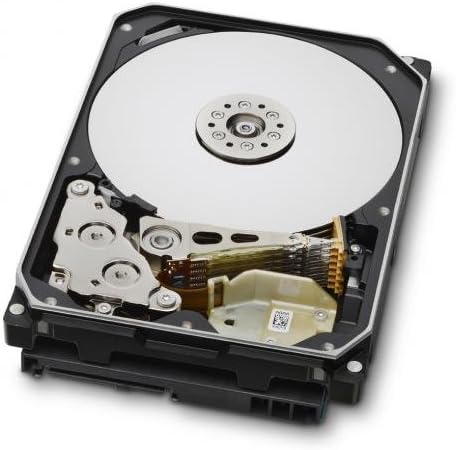
Figure 2: Internal components of the HGST Ultrastar He8, illustrating the platters and read/write head assembly.
4.2 Initial Configuration (Operating System)
Физик суулгацын дараа дискийг хадгалахад ашиглахын өмнө үйлдлийн системээр эхлүүлэх, хуваах, форматлах шаардлагатай.
- Дискний удирдлагад хандах:
- Windows: Right-click on the Start button, then select "Disk Management."
- Линукс: гэх мэт хэрэгслүүдийг ашиглаарай
fdisk,gparted, эсвэлDisks. - макос: Use "Disk Utility."
- Дискийг эхлүүлэх: The new drive should appear as "Unallocated Space." You may be prompted to initialize the disk. Choose GPT (GUID Partition Table) for drives larger than 2TB.
- Create New Simple Volume (Partition): Right-click on the unallocated space and select "New Simple Volume." Follow the wizard to define the partition size, assign a drive letter, and format the volume.
- Драйвыг форматлах: a-г сонгоно уу file system (e.g., NTFS for Windows, ext4 for Linux, APFS/HFS+ for macOS). Perform a quick format for faster setup, or a full format for a more thorough check (which takes significantly longer).
5. Ажиллаж байгаа
The HGST Ultrastar He8 is designed for continuous operation in enterprise environments, offering high capacity and reliable performance. Once configured, it functions like any other storage drive within your system.
- Өгөгдөл дамжуулах: Дамжуулах files to and from the drive using your operating system's file explorer or command-line tools.
- Гүйцэтгэл: The drive operates at 7200 RPM with a SATA 6Gb/s interface, providing fast data access and transfer speeds suitable for demanding applications.
- Эрчим хүчний менежмент: Ensure your operating system's power settings are configured appropriately for hard drives, especially in server environments, to optimize power consumption and drive longevity.
6. Засвар үйлчилгээ
Regular maintenance helps ensure the longevity and reliability of your hard drive and the data stored on it.
- Өгөгдлийн нөөцлөлт: Regularly back up critical data to another storage device or cloud service. No storage device is infallible.
- Драйвын эрүүл мэндийг хянах: Use S.M.A.R.T. (Self-Monitoring, Analysis and Reporting Technology) tools to monitor the drive's health status. Many operating systems and third-party utilities offer this functionality.
- Байгаль орчны нөхцөл: Maintain a stable operating environment. Avoid extreme temperatures, high humidity, and excessive vibrations.
- Програм хангамжийн шинэчлэлтүүд: Western Digital дэмжлэгийг үе үе шалгаж байгаарай website for firmware updates for your specific drive model. Firmware updates can improve performance, stability, or address known issues. Exercise caution when performing firmware updates, as an interrupted update can render the drive inoperable.
7. Алдаа засах
If you encounter issues with your HGST Ultrastar He8 drive, consider the following troubleshooting steps:
- Драйв илрээгүй:
- Бүх кабелийн холболтууд (SATA өгөгдөл болон тэжээл) аюулгүй эсэхийг шалгана уу.
- Системийн BIOS/UEFI тохиргоонд эх хавтан дээрх SATA порт идэвхжсэн эсэхийг шалгана уу.
- Test the drive in a different SATA port or with different cables.
- Ensure the drive is initialized and formatted in Disk Management (Windows) or equivalent utility (Linux/macOS).
- Удаан гүйцэтгэл:
- Дискний нөөцийг ашигладаг арын процессуудыг шалгана уу.
- Ensure the drive is connected to a SATA 6Gb/s port and that the necessary drivers are installed.
- Болзошгүй асуудлуудыг илрүүлэхийн тулд SMART хэрэгслүүдийг ашиглан хөтчийн эрүүл мэндийг хянана уу.
- Дулаан саармагжуулахаас сэргийлэхийн тулд хангалттай агааржуулалтыг хангана.
- Ер бусын дуу чимээ:
- Clicking, grinding, or repetitive beeping sounds can indicate a mechanical failure. Immediately back up any accessible data and consider replacing the drive.
- A slight hum or whirring is normal for a spinning hard drive.
- Өгөгдлийн эвдрэл:
- Дискний алдаа шалгах хэрэгслүүдийг ажиллуул (жишээ нь,
chkdskon Windows,fsckЛинукс дээр). - Ensure proper system shutdowns to prevent data loss.
- Дискний алдаа шалгах хэрэгслүүдийг ажиллуул (жишээ нь,
8. Техникийн үзүүлэлтүүд
| Онцлог | Тодорхойлолт |
|---|---|
| Загварын дугаар | HUH728080ALE604, 0F23668, 0F25721 |
| Хүчин чадал | 8 TB |
| Интерфэйс | SATA 6Gb/s (Serial ATA-600) |
| Form Factor | 3.5 инч |
| Эргэлтийн хурд | 7200 эргэлт |
| Кэш | 128 MB |
| Хэмжээ (LxWxH) | 5.79 x 4 x 1.03 инч |
| Жин | 1.43 фунт |
| Технологи | HelioSeal |
| Найдвартай байдал (MTBF) | 2+ Million Hours (typical) |
9. Баталгаат хугацааны мэдээлэл
The HGST Ultrastar He8 hard drive typically comes with a 3-year seller warranty, covering defects in materials and workmanship under normal use. For specific warranty terms and conditions, please refer to the documentation provided at the time of purchase or contact your seller directly.
Standard return policies usually allow for returns or replacements within 30 days of purchase, subject to the seller's terms.
10. Дэмжлэг
For further assistance, technical support, or warranty claims, please contact Western Digital customer support or visit their official webсайт:
- Western Digital дэмжлэг Webсайт: https://support.wdc.com
- Western Digital Store: Western Digital Store on Amazon
When contacting support, please have your drive's model number (HUH728080ALE604 or 0F23668) and serial number ready.


