Танилцуулга
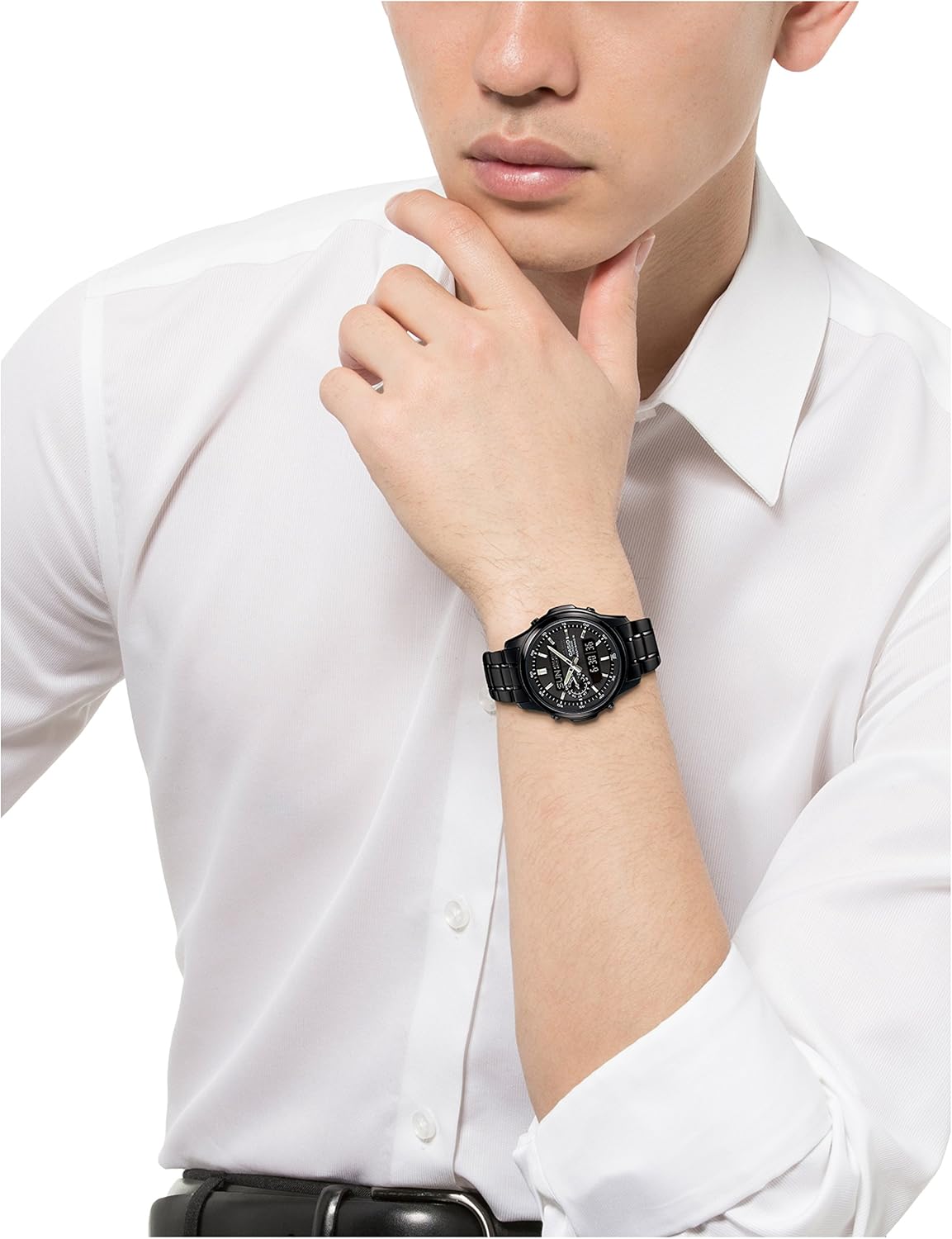
This manual provides detailed instructions for the proper use and maintenance of your CASIO Lineage Solar Radio Multiband6 LCW-M300DB-1AJF watch. Please read this manual thoroughly to ensure optimal performance and longevity of your timepiece. This watch combines solar power with radio-controlled timekeeping for accuracy and convenience.
Гол онцлогууд
- Бат бөх нарны эрчим хүч: Utilizes a solar charging system that converts light into power, eliminating the need for regular battery replacement.
- Multiband 6 Radio Control: Automatically receives time calibration signals from six transmission stations worldwide (Japan, North America, Europe, and China) to maintain accurate time.
- 100 метрийн усны эсэргүүцэл: Усанд сэлэх, усанд ороход тохиромжтой, гэхдээ шумбахад тохиромжтой.
- Дэлхийн цаг: Displays the current time in 48 cities (with daylight saving time setting) and Coordinated Universal Time (UTC).
- Секундомер: 1/100-second stopwatch with a 24-hour measuring capacity.
- Цаг хэмжигч: Countdown timer settable in 1-minute units up to 60 minutes, with a repeat function.
- Сэрүүлэг: Five daily alarms, including one with a snooze function, plus an hourly цагийн дохио.
- Батерейны түвшний үзүүлэлт: Displays the current charge level of the watch's rechargeable battery.
- Эрчим хүч хэмнэх функц: Automatically enters a power-saving mode when left in the dark for a certain period to conserve energy.
- Full Auto Calendar: Automatically adjusts for month lengths and leap years until the year 2099.
- 12/24 цагийн формат: Allows switching between 12-hour and 24-hour time displays.
- Full Auto LED Light: Automatically illuminates the display when the arm is tilted in the dark, with an afterglow feature.

Тохиргоо ба анхны тохиргоо
1. Анхны цэнэглэлт (Хүчтэй нарны эрчим хүч)
Before initial use, expose the watch to bright light for several hours to ensure it is sufficiently charged. The watch features a solar panel that converts light into electrical energy, stored in a rechargeable battery. Regular exposure to light is essential for maintaining optimal charge.
2. Time Calibration Signal Reception (Multiband 6)
Your watch automatically receives time calibration signals. For optimal reception, place the watch near a window at night. The watch will attempt to receive the signal automatically between midnight and 5:00 AM. Manual reception can also be initiated.
- Автомат хүлээн авалт: The watch attempts to receive the signal up to six times a day.
- Гараар хүлээн авах: Refer to the "Operating" section for instructions on initiating manual signal reception.
The Multiband 6 feature ensures accurate timekeeping by receiving signals from various global locations. If signal reception is not possible, the watch operates with the accuracy of a standard quartz movement (approximately ±15 seconds per month).
3. Home City Setting
Set your Home City (time zone) to ensure correct time display and radio signal reception. This setting is crucial for the watch to automatically adjust to your local time.
- Цаг хэмжилтийн горимд, товчийг дараад барина уу ТОХИРУУЛАХ button (usually top left) until the city code starts to flash.
- -г ашиглана уу Урагшаа болон УРВАХ buttons (usually top right and bottom right) to select your desired city code.
- дээр дарна уу ТОХИРУУЛАХ Тохиргооны горимыг баталгаажуулж, гарахын тулд дахин товчийг дарна уу.
Цагийг ажиллуулах
Горим солих
дээр дарна уу MODE button (usually bottom left) to cycle through the different modes:
- Цаг барих горим
- Дэлхийн цагийн горим
- Сэрүүлгийн горим
- Секундомер горим
- Таймер горим

Тодорхой функцуудыг ашиглах
Дэлхийн цагийн горим
In World Time Mode, use the Урагшаа болон УРВАХ товчлуурууд view the current time in different cities around the world. You can also swap your Home City time with the World Time city time.
Сэрүүлгийн горим
In Alarm Mode, you can set up to five independent daily alarms. One alarm includes a snooze function. Use the ТОХИРУУЛАХ button to select an alarm and the Урагшаа/УРВАХ buttons to set the alarm time. Press the MODE button to toggle alarms on/off.
Секундомер горим
The stopwatch measures elapsed time, split times, and two finishes. Press the START/STOP button (usually top right) to start and stop the measurement. Press the RESET button (usually bottom right) to reset the stopwatch.
Таймер горим
The countdown timer can be set from 1 minute up to 60 minutes. Use the ТОХИРУУЛАХ button to set the countdown time and the START/STOP button to begin the countdown. An alarm will sound when the timer reaches zero.
Full Auto LED Light
The watch features an automatic LED backlight. When the auto light switch is enabled, tilting your wrist towards your face in a dark environment will automatically illuminate the display. This function can be enabled or disabled in Timekeeping Mode by holding the ГЭРЭЛ button (usually bottom right) for a few seconds.
Засвар үйлчилгээ
Charging the Watch (Tough Solar)
To ensure continuous operation, expose the watch to light regularly. The watch charges most efficiently under direct sunlight. Indoor fluorescent lighting also charges the watch, but at a slower rate. Avoid prolonged storage in dark places, as this can deplete the rechargeable battery.
- Цэнэглэх заавар: Place the watch where its face is exposed to light.
- Батерейны түвшний үзүүлэлт: Monitor the battery level indicator to ensure sufficient charge.
- Эрчим хүч хэмнэх: The watch will enter Power Saving mode when left in the dark for an extended period to conserve charge.
Усны эсэргүүцэл
The watch is rated for 100-meter water resistance. This means it is suitable for everyday use, swimming, and snorkeling. However, it is not designed for scuba diving. Avoid operating buttons while the watch is wet or submerged to prevent water ingress.
- Усан доор товчлуурыг бүү ажиллуул.
- Avoid exposing the watch to hot water or steam (e.g., showers, saunas) as this can compromise seals.
- Давстай усанд орсны дараа цагийг цэвэр усаар зайлж, арчиж хатаана.

Цэвэрлэгээ
Wipe the watch and band with a soft, dry cloth to remove dirt and moisture. For stubborn dirt, use a soft brush with mild soap and water, then rinse thoroughly and dry. Avoid using chemical cleaners or solvents.
Алдааг олж засварлах
Time is Incorrect
- Дохионы хүлээн авалтыг шалгах: Ensure the watch is in a location conducive to radio signal reception (e.g., near a window, away from electronic interference). Try initiating manual reception.
- Гэрийн хотын тохиргоо: Verify that your Home City is correctly set for your current time zone.
- Гараар цаг тохируулах: If automatic reception consistently fails, you can manually set the time. Refer to the full instruction manual for detailed steps on manual time adjustment.
Watch Stops or Display is Blank
- Insufficient Charge: The watch may not have enough power. Expose it to bright light for several hours to charge the solar battery.
- Цэнэг хадгалах горим: The watch might be in Power Saving mode. Move it to a well-lit area or press any button to wake it up.
Buttons Do Not Respond
- Усанд өртөх: Ensure the watch is completely dry if it has been exposed to water.
- Батерей бага: A very low battery charge can sometimes affect button responsiveness. Charge the watch fully.
Үзүүлэлтүүд
| Загварын дугаар | LCW-M300DB-1AJF |
| Брэнд | LINEAGE (CASIO) |
| Хөдөлгөөн | Кварц (Нарны эрчим хүчээр ажилладаг) |
| Дэлгэцийн төрөл | Аналог |
| Усны эсэргүүцэл | 100 Meters (Waterproof) |
| Кейсийн материал | Зэвэрдэггүй ган |
| Хамтлаг материал | Зэвэрдэггүй ган |
| Кристал материал | Ашигт малтмалын шил |
| Кейсийн диаметр | 42.8 миллиметр |
| Кейсийн зузаан | 11.6 миллиметр |
| Хамтлагийн өргөн | 11.6 миллиметр |
| Зүйлийн жин | 127 грамм |
| Зайны төрөл | Rechargeable Solar Battery (included) |
Бүтээгдэхүүний видео үзүүлбэр
Үзүүлэн үзэхийн тулд энэ видеог үзээрэйview of the CASIO Lineage LCW-M300DB-1AJF watch, showcasing түүний дизайн, онцлог.
Video: A 21-second demonstration of the CASIO Lineage LCW-M300DB-1AJF watch, rotating to show its front, sides, and back, highlighting its sleek black design and digital/analog display.
Баталгаат болон дэмжлэг
Your CASIO Lineage watch is covered by a manufacturer's warranty. Please refer to the warranty card included with your purchase for specific terms and conditions, including warranty period and coverage details.
Хэрэглэгчийн дэмжлэг
For technical assistance, repairs, or further inquiries, please contact CASIO customer support. Contact information can typically be found on the official CASIO webсайт эсвэл таны баталгаат баримт бичигт.
- Онлайн нөөцүүд: Visit the official CASIO website for FAQs, additional manuals, and support contact details.
- Үйлчилгээний төвүүд: Information on authorized service centers can be found on the CASIO webсайт.


