1. Танилцуулга
This manual provides detailed instructions for the setup, operation, and maintenance of your Technoline WS 6760 Radio-Controlled Weather Station. Please read this manual thoroughly before using the device to ensure correct operation and to maximize its features. The WS 6760 offers comprehensive weather data including indoor and outdoor temperature and humidity, atmospheric pressure, weather forecasts, and a radio-controlled clock with additional astronomical information.
2. Аюулгүй байдлын мэдээлэл
- Үндсэн төхөөрөмж эсвэл мэдрэгчийг хэт өндөр температур, нарны шууд тусгал, чийгэнд бүү тавь.
- Төхөөрөмжийг унагах эсвэл хүчтэй цохилтод оруулахаас зайлсхий.
- Төхөөрөмжийг өөрөө задлах, засах гэж бүү оролдоорой. Бүх үйлчилгээг мэргэшсэн боловсон хүчинд шилжүүлээрэй.
- Ашигласан батерейг орон нутгийн дүрэм журмын дагуу хариуцлагатайгаар устгана уу.
- Төхөөрөмжийг хүүхдэд хүрэхгүй газар хадгална уу.
3. Багцын агуулга
Бүх зүйл байгаа, сайн нөхцөлд байгаа эсэхийг шалгана уу:
- Technoline WS 6760 Main Weather Station Unit
- TX70DTH Wireless Outdoor Sensor
- Зааварчилгааны гарын авлага
4. Бүтээгдэхүүн дууссанview
4.1 үндсэн нэгж
The main unit features a large LCD display showing various weather parameters and time information. It is designed for tabletop placement.

Зураг 4.1: Technoline WS 6760 Main Unit and TX70DTH Outdoor Sensor. This image shows the primary display unit alongside its wireless outdoor sensor, illustrating their relative sizes and designs.

Зураг 4.2: Нарийвчилсан view of the WS 6760 main unit's display, showing various data points such as time, date, indoor/outdoor temperature and humidity, atmospheric pressure history, and weather forecast icons.
4.2 Wireless Outdoor Sensor (TX70DTH)
The TX70DTH sensor measures outdoor temperature and humidity and transmits data wirelessly to the main unit. It features a small display for local readings.

Зураг 4.3: The TX70DTH outdoor sensor shown mounted on a brick wall, demonstrating a typical installation scenario. The sensor displays its current temperature and humidity readings.

Зураг 4.4: A standalone view of the TX70DTH outdoor sensor, highlighting its compact design and integrated display for temperature and humidity.
5. Тохиргоо
5.1 Батерей суурилуулах
- Үндсэн нэгж: Open the battery compartment cover on the back of the main unit. Insert 2 x AA batteries, observing the correct polarity (+/-). Close the cover.
- Гадна мэдрэгч: Open the battery compartment cover on the back of the TX70DTH sensor. Insert 2 x AA batteries, observing the correct polarity (+/-). Close the cover.
Note: Always replace all batteries at the same time. Use high-quality alkaline batteries for optimal performance.
5.2 Мэдрэгчийг хослуулах
After inserting batteries into both units, the main unit will automatically attempt to connect with the outdoor sensor. This process may take a few minutes. Ensure the sensor is within range of the main unit (typically up to 30 meters in open air).
- If the outdoor temperature/humidity does not appear, press the "SEARCH" button on the main unit to initiate a manual search for the sensor.
- The sensor has a channel switch (1, 2, 3). Ensure the main unit is set to the same channel as the sensor if you are using multiple sensors or experiencing interference.
5.3 Initial Time and Date Setup
The WS 6760 is equipped with a radio-controlled clock (DCF-77). Upon initial power-up, it will automatically search for the DCF signal to set the time and date. This process can take several hours depending on your location and signal strength.
- Дохио илүү сайн хүлээн авахын тулд үндсэн төхөөрөмжийг цонхны ойролцоо байрлуул.
- Once the signal is received, the time, date, and day of the week will be automatically set. A signal icon will appear on the display.
- You can manually set the time and date if the radio signal is unavailable or if you prefer manual adjustment. Refer to Section 6.1 for manual settings.
- Adjust the time zone offset (± 12 hours) if your location is not in the standard DCF time zone.
6. Ашиглалтын заавар
6.1 Цаг болон огнооны дэлгэц
- 12/24 цагийн формат: Press the "MODE" button to toggle between 12-hour and 24-hour time display.
- Гараар цагийн тохиргоо: If the radio signal is not received, hold the "MODE" button to enter manual time setting mode. Use the "UP" and "DOWN" buttons to adjust values and "MODE" to confirm.
- Weekday Language: The weekday can be displayed in 7 different languages. Access this setting via the manual time setting mode.
6.2 Температур ба чийгшил
The station displays both indoor and outdoor temperature and humidity. The outdoor readings are received from the TX70DTH sensor.
- MIN/MAX Memory: "MIN/MAX" товчийг дарж view the minimum and maximum recorded indoor/outdoor temperature and humidity values. Press again to clear.
- Тренд дэлгэц: Arrows next to the temperature and humidity readings indicate rising, stable, or falling trends.
- Тав тухтай байдлын үзүүлэлт: An icon indicates the indoor comfort level based on temperature and humidity.
- Хүйтний сэрэмжлүүлэг: An alarm icon will appear when the outdoor temperature approaches freezing point.
6.3 Atmospheric Pressure and Weather Forecast
The station measures atmospheric pressure and uses this data to predict future weather conditions.
- Даралтын дэлгэц: The current atmospheric pressure is displayed, often in hPa.
- 12-Hour History: A bar graph shows the atmospheric pressure trend over the last 12 hours, aiding in weather prediction.
- Цаг агаарын мэдээний дүрс тэмдэг: Icons (e.g., sunny, partly cloudy, cloudy, rainy) predict the weather for the next 12-24 hours based on pressure changes.
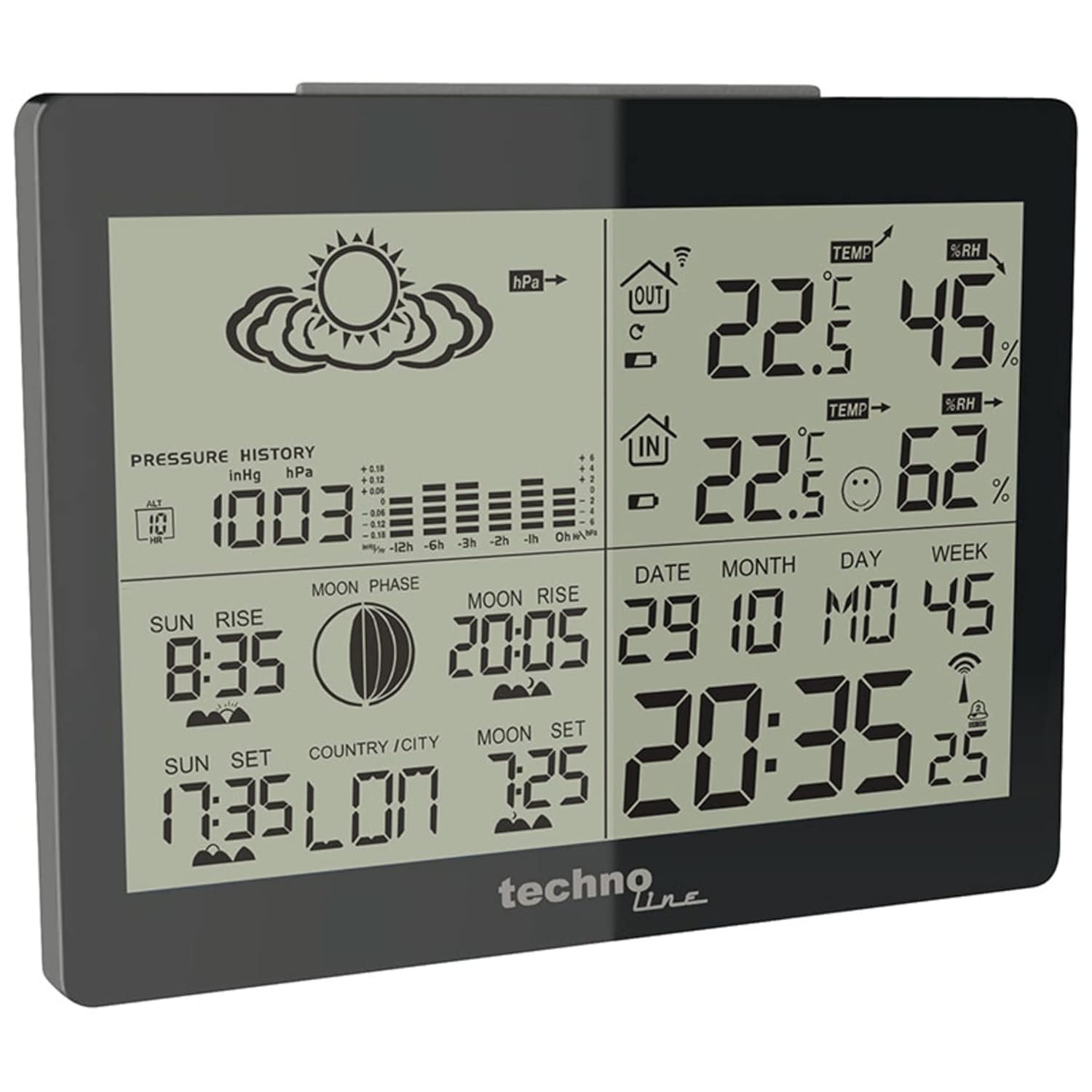
Зураг 6.1: The main unit display highlighting the atmospheric pressure history graph and weather forecast icons, which predict future weather conditions.
6.4 Astronomical Data
The WS 6760 provides information related to celestial events.
- Нар мандах ба жаргах: Displays the local sunrise and sunset times.
- Сарны үе шатууд: An icon indicates the current phase of the moon.
- Moonrise and Moonset: Shows the local moonrise and moonset times.
Сэрүүлгийн 6.5 функц
The station includes two programmable alarms with a snooze function.
- Сэрүүлгийг тохируулах: Press the "ALARM" button to cycle through Alarm 1, Alarm 2, and Alarm Off. Hold "ALARM" to enter setting mode for the selected alarm. Use "UP" and "DOWN" to adjust time and "ALARM" to confirm.
- Залгах функц: When an alarm sounds, press any button (except "ALARM") to activate the snooze function. The alarm will sound again after a few minutes.
6.6 Арын гэрэлтүүлэг
The display features a blue backlight for improved visibility in low-light conditions.

Зураг 6.2: The main unit display illuminated with its blue backlight, enhancing readability in dark environments.
- Press the "LIGHT" button (usually located on the top or side) to activate the backlight for a few seconds.
7. Засвар үйлчилгээ
- Цэвэрлэгээ: Дэлгэцийг арчиж, casing зөөлөн, damp даавуу. Зүлгүүрийн цэвэрлэгч, уусгагчийг бүү ашигла.
- Зай солих: Replace batteries in both the main unit and the outdoor sensor when the low battery indicator appears on the display. Always replace all batteries at once.
- Мэдрэгчийн байршил: Ensure the outdoor sensor is placed in a shaded, well-ventilated area, protected from direct rain and sunlight, to ensure accurate readings and prolong its lifespan.
8. Алдаа засах
| Асуудал | Боломжит шалтгаан | Шийдэл |
|---|---|---|
| Гаднах температур/чийгшлийн заалт байхгүй. |
|
|
| Radio-controlled time not setting. |
|
|
| Inaccurate outdoor readings. |
|
|
| Дэлгэц бүдэг эсвэл хоосон байна. |
|
|
9. Техникийн үзүүлэлтүүд
- Загвар: Technoline WS 6760
- Үндсэн нэгжийн хэмжээсүүд (Урт x Өргөн x Өндөр): 145 x 45 x 110 мм
- Outdoor Sensor Dimensions (L x W x H): 60 x 99 x 24 мм
- Материал: Хуванцар
- Өнгө: Хар
- Цахилгаан эх үүсвэр (Үндсэн нэгж): 2 х АА батерей (оруулаагүй)
- Цахилгаан эх үүсвэр (Гадна мэдрэгч): 2 х АА батерей (оруулаагүй)
- Радио давтамж: 433 МГц
- Радио удирдлага: DCF-77 дохио
- Temperature Range (Indoor): 0°C - +50°C (32°F - 122°F) (Assumed, typical)
- Temperature Range (Outdoor): -20°C - +60°C (-4°F - 140°F) (Assumed, typical)
- Чийгшлийн хязгаар (Дотор/Гадна): 20% - 95% RH (Assumed, typical)
- Үйлдвэрлэгч: Технолайн
- Гарал үүслийн улс: Хятад
Note: Temperature and humidity ranges are typical for similar devices and may vary slightly.
10. Баталгаат хугацаа ба дэмжлэг
The Technoline WS 6760 Weather Station comes with a 2 жилийн баталгаат хугацаа худалдан авсан өдрөөс эхлэн үйлдвэрлэлийн согогийг хамарна. Баталгаат заргад зориулж худалдан авалтаа нотлох баримтаа үлдээнэ үү.
For technical support, troubleshooting assistance, or warranty inquiries, please contact your retailer or the manufacturer, Technoline, directly. Contact information can typically be found on the manufacturer's official webсайт эсвэл бүтээгдэхүүний сав баглаа боодол.


