1. Танилцуулга
This manual provides detailed instructions for the installation, operation, and maintenance of your D-Link DCS-8350LH 2K QHD Indoor Wi-Fi Camera. Please read this manual thoroughly before using the product to ensure proper setup and functionality.
The D-Link DCS-8350LH is designed to provide precise and detailed surveillance for your home or small office. It features 2K QHD resolution, color night vision, AI-based detection, and two-way audio for comprehensive monitoring.
2. Аюулгүй байдлын мэдээлэл
- Камер унахаас сэргийлж тогтвортой байршилд суурилуулсан эсэхийг шалгаарай.
- Зөвхөн камертай хамт ирдэг тэжээлийн адаптерийг ашиглаарай.
- Do not expose the camera to water or moisture. This product is for indoor use only.
- Камерыг дулааны эх үүсвэрийн ойролцоо эсвэл нарны шууд тусгалд байрлуулахаас зайлсхий.
- Камерыг өөрөө нээх эсвэл засах гэж бүү оролдоорой. Бүх үйлчилгээг мэргэшсэн ажилтнуудад даатга.
- Камер болон түүний дагалдах хэрэгслийг хүүхдэд хүрэхгүй газар хадгална уу.
3. Бүтээгдэхүүн дууссанview
Familiarize yourself with the components of your D-Link DCS-8350LH camera.
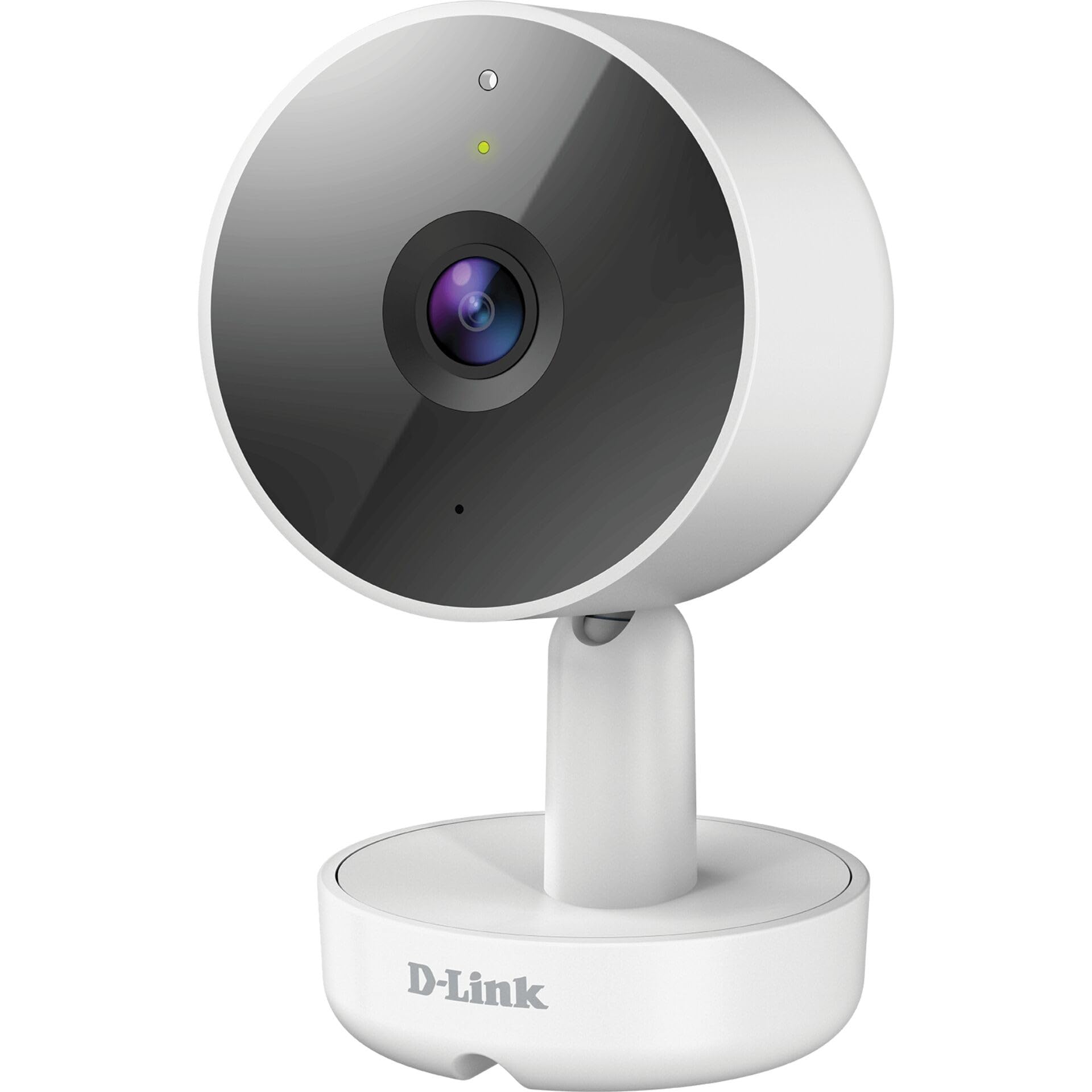
Зураг 3.1: Урд View камерын тухай
- 1. Линз: Видео бичлэг.
- 2. Төлөв LED: Indicates camera status (e.g., power, connection).
- 3. Микрофон: Хоёр талын харилцаа холбооны аудиог бичдэг.
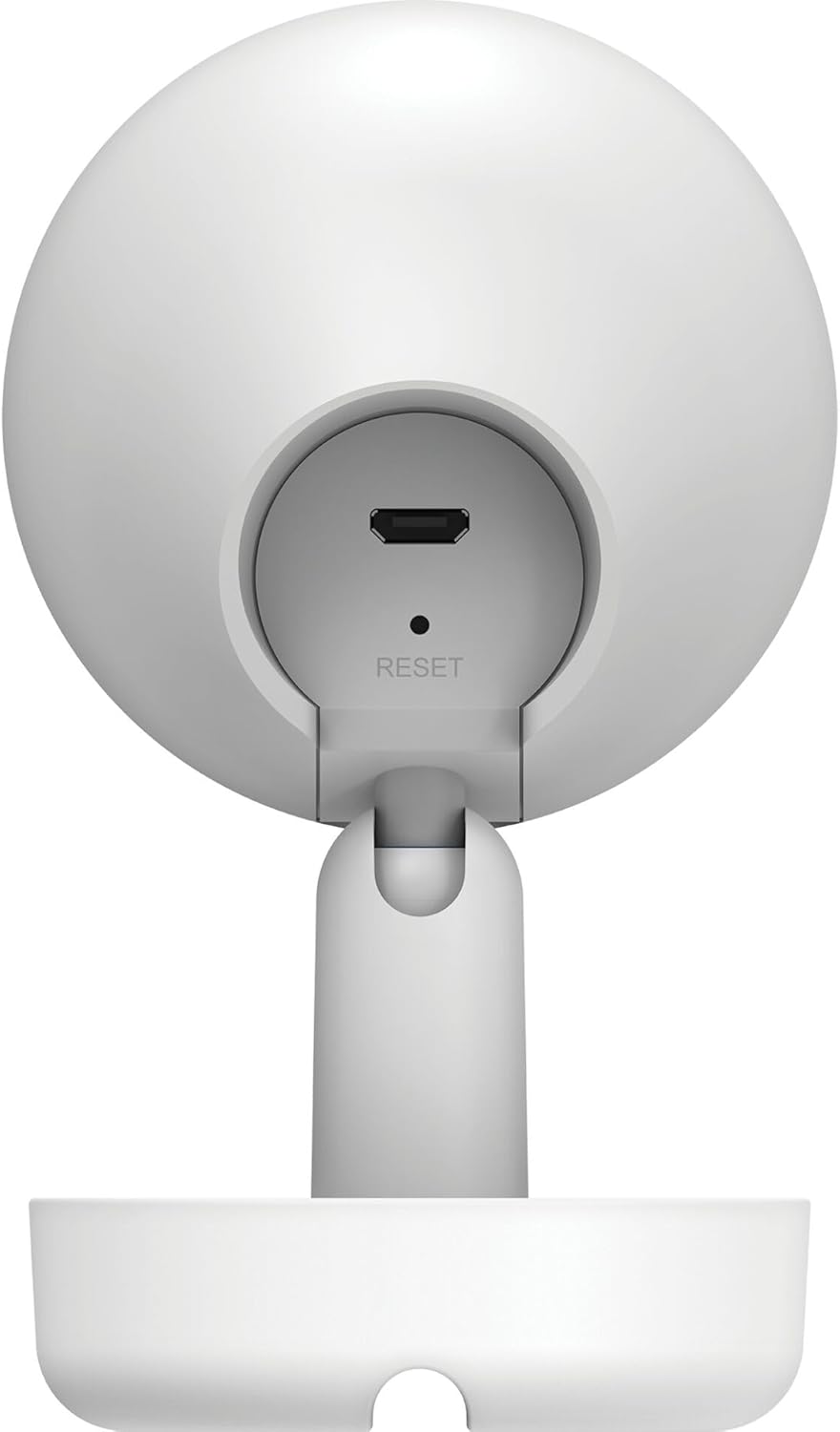
Зураг 3.2: Арын View камерын тухай
- 1. Micro USB Power Port: Цахилгаан адаптерт холбогдоно.
- 2. Дахин тохируулах товч: Үйлдвэрийн тохиргоог сэргээхэд ашигладаг.
- 3. Илтгэгч: Хоёр талын харилцааны аудио гаралт.
- 4. MicroSD Card Slot: For local video storage (located on the side or bottom, not visible in this specific image, but mentioned in features).
4. Тохиргоо
Follow these steps to set up your D-Link DCS-8350LH camera:
- mydlink програмыг татаж авах: хайх "mydlink" on the App Store (iOS) or Google Play (Android) and download the official mydlink app.
- Create a mydlink Account: Open the app and follow the on-screen instructions to create a new mydlink account or log in if you already have one.
- Камерыг асаах: Connect the provided power adapter to the camera's Micro USB port and plug it into a power outlet. The status LED will begin to blink.
- Төхөөрөмж нэмэх: In the mydlink app, tap the menu icon (usually three lines) and select "Add a Device". Scan the QR code located on the camera or its packaging.
- Wi-Fi-д холбогдох: Follow the app's instructions to connect your camera to your home Wi-Fi network. Ensure your mobile device is connected to the same Wi-Fi network during setup.
- Байршил: Position your camera in the desired indoor location.

Зураг 4.1: Camera and mydlink App Integration
5. Суурилуулалт
The D-Link DCS-8350LH camera supports wall mounting for optimal placement.
- Байршил сонгоно уу: Дотор байрлалыг тодорхой газар сонгоно уу view таны хянахыг хүссэн газрын болон таны Wi-Fi сүлжээний хамрах хүрээнд.
- Суурилуулах гадаргуу: Ensure the wall or surface is strong enough to support the camera.
- Суурийг хамгаалах: Use appropriate screws and anchors (not included) to secure the camera's base to the chosen surface.
- Өнцөг тохируулах: Once mounted, adjust the camera's angle to cover the desired viewing area. The camera has a 108-degree viewөнцөг.
6. Ашиглалтын заавар
Once set up, you can access and control your camera using the mydlink app.
6.1. Амьд View
Open the mydlink app and select your DCS-8350LH camera from the device list to view the live feed. The camera provides 2K QHD (1440p) resolution for clear images.
6.2. Өнгөт шөнийн хараа
The camera automatically switches to color night vision in low-light conditions, allowing you to see detailed color video even when it's dark.
6.3. AI-based Event Detection
Камер нь ухаалаг илрүүлэх чадвартай:
- Хүн илрүүлэх: Identifies human presence, reducing false alarms from pets or moving objects.
- Дуу илрүүлэх: Alerts you to specific sounds, including carbon monoxide and smoke alarm sounds.
Configure detection zones and sensitivity settings within the mydlink app to customize alerts.
6.4. Хоёр талын аудио
Use the built-in microphone and speaker to communicate with people or pets near the camera. Tap the microphone icon in the live view within the mydlink app to speak.
6.5. Видео бичлэг болон хадгалалт
The DCS-8350LH offers multiple recording options:
- MicroSD карт: Insert a microSD card (not included) into the camera's slot for local storage of recorded video clips.
- mydlink Cloud Recording: Utilize the mydlink Cloud service for secure off-site storage. Free and paid subscription plans are available.
- Smartphone Recording: Capture snapshots and video clips directly to your smartphone via the mydlink app.
7. Засвар үйлчилгээ
7.1. Цэвэрлэгээ
To clean the camera, gently wipe the lens and exterior surfaces with a soft, dry cloth. Do not use liquid cleaners or abrasive materials.
7.2. Програм хангамжийн шинэчлэлтүүд
Regularly check for firmware updates through the mydlink app. Keeping your camera's firmware up-to-date ensures optimal performance, security, and access to new features.
8. Алдаа засах
If you encounter issues with your D-Link DCS-8350LH camera, refer to the following common solutions:
- Camera Offline / Wi-Fi Disconnection:
- Камер таны Wi-Fi чиглүүлэгчийн хүрээнд байгаа эсэхийг шалгаарай.
- Check your Wi-Fi network status.
- Тэжээлийн адаптерийг салгаж, дахин залгаснаар камерыг дахин эхлүүлнэ үү.
- If the issue persists, try resetting the camera to factory defaults (see below) and re-adding it to the mydlink app.
- Видео чанар муу:
- Камерын линз цэвэр байгаа эсэхийг шалгаарай.
- Check your internet connection speed. A stable and fast connection is required for 2K QHD streaming.
- Камерын байрлалыг тохируулж, хурц гэрэл эсвэл саад тотгороос зайлсхий.
- Камерыг дахин тохируулах:
To restore the camera to its factory default settings, use a paperclip or a thin object to press and hold the recessed Дахин тохируулах button (refer to Figure 3.2) for approximately 10 seconds while the camera is powered on. The status LED will change, indicating a reset. You will then need to reconfigure the camera through the mydlink app.
9. Техникийн үзүүлэлтүүд
| Онцлог | Дэлгэрэнгүй |
|---|---|
| Загварын нэр | DCS-8350LH |
| Видео бичлэгийн нягтрал | 1440p (2K QHD) |
| Viewing өнцөг | 108 градус |
| Холболтын протокол | Wi-Fi |
| Утасгүй холбооны технологи | Bluetooth (for initial setup) |
| Дотор/гадаа ашиглах | Дотор |
| Эрчим хүчний эх үүсвэр | Цахилгаан утас |
| Эрчим хүчний хэрэглээ | 8 ватт |
| Form Factor | Дом |
| Суурилуулах төрөл | Ханын бэхэлгээ |
| Материал | Хуванцар |
| Хэмжээ (L x W x H) | 6.67 x 6.57 x 11.14 см |
| Жин | 320 грамм |
| Оруулсан бүрэлдэхүүн хэсгүүд | Дотор камер |
| Хянагчийн төрөл | Amazon Alexa |
10. Баталгаат хугацаа ба дэмжлэг
For warranty information, technical support, and further assistance, please visit the official D-Link website or contact D-Link customer service. Keep your purchase receipt as proof of purchase.
You can find the latest support resources, FAQs, and contact details at www.dlink.com.


